


 Video Converter Ultimate
 ضبط صفحه
 تعمیر ویدیو
4 بهترین تبدیل آفلاین و آنلاین SWF به FLV را در ویندوز و مک پیدا کنید
من در حال حاضر به دنبال راه حلی برای آپلود فایل های SWF خود در سایت های اشتراک گذاری ویدیو مانند یوتیوب، فیس بوک، مای اسپیس و موارد دیگر هستم. آیا می توانید به من کمک کنید سریع ترین راه حل این مشکل را پیدا کنم؟
این مشکل رایج است، بهویژه اگر ویدیوی شما با پسوند فایل .swf باشد. با این حال، این فرمت در وب معمول است، اما بهاشتراکگذاری فایل در پلتفرمهای اشتراک ویدیو کار نمیکند. علاوه بر این، اگر میخواهید فایلهای SWF خود را به اشتراک بگذارید، باید این فرمت را به یک فرمت پشتیبانیشدهتر مثل FLV تبدیل کنید. با این توضیح، بیایید چهار جواهر پنهان مبدلهای آفلاین و آنلاین SWF به FLV را که میتوانید استفاده کنید، در این مقاله بررسی کنیم.

قسمت 1. تبدیل SWF به FLV آنلاین به صورت رایگان با تبدیل آنلاین رایگان ویدیوی FVC
FVC Free Video Converter Online بیرقیبترین مبدل ویدیویی است که میتوانید برای تبدیل SWF به FLV بهصورت آنلاین و رایگان از آن استفاده کنید. این ابزار تحت وب در تبدیل فایل به یک فرمت جدید تخصص دارد، بدون اینکه نیاز باشد آن را روی دسکتاپ خود دانلود کنید. علاوه بر توانایی تبدیل، میتوانید مشخصات ویدیو و صدا را نیز مطابق نیاز خود تغییر دهید. میخواهید بدانید چگونه از این مبدل تحت وب سبک استفاده کنید؟ پس مراحل نوشتهشده در زیر را کپی و دنبال کنید.
مرحله ۱. روی این لینک کلیک کنید تا در یک تب جدید صفحه رسمی FVC Free Video Converter Online باز شود.
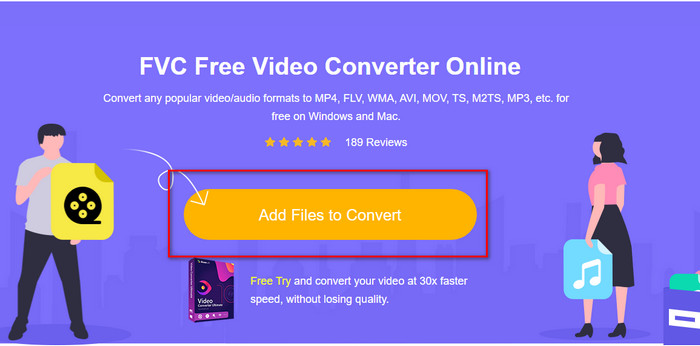
مرحله ۲. در وبسایت، روی Add Files to Convert کلیک کنید، سپس یک پوشه از کامپیوتر باز میشود؛ فایل .swf را انتخاب کرده و دکمه Open را بزنید.
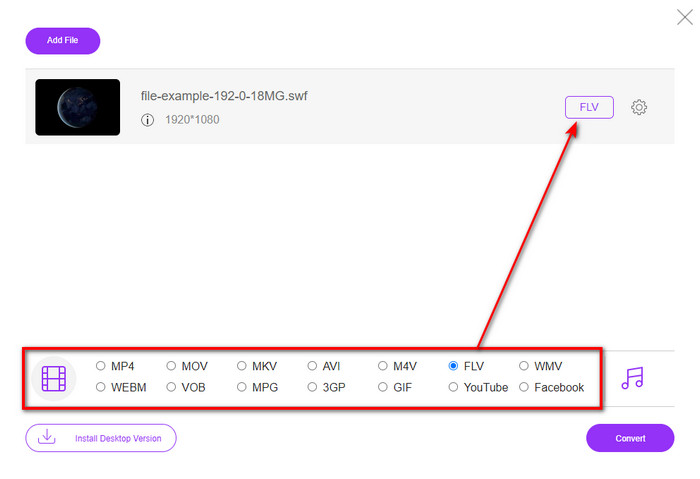
مرحله ۳. پس از وارد کردن فایل، در فهرست تنظیمات، فرمت FLV را انتخاب کنید.
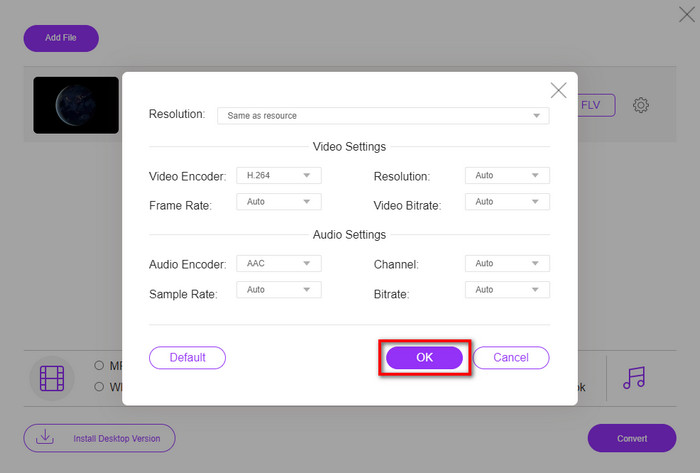
برای تغییر مشخصات ویدیو و صدا، روی دکمه gear کلیک کنید.
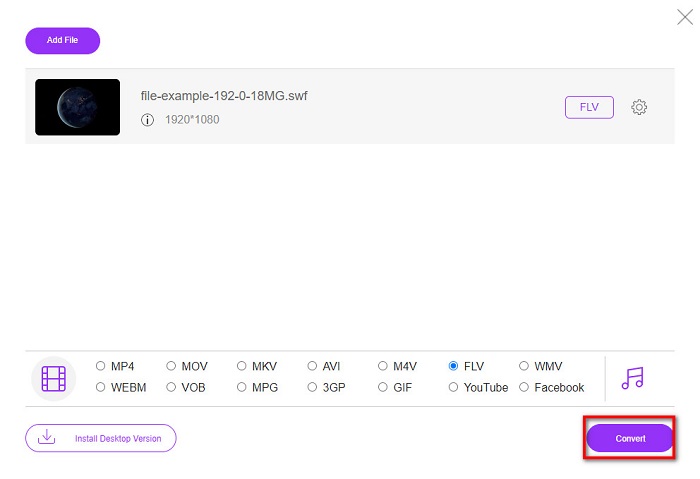
مرحله ۴. برای شروع فرایند تبدیل، روی دکمه Convert کلیک کنید.
قسمت 2. تبدیل SWF به FLV با FFmpeg
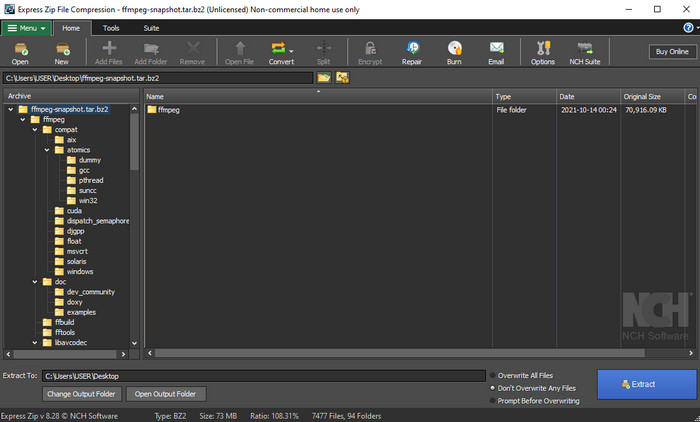
FFmpeg رابط و دستور منحصربهفردی برای تبدیل رایگان SWF به FLV دارد. اگر با این مبدل آشنا باشید، قبلاً میدانید چگونه از آن استفاده کنید؛ اما همه این را نمیدانند. توضیح کوتاه اینکه این مبدل شبیه مبدلهای ویدیویی معمولی که روی وب استفاده یا دانلود میشوند نیست. بهجای استفاده از دکمه برای اجرای فرمان، باید با یک پنجره فرمان (پرومپت) این مبدل را کنترل کنید.
مرحله ۱. مبدل FFmpeg را روی درایو خود دانلود و سپس آن را باز کنید.
مرحله ۲. روی کامپیوتر خود، پنجره Command Prompt را باز کنید.
مرحله ۳. در CMD به پوشهای که فایل SWF شما در آن است بروید و آن را وارد کنید. این دستور را کپی کرده و در پنجره فرمان قرار دهید: ffmpeg -i input.swf -vn -ar 44100 -ac 2 -b:a 192k output.flv و برای شروع فرایند، دکمه Enter را فشار دهید.
قسمت 3. تبدیل SWF به FLV در فلش
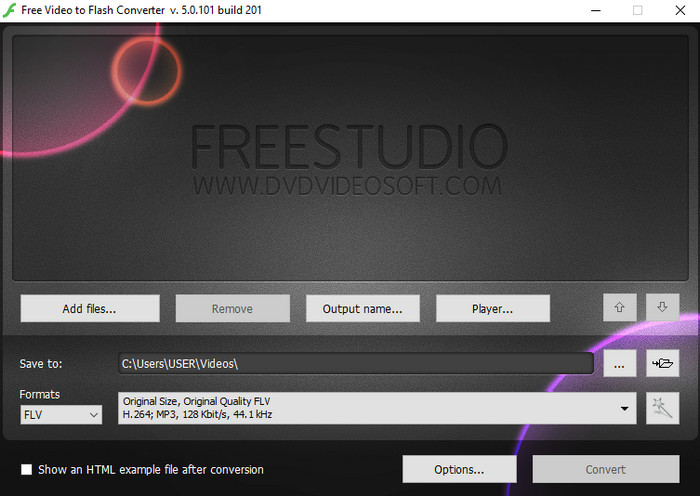
Free Video to Flash Converter یک مبدل رایگان قابل دانلود برای ویندوز است. این مبدل دو فرمت در اختیار شما قرار میدهد. این برنامه مشخصاً فقط برای تبدیل فایلها به فرمت FLV یا SWF طراحی شده است. بنابراین، اگر بهدنبال تبدیل فایلهای SWF خود به AVI، MP4، MOV، MKV و غیره هستید، اینجا امکانپذیر نیست. بدون اتلاف وقت، بیایید یاد بگیریم چگونه در Flash، SWF را به FLV تبدیل کنیم.
مرحله ۱. نرمافزار رسمی Flash Converter را روی ویندوز خود دانلود کرده و برنامه را اجرا کنید.
مرحله ۲. روی Add Files بزنید تا فایل را در مبدل بارگذاری کنید. سپس روی Formats کلیک کرده، بهدنبال FLV بگردید و میتوانید کیفیت را نیز انتخاب کنید.
مرحله ۳. با کلیک روی دکمه Convert در گوشه پایین سمت راست رابط، تبدیل را آغاز کنید.
قسمت 4. نحوه تبدیل SWF به FLV با کمک بهترین مبدل SWF در ویندوز و مک
هنوز از سه مبدل SWF به FLV آنلاین و آفلاینی که در بالا معرفی شد راضی نیستید؟ اگر چنین است، سعی کنید از FVC Video Converter Ultimate استفاده کنید. این مبدل از انتظارات هر مشتری فراتر میرود، بهویژه از نظر سرعت فرایند تبدیل که این ابزار ارائه میدهد. علاوه بر تبدیل فوقالعاده، این برنامه قابلیتهای ویرایشی پیشرفته برای بهبود ویدیو و جعبهابزار (Toolbox) برای اهداف دیگر دارد. همچنین، مراحل راهنما که در زیر فهرست شدهاند، موفقیت 101 درصدی در تبدیل فایل شما را تضمین میکنند.
مرحله ۱. پیش از استفاده از ابزار، باید آن را روی درایو ویندوز یا مک خود دانلود کنید، مراحل نصب را طی کرده و آن را اجرا کنید.
دانلود رایگانبرای ویندوز 7 یا بالاتردانلود امن
دانلود رایگانبرای MacOS 10.7 یا بالاتردانلود امن
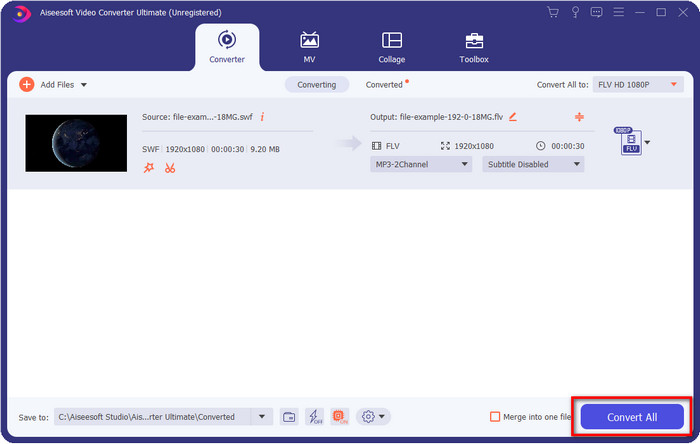
مرحله ۲. پس از اینکه برنامه روی سیستم شما اجرا شد، روی Add Files کلیک کنید تا فایلهای SWF موردنظر برای تبدیل را بارگذاری کنید.
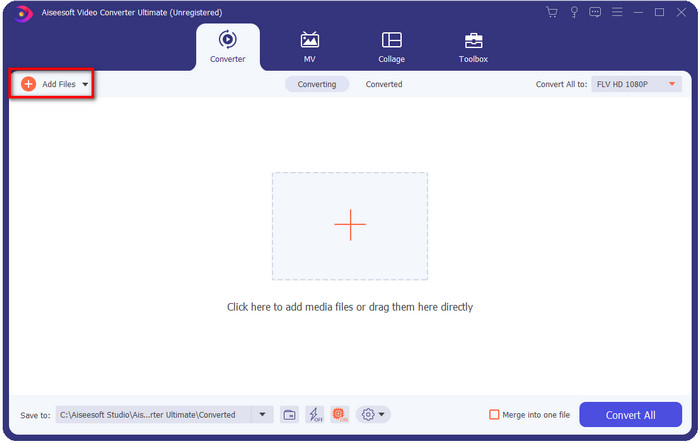
مرحله ۳. روی گزینه Convert All to کلیک کرده و فرمت FLV را انتخاب کنید. همچنین میتوانید کیفیت را برای دستیابی به وضوح بالا یا حفظ نسخه اصلی برگزینید.

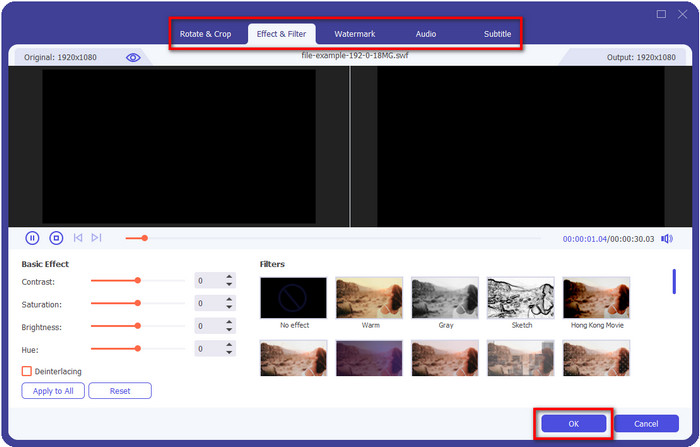
اگر میخواهید خروجی ویدیوی خود را بهتر کنید، روی دکمه wand کلیک کنید. این کار شما را به بخشهای مختلف ویرایشی مانند Crop, Rotate, Add Effects, Subtitle, Audio, و Watermark هدایت میکند. برای ذخیره تغییراتی که اعمال کردهاید، روی OK کلیک کنید.
مرحله ۴. روی Convert All کلیک کنید تا فرایند شروع شود. تبدیل SWF به FLV فقط مدت زمان کمی طول میکشد؛ پس از پایان تبدیل، پوشهای روی صفحه شما ظاهر میشود که فایل FLV در آن قرار دارد.
بخش 5. دانش گسترده SWF و FLV
ShockWave File یا SWF یک فرمت Adobe است، اما Macromedia آن را ایجاد کرده است. برای حفظ انیمیشن ها و صداهای مبتنی بر برداری که در وب استفاده می شوند، شناخته شده است. علاوه بر این، از آنجایی که این یک پایه برداری است، میتوانید به راحتی مقیاس گرافیکی را برای تناسب یا بزرگنمایی تنظیم کنید. به غیر از انیمیشن برداری، اندازه فایل بسیار کوچک است تا ویدیو را سریعتر بارگیری کند، حتی اگر اتصال اینترنت شما کند باشد. اما اگر بخواهید آنها را در پلتفرمهای اشتراکگذاری ویدیو به اشتراک بگذارید، این قالب پشتیبانی نمیشود.
اگرچه FLV نیز تحت Adobe است، اما این فرمت بهتر از SWF است. فرمت FLV یا FlashVideo فرمت استاندارد ویدیویی در اکثر وب سایت ها است. این فرمت می تواند حاوی دو کدک مختلف باشد که برای ویدئو و صدا در نظر گرفته شده است. و درست مانند فایل SWF، این فرمت برای بارگذاری سریعتر فایل در وب کوچک است. هنگامی که فایل FLV را روی درایو خود دانلود کردید، می توانید آن را در پخش کننده رسانه خود پخش کنید حتی اگر هنوز کامل نشده باشد.
اگر SWF را به FLV تبدیل کنید کمک می کند زیرا SWF دارای نقص های زیادی است که می توانید در قالب FLV پیدا کنید. به خصوص اگر فایل ویدئویی طولانی باشد، زیرا .swf فقط می تواند یک فریم محدود در ثانیه داشته باشد، این احتمال وجود دارد که نتوانید از آن استفاده کنید. اما FLV می تواند ویدیوهای طولانی را به راحتی نگه دارد. علاوه بر این، اگر می خواهید بر روی کیفیت تمرکز کنید، FLV کیفیت بهتری نسبت به SWF دارد.
بخش 6. سوالات متداول در مورد تبدیل SWF به FLV
آیا فایل SWF از شفافیت پشتیبانی می کند؟
مانند PNG و GIF، این فرمت نیز از مقیاس خاکستری با رنگهای واقعی پشتیبانی میکند یا یک رنگ را برای شفاف کردن آن اختصاص میدهد.
کجا می توانم ویدیوهای SWF را تماشا کنم؟
در حال حاضر، نمیتوانید فایلهای SWF را روی پخشکننده رسانه پیشفرض خود تماشا کنید، زیرا پشتیبانی نمیشود. با این حال، میتوانید روی این لینک کلیک کرده و درباره ۴ پخشکننده برتر SWF برای ویندوز یا مک بیشتر بدانید.
آیا می توانم .swf گوشی خود را ذخیره کنم؟
ذخیره فایل های SWF در تلفن شما امکان پذیر است، اما پخش آن در پخش کننده رسانه محلی شما امکان پذیر نیست. زیرا این فرمت برای سازگاری با تلفن نیست بلکه برای وب است. بنابراین، اگر فایلی را با این پسوند دانلود میکنید، انتظار داشته باشید که نتوانید از آن استفاده کنید. با این حال، می توانید آن را به یک فرمت قابل پخش مانند MP4 در تلفن خود تبدیل کنید.
نتیجه
این مقاله جواهرهای مبدل را که میتوانید برای تبدیل SWF به FLV بدون کاهش کیفیت SWF استفاده کنید، معرفی میکند. در حین گردآوری همه این مبدلها، متوجه شدیم که FVC Video Converter Ultimate همان جواهر پنهانی است که برای حل این مشکل بهدنبال آن هستید. این ابزار در مقایسه با همه ابزارهای ذکرشده، بهترین خروجی و سریعترین فرایند تبدیل را ارائه میکند. اکنون شما باید گنجینهای را که میخواهید برای حل مشکل تبدیل خود به کار ببرید، با دانلود یا دسترسی به ابزار روی وب انتخاب کنید.
-
 مبدل های مفید DV به FLV برای تبدیل DV به FLV [2022]
 اگر به دنبال بهترین و آسان ترین ابزار برای استفاده در تبدیل DV به FLV هستید، در اینجا بهترین مقاله برای شما وجود دارد. بینش عالی داشته باشید و تمام اطلاعات این مقاله را بررسی کنید.
-
 نحوه تبدیل MPG به FLV بدون از دست دادن کیفیت [ثابت شده]
 شما باید فیلم مورد علاقه خود را در این پخش کننده رسانه تماشا کنید، اما MPG را پشتیبانی نمی کند. سعی کنید با استفاده از مبدل هایی که این مقاله معرفی می کند، فایل MPG خود را به FLV تبدیل کنید.
-
 تبدیل TRP به FLV با ساده ترین روش های آفلاین و آنلاین
 آیا می خواهید فایل ویدئویی TRP خود را سریع و بدون دردسر به FLV تبدیل کنید؟ این مقاله را بخوانید تا بهترین نرم افزار و خدمات آنلاین را که به بهترین وجه مناسب شرایط است را به شما ارائه دهیم.
