


 Video Converter Ultimate
 ضبط صفحه
 تعمیر ویدیو
9 برتر: بهترین نرم افزار ویرایش گیف متحرک برای مبتدیان [آنلاین و آفلاین]
بهترین راه برای بیان بهتر احساسات این است که فایل های GIF را در پیام خود قرار دهید. هدف اصلی آن ذخیره و پشتیبانی از تصاویر متحرک و ثابت است. مشخص است که GIF ها می توانند بهتر از فرمت های دیگر موجود در وب بارگیری شوند و بسیار کوچکتر هستند. دیدن یک GIF به جای یک تصویر، هیجان انگیزتر است. اما همه گیفهایی که در اینترنت جستجو میکنید نمیتوانند احساسی را که میخواهید ارائه دهید، به شما ارائه کنند.
بنابراین بهجای جستوجوی گیفها در اینترنت، آنها از یک نرمافزار ویرایش GIF استفاده میکنند تا گیفهای خودشان را بسازند. اما شاید برایتان سؤال باشد که از چه ابزاری باید استفاده کنید تا یک گیف چشمگیر بسازید که گیرنده را تحت تأثیر قرار دهد. در ادامه فهرستهایی از بهترین ابزارها برای ساخت GIF آورده شده است. تمام ابزارهای زیر را میتوان برای تبدیل، ویرایش، ساخت و کارهای بیشتر روی GIF به کار برد. پس اگر بهدنبال ابزار مناسب برای کار مناسب هستید، به خواندن ادامه دهید تا بیشتر با این ابزارها آشنا شوید.

بخش 1. بهترین ویرایشگر GIF آفلاین که به طور موثر برای رایانه شخصی و مک کار می کند
1. فیلم رایگان FVC به GIF Maker
ویدیوی مورد علاقهتان را به فرمت GIF تبدیل کنید تا بتوانید آن را بهآسانی برای دوستان، خانواده یا هر شخص دیگری بفرستید. این مبدل ویدیوی رایگان به GIF به شما این فرصت را میدهد که گیفهای خودتان را بسازید. کار اصلی آن این است که هر نوع فرمت ویدیویی، چه MP4، MOV، AVI و بسیاری فرمتهای دیگر را به فرمت GIF تبدیل کند. همچنین امکانات ویرایش و برش (Trim) هم در اختیار شما میگذارد. این ویرایشگر GIF روی تمام سیستمها در دسترس است. برای اینکه بدانید چطور از این ابزار استفاده کنید، مراحل گامبهگام زیر را دنبال کنید.
گام 1. ابزار را روی درایو خود دانلود، نصب و راهاندازی کنید.
دانلود رایگانبرای Windows 7 یا بالاتردانلود ایمن
دانلود رایگانبرای MacOS 10.7 یا بالاتردانلود ایمن
گام 2. یک رابط کاربری شبیه تصویر زیر روی صفحهنمایش شما ظاهر میشود. روی Add File کلیک کنید یا فایل را بکشید و رها کنید (drag-and-drop) تا وارد مبدل شود.
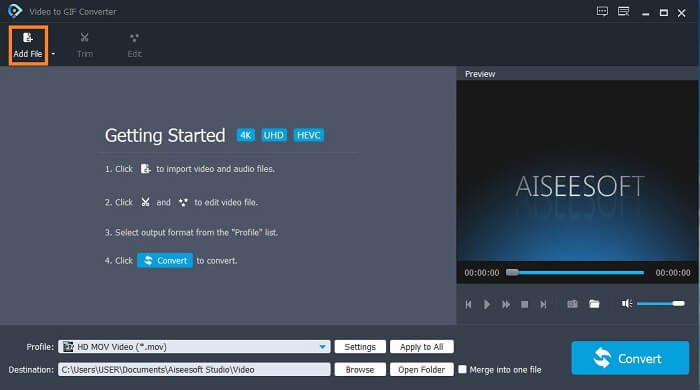
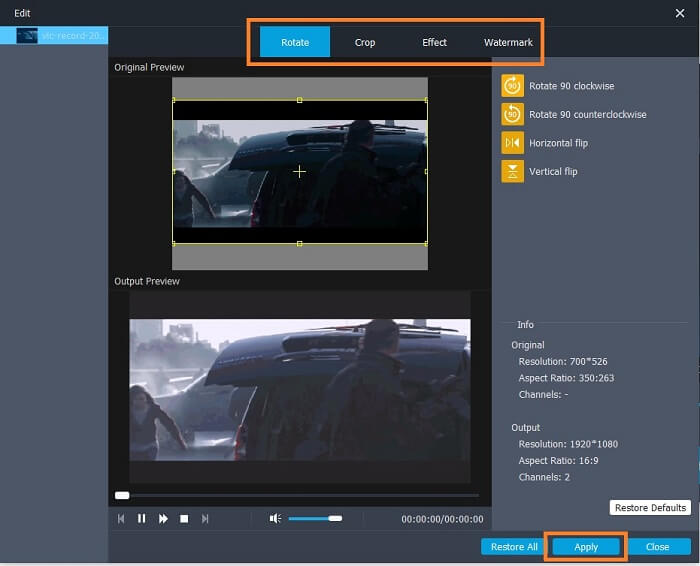
گام 3. اگر GIF را از قبل اضافه کردهاید، میتوانید آن را Trim کنید تا کوتاهتر شود و با کلیک روی OK تغییرات را ذخیره کنید. همچنین میتوانید در بخش Edit، گیف خود را بچرخانید (rotate)، برش دهید (crop)، افکت اضافه کنید و روی آن واترمارک قرار دهید و با کلیک روی Apply تغییرات را ذخیره کنید.
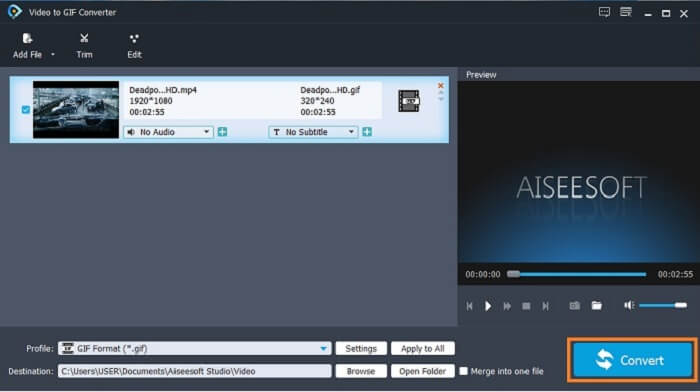
گام 4. مقصد (destination) ذخیره خروجی نهایی را انتخاب کنید. برای شروع تبدیل، روی Convert کلیک کنید.
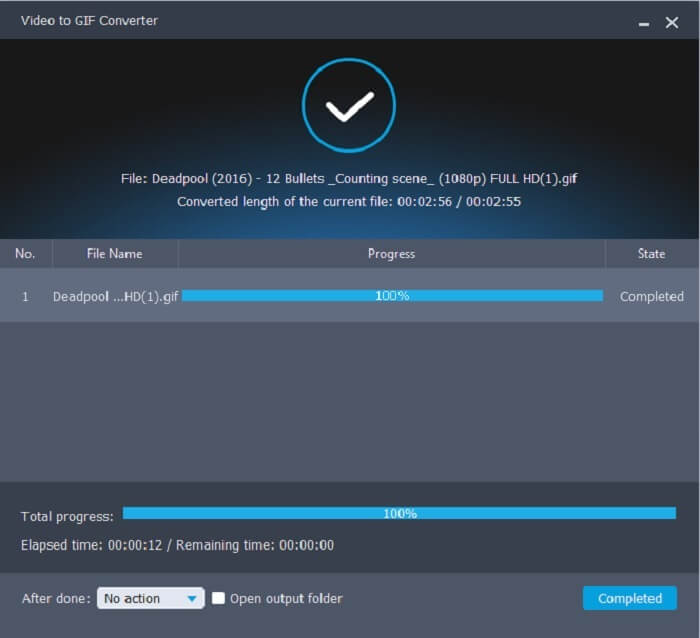
گام 5. وقتی همهچیز تمام شد، چنین پیغامی روی نمایشگر خود میبینید؛ یعنی تبدیل با موفقیت انجام شده است.
طرفداران
- بهترین ابزار رایگان برای تبدیل فرمت ویدیو به GIF.
- این در تمام پلتفرم های مختلف شناخته شده موجود است و همیشه خروجی باورنکردنی تولید می کند.
- حتی اگر اینترنت در دسترس نباشد کار می کند.
منفی ها
- همه ویژگی های نهایی در اینجا ارائه نشده است.
- این یک ابزار قابل دانلود نیز مانند نسخه پریمیوم است.
2. Video Converter Ultimate
معروف است که ویرایشگر GIF بالا، در ساخت GIF به شما کیفیت درجهیک ارائه میدهد. اما آیا میدانستید که ابزاری وجود دارد که حتی از ابزار بالا و پایین هم بهتر است؟ Video Converter Ultimate درست مطابق نامش، بهترین سازنده GIF است که روی تمام نرمافزارها در دسترس است. این ابزار فقط در ساخت GIF عالی نیست، بلکه بهعنوان یک مبدل و کارهای بسیار دیگر هم عمل میکند. روی گیف خود افکت اضافه کنید تا در میان سایر GIFها برجسته شوید. پس اگر در رقابتی برای ساخت بهترین GIF با دوستانتان هستید و میخواهید برنده شوید، این شانس شماست تا آنها را شگفتزده کنید. همچنین برای اینکه یاد بگیرید چطور از این ابزار استفاده کنید، باید این مراحل را بهدرستی دنبال کنید تا یک GIF موفق داشته باشید.
گام 1. روی دکمه دانلود کلیک کنید و آن را روی درایو کامپیوتر نصب کنید. تنظیمات دلخواه را اعمال کرده و روی Finish کلیک کنید تا ذخیره شده و ابزار اجرا شود.
دانلود رایگانبرای ویندوز 7 یا بالاتردانلود امن
دانلود رایگانبرای MacOS 10.7 یا بالاتردانلود امن
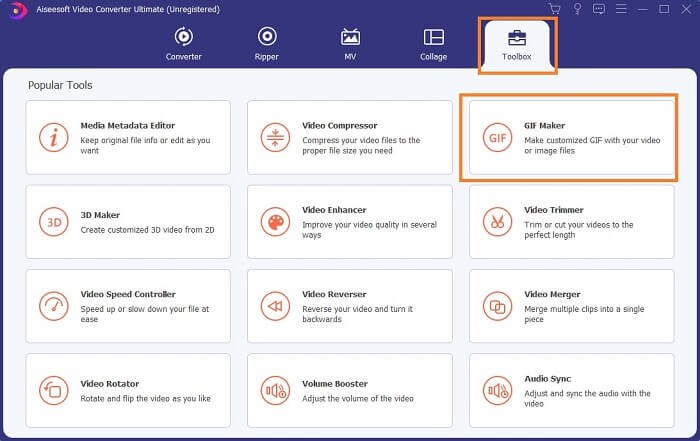
گام 2. اگر ابزار روی سیستم شما در حال اجرا باشد، رابطی مانند این روی صفحه ظاهر میشود. به Toolbox و سپس GIF Maker بروید تا ساخت GIF را شروع کنید.
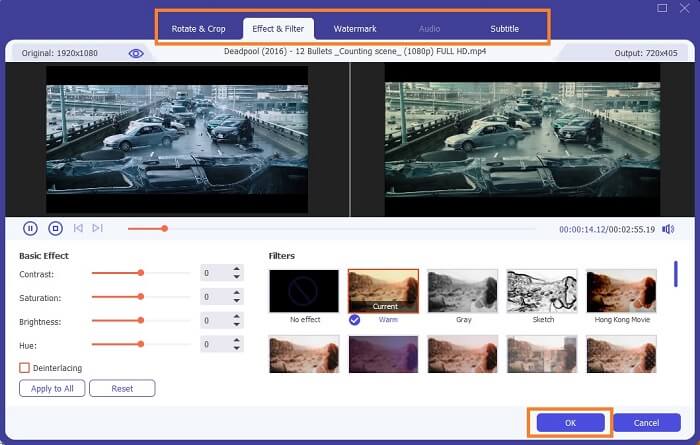
گام 3. سپس روی Video to GIF کلیک کرده و ویدیویی را که میخواهید تبدیل کنید انتخاب کنید. بعد از انتخاب فایل ویدئویی، میتوانید آن را ویرایش کنید؛ مانند چرخش و برش (rotate and crop)، افکت و فیلتر، واترمارک و همچنین زیرنویس. برای ذخیره تنظیمات روی OK کلیک کنید.
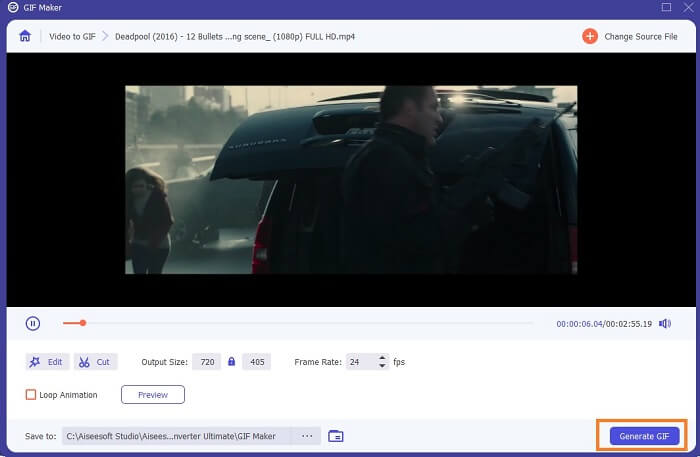
گام 4. روی Preview کلیک کنید تا 10 ثانیه اول ویدیوی ساختهشده را تماشا کنید. برای شروع تبدیل روی Generate GIF بزنید.
گام 5. وقتی همهچیز تمام شد، فایل را در File Explorer خود پیدا کرده و خروجی نهایی را تماشا یا ارسال کنید.
طرفداران
- بهترین مبدل ویدیو برای یک GIF با ابزار نهایی برای بهبود GIF.
- از تمام فرمت های ویدیویی-صوتی شناخته شده و ناشناخته در وب پشتیبانی می کند.
- ابزار چند منظوره با خروجی نهایی عالی.
منفی ها
- این یک ابزار پرمصرف است اما هزینه کمتری دارد.
- قبل از اینکه بتوانید از آن استفاده کنید، باید در فضای ذخیره سازی خود بارگیری شود.
قسمت 2. 3 از بهترین ویرایشگرهای GIF آنلاین
1. ازگیف
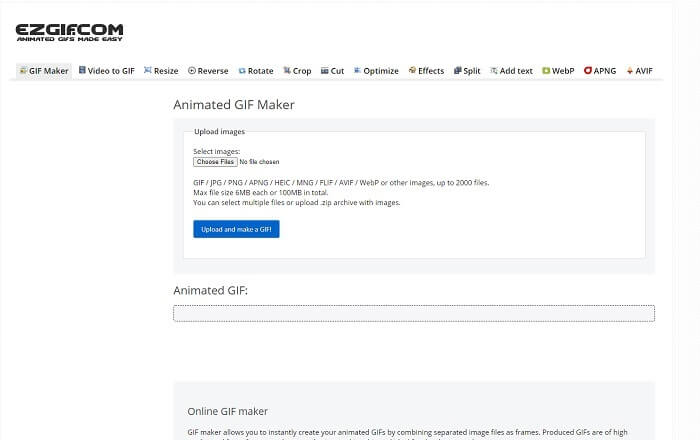
یکی از ویرایشگرهای آنلاین GIF که ممکن است قبلاً در اینترنت با آن برخورد کرده باشید، Ezgif است که بهعنوان یکی از بهترین سازندگان GIF شناخته میشود. با اینکه این ابزار امکانات متعددی مانند چرخاندن ویدیو، برش ویدیو، معکوس کردن آن و غیره را در اختیار شما میگذارد، اما این قابلیتها هر کدام جدا از هم قرار گرفتهاند. بنابراین بهجای اینکه روی ساخت و ویرایش GIF تمرکز کنید، باید فایل را بین ابزارهای مختلف ویرایشی جابهجا کنید تا آن را بهبود دهید که برای شما دردسرساز است. همچنین رابط کاربری آن پسزمینه سفید دارد که ساده اما خستهکننده است. بهنظر میرسد این ابزار آنلاین از نظر رابط کاربری بهروزرسانی نشده است.
طرفداران
- ابزار On-point با گزینه های مختلف.
- ابزار صفحه وب ساده است.
- موثر در ساخت گیف.
منفی ها
- هر کدام به 6 مگابایت و در کل 100 مگابایت محدود شده است.
- کاربر پسند نیست زیرا تمام ویژگی های ابزار در سراسر وب سایت وجود دارد. و به دلیل پس زمینه سفید ساده اش، دیدن آن کمی خسته کننده است.
2. VEED.IO
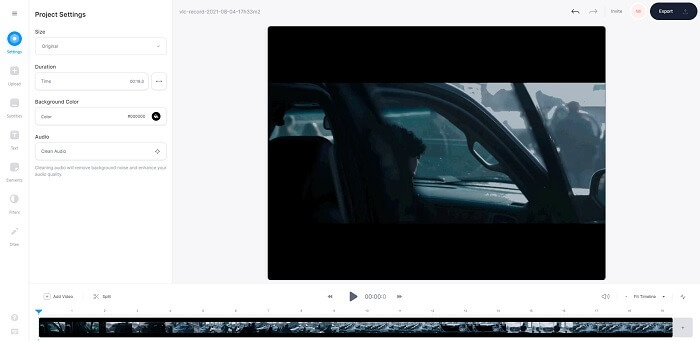
ابزار دیگر آنلاین ویرایش GIF برای ساخت یک GIF، VEED.IO است. با این ابزار، ویدیوی خود را بسازید، ویرایش کنید و به فرمت GIF تبدیل کنید. صفحه اصلی وبسایت این ابزار، برخلاف Ezgif، تا حدی ظاهر جذابی دارد. اما وقتی شروع به ساخت GIF بهصورت آنلاین میکنید، صفحه ابزار غیر پاسخگو (غیر ریسپانسیو) میشود و از نظر امنیتی هم چندان قابلاعتماد نیست. همچنین، بهتر است رمز عبور یا اطلاعات کارت اعتباری خود را وارد نکنید، چون این احتمال وجود دارد که توسط مهاجمان سرقت شوند.
طرفداران
- پشتیبانی بهتر از مشتری
- این یک نسخه حرفه ای از ابزار را ارائه می دهد.
- دسترسی آسان از طریق اینترنت.
منفی ها
- ابزار وب محافظت نشده است. بنابراین، با مسئولیت خود بازدید کنید.
- بدون ویژگی ویرایش سه بعدی
3. گیفی
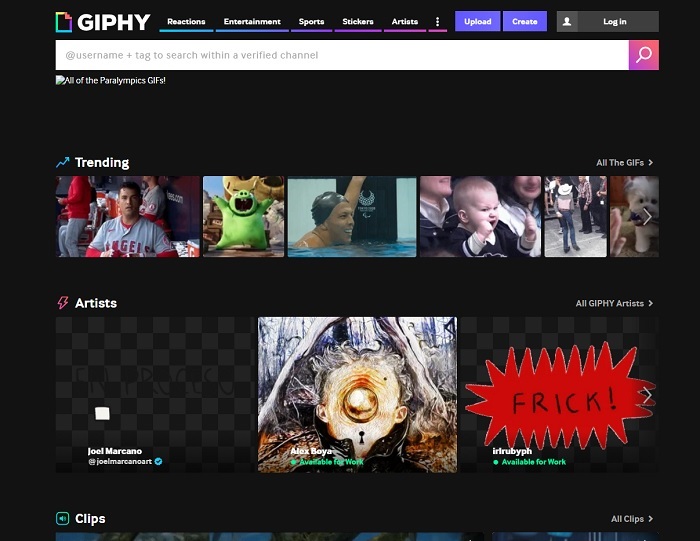
Giphy یک ویرایشگر آنلاین GIF متحرک است. این ابزار نمونههای آماده GIF مانند واکنشها، سرگرمی، ورزش و استیکرها را ارائه میدهد. با اینکه یکی از بهترین سازندگان GIF است، اما برای استفاده از آن نیاز به ساخت حساب کاربری دارید. درواقع این کار به وبسایت اجازه میدهد به حساب شما دسترسی داشته باشد. پس بهخاطر داشته باشید که بهروزرسانیها، قابلیتهای جدید یا گیفهای تازه این ابزار دائماً به ایمیل شما ارسال خواهند شد.
طرفداران
- فایل های GIF را به صورت آنلاین آپلود و ایجاد کنید.
- بزرگترین کتابخانه برای فایلهای GIF، کلیپها و استیکرهای رایگان در وب.
- رابط کاربری به روز است و عالی به نظر می رسد.
منفی ها
- قبل از استفاده از ابزار باید ثبت نام کنید. بنابراین، اگر ثبت نام نکنید یا وارد شوید، ابزار غیر قابل دسترس است.
- حداکثر طول برای GIF فقط 30 ثانیه است.
قسمت 3. برنامه های ویرایشگر GIF در اندروید و iOS
1. GIPHY: صفحه کلید و سازنده گیف و استیکر
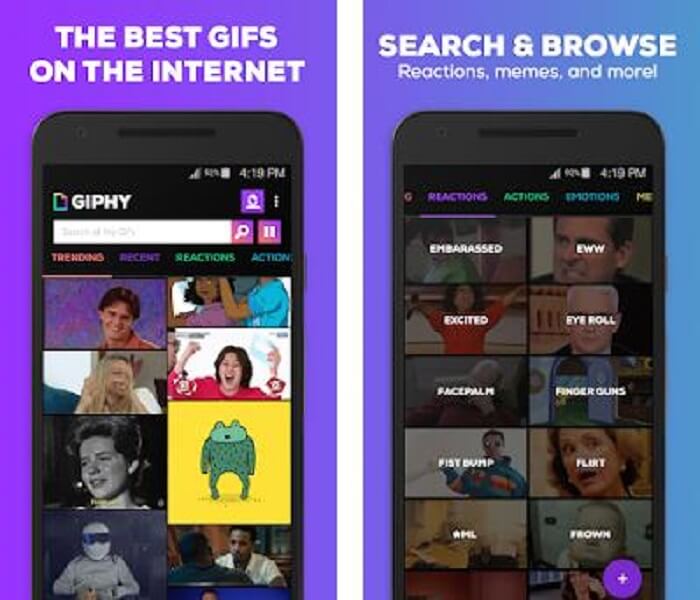
برنامه ویرایشگر GIF دیگری که روی اندروید و iOS در دسترس است، GIPHY: GIF & Sticker Keyboard & Maker است. این برنامه بهعنوان یکی از بزرگترین مخازن GIF در تمام Play Store و App Store شناخته میشود. اما فقط این نیست؛ این اپ میتواند گیفهای آماده در اختیار شما قرار دهد یا اگر بخواهید میتوانید گیفهای خودتان را بسازید. همچنین میتوانید گیفهای خود را درون برنامه هم به اشتراک بگذارید. در برخی موارد، وقتی گیفهایی را که هنگام ساخت بهخوبی کار میکردند یا از قبل روی گوشیتان بودهاند آپلود میکنید، برنامه آنها را کمی باگدار میکند و بعضی قسمتهای GIF سریعتر و بعضی قسمتها کندتر پخش میشوند.
طرفداران
- گیف ها، استیکرها و کلیپ های ویدیویی شگفت انگیز.
- کم یا بدون تبلیغات در برنامه.
- گیف های خود را ویرایش کنید و انیمیشن های زیبایی شناختی بیشتری را روی گیف ها اضافه کنید.
منفی ها
- در برخی مواقع زمانی که فایلهای GIF را از این برنامه دانلود میکنید، تصاویر ثابتی دریافت خواهید کرد. به جای دانلود آن با فرمت .gif تبدیل به .jpeg شد.
- ورود به برنامه کمی آزاردهنده است زیرا در برخی موارد نمی توانید به درستی وارد شوید و باید این کار را بیشتر انجام دهید.
2. ImgPlay–GIF Maker
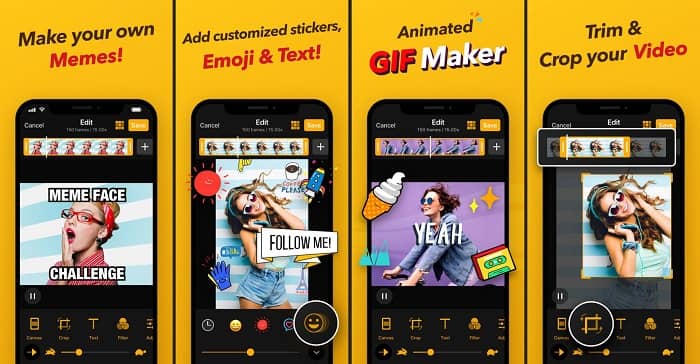
بهترین و سادهترین راه برای ساخت GIF، چه از ویدیو و چه از تصویر. Imgplay میتواند تصاویر یا ویدیوهای شما را به یک GIF کاملاً کاربردی تبدیل کند. این برنامه بهترین امکانات را برای متمایز کردن GIF شما در اختیارتان قرار میدهد. اگر بخواهید خروجی نهایی گیف خود را ذخیره کنید، یک واترمارک در گوشه پایین سمت راست GIF نهایی قرار میگیرد. برای حذف واترمارک باید نسخه پریمیوم ابزار را خریداری کنید.
طرفداران
- از دستگاه های اندروید و iOS پشتیبانی می کند.
- در صورت خرید نسخه پریمیوم ابزار، بیش از 30 فیلتر را روی GIF خود اعمال کنید تا بهتر شود.
- به راحتی از ویدیوها و تصاویر خود گیف ایجاد کنید.
منفی ها
- در iOS به جای اندروید بهتر کار می کند. اساساً نمیتوانید روشنایی، کنتراست، اشباع و نرخ فریم را با دیگر ویژگیهای اصلی اندروید تنظیم کنید.
- همچنین، منتظر تبلیغات در این برنامه ها نیز باشید. برای حذف آنها باید نسخه پریمیوم را خریداری کنید. فریم در ثانیه آن نیز بسیار کم است.
3. GIFX
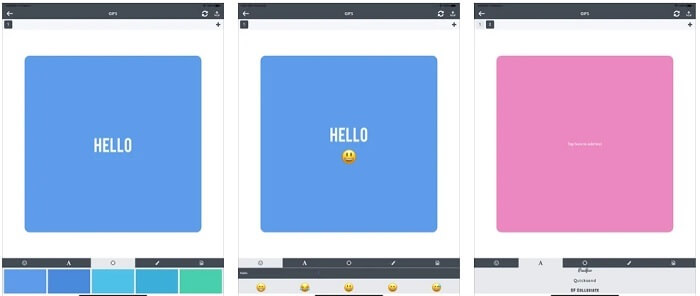
این ویرایشگر GIF فقط روی iOS در دسترس است. GIFX میتواند برای ساختن بهترین GIFی که میخواهید داشته باشید، کار را برای شما انجام دهد. این برنامه از تبدیل تصاویر و ویدیوها به فرمت GIF هم پشتیبانی میکند. همچنین میتوانید آن را از طریق پیام چندرسانهای (MMS) و ایمیل به اشتراک بگذارید. علاوه بر این، امکان اضافه کردن ایموجی و متن به گیف شما را فراهم میکند تا احساسات خود را بهتر بیان کنید.
طرفداران
- GIF متحرک خود را با این برنامه در iOS ایجاد کنید.
- همچنین از محصولات مختلف اپل مانند iPad، iPhone، iPod touch و Mac نیز پشتیبانی می کند.
- سرعت GIF خود را با این ابزار تنظیم کنید.
منفی ها
- این ابزار می گوید که از فیلم ها پشتیبانی می کند اما به شما اجازه نمی دهد ویدیوها را به GIF خود اضافه کنید.
- امتیاز برنامه فقط 1 ستاره است و فقط 2 نظر دریافت می کند که برای یک برنامه بسیار کم است.
4. GIF Studio
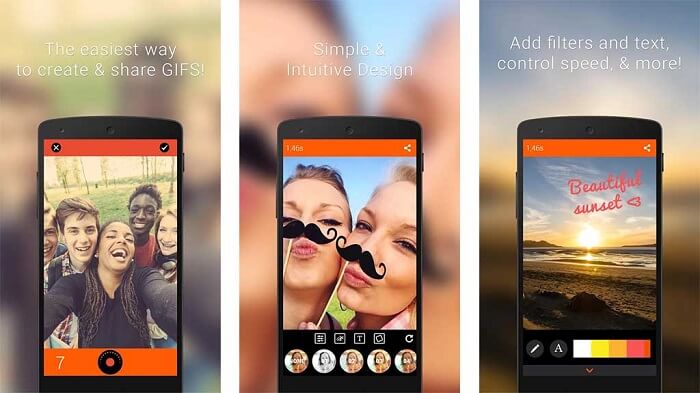
اگر بهدنبال بهترین اپلیکیشن ویرایش GIF هستید، این برنامه یعنی GIF Studio میتواند همان چیزی باشد که میخواهید. این اپ به شما فرصت میدهد تا تخیل خود را در گیفهایتان بهکار بگیرید. با این برنامه GIFهای متحرک بسازید، ویرایش کنید و پخش کنید. همچنین اگر کاربری هستید که ساخت GIF را کمی دشوار میدانید، این ابزار کار را برای شما سادهتر میکند. این برنامه ویژگیهای بیشتری هم برای افزودن به GIF در اختیارتان میگذارد تا آن را جذابتر کنید.
طرفداران
- ادغام چندین GIF در یک.
- برای ساخت کارت تبریک، متنی را به GIF های خود اضافه کنید.
- GIF های خود را به اشتراک بگذارید و به راحتی آن را ذخیره کنید.
منفی ها
- زیرا توسعه دهندگان آن را ساده کرده اند. رابط کاربری وحشتناک است. یادگیری استفاده از این برنامه کمی سخت خواهد بود.
- از GIF هایی که از سازنده گیف دیگری ساخته شده اند پشتیبانی نمی کند.
بخش 4. سوالات متداول در مورد ویرایشگر GIF
آیا فرمت های دیگری مانند GIF وجود دارد که بتواند تصاویر متحرک را ذخیره کند؟
پس از 30 سال یکی از فرمت های تصویری-ویدیویی معروف. قبلاً یک رقیب ساخته است: APNG، AVIF، MNG، WebP و FLIF.
فشرده سازی اطلاعات GIF چیست؟
این یک فشردهسازی بدون اتلاف (lossless) است؛ بنابراین هنگام فشردهسازی داده، هیچ بخشی از آن از بین نمیرود و انتقال این فرمت در اینترنت آسان است. اگر GIF شما حجم بالایی دارد، میتوانید به این صفحه سر بزنید: چگونه GIF متحرک را به فایل با حجم کم تبدیل کنیم
برای ضبط فرمت GIF از چه ضبط کننده GIF می توانم استفاده کنم؟
میتوانید از FVC Screen Recorder، یک ضبط کننده GIF قابل دانلود که در همه پلتفرمهای مختلف موجود است، استفاده کنید و فرمت GIF و موارد دیگر را ارائه میکند. با کیفیت فوق العاده بالا و همچنین بسیاری از گزینه های دیگر. دانلود FVC Free Screen Recorder برای ویندوز دانلود FVC Free Screen Recorder برای مک
نتیجه
و اکنون که کاملاً واضح است که بهترین راه برای ارائه یک پیام عالی استفاده از GIF است. اگرچه استفاده از یک پیام خام خوب است، اما افزودن یک GIF بسیار بهتر است. بنابراین، انتخاب بهترین ویرایشگر GIF برای ارائه لحن مناسب پیامی که میخواهید به اشتراک بگذارید و بیانیهای واضح داشته باشید یا برای افزودن لحن خندهدار ضروری است. ابزار نهایی را برای ایجاد یک GIF نهایی انتخاب کنید تا بهترین تأثیری را که می خواهید به اشتراک بگذارید، ایجاد کنید.
-
 نحوه تبدیل فیلم های AVI به پرونده های متحرک GIF در ویندوز / مک
 آیا می خواهید بخش های جالب AVI را برای ایجاد الگوهای رفتاری GIF انتخاب کنید؟ این مقاله به شما 2 روش مناسب برای کلیپ فیلم های AVI و تبدیل AVI به پرونده های GIF متحرک به صورت رایگان را به شما می گوید.
-
 [حل شده] نحوه تبدیل ویدیوهای FLV به فایل های متحرک GIF به صورت رایگان
 اگر می خواهید برای ارسال بهتر GIF از بخش های ویدئویی FLV ایجاد کنید ، می توانید در مورد چگونگی تبدیل فیلم های FLV به فایل های GIF به راحتی از این مقاله بیشتر بدانید.
-
 [2 راه حل] نحوه تبدیل فایل های SWF به GIF به راحتی و به صورت رایگان
 وقتی نمی توانید قالب GIF را از طریق نرم افزار Flash صادر کنید ، می توانید ابتدا فایل ها را در قالب SWF ذخیره کنید. سپس می توانید 2 روش آسان برای تبدیل SWF به فایل های GIF را از این مقاله بیاموزید.
