


 Video Converter Ultimate
 ضبط صفحه
 تعمیر ویدیو
5 تغییر اندازهدهنده گیف که میتوانید برای تغییر شکل GIF متحرک آنلاین و آفلاین خود استفاده کنید
تغییر اندازه یک گیف با هر ویرایشگری کار سادهای است، اما همهی ویرایشگرها این قالب را پشتیبانی نمیکنند. بهجای امتحان کردن ابزارهای مختلف و تلف کردن وقت، چرا در خواندن این مقاله همراه ما نمیشوید؟ چرا؟ چون ما ابزارهای تغییر اندازهای را معرفی میکنیم که میتوانید از آنها استفاده کنید و فقط واقعیتهایی را درباره این پنج ابزار بیان خواهیم کرد. پس، آمادهاید با تغییردهندههای اندازه گیفهای متحرک که روی پلتفرمهای مختلف شما در دسترس هستند آشنا شوید؟ اگر چنین است، حالا باید سراغ بررسی دقیق این پنج تغییردهنده اندازه GIF در ادامه برویم و تفاوتهای هر ابزار را بشناسیم.

قسمت 1. 5 تاپ ریزسازهای گیف آنلاین و آفلاین
1. FVC Video Converter Ultimate [توصیه می شود]
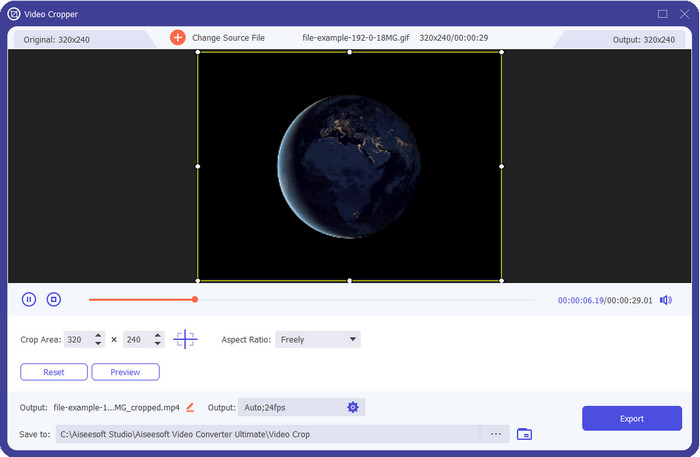
هیچیک از ابزارهای اینجا امکاناتی را که FVC Video Converter Ultimate میتواند برای گیفهای شما فراهم کند، ندارند. شاید از خودتان میپرسید چه چیزی این ابزار را منحصربهفرد میکند؟ این ابزار نهایی امکان تغییر اندازه کامل و مقرونبهصرفه گیف را فراهم میکند که قطعاً از کار با آن لذت میبرید. این ابزار برای خروجی حرفهای، مشابه آنچه فتوشاپ به شما میدهد، عالی است، اما برای تازهکارها و حرفهایها بسیار سریعتر عمل میکند. علاوه بر اینکه این ابزار میتواند اندازه گیف شما را تغییر دهد، میتوانید گیفهایتان را به MP4، MOV، AVI، MKV و بیش از ۲۰۰ فرمت دیگر تبدیل کنید تا با دستگاههای مختلف سازگار شوند. اگر میخواهید یک گیف بسازید و آن را بهعنوان تصویر پسزمینه تنظیم کنید، خوششانس هستید، چون این ابزار نهایی یک سازنده GIF هم دارد که در این کار به شما کمک میکند. اگر میخواهید یاد بگیرید چطور گیف بسازید و آن را بهعنوان تصویر پسزمینه تنظیم کنید، روی این لینک کلیک کنید. با این حال، این ابزار برای همه کاربران توصیه میشود تا بدون نیاز به خواندن دفترچه راهنما، بهراحتی نحوه تغییر اندازه GIF را یاد بگیرند.
دانلود رایگانبرای ویندوز 7 یا بالاتردانلود امن
دانلود رایگانبرای MacOS 10.7 یا بالاتردانلود امن
طرفداران
- با کشیدن آزادانه نقاط، اندازه GIF خود را مطابق با اندازه ای که می خواهید تغییر دهید.
- این یک پیشنمایش دارد که میتوانید برای اطمینان از اینکه اندازه دقیق مورد نیاز شما در GIF است، نگاه کنید.
- دارای یک رندر فوق سریع داخلی برای فرآیند صادرات صاعقه است.
- در هر سیستم عامل دسکتاپ مانند ویندوز و مک موجود است.
منفی ها
- نیاز به خرید.
2. Adobe Photoshop
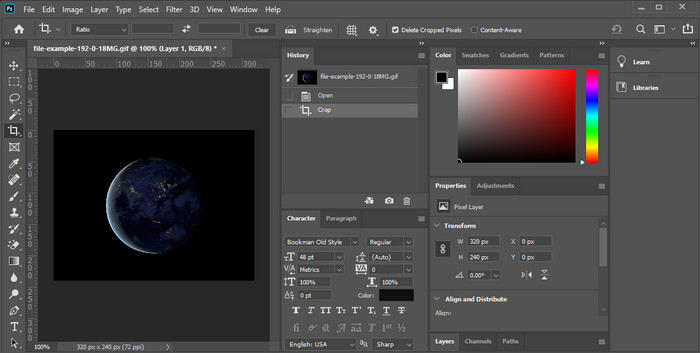
اگر یک ابزار حرفهای برای تغییر اندازه میخواهید چه؟ در این صورت، Adobe Photoshop یک گزینه است. این ابزار قابل دانلود کمک میکند هر گیفی را ظرف چند دقیقه بهسادگی تغییر اندازه دهید. در توضیح دقیقتر، این ابزار انتخاب هر کاربر حرفهای است که میخواهد تصاویرش، مانند گیفها، را طوری ویرایش کند که بهتر و جذابتر به نظر برسند. با وجود حرفهای بودن ابزار، استفاده از آن برای کسانی که آشنایی چندانی با تکنولوژی ندارند، همچنان دشوار است. همچنین، اگر فقط قصد تغییر اندازه گیف را دارید، این ابزار برای چنین کاری گران محسوب میشود. اما اگر میخواهید از فتوشاپ برای تغییر اندازه GIF و افزودن جزئیات مختلف استفاده کنید، این ابزار به شما کمک خواهد کرد؛ هرچند یادگیری کار با آن نسبت به دیگر ابزارها زمان بیشتری میبرد.
طرفداران
- این بهترین انتخاب برای ویرایش حرفه ای تصویر است.
- ابزار حرفه ای برای استفاده حرفه ای.
- ویژگی های ویرایش پیشرفته برای فایل های GIF.
منفی ها
- هزینه بر.
- اگر در زمینه ویرایش تازه کار هستید، استفاده از آن سخت است.
3. GIFGIF
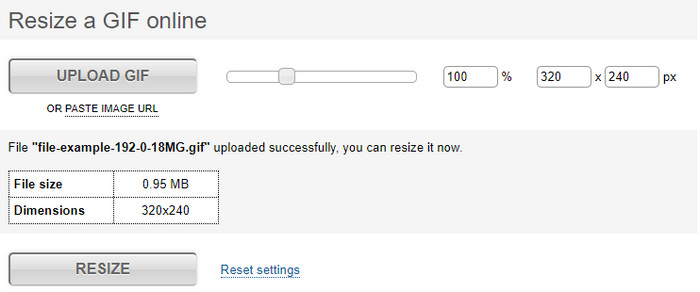
GIFGIFs یکی از گستردهترین کتابخانههای گیف را دارد که میتوانید از آن برای ذخیره گیفهای آماده در فضای خود استفاده کنید و همچنین یک ویرایشگر ساده برای تغییر اندازه گیفهای بزرگ در اختیار شما میگذارد. این ابزار تا به حال برای کمک به کاربران در تنظیم گیفهایشان در صورت نیاز، از طریق خدمات آنلاین در دسترس بوده است. با اینکه این تغییردهنده اندازه تحت وب رایگان و آنلاین است، اما هیچ تبلیغی در رابط کاربری ندارد که مزاحم شما شود، و این بسیار عالی است. اما مشکل اصلی در بخش تغییر اندازه آن این است که باید اندازه دقیق نسبت تصویر مورد نظرتان را مشخص کنید. این مسئله حتی از تبلیغات هم آزاردهندهتر است، چون باید چندین بار امتحان کنید تا مطمئن شوید دقیقاً به اندازهای که میخواهید رسیدهاید. با این حال، اگر از نسبت ابعادی که نیاز دارید اطلاع دارید، این ابزار گزینه مناسبی برای تغییر اندازه گیفهای شماست.
طرفداران
- کتابخانه داخلی برای GIF.
- هیچ تبلیغی در وب ندارد که در حین تغییر اندازه گیف باعث آزار یا مزاحمت شما شود.
- استفاده آسان و رایگان.
منفی ها
- برای تکمیل کار تغییر اندازه گیف ها به اینترنت نیاز است.
- سخت است بدانید که آیا این اندازه دقیقاً مورد نیاز است یا خیر.
4.RedKetchup.io
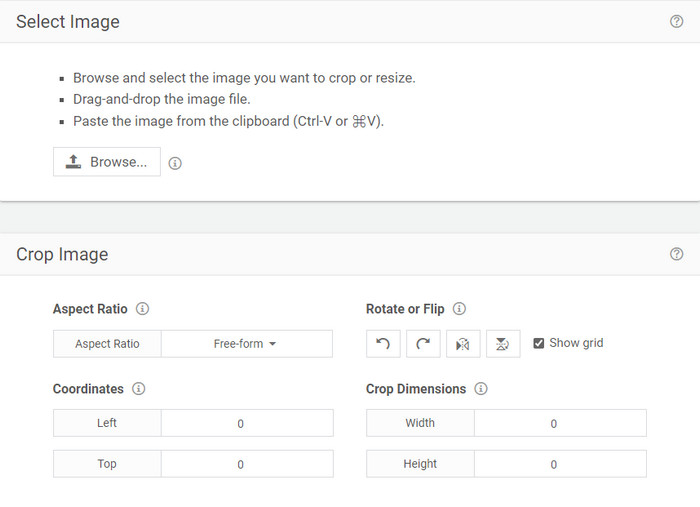
RedKetchup.io راهی ساده و تعاملی برای تغییر اندازه گیفهای متحرک در محدوده مشخصی که میخواهید فراهم میکند. این ابزار تحت وب به کاربران اینترنت اجازه میدهد با استفاده از قابلیتهای ویرایشی که ارائه میدهد، ظاهر گیفهای خود را بهتر کنند. علاوه بر این، میتوانید در اینجا تغییر اندازه بسیار دقیقتری انجام دهید؛ دقیقتر از آنچه Ezgif در اختیار شما میگذارد. با وجود اینکه کار با این ابزار از ابزار اول سادهتر است، رابط کاربری آن از نظر رنگبندی ضعیف است و حرفهای به نظر نمیرسد. تنها رنگی که هنگام ورود به این ابزار میبینید، نام آن است که به رنگ قرمز نمایش داده میشود. علاوه بر این، دسترسی به ابزار رایگان است، اما وجود برخی تبلیغات در رابط کاربری میتواند تا حدی خستهکننده باشد.
طرفداران
- برای هر کسی که به اینترنت متصل است در دسترس است.
- تغییر اندازه GIF بسیار دقیق.
- در عین حال رایگان، استفاده از آن ساده است.
منفی ها
- این دارای تبلیغات مزاحم در رابط است.
- وابسته به اینترنت
5. ازگیف
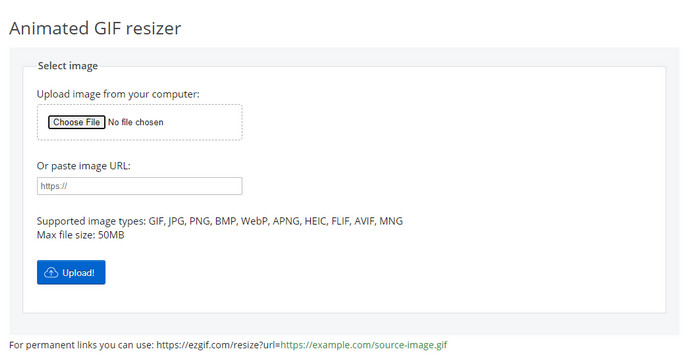
این ابزار بهعنوان یکی از برترین سازندههای گیف شناخته میشود و در صورت نیاز میتواند گیفها را بهصورت آنلاین هم تغییر اندازه دهد. Ezgif رابطی شهودی فراهم میکند تا بدون صرف تلاش زیاد، گیفهای شما را بهتر کند. علاوه بر این، اگر آشنایی زیادی با فناوری ندارید، این ابزار برای این نوع کاربران گزینه بسیار خوبی است. اما اگر اتصال اینترنتی نداشته باشید، این ابزار مانند سایر ابزارهای تحت وب، انتخاب مناسبی برای تغییر اندازه گیف شما نیست، چون به اینترنت وابسته است. همچنین تبلیغات موجود در رابط کاربری میتواند هنگام تغییر اندازه گیفها مزاحم شما شود. اگر قصد دارید از این ویرایشگر استفاده کنید، حتماً از پیش تعداد پیکسلهای عرض و ارتفاع مورد نظرتان را بدانید، چون پیشنمایشی وجود ندارد تا بررسی کنید آیا گیف تغییر اندازه دادهشده مطابق نیاز شماست یا نه، و نمیتوانید نسبت تصویر را با کشیدن تنظیم کنید.
طرفداران
- بهترین سازنده GIF آنلاین.
- دارای ویژگی های ساده ویرایش GIF است که شما به آن نیاز خواهید داشت.
- به صورت رایگان به آن دسترسی داشته باشید.
منفی ها
- هیچ پیش نمایشی برای بررسی درست بودن اندازه گیف ندارد.
- تبلیغات در رابط کاربری هستند که می توانند شما را آزار دهند.
بخش 2. نمودار مقایسه ای در مورد 5 تغییر دهنده GIF
| امکانات | Video Converter Ultimate [توصیه می شود] | فتوشاپ | فایل های GIFGIF | RedKetchup.io | ازگیف |
| ویژگی های ویرایش |  | | | | |
| بدون تبلیغات | | |  | | |
| کاربر پسند | | | | | |
| وابسته به اینترنت | | | | | |
| ارزان یا بدون هزینه | | | | | |
| صفحه پیش نمایش | | | | | |
بخش 3. سؤالات متداول در مورد GIF Resizer
آیا پس از تغییر اندازه، کیفیت گیف تغییر می کند؟
از نظر کیفیت، GIF نباید به شدت به یک تار تبدیل شود، اما پس از تغییر اندازه گیف، کیفیت آن تغییر می کند، اما نباید از GIF اصلی فاصله زیادی داشته باشد. بنابراین، اگر با این مشکل مواجه شدید، به این معنی است که کیفیت در حین صادرات تغییر کرده است نه در هنگام تغییر اندازه گیف.
آیا حجم فایل GIF کوچک می شود؟
پس از مقایسه دو گیف اصلی و تغییر اندازه، شاهد تغییر قابل توجهی در اندازه فایل بودیم. با وجود اینکه یک تغییر کوچک است، می توان گفت که اندازه آن از اندازه اصلی کوچکتر شده است.
آیا می توانم پس از تغییر اندازه آن را به GIF اصلی برگردانم؟
بعد از اینکه اندازه GIF خود را تغییر دادید، اگر هنوز آن را صادر نکرده اید، می توانید آن را به حالت اصلی تبدیل کنید. با این حال، اگر GIF را صادر کنید و از نتیجه راضی نباشید، نمیتوانید آن را به اندازه GIF اصلی برگردانید. برای جلوگیری از این مشکل، باید از یک resizer GIF استفاده کنید که دارای پیش نمایش باشد تا خروجی را قبل از صادرات بررسی کنید.
بعد از تبدیل JPG به GIF حرکت می کند؟
نه، چنین اتفاقی نمیافتد، چون JPEGها مانند گیفهای متحرک، متحرک نیستند. اما میتوانید چندین تصویر JPEG را در صورتی که آنها را به یک گیف تصویری تبدیل کنید، به گیف تبدیل کنید. میخواهید یاد بگیرید چطور این کار را انجام دهید؟ در این صورت، این مقاله به شما کمک زیادی میکند تا مجموعه JPEGهای خود را به GIF تبدیل کنید.
نتیجه
حالا که میدانیم چه تغییردهندههای اندازه GIF در دسترس شما هستند، وقت انتخاب رسیده است. همه ابزارهای آنلاین و آفلاین بهطور جداگانه آزمایش شدهاند تا اطلاعات دقیقی درباره خود ابزارها و قابلیتهایشان ارائه شود. اما دریافتیم که Video Converter Ultimate بهترین خروجی را از نظر تغییر اندازه گیف ارائه میدهد. با اینکه لازم است این ابزار را خریداری کنید، با اطمینان میگوییم پس از تهیه این ابزار نهایی، پولتان هدر نخواهد رفت. بنابراین، اگر هنوز به حرفهای ما شک دارید، باید با کلیک روی دکمه دانلود، این ابزار نهایی را دانلود و امتحان کنید.
دانلود رایگانبرای ویندوز 7 یا بالاتردانلود امن
دانلود رایگانبرای MacOS 10.7 یا بالاتردانلود امن
-
 چگونه از چندین عکسی که گرفته اید و ذخیره کرده اید یک GIF در آیفون بسازید
 آیا می خواهید بدانید که چگونه از عکس های خود در آیفون GIF بسازید؟ در این پست 3 نرم افزار به اشتراک گذاشته شده است که می توانید از آنها برای ساخت گیف در آیفون خود استفاده کنید.
-
 3 مبدل برتر که نباید برای تبدیل PNG به GIF متحرک از دست بدهید
 آیا می خواهید PNG خود را زنده کنید؟ سپس سعی کنید با ابزارهای مفید موجود و مراحل نحوه انجام آن، فرمت PNG را به فرمت متحرک GIF تبدیل کنید.
-
 4 روش برتر برای تبدیل GIF متحرک به FLV در رایانه شخصی / مک / آنلاین / اندروید / iOS
 آیا می خواهید GIF خود را به FLV تبدیل کنید و آنها را به صورت آنلاین به اشتراک بگذارید؟ اگر چنین است، بیایید بهترین مبدل های GIF به FLV را که می توانید در رایانه شخصی، مک، آنلاین، اندروید و iOS استفاده کنید، بررسی کنیم.
