


 Video Converter Ultimate
 ضبط صفحه
 تعمیر ویدیو
بررسی ویژگیهای پسزمینه و بهبود حذف Fotor Remove
در حوزه ویرایش عکس، ابزارهایی مانند حذف پسزمینه و تقویتکنندههای عکس کاملاً متداول هستند و میتوانند کیفیت خروجی شما را ارتقا دهند و آن را متمایز کنند. در همین نقطه بود که ابزارهایی مانند Fotor وارد صحنه ویرایش عکس شدند و تمرکز ویژهای بر حذف پسزمینه و بهبود عکس داشتند. پرسشهای رایجی مانند «آیا Fotor امن است؟» نیز مطرح میشود. در این نقد، ما ویژگیهای چندوجهی Fotor را با دقت بررسی کرده و قابلیتهای آن را آشکار میکنیم. بهطور همزمان، سفری را برای کشف یک جایگزین قابلتوجه آغاز میکنیم که شاید بخواهید آن را نیز امتحان کنید. به خواندن این بررسی Fotor ادامه دهید تا با تواناییهای Fotor در حذف پسزمینه و بهبود عکس آشنا شوید و تصمیم بگیرید آیا واقعاً ابزار مناسبی برای نیازهای شما هست یا نه.

قسمت 1. Fotor Review - Background Remover & Photo Enhancer
دسترسی به ابزارهای ویرایش همه کاره و قدرتمند در دنیای پویای عکاسی دیجیتال و طراحی خلاقانه بسیار مهم است. Fotor، یک برنامه جامع ویرایش عکس، در ارائه ابزارهای مورد نیاز برای پیمایش در این قلمرو همیشه در حال تحول در اختیار کاربران قرار میگیرد. قابلیتهای آن، بهویژه ویژگیهای برجسته مانند حذف پسزمینه و تقویتکننده عکس را کاوش کنید تا امروز سفر خلاقانه خود را ارتقا دهید!
فوتور
Fotor یک ابزار همهکاره در زمینه ویرایش عکس است که بهخاطر رابط کاربری ساده و ویژگیهای چشمگیرش در تقویت تصویر و حذف پسزمینه شناخته میشود. قابلیت Background Remover این ابزار به کاربران اجازه میدهد تا پسزمینهها را حذف کرده و تصاویر خود را بدون دردسر ارتقا دهند. اگر آن را با تقویتکننده عکس آن همراه کنید، به نتیجهای باکیفیت و مطلوب که بهدنبالش هستید دست خواهید یافت. این ابزار نهتنها برای ویرایش عکس طراحی شده است، بلکه تعداد زیادی الگو (Template) نیز برای افراد غیرحرفهای ارائه میدهد تا برای شروع یا کار روی پروژههای خود از آنها استفاده کنند. اگر بهدنبال نرمافزاری هستید که تقریباً همه ابزارهای پایه را بههمراه قابلیتهای حذف پسزمینه و تقویت عکس در خود جای داده باشد، میتوانید Fotor را بهعنوان یکی از گزینههای خود در نظر بگیرید.
بهترین برای
Fotor برای افراد و مشاغلی که به دنبال یک پلتفرم بصری برای بهبود عکس های خود هستند، ایده آل است، به خصوص زمانی که حذف پس زمینه دقیق برای یک نتیجه نهایی صیقلی ضروری است. در زیر برخی از قابلیتهایی که Fotor واقعاً دارد و بهترین استفاده را برای آنها دارد آورده شده است:
◆ افراد و کسبوکارها. این نرمافزار کاربرپسند برای افراد حرفهای و مبتدی طراحی شده و آن را به راهحلی ایدهآل تبدیل کرده است که به افراد و کسبوکارها امکان میدهد با استفاده از رابط و قابلیتهای سادهاش، پروژهها را بهآسانی ایجاد و بهبود دهند.
◆ ابزارهای تقویت تصویر. Fotor مملو از قالبها و فیلترهاست تا عکسهای شما را در بهترین کیفیت ممکن نمایش دهد. علاوهبر این، Fotor با استفاده از قابلیتهای تقویت عکس، تاری و نقصها را کاهش میدهد و همین موضوع آن را به ابزاری ایدهآل برای رفع مشکلات کیفیتی در تصاویر تبدیل میکند.
◆ حذفکننده پسزمینه. دقت Fotor در حذف پسزمینه بدون شک تحسینبرانگیز است، زیرا در مقایسه با سایر نرمافزارهای موجود در وب، نتایجی دقیق در اختیار شما قرار میدهد.
◆ ویرایش عکس. این ابزار از مجموعهای از قابلیتهای ضروری برای کار روی ویرایش عکس و موارد مشابه تشکیل شده است. در نتیجه، Fotor به نرمافزار مرجع برای انجام وظایف متعدد در زمینه ویرایش عکس تبدیل شده است.
قیمت گذاری
مدل قیمتگذاری: Basic و Pro
Fotor Basic: رایگان
Fotor Pro: $8.99 در ماه
◆ پردازش تصویر دسته ای.
◆ ویرایشگر و تقویت کننده تصویر.
◆ در دسترس بودن در چندین دستگاه.
◆ قالب های از پیش ساخته شده.
◆ حذف پس زمینه.
◆ ابزار کلاژ عکس.
◆ مبدل فایل RAW.
◆ فیلترها و جلوه های پیشرفته.
◆ طراح.
مراحل استفاده از Fotor Photo Enhancer
گام ۱. به وبسایت Fotor Photo Enhancer بروید و عکسی را که میخواهید بهبود دهید، در بخش Enhance Photo Now بارگذاری کنید.
گام ۲. Fotor تصویر شما را بهطور خودکار پردازش میکند. فقط کافی است با کشیدن نشانگر فلش از چپ به راست، پیشنمایش قبل و بعد را با هم مقایسه کنید.
گام ۳. هنگامی که راضی شدید، برای ذخیره پیشرفت کار روی عکستان روی Apply کلیک کنید.
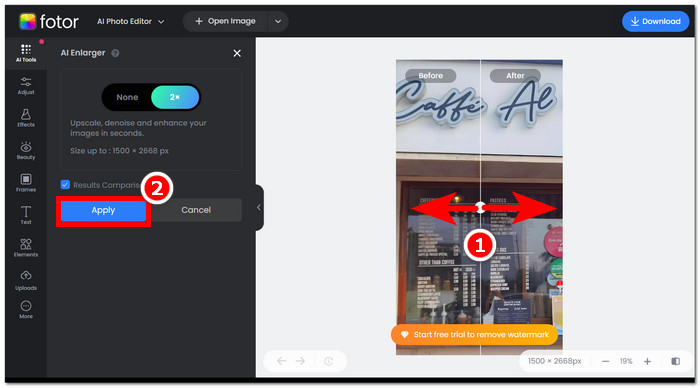
گام ۴. برای ذخیره تصویرِ اکنون بهبودیافته، روی Download در گوشه بالای سمت راست صفحه کلیک کنید.,
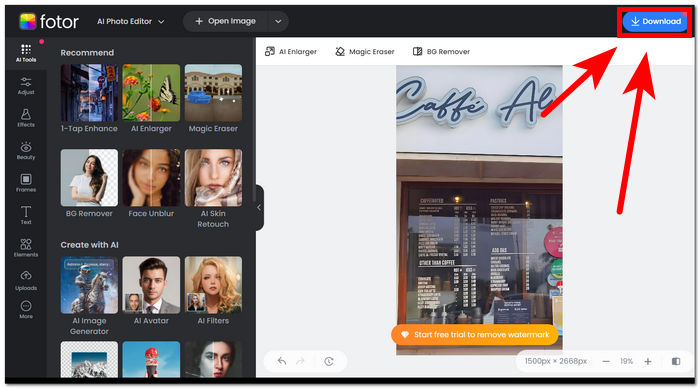
مراحل استفاده از Fotor Background Remover
گام ۱. به وبسایت Fotor Background Remover بروید و عکسی را که میخواهید پسزمینهاش را حذف کنید، در بخش Upload Image بارگذاری نمایید.
گام ۲. بهمحض اینکه عکس شما در نرمافزار بارگذاری شد، پسزمینه تصویرِ آپلودشده را بهطور خودکار حذف میکند.
گام ۳. میتوانید با استفاده از ابزار Erase/Restore که در نوار ناوبری بالا-سمت چپ قرار دارد و با آن بازی و آزمایش کنید، بهصورت دستی پسزمینه را پاک یا بازیابی کنید.
گام ۴. وقتی از نتیجه راضی بودید، روی Download که در بالای سمت راست صفحه قرار دارد کلیک کنید تا تصویر روی دسکتاپ شما ذخیره شود.
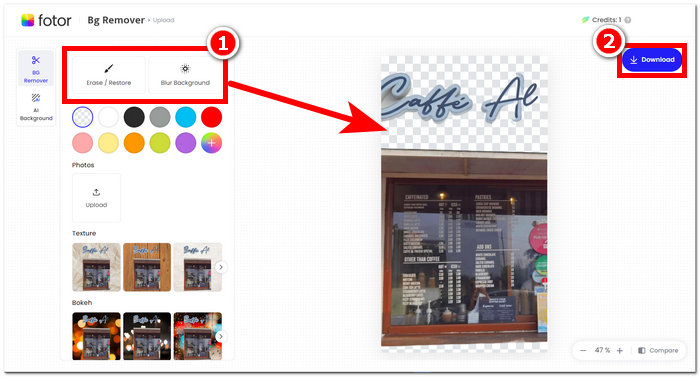
برای جمع بندی بررسی Fotor، ویژگی های آن در زمینه ویرایش عکس بسیار عالی است. از این رو، این به شما امکان می دهد پروژه های فوق العاده ای را به راحتی ایجاد کنید. جدا از اینکه از تمام ابزارهای اساسی در هنگام دستکاری عکس تشکیل شده است، تأکید بر بهبود عکس و حذف پسزمینه بدون درز است، زیرا به راحتی میتوان رابط کاربری آن را پیمایش کرد. با این حال، از میان تمام ویژگیهای آن که در جدول آورده شده است، تنها زمانی میتوانید از ویژگیها و عملکرد Fotor به طور کامل لذت ببرید که در برنامه ماهانه آن مشترک شوید.
بخش 2. جایگزین Fotor برای حذف پسزمینه و عکسهای سطح بالا
FVC دامنه فعالیت خود را گسترش داده و ابزارها و نرمافزارهایی ایجاد کرده است که نیازهای خالقان محتوا در صنعت ویرایش بصری را برآورده میکند. دو مورد از این ابزارها FVC Free Background Remover و FVC Free Image Upscaler هستند؛ این دو ابزار هر کدام دامنه وب مخصوص خود را دارند تا هدفشان برای کاربران روشن باشد و باعث سردرگمی نشوند. در مقابل، ابزارهای نرمافزاریِ همهکاره، همه ابزارهای مربوط به کارهای مختلف را در یک نرمافزار قرار میدهند که آشنا شدن با آن میتواند زمانبر باشد. علاوهبر این، این ابزارهای FVC به خالقان محتوا کمک میکنند که از قابلیتهای آنها بهصورت رایگان و بدون دردسرهای مربوط به دانلود و نصب استفاده کنند. در زیر مراحل استفاده از ابزارهای حذف پسزمینه و افزایش مقیاس تصویر FVC فهرست شده است.
مراحل استفاده از FVC Free Background Remover:
گام ۱. به وبسایت FVC Free Background Remover بروید و عکسی را که میخواهید پسزمینه آن حذف شود، Upload کنید.
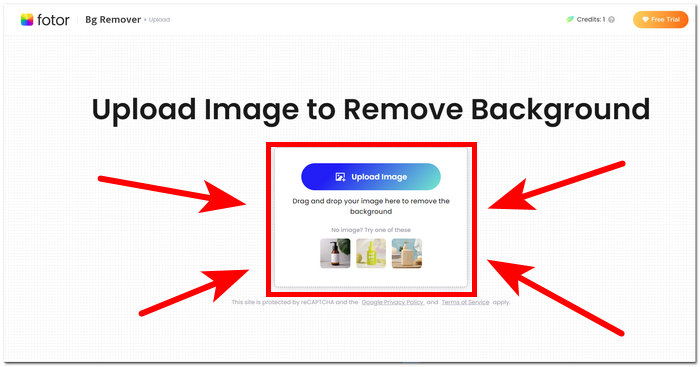
گام ۲. هوش مصنوعی FVC بهطور خودکار پسزمینه را در عکس شما شناسایی و حذف میکند.
گام ۳. پس از تکمیل فرایند، اکنون میتوانید عکس خود را Download کنید.
مراحل استفاده از قابلیتهای FVC Free Image Upscaler:
گام ۱. عکس خود را در وبسایت FVC Image Upscaler بارگذاری کنید.
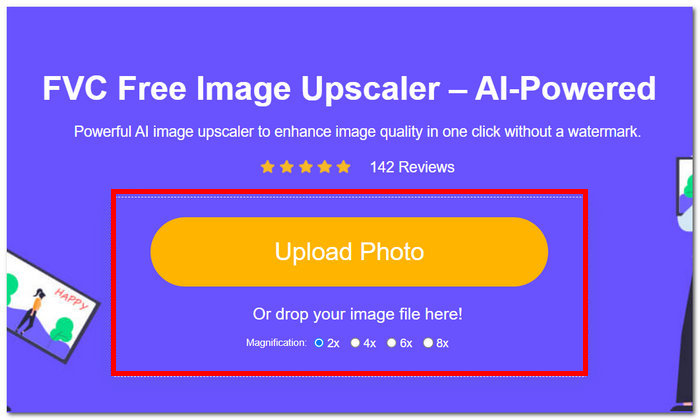
گام ۲. میزان Magnification (بزرگنمایی) دلخواه خود را انتخاب کرده و روی آن کلیک کنید.
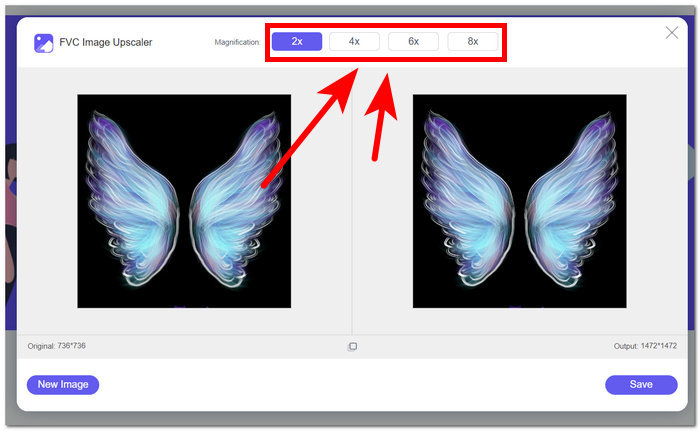
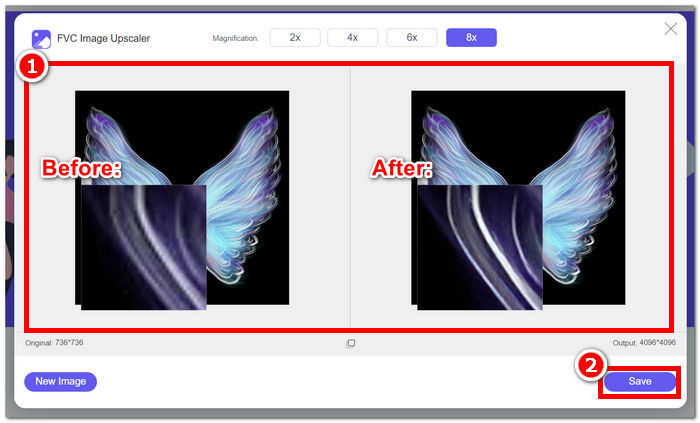
گام ۳. ابزار بهطور خودکار عکس را پردازش میکند و شما میتوانید تفاوت را بر اساس بزرگنمایی انتخابشده مشاهده کنید.
گام ۴. عکسِ اکنون با مقیاسِ بالاتر آماده ذخیره است. فقط روی Download کلیک کنید.
ابزارهای Fotor و FVC ممکن است نتایج با کیفیت و دقت یکسانی را هنگام مدیریت حذف پسزمینه و ارتقاء تصویر ایجاد کنند. با این حال، زمانی که ابزارهای FVC برای استفاده در هر مرورگر محلی رایگان است، در دسترس بودن آنها متفاوت است، در حالی که Fotor ممکن است ویژگی های رایگان اولیه داشته باشد اما محدود است. مطمئن شوید که ابتدا عملکرد و راحتی را که برای شما به ارمغان می آورند بررسی کنید و به خودتان اجازه دهید در استفاده از ابزارهای آنلاینی که سریع، کارآمد و ایمن هستند غرق شوید. FVC به شما کمک می کند تا در زمان صرفه جویی کنید و پروژه های معلق خود را به موقع به پایان برسانید.
بخش 3. سوالات متداول درباره Fotor
آیا استفاده از Fotor رایگان است؟
بله، Fotor یک نسخه رایگان از پلتفرم ویرایش عکس خود را ارائه می دهد که به کاربران امکان دسترسی به ابزارهای اساسی را بدون هیچ هزینه ای می دهد. این به افراد اجازه می دهد تا از ویژگی های اساسی بدون تحمیل هزینه استفاده کنند.
هزینه Fotor در ماه چقدر است؟
Fotor برنامههای قیمتگذاری متنوعی را ارائه میکند که شامل اشتراکهای ماهانه و سالانه میشود، با تغییرات هزینه بسته به ویژگیهای موجود. برای مشاهده اطلاعات به روز و دقیق قیمت، کاربران تشویق می شوند برای جزئیات بیشتر در مورد پیشنهادات فعلی خود به وب سایت رسمی Fotor مراجعه کنند.
مدت زمان آزمایشی رایگان Fotor چقدر است؟
Fotor ممکن است یک نسخه آزمایشی رایگان برای ویژگیهای ممتاز خود ارائه دهد، اگرچه مدت زمان آزمایشی ممکن است تغییر کند. برای دریافت جدیدترین اطلاعات در مورد مدت زمان آزمایشی رایگان، توصیه می شود وب سایت رسمی Fotor را بررسی کنید.
Fotor کار نمی کند؟
اگر با مشکل کار نکردن Fotor مواجه هستید، اتصال اینترنت خود را بررسی کنید، حافظه پنهان مرورگر خود را پاک کنید یا اگر از نسخه دسکتاپ استفاده می کنید، برنامه را به روز کنید. اگر مشکلات همچنان ادامه داشت، توصیه میشود برای کمک با پشتیبانی مشتری Fotor تماس بگیرید. آنها می توانند شما را در حل مسائل فنی راهنمایی کنند یا در مورد هر گونه به روز رسانی احتمالی سیستم اطلاعاتی ارائه دهند.
آیا Fotor برنامه خوبی است؟
بله، Fotor یک برنامه خوب برای ویرایش عکس در نظر گرفته می شود که یک رابط کاربر پسند مناسب برای کاربران مبتدی و با تجربه تر ارائه می دهد. ویژگی های متنوع آن، از جمله Background Remover، آن را برای نیازهای مختلف ویرایشی همه کاره می کند. با این حال، مناسب بودن Fotor به ترجیحات فردی و الزامات خاص برای بهبود عکس بستگی دارد.
نتیجه
Fotor بهویژه به خاطر قابلیتهای حذف پسزمینه و بهبود تصویر، بهعنوان یک رقیب قابلتوجه مطرح است. این ابزار بهدلیل تنوع قابلیتها و رابط کاربریای که تقریباً همه ابزارهای پایه موردنیاز در حوزه ویرایش عکس را در بر دارد، به یکی از ابزارهای استاندارد در ویرایش تصاویر تبدیل شده است. با این حال، با توجه به نیازهای متنوع کاربران، بررسی جایگزینهایی مانند FVC دید گستردهتری ارائه میدهد. چه Fotor را انتخاب کنید و چه جایگزینهای آن را، نکته کلیدی این است که مسیر خلاقانه خود را با ابزارهایی توانمند کنید که با دید و سلیقهتان همراستا هستند. حتماً هر یک از این ابزارها را امتحان کرده و حداکثر استفاده را از آنها ببرید تا بهترین گزینه را برای پروژههای حذف پسزمینه و تقویت عکس خود پیدا کنید.
-
 نحوه حذف پس زمینه از تصویر با استفاده از GIMP
 با GIMP و فرآیند گام به گام حذف پس زمینه از تصاویر شروع کنید. امروز روش های کارآمد برای ایجاد تصاویر شفاف با استفاده از GIMP را کشف کنید!
-
 چگونه اندازه تصویر را به صورت آنلاین و آفلاین افزایش دهیم
 ساده ترین راه برای افزایش اندازه تصویر بدون از دست دادن کیفیت را کشف کنید. ابزارها و نرم افزارهای تغییر اندازه ما را برای اطمینان از کیفیت مطلوب برای تصاویر خود ببینید.
-
 نحوه تغییر اندازه یک تصویر در فتوشاپ: راهنمای باید بدانید
 فرآیند گام به گام تغییر اندازه یک تصویر در فتوشاپ را بیاموزید. این راهنما را دنبال کنید تا به طور موثر اندازه تصاویر خود را با سهولت و کیفیت تغییر دهید!
