


 Video Converter Ultimate
 ضبط صفحه
 تعمیر ویدیو
نحوه تبدیل RAR به MP4: باز کردن بسته بندی و تغییر صحیح فایل های RAR به MP4
اگر فردی آشنا به فناوری باشید، میدانید که فایلهای RAR و MP4 در کارهای روزمره بسیار رایجاند. در اصل، فایلهای RAR مانند بستههای فشردهای هستند که میتوانند انواع مختلفی از محتوا را در خود نگه دارند – ویدیو، تصویر و هر چیز دیگری. با این حال، تا به حال به این فکر کردهاید که برای سازگاری بیشتر، یک فایل RAR را به MP4 تبدیل کنید؟ این سؤال معمولاً وقتی پیش میآید که از اینترنت فیلمهایی با برچسب RAR دانلود میکنید یا ویدیوهایی را که داخل فایل RAR فشرده شدهاند از طریق ایمیل دریافت میکنید، درست است؟ پس برای تبدیل آنها به MP4، باید ابتدا فایل RAR را از حالت فشرده خارج (اِکسترکت) کنید و سپس ویدیوهای داخل آن را به فرمت MP4 تبدیل کنید. بنابراین، در ادامه این مطلب همراه ما باشید تا دو روش ساده، آفلاین و آنلاین، را برای انجام این تبدیل RAR به MP4 یاد بگیرید.

قسمت 1. تبدیل RAR به MP4 آنلاین با ezyZip
با مبدل آنلاین توصیه شده شروع کنید که می تواند فایل های RAR را به طور موثر مدیریت کند. هر زمان که درگیر تبدیل فایل هستید، Ezyzip متحد اصلی شماست. این بهترین انتخاب آنلاین برای استخراج فایل های MP4 از آرشیو RAR به روشی بدون دردسر است. نیازی نیست که دستگاه رایانه خود را با نرم افزار مبدل MP4 اضافی شلوغ کنید. این به این دلیل است که ezyZip مستقیماً در مرورگر شما کار می کند و از مشکل نصب جلوگیری می کند. علاوه بر این، این ابزار فقط به تبدیل یک فایل RAR به MP4 به صورت آنلاین به صورت رایگان محدود نمی شود زیرا از انواع دیگر گزینه های استخراج و تبدیل فایل نیز پشتیبانی می کند.
چیزی که ezyZip را از بقیه مبدل های آنلاین متمایز می کند، رویکرد منحصر به فرد آن است. با پردازش کل موارد به صورت محلی در مرورگر شما، فایل های شما را سالم و سالم نگه می دارد. این بدان معناست که نیازی به آپلود یا دانلود خسته کننده در سرورهای خارجی نیست که منجر به تبدیل سریع می شود. قابل توجه است، ممکن است هنگام استفاده از ezyZip محدودیت های اندازه را فراموش کنید زیرا این ابزار هیچ محدودیتی را اعمال نمی کند. این همچنین به این معنی است که حریم خصوصی شما دست نخورده باقی می ماند زیرا فایل های شما هرگز از مرورگر شما خارج نمی شوند! در حال حاضر، ما اجازه نمی دهیم این اسلاید بدون آموزش فرآیند ezyZip برای تبدیل فایل های خود از RAR به MP4 به شما منتقل شود. از این رو، راهنمای زیر ارائه شده است.
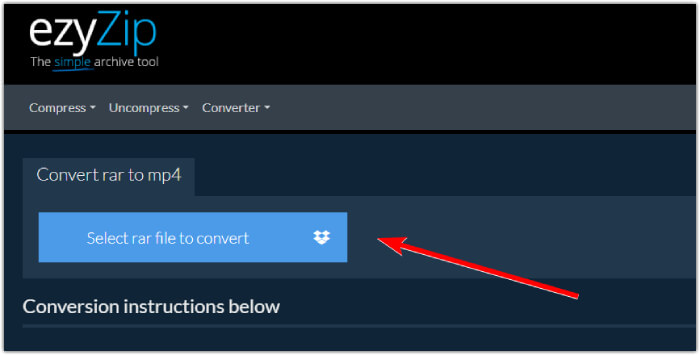
مرحله 1. وارد وبسایت رسمی مبدل شوید و با کلیک روی دکمه Select rar file to convert فایل RAR خود را وارد کنید.
مرحله 2. وقتی فایلها بارگذاری شدند، ابزار به طور خودکار آنها را در بایگانی RAR تبدیل میکند. حالا روی دکمه Save کلیک کنید تا هر فایل MP4 را در مسیر دلخواهتان ذخیره کنید.
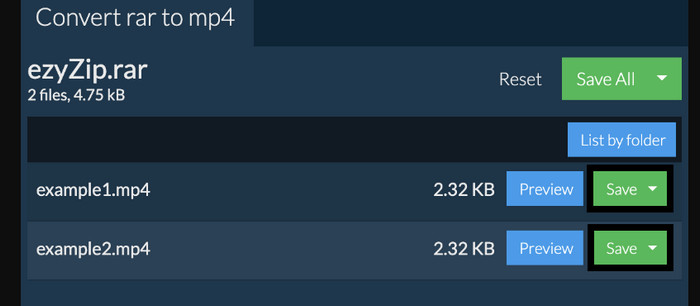
مرحله 3. اگر در صورتی که دکمه Save غیرفعال بود، باید بدانید مرورگری که استفاده میکنید توسط این مبدل پشتیبانی نمیشود. در غیر این صورت، وقتی فایلها با موفقیت ذخیره شدند، گزینهای برای مشاهده فایلهای تبدیلشده در اختیار شما قرار میگیرد.
قسمت 2. تبدیل RAR به MP4 آفلاین با WinRAR
راه های آفلاین عالی برای تبدیل RAR به MP4 با WinRAR وجود دارد. WinRAR یک نرم افزار محبوب است که به طور خاص برای کاربران ویندوز طراحی شده است. نرم افزاری است که طیف وسیعی از ویژگی های مفید را برای مدیریت فایل های فشرده ارائه می دهد. علاوه بر این، این برنامه فرآیند باز کردن یا از حالت فشردهسازی فایلهای RAR را برای استخراج و دسترسی به آنها ساده میکند. علاوه بر این، WinRAR ادامه مییابد زیرا قابلیت تبدیل فایلهای RAR به فرمتهای ویدیویی مختلف مانند MP4 یا M4V را نیز فراهم میکند. این قابلیت برای کاربرانی که نیاز به کار با محتوای چندرسانه ای ذخیره شده در آرشیوهای RAR دارند بسیار ارزشمند است. بنابراین، اگر می خواهید بدانید که چگونه فایل های RAR را با WinRar باز کرده و به MP4 تغییر دهید، دستورالعمل های گام به گام زیر را مطالعه کنید.
مرحله 1. ابتدا برنامه معروف و تخصصی RAR را روی دسکتاپ خود دانلود کنید. هنگام دانلود، از یک منبع قابل اعتماد استفاده کنید. سپس، بعد از نصب، آن را سریعاً اجرا کنید تا فرایند تبدیل را آغاز کنید.
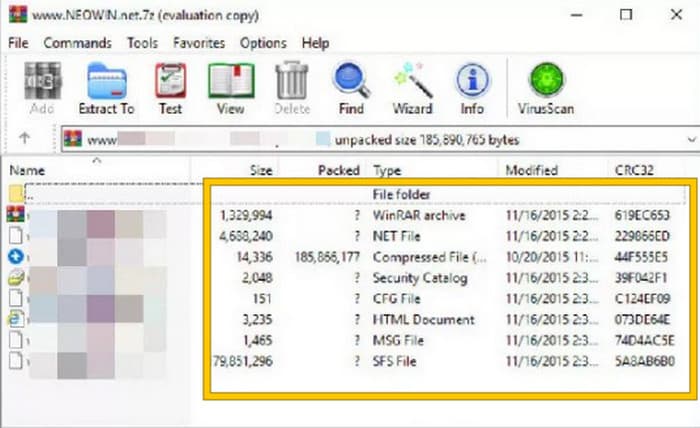
مرحله 2. به محض اجرای برنامه، میتوانید فوراً فایل RARی را که میخواهید به MP4 تبدیل کنید باز یا بارگذاری کنید. متوجه میشوید که فایل بارگذاری شده است، زیرا در مرکز رابط کاربری نمایش داده خواهد شد.
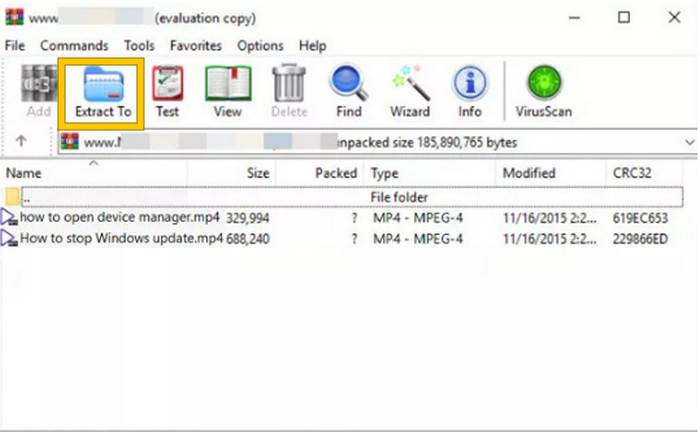
مرحله 3. در نهایت، برای شروع تبدیل یا خارجکردن از حالت فشرده، روی دکمه Extract To در فهرست زبانه منو کلیک کنید. پس از پایان کار، میتوانید فایلهای تبدیلشده را مستقیماً در همان رابط باز کنید.
بخش 3. نکته پاداش: بهترین راه برای تبدیل هر صوتی/تصویری به MP4 آنلاین
اجازه بدهید یک نکتهی اضافی هم به شما بگوییم: روشی که میتوانید با آن هر فایل ویدیویی و صوتی را به سریعترین و بهترین شکل به MP4 تبدیل کنید! با FVC Free Video Converter Online آشنا شوید؛ مبدلی که تغییر دادن ویدیوها و فایلهای صوتی شما به فرمتهای مختلف، مثل MP4، را بسیار ساده و کاملاً رایگان میکند. علاوه بر این، میتوانید ویدیوهای باکیفیتِ بالای خود را خیلی سریع و در عین حال بدون افت کیفیت یا شفافیت، به فرمتهای محبوب تبدیل کنید. همچنین از فرایند بسیار پرسرعت آن هم لذت خواهید برد، چون به شما اجازه میدهد چندین فایل را در کمترین زمان تبدیل کنید!
بیشتر وجود دارد! این مبدل ویدیوی رایگان FVC به شما امکان میدهد ویدیوها و صداهای خود را مطابق با دلخواه خود تنظیم کنید. این به این دلیل است که این مبدل به شما امکان می دهد مواردی مانند وضوح، نرخ فریم، میزان بیت و حتی تنظیمات صدا مانند میزان صدا و میزان بیت را به تنظیمات دلخواه خود تنظیم کنید. این بدان معنی است که می توانید رسانه خود را همانطور که دوست دارید سفارشی کنید و آن را به سرعت صادر کنید. بنابراین، اگر نمیدانید که چگونه فایلهای ویدیویی یا صوتی خود را به صورت آنلاین به MP4 تبدیل کنید، مراحل ساده زیر را دنبال کنید.
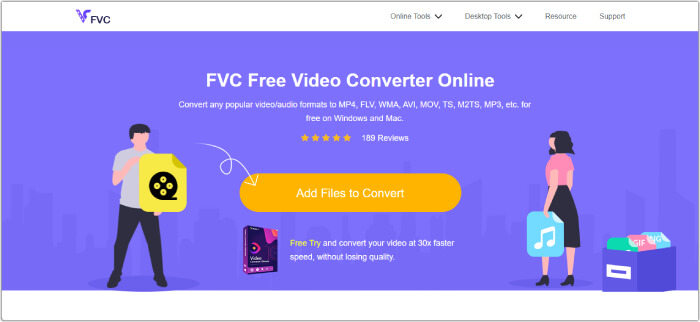
مرحله 1. فرایند را با مراجعه به وبسایت رسمی FVC Free Video Converter Online آغاز کنید. پس از ورود، روی دکمه Add Files to Convert کلیک کنید تا لانچر را دریافت کرده و فایل اولیه را بارگذاری کنید.
مرحله 2. پس از بارگذاری فایل، میتوانید با کلیک روی دکمه Add File در فضای اصلی کار، فایلهای رسانهای بیشتری اضافه کنید. سپس، با کلیک روی هر فایل و انتخاب فرمت MP4 در پایین صفحه، آنها را روی MP4 تنظیم کنید.
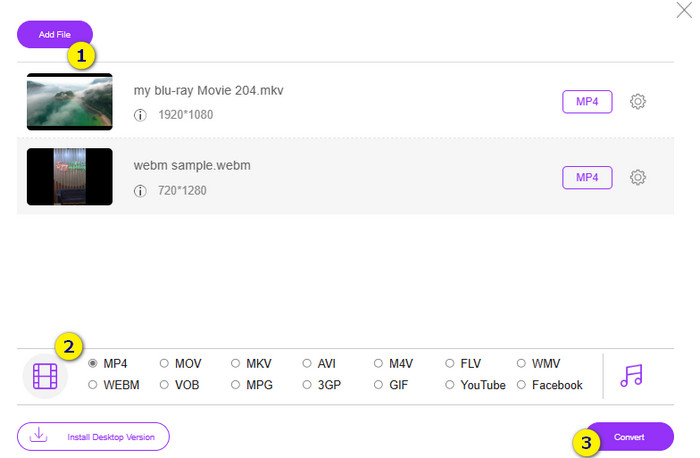
مرحله 3. پس از آن، زمان شروع تبدیل سریع و گروهی است؛ برای این کار، روی دکمه Convert در پایین صفحه کلیک کنید.
مطالعه بیشتر:
MOV در برابر MP4 – کدام را انتخاب میکنید؟
بهترین ویرایشگر MP4 برای ویندوز و مک در سال 2025
بخش 4. سوالات متداول در مورد تبدیل RAR و MP4
فایل RAR چیست؟
فایل های RAR در قالب فایل آرشیو فشرده می شوند. این به شما امکان می دهد چندین فایل را در یک ظرف واحد ذخیره کنید و در عین حال اندازه کلی آنها را کاهش دهید.
چگونه RAR را به MP4 در مک تبدیل کنم؟
برای تبدیل RAR به MP4 در مک، میتوانید ابتدا از نرمافزار استخراج فایل مانند Unarchiver برای خارجکردن محتوای داخل آرشیو RAR استفاده کنید. سپس هر فایل ویدیویی سازگاری که در میان محتوای استخراجشده وجود دارد را میتوان با استفاده از یک مبدل قدرتمند به فرمت MP4 تبدیل کرد. برای این کار میتوانید از FVC Video Converter Ultimate استفاده کنید.
آیا یک فایل RAR می تواند حاوی فیلم باشد؟
یک فایل RAR مانند یک پوشه فشرده است که می تواند هر نوع فایلی را در خود جای دهد. بنابراین، بله، فایل RAR می تواند حاوی فیلم باشد.
نتیجه
این پست برای انجام کار تبدیل RAR به MP4 روی دستگاه شما کاملاً مناسب است، چرا که بهترین روشهای انجام این کار را در اختیارتان میگذارد. خوشبختانه، یک مبدل آنلاینِ فوقالعاده برای ویدیو و صدا نیز معرفی میکند که باعث میشود مانند یک حرفهای کار کنید!
-
 راه های فشرده سازی آنلاین ویدیو برای کاهش حجم فایل ویدیویی
 اگر به دنبال کمپرسورهای ویدئویی به صورت آنلاین هستید، دیگر چیزی پیدا نکنید زیرا ما شما را تحت پوشش قرار دادیم! در اینجا برخی از راحت ترین ابزارهایی که می توانید استفاده کنید آورده شده است.
-
 نحوه فشرده سازی یک فیلم MP4 به اندازه کوچکتر
 ویدیوی MP4 برای بارگذاری خیلی بزرگ است؟ آیا می خواهید اندازه ویدئو را کاهش دهید؟ در اینجا 3 روش کارآمد برای فشرده سازی فایل MP4 به اندازه کوچکتر و بدون محدودیت آورده شده است.
-
 چگونه فیلم ها را بصورت رایگان فشرده کنیم / این 7 کمپرسور آنلاین فیلم را امتحان کنید
 7 روش فشرده سازی فیلم ها را به صورت رایگان در رایانه یا تلفن خود بخوانید و دریافت کنید. شما می توانید فیلم های بزرگ را به راحتی به اندازه پرونده های کوچک برای ایمیل ، توییتر ، اینستاگرام ، یوتیوب ، واتس اپ و موارد دیگر کاهش دهید.
