


 Video Converter Ultimate
 ضبط صفحه
 تعمیر ویدیو
تبدیل خارق العاده Mini DV به AVI در سیستم عامل ویندوز و مک موجود است
هدف اصلی فایلهای DV این است که ویدیوی دیجیتال ضبط شده با دوربینهای ویدئویی یا هندیکمهای ساخت پاناسونیک و سونی را از اواخر سال 1995 در خود ذخیره کنند. این کُدِک و قالب نوار بهدلیل نقش آن در گذار از تولید آنالوگ به دیجیتال مشهور شد. اما امروزه دیگر نمیتوانید فایل DV را با پخشکننده پیشفرض سیستم خود اجرا کنید یا حتی بهراحتی آن را بهصورت آنلاین بهاشتراک بگذارید. بنابراین، اگر میخواهید این فایل را پخش کنید، باید به تبدیل آن به یک قالب بسیار پشتیبانی شده و قابل پخش مثل AVI فکر کنید. علاوه بر این، توضیحات زیر به شما کمک میکند تا DV را بهتر درک کنید، فایلهای DV را به AVI تبدیل کنید و در صورتی که نمیخواهید تبدیل انجام دهید، آن را با یک پخشکننده رسانه اجرا کنید.

قسمت 1. نبرد فرمت ها: DV VS AVI
فایل DV و AVI تقریباً شبیه به هم هستند زیرا این دو فرمت می توانند حاوی ویدیو و صدا باشند. با این حال، هدف آنها و نحوه ذخیره فایل رسانه ای از یکدیگر دور است. در این صورت، بیایید با مقایسه 3 توانایی منحصر به فرد آنها، تفاوت بین DV و AVI را مشخص کنیم.
سازگاری قالب
فرمت AVI پشتیبانی بسیار بیشتری دارد و یکی از سازگارترین قالبها برای پخش و ویرایش ویدیو به شمار میرود. این فرمت میتواند پخش ویدیو را بهشکل همگامسازی شده در خود جای دهد. در مقابل، فایل DV توسط تعداد زیادی از ویرایشگرهای ویدیو و پخشکنندههای رسانه در ویندوز و مک پشتیبانی نمیشود. به همین دلیل، این یکی از دلایلی است که شما به یک مبدّل mini DV به AVI نیاز دارید.
فشردهسازی پشتیبانی شده
AVI یک فرمت فایل بدون اتلاف برای ذخیره سازی قوی و پیشرفته فایل های رسانه ای است. با این حال، این فرمت مقدار زیادی از فضای ذخیره سازی هارد دیسک شما را می خورد زیرا فشرده نشده است. در حالی که DV از فشرده سازی با اتلاف برای ویدیوی خود استفاده می کند، اما فایل صوتی فشرده نشده است. دلیل اینکه این فرمت ضعیف است این است که از DCT به عنوان پایه ای برای فریم به فریم استفاده شده برای فشرده سازی ویدیو استفاده می کند.
وفاداری صوتی (کیفیت صدا)
فایل DV وفاداری صوتی از کیفیت صوتی متوسط و بهترین پشتیبانی می کند زیرا از نمونه صوتی PCM تا 48 کیلوهرتز با طول 20 بیت یک کلمه استفاده می کند. AVI از PCM فشرده نشده استفاده می کند و کیفیت صدا عالی است. با این حال، بهتر است از DV به عنوان رمزگذار برای دستیابی به DV-AVI که فشرده می شود استفاده کنید.
اکنون که متوجه شدیم این فرمت ها چیست، اکنون زمان مناسبی است که با خواندن آموزش ارائه شده در زیر، DV را به AVI در مک یا رایانه شخصی خود تبدیل کنید.
بخش 2. بهترین ابزار مبدل فوق العاده برای تبدیل DV به AVI در مک و ویندوز
FVC Video Converter Ultimate
در انتخاب یک مبدّل که خروجی فوقالعادهای تولید کند، مشکل دارید؟ اگر چنین است، پیشنهاد میکنیم از FVC Video Converter Ultimate استفاده کنید. این نرمافزار به یکی از محبوبترین گزینهها در بین کاربرانی تبدیل شده است که اغلب فرمت فایلهای خود را تغییر میدهند. همچنین واژه «Ultimate» فقط در نام آن نیست، بلکه در عملکردی که ارائه میدهد هم دیده میشود. بهطور کلی، این برنامه برای همه افرادی که در تبدیل فایلهایشان به کمک نیاز دارند، گزینهای همهجانبه است. پیش از آنکه به سراغ مراحل برویم، ابتدا مزیتهایی را که با دانلود این نرمافزار بهدست میآورید، مرور میکنیم.

Video Converter Ultimate
30000+ بارگیری- فایل ویدئویی DV خود را به بیش از 200 فرمت موجود تبدیل کنید.
- پشتیبانی از تمام سیستم عامل ها مانند PC و Mac.
- جعبه ابزار آن شامل ویژگیهای پیشرفتهای مانند ساخت GIF، ویرایش ویدیو، ادغام و موارد دیگر است.
- رابط بصری برای همه.
- این تبدیل 30 برابر سریعتر در مقایسه با سایر مبدل های آنلاین یا آفلاین پشتیبانی می کند.
دانلود رایگانبرای ویندوز 7 یا بالاتردانلود امن
دانلود رایگانبرای MacOS 10.7 یا بالاتردانلود امن
بنابراین بدون هیچ مقدمه ای، بیایید به آموزش زیر ادامه دهیم و بدون از دست دادن کیفیت ویدیو، DV را به AVI تبدیل کنیم.
مراحل تبدیل DV به AVI با استفاده از FVC Video Converter Ultimate:
مرحله 1. دکمه دانلودی را که در پایین قرار دارد فشار دهید و سیستمعاملی را که در حال حاضر استفاده میکنید انتخاب کنید. نرمافزار را روی درایو خود نصب کرده و روی Start Now کلیک کنید تا به مرحله بعد بروید.
دانلود رایگانبرای ویندوز 7 یا بالاتردانلود امن
دانلود رایگانبرای MacOS 10.7 یا بالاتردانلود امن
مرحله 2. نرمافزار را باز کنید و روی دکمه + که در وسط رابط ابزار قرار دارد کلیک کنید. پنجره پوشهها باز میشود و برای بارگذاری فایل .dv، روی Open کلیک کنید.
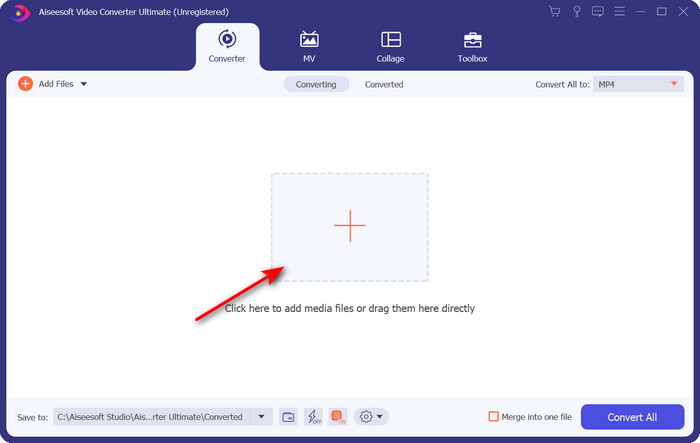
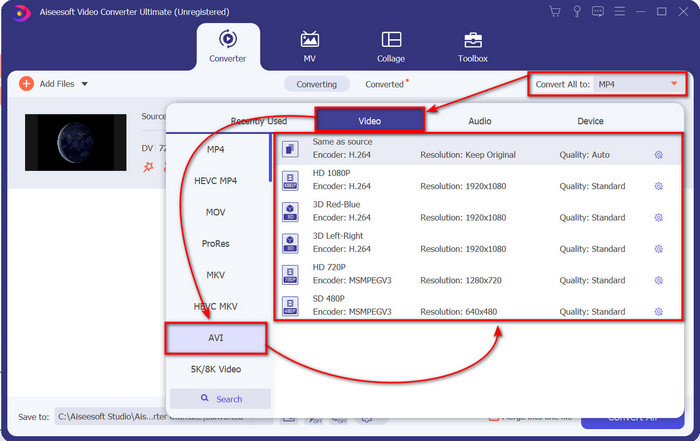
مرحله 3. برای تغییر فایل .dv به .avi، روی دکمه drop-down کلیک کرده و فرمت AVI را جستجو کنید.
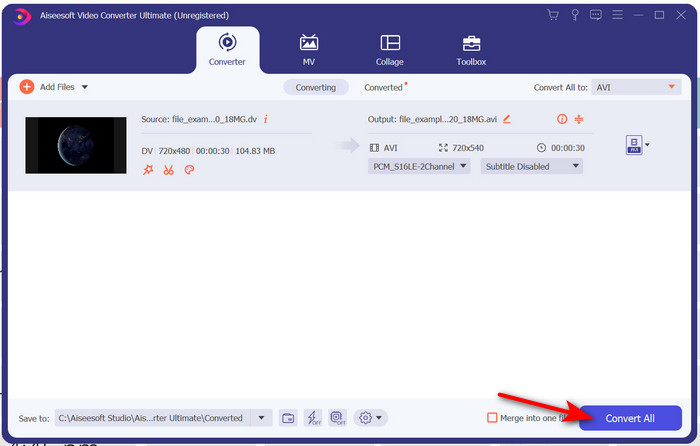
مرحله 4. پس از انتخاب فرمت، اکنون زمان آن رسیده است که با کلیک روی Convert All، فایل خود را از DV به AVI تبدیل کنید.
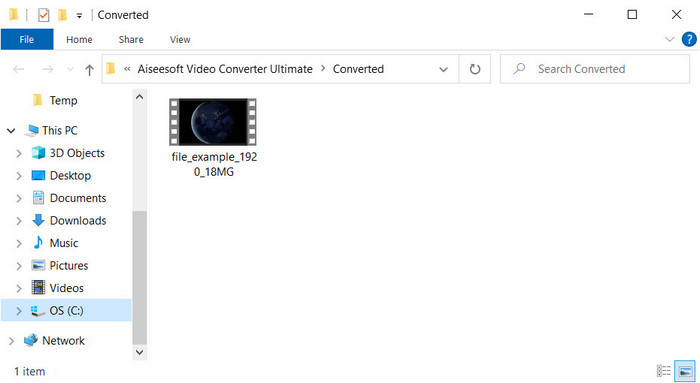
مرحله 5. تبدیل فایل کمتر از یک دقیقه زمان میبرد، بنابراین منتظر ماندن طولانی لازم نیست. پس از اتمام، پنجره پوشه جدیدی با فایلهای تبدیل شده نمایش داده میشود.
قسمت 3: فایل های DV خود را با پخش کننده ویدیوی DV موجود در رایانه شخصی و مک پخش کنید
پخش کننده بلو - ری
اگر نمیخواهید mini DV را به AVI تبدیل کنید، از یک پخشکننده رسانه که از این نوع فرمت پشتیبانی میکند استفاده کنید؛ یعنی Blu-ray Player. این پخشکننده رسانه از بیش از 300 فرمت و کُدِک پشتیبانی میکند تا بتوانید ویدیو را بدون دردسر روی دسکتاپ خود پخش کنید. همچنین این پخشکننده امکانات بسیار پیشرفتهای را که یک پخشکننده ویدیو باید داشته باشد، در اختیار شما قرار میدهد تا تجربه تماشای بهتری داشته باشید. میتوانید از CD، DVD یا دیسک بلوری نیز برای پخش ویدیو روی رایانه خود استفاده کنید؛ در واقع، مانند یک پخشکننده رسانه قابلحمل برای همه است. بنابراین، اگر نمیخواهید درگیر تبدیل فایل .dv شوید، برای پخش ویدیو مراحل زیر را دنبال کنید.
مراحل پخش فایل DV با کمک Blu-ray Player:
مرحله 1. برای دانلود این پخشکننده، روی دکمه زیر کلیک کنید، سپس برنامه را نصب کرده و آن را اجرا کنید.
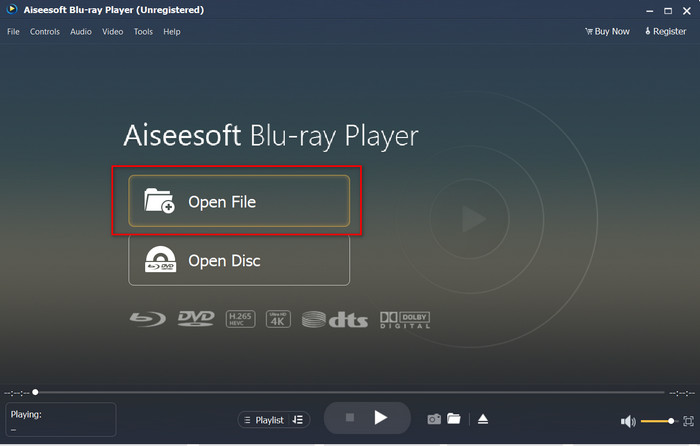
مرحله 2. روی Open File کلیک کنید، سپس فایل .dv را در پوشه خود پیدا کرده و روی Open فشار دهید.
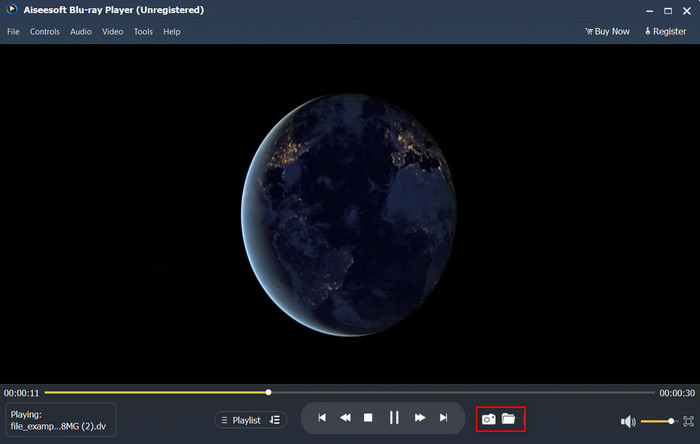
مرحله 3. فایل DV بهطور خودکار روی دسکتاپ شما پخش میشود. علاوه بر این، اگر میخواهید از آنچه تماشا میکنید اسکرینشات بگیرید، روی دکمه camera کلیک کنید. سپس اگر میخواهید تصاویر گرفتهشده را پیدا کنید، روی دکمه folder کلیک کنید.
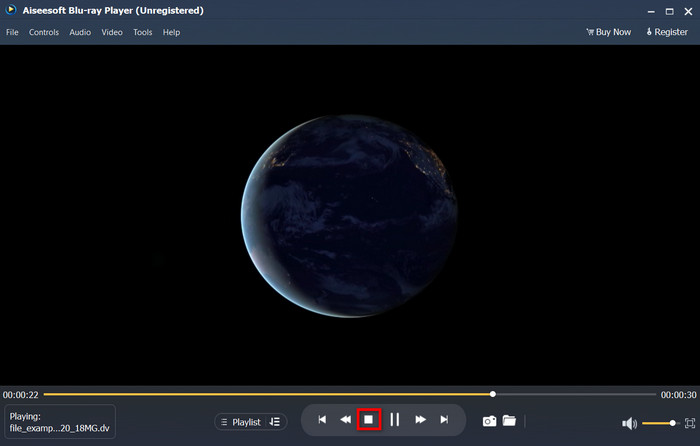
مرحله 4. اگر میخواهید تماشای فایل .dv را متوقف کنید، روی دکمه cube کلیک کنید.
مرحله 5. برای تماشای فایل دیگری با فرمتی متفاوت، مراحل 2 و 3 را دوباره انجام دهید و از تماشای ویدیوی باکیفیت لذت ببرید.
مرتبط:
بخش 4. سوالات متداول در مورد تبدیل DV به AVI
آیا تبدیل فایل های DV کیفیت خود را از دست می دهد؟
تبدیل هر فرمتی به نسخه جدید نباید کیفیت فرمت اصلی ویدیو را کاهش دهد. با این حال، برخی مبدلها از تبدیل کیفیت ویدیوی 1080 یا 4k پشتیبانی نمیکنند، زیرا این کار زمانبر است. بنابراین، اگر نمیخواهید کیفیت را از دست بدهید، از FVC Video Converter Ultimate استفاده کنید. انتظار کمتری از این نداشته باشید زیرا این نرم افزار کیفیت شما را لمس نمی کند و گزینه ای برای ارتقا یا حفظ آن در اختیار شما قرار می دهد.
آیا می توانم .dv را روی VLC بازی کنم؟
در مورد امروز، VLC هیچ فایل .dv را برای پخش پشتیبانی نمی کند. با این حال، اگر AVI را فشرده کنید و به جای آن از DV-AVI استفاده کنید، می توانید ویدیو را در VLC پخش کنید.
بهترین جایگزین برای DV چه فرمتی است؟
اگر می خواهید بهترین جایگزین برای فایل DV را بدانید، سعی کنید از فایل MP4 استفاده کنید. این فرمت به عنوان فرمت چند منظوره شناخته می شود زیرا با تمام دسکتاپ ها و دستگاه هایی که می خواهند ویدیو را پخش یا ویرایش کنند سازگار است. اما اگر بخواهیم آنها را با هم مقایسه کنیم کیفیت MP4 و DV با یکدیگر بسیار متفاوت است. با این وجود، MP4 از نظر سازگاری بهترین فرمت رسانه ای است که می توانید به عنوان جایگزین استفاده کنید.
نتیجه
در جمعبندی، ما فقط یک مبدّل DV به AVI را معرفی کردیم، زیرا این تنها نرمافزاری است که در تبدیل این نوع فایل عملکرد واقعاً خوبی دارد. همانطور که در طول مقاله دیدید، راه دیگری هم برای پخش فایل .dv از طریق یک پخشکننده DV معرفی کردیم. در واقع، دو ابزار مختلف در اختیارتان گذاشتیم؛ یکی برای پخش فایل .dv و دیگری برای تبدیل آن. حال اگر FVC Video Converter Ultimate را انتخاب کنید، میتوانید در مدت زمانی مناسب، انتظار خروجی با کیفیتی شگفتانگیز را داشته باشید. اما اگر ترجیح میدهید فایل DV را فقط پخش کنید، انتخاب شما باید Blu-ray Player باشد.
-
 بهترین 5 گزینه برای تبدیل MPEG به فرمت AVI [آنلاین و آفلاین]
 آیا برای جستجوی مبدل برای MPEG مشکل دارید؟ سپس سعی کنید این مقاله را بخوانید زیرا نحوه تغییر فرمت MPEG به AVI را با مراحل دقیق یاد می گیریم.
-
 4 مبدل شگفت انگیز به رایگان تبدیل WMV به AVI آنلاین [2021]
 آیا به دنبال تبدیل WMV به AVI هستید؟ و اگر چنین است، سعی کنید این مقاله را بخوانید زیرا ما تمام ابزارهایی را که میتوانیم در وب پیدا کنیم برای کمک به شما در این کار ذکر شده بررسی میکنیم.
-
 4 جدیدترین مبدل آنلاین و آفلاین برای تبدیل فرمت F4V به فرمت AVI
 آیا هیچ ایده ای برای تبدیل F4V به AVI یا هر فرمت ویدیویی دیگر ندارید؟ سپس این مقاله را بخوانید تا نحوه تبدیل با ابزار موجود را یاد بگیریم.
