


 Video Converter Ultimate
 ضبط صفحه
 تعمیر ویدیو
روش های قابل توجه برای برش ویدیو در اسنپ چت [از جمله راه آفلاین]
اپلیکیشن اسنپچت برنامه دیگری است که اخیراً محبوبیت زیادی پیدا کرده است. تمرکز اصلی اسنپچت در ابتدا روی تبادل عکسهای خصوصی و شخصیسازیشده بود. اما اکنون میتوانید از آن برای کارهای مختلفی مانند ارسال ویدیو و شرکت در تماسهای ویدیویی زنده نیز استفاده کنید. از طرف دیگر، میتوانید از این برنامه برای برش و کوتاه کردن ویدیوهای خود هم استفاده کنید. همانطور که میدانیم، اسنپچت فقط ویدیوهایی تا ۶۰ ثانیه را میپذیرد. اگر قصد دارید در این اپلیکیشن موبایلی ویدیویی را آپلود یا پست کنید، بهترین راهحل، کوتاه کردن (Trim) ویدیو است. در این صورت، این مطلب را بخوانید تا روشهای دقیق و گامبهگامی را که میتوانید برای کوتاه کردن ویدیو در اسنپچت و برش ویدیو برای اسنپچت به کار ببرید، ببینید.

قسمت 1. چگونه یک ویدیو را برای اسنپ چت با استفاده از رایانه برش دهیم
اسنپچت هنگام پستکردن ویدیو محدودیت دارد. یکی از بهترین راهحلها برای این نوع مشکل، کوتاهتر کردن ویدیو است. به این ترتیب، وقتی یک ویدیو را برش میزنید یا Trim میکنید، میتوانید آن را در اسنپچت اضافه کنید. اگر بهدنبال بهترین نرمافزار ویرایش ویدیو برای کوتاه کردن یک ویدیوی طولانی برای اسنپچت هستید، از Video Converter Ultimate استفاده کنید. این برنامه قابلیت عالی تقسیم ویدیو دارد و میتواند ویدیوی شما را به چند قسمت جداگانه تبدیل کند. همچنین روند تقسیم ویدیوها برای کاربران غیرحرفهای هم بسیار مناسب است. میتوانید تنها با چند کلیک ویدیوها را تقسیم کنید. چیدمان رابط کاربری آن نیز ساده و کاربرپسند است و بهراحتی میتوانید هر گزینه را متوجه شوید. علاوه بر این، این برنامه امکانات بیشتری غیر از تقسیم ویدیوها در اختیار شما میگذارد. Video Converter Ultimate به شما اجازه میدهد مطابق سلیقهتان ویدیوها را برش (Crop)، چرخش (Rotate) و بهبود (Enhance) دهید. همچنین از فرمتهای مختلف ویدیویی پشتیبانی میکند؛ از جمله MP4، MOV، MKV، AVI و موارد دیگر. افزون بر این، کاربران ویندوز و مک هر دو میتوانند از این برنامه استفاده کنند، چون برای هر دو سیستمعامل ویندوز و مک در دسترس است.
مرحله ۱. روی دکمه Download زیر کلیک کنید تا Video Converter Ultimate را دانلود کنید. از آنجا که برنامه هم برای مک و هم برای ویندوز موجود است، دو دکمه در پایین میبینید. بر اساس دستگاهی که استفاده میکنید روی دکمه مربوطه کلیک کنید. بعد از آن، برنامه را اجرا کنید.
دانلود رایگانبرای ویندوز 7 یا بالاتردانلود امن
دانلود رایگانبرای MacOS 10.7 یا بالاتردانلود امن
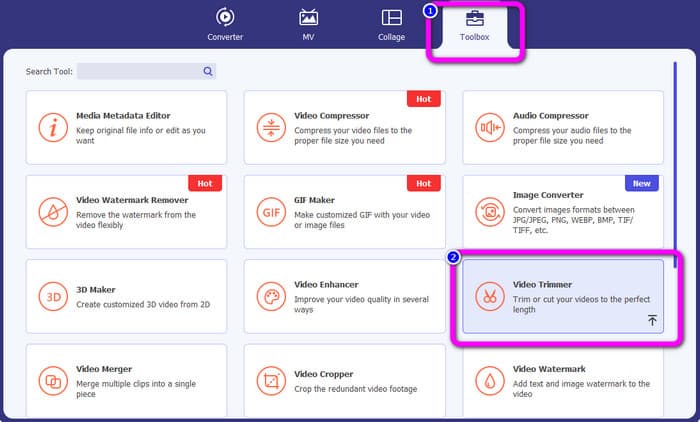
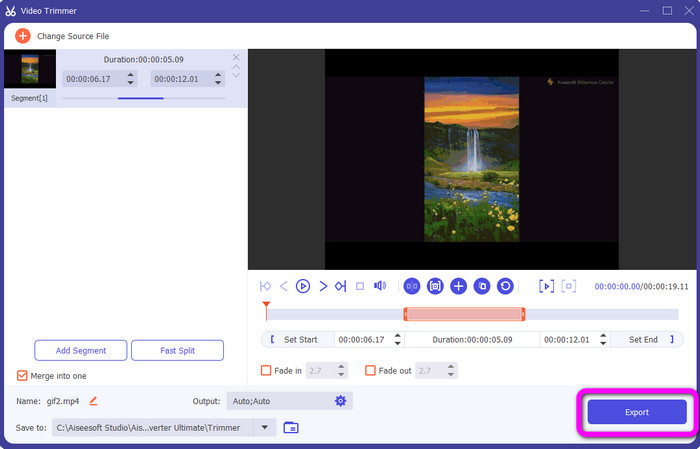
مرحله ۲. روی پنل Toolbox در بخش بالایی رابط کاربری کلیک کنید. وقتی ابزارهای زیر مجموعه Toolbox ظاهر شدند، ابزار Video Trimmer را انتخاب کنید.
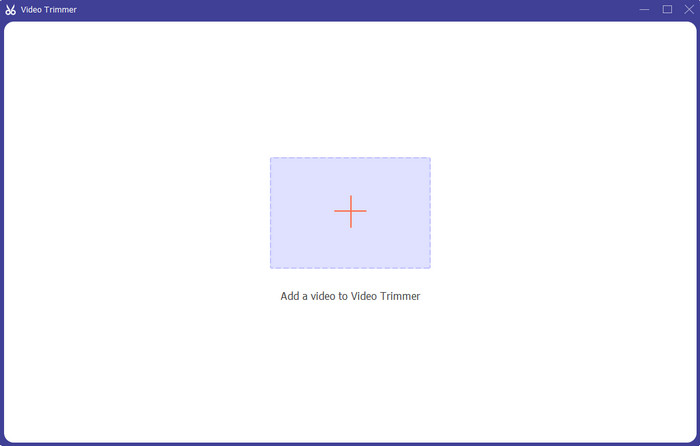
مرحله ۳. روی نماد Plus در بخش میانی رابط کلیک کنید. سپس ویدیویی را که میخواهید برش دهید از پوشه فایلها انتخاب کنید.
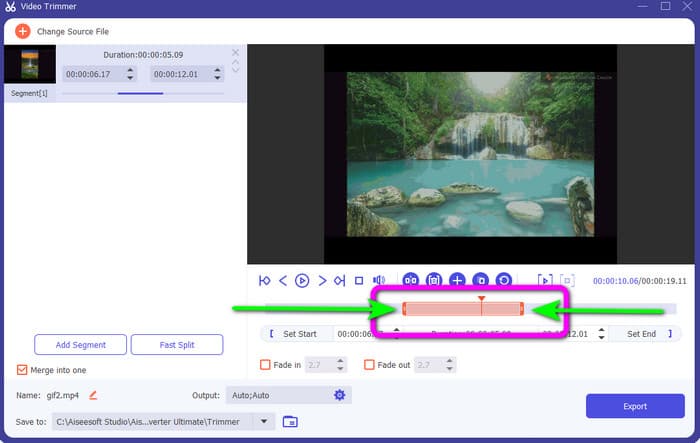
مرحله ۴. میتوانید ویدیو را با تنظیم نوار نارنجی که در قسمت پایینی ویدیو میبینید، برش بزنید. این نوار در هر دو سمت لبه دارد. لبههای نوار را جابهجا کنید تا بخش دلخواه ویدیو را Trim کنید.
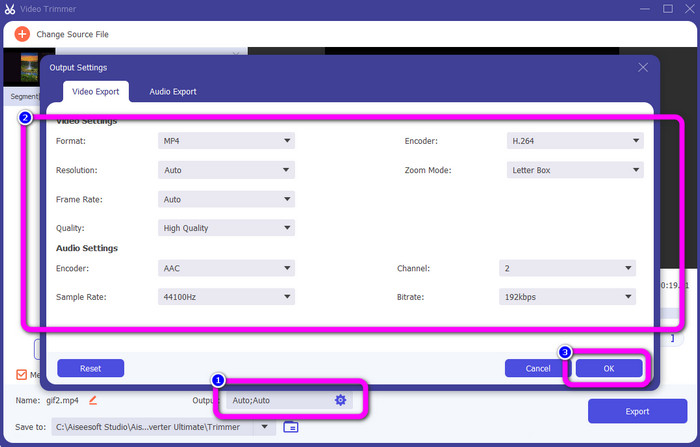
مرحله ۵. با کلیک روی گزینه Output Settings میتوانید برای تغییرات بیشتر، نرخ فریم، کیفیت، رزولوشن و حالت بزرگنمایی (Zoom Mode) ویدیو را تنظیم کنید. همچنین میتوانید نرخ نمونهبرداری (Sample Rate) و بیتریت صدای ویدیو را تغییر دهید. سپس روی OK کلیک کنید.
مرحله ۶. در آخرین مرحله، روی دکمه Export کلیک کنید. منتظر بمانید تا فرایند نهایی انجام شود و پس از چند ثانیه میتوانید ویدیوی نهایی و ویرایششده را در کامپیوتر خود ذخیره کنید.
قسمت 2. نحوه برش ویدیو در اسنپ چت
در این قسمت با نحوه برش دادن ویدیو در اسنپ چت آشنا می شوید. این اپلیکیشن موبایل برای گرفتن عکس و فیلم عالی است. این به شما جلوه های زیادی می دهد تا آنها را تقویت کنید و کاربران را راضی کنید. همچنین یک بستر ارتباطی برای افراد دیگر در نظر گرفته می شود. علاوه بر این، اسنپ چت نه تنها قادر به چنین چیزهایی است. برنامه تلفن همراه همچنین به شما امکان می دهد یک ویدیو را به راحتی برش دهید یا کوتاه کنید. جدای از آن، اسنپ چت به شما امکان می دهد ویدیوی خود را با تغییر فیلترها، افزودن افکت ها، برش و موارد دیگر ویرایش کنید. با این حال، مانند سایر برنامه ها، اسنپ چت بر روی گرفتن عکس و فیلم تمرکز دارد. بنابراین، نمی توانید از ابزارهای ویرایش پیشرفته برنامه استفاده کنید. همچنین، فقط ویدیوهای کوتاه را می پذیرد، که برای کاربرانی که می خواهند ویدیوهای طولانی بارگذاری کنند رضایت بخش نیست. مراحل زیر را در مورد نحوه کوتاه کردن یک ویدیو در اسنپ چت مشاهده کنید.
پس از ضبط ویدیو را برش دهید
مرحله ۱. برنامه Snapchat را از App Store یا Google Play Store دانلود کنید. بعد از نصب اپلیکیشن موبایلی، آن را در گوشی خود باز کنید.
مرحله ۲. بعد از آن، با استفاده از اسنپچت یک ویدیو ضبط کنید. وقتی ضبط ویدیو تمام شد، یک کلیپ کوچک در بخش پایینی صفحه ظاهر میشود. روی آن کلیک کنید تا فرایند Trim کردن ویدیو را شروع کنید.
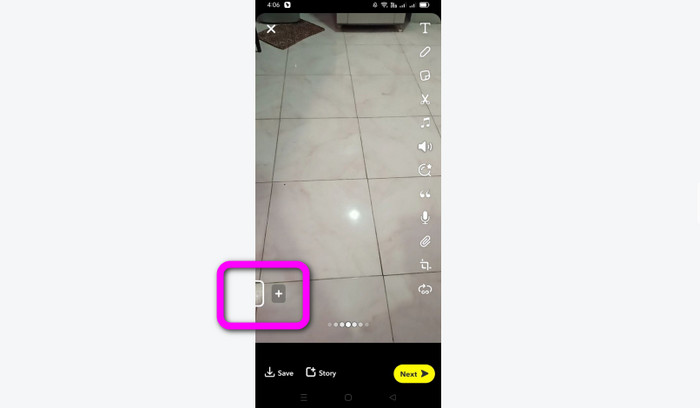
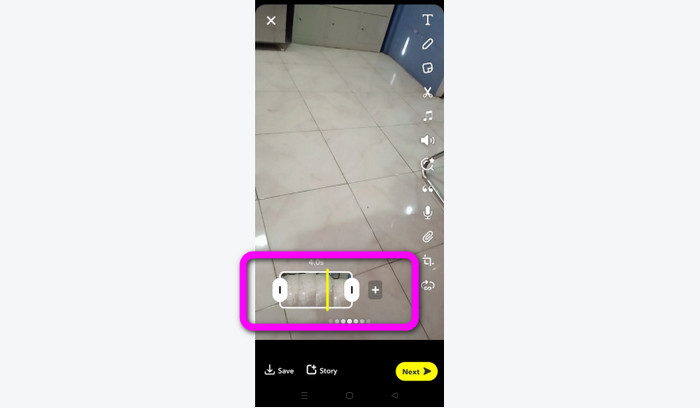
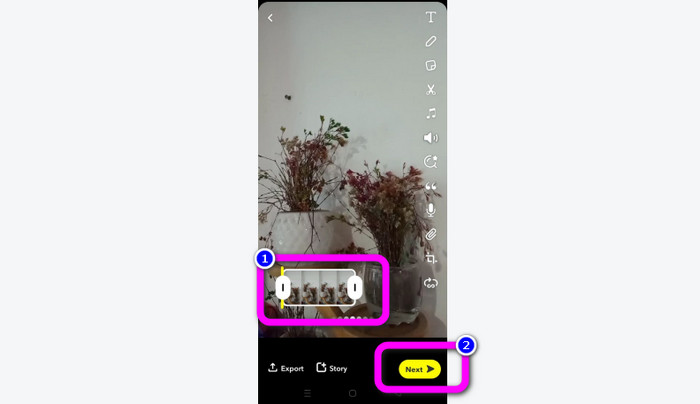
مرحله ۳. وقتی کلیپ روی صفحه ظاهر شد، میتوانید روند کار را ادامه دهید. لبههای کلیپ را بکشید و ویدیو را بر اساس سلیقه خود کوتاه کنید.
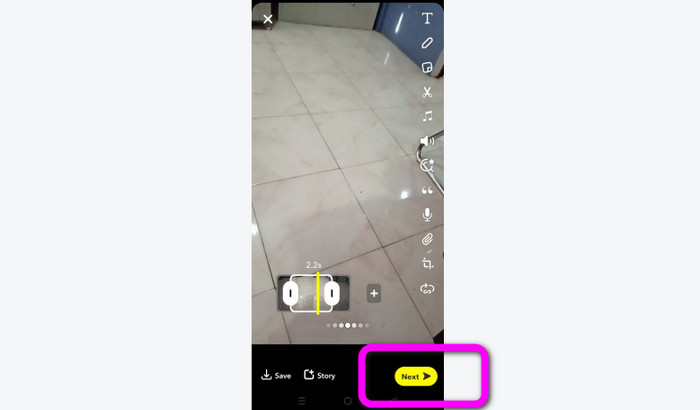
مرحله ۴. سپس وقتی از نتیجه نهایی راضی بودید، دکمه Next را در گوشه پایین سمت چپ رابط فشار دهید. به این صورت میتوانید ویدیوی برشخورده خود را ذخیره کنید.
برش یک ویدیو از خاطرات
مرحله ۱. اپلیکیشن Snapchat را در گوشی خود باز کنید. بعد از آن به بخش Memories بروید. در این قسمت میتوانید ویدیوهای خود را ببینید. ویدیو را برای چند ثانیه نگه دارید و روی گزینه Edit کلیک کنید.
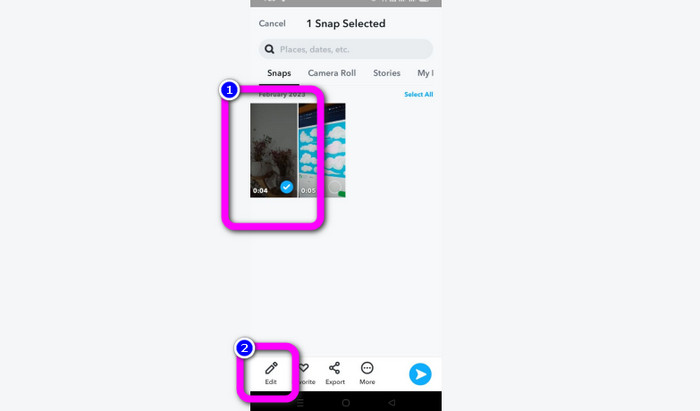
مرحله ۲. سپس ویدیو را در بخش پایینی صفحه مشاهده خواهید کرد. از این ویدیو میتوانید برای تنظیم لبههای ویدیو و شروع فرایند Trim استفاده کنید. بعد از آن، وقتی برش ویدیو تمام شد، برای ذخیره ویدیوی نهایی روی دکمه Next کلیک کنید.
۱۱ ابزار قابلتوجه برای برش ویدیو [رایگان و پولی]
روشهای عالی برای برش راحت ویدیو بهصورت آنلاین
بخش 3. سوالات متداول در مورد نحوه برش ویدیو در اسنپ چت
1. کوتاه کردن یک ویدیو در اسنپ چت به چه معناست؟
برش دادن یک ویدیو به معنای ایجاد یک برش است که یک بخش مشخص را به عنوان ابتدا و یک بخش خاص را به عنوان انتهای کلیپ ویدیویی تعیین می کند. این گزینه به شما امکان میدهد موقعیتهای آغاز و پایان ویدیو را در اسنپ چت انتخاب کنید. اگر میخواهید بخشهایی از ویدیویی را آپلود کنید که در ابتدا بیش از 10 ثانیه طول کشید، این گزینه ایدهآل است.
2. آیا می توانید از ویژگی تقسیم در اسنپ چت استفاده کنید؟
اگر ویدیویی را از Camera Roll خود آپلود کرده باشید، نمی توانید از این ویژگی استفاده کنید. اگر از دوربین اسنپ چت برای عکسبرداری استفاده کرده اید، می توانید. میتوانید از ابزار Split برای جدا کردن فیلم به تکههای قابل ویرایش استفاده کنید و هر قسمتی را که نمیخواهید حفظ کنید حذف کنید.
3. حداکثر اندازه ویدیو برای یک ویدیوی اسنپ چت چقدر است؟
اگر عکسها یا فیلمهایی را از رول دوربین خود به اسنپ چت ارسال میکنید، فقط میتوانید یک ویدیو تا حداکثر ۲.۵ مگابایت ارسال کنید. فایل های شما قبل از تحویل فشرده می شوند.
نتیجه
اگر از اسنپچت برای کوتاه کردن ویدیو استفاده میکنید، این مقاله برای شماست. در این مقاله بهترین روش برای کوتاه کردن ویدیو در اسنپچت را در اختیارتان گذاشتیم. همچنین اگر ترجیح میدهید ویدیوی خود را برای اسنپچت در کامپیوتر Trim کنید، یک برنامه برای این کار وجود دارد. Video Converter Ultimate برنامهای عالی برای کوتاه کردن ویدیو با استفاده از کامپیوتر است. این برنامه رابط کاربری شهودی دارد و کاملاً رایگان است.
-
 6 انتخاب مورد علاقه فیلترهای اسنپ چت متحرک اسنپ چت در اسنپ چت
 آیا میخواهید بهترین راههای افزودن فیلتر در ویدیوهای اسنپ چت را بدانید؟ خوب، میتوانید روی این کلیک کنید و فیلترهای مختلفی را که میتوانید برای اعمال در ویدیوهای اسنپ چت استفاده کنید، بیاموزید.
-
 چگونه سرعت ویدیو را در اسنپ چت به راحتی در هر دستگاهی کاهش دهیم
 بهترین راه برای کاهش سرعت ویدیو در اسنپ چت از قبل در اینجا وجود دارد. برای اینکه بدانید این تکنیک ها برای کاهش سرعت یک ویدیو چیست، آن را به طور کامل دنبال کنید.
-
 ساده ترین راه ها برای حذف متن اسنپ چت از اسکرین شات
 بیایید متن اسنپ چت را با استفاده از ابزارهای قابل اعتماد آنلاین و آفلاین از عکس ها و ویدیوها حذف کنیم. ما راه های آسانی را به شما پیشنهاد می کنیم. اکنون آن را امتحان کنید، و بیایید آن را امتحان کنیم!
