


 Video Converter Ultimate
 ضبط صفحه
 تعمیر ویدیو
راه های ساده برای افزودن سریع تصویر به ویدیو در iMovie
اضافه کردن تصاویر به ویدیو به یکی از بهترین راهها برای رساندن بهتر پیام به مخاطب تبدیل شده است. بیشتر ویرایشگرهای ویدیو میتوانند به شما کمک کنند خیلی سریع تصویر را روی ویدیو قرار دهید و اگر کاربر اپل هستید، احتمالاً قبلاً با iMovie روبهرو شدهاید. این برنامه بهعنوان یکی از بهترین ویرایشگرهایی شناخته میشود که میتوانید روی دستگاه اپل خود از آن استفاده کنید. با این حال، برای بسیاری از کاربران عادی اپل کار با iMovie چالشبرانگیز است چون تجربه استفاده از آن را ندارند. اکنون، اگر شما هم از همان کاربران اپلی هستید که در استفاده از آن مشکل دارید و میخواهید تصویری را به ویدیو اضافه کنید، میتوانید این مقاله را بخوانید — یادگیری چگونگی اضافه کردن تصویر روی ویدیو در iMovie ساده است اگر جزئیات زیر را دنبال کنید.

قسمت 1. نحوه پوشاندن تصویر روی یک ویدیو در iMovie [Mac]
اگر iMovie در مک دارید، میتوانید از آن استفاده کنید و تصویر را به ویدیو اضافه کنید. بنابراین اکنون، اگر می خواهید یاد بگیرید که چگونه یک عکس را روی iMovie ویدیو قرار دهید، مراحل زیر به شما کمک می کند.
مرحله 1. در Finder بهدنبال iMovie بگردید و سپس روی آن کلیک کنید تا باز شود.
مرحله 2. در بالای سمت چپ iMovie روی دکمه Import کلیک کنید تا ویدیو و تصویر را بهآسانی وارد کنید. فایلهای رسانهای واردشده را بکشید و در Timeline قرار دهید.
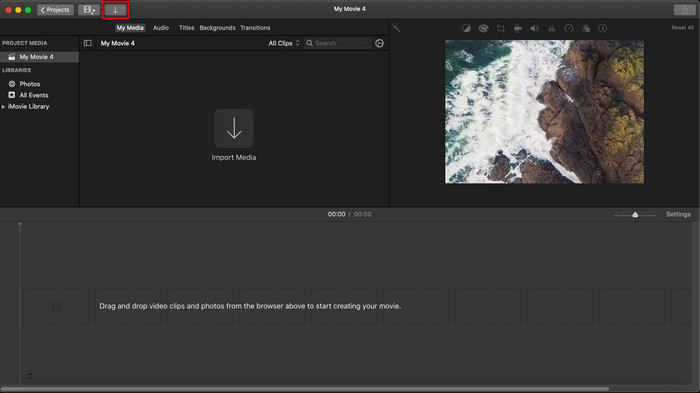
مرحله 3. تصویر واردشده و مدت زمان نمایش آن را تنظیم کنید. بعد از آن روی Export کلیک کنید تا فایل در رایانهتان دانلود شود.
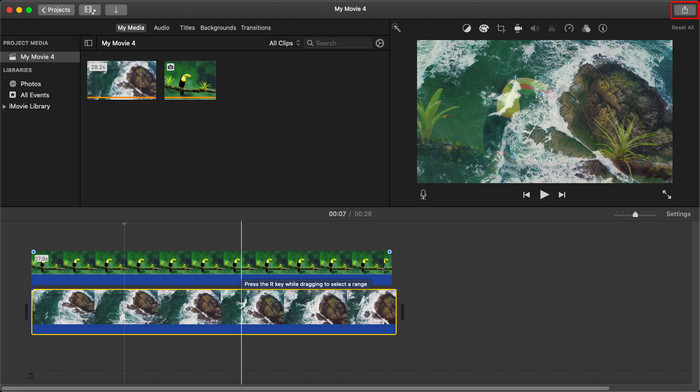
مراحلی که در اینجا ارائه کردیم از تجربه عملی استفاده از iMovie است. اگر بهروزرسانی در ابزار وجود داشته باشد یا برخی تغییرات به زودی رخ دهد، ممکن است مراحل متفاوت باشد.
قسمت 2. نحوه درج عکس ها در ویدیو با iMovie [iOS]
اگر از یک دستگاه iOS استفاده می کنید و می خواهید از iMovie به عنوان ویرایشگر برای افزودن تصویر به ویدیو استفاده کنید، چه؟ آیا امکان دارد؟ خب بله همینطوره ما میتوانیم با خواندن جزئیات زیر با مراحلی که ارائه کردیم، نحوه قرار دادن تصویر در یک iMovie ویدیویی در آیفون را به شما آموزش دهیم.
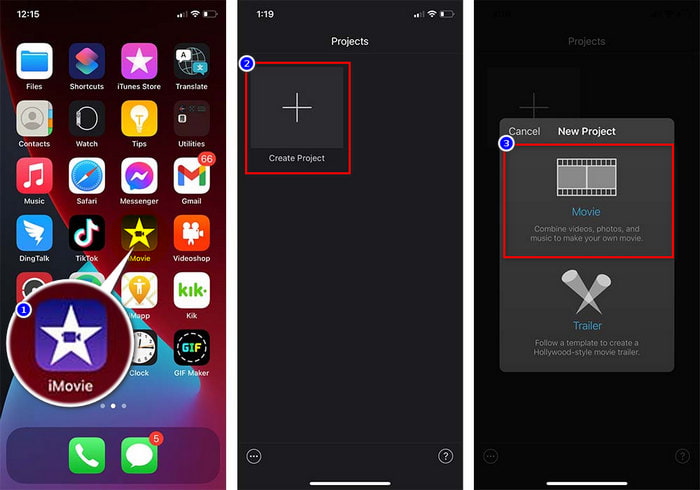
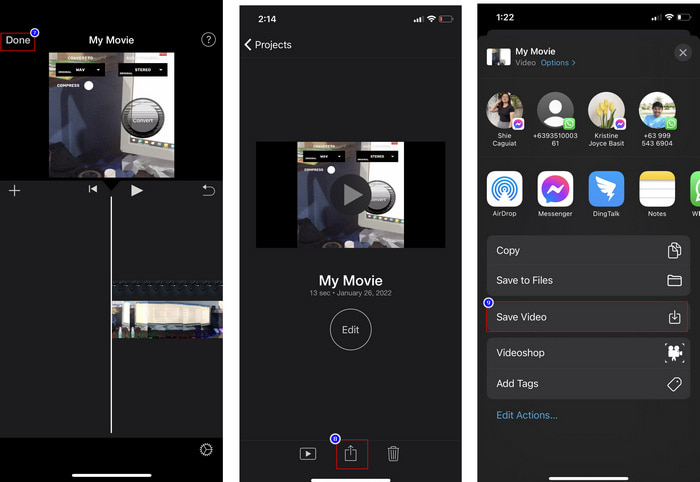
مرحله 1. برنامه iMovie را در دستگاه iOS خود اجرا کنید، روی Create Project و سپس Movie کلیک کنید. ویدیوی موجود در کتابخانه خود را اضافه کنید.
مرحله 2. روی دکمه + کلیک کنید تا تصویر واترمارک را به ویدیو اضافه کنید. آن را در کتابخانه جستوجو کنید، روی آن کلیک کنید، دکمه سهنقطه را بزنید و Green/Blue Screen را انتخاب کنید. روی تصویر ضربه بزنید تا پسزمینه آن بهطور خودکار حذف شود.
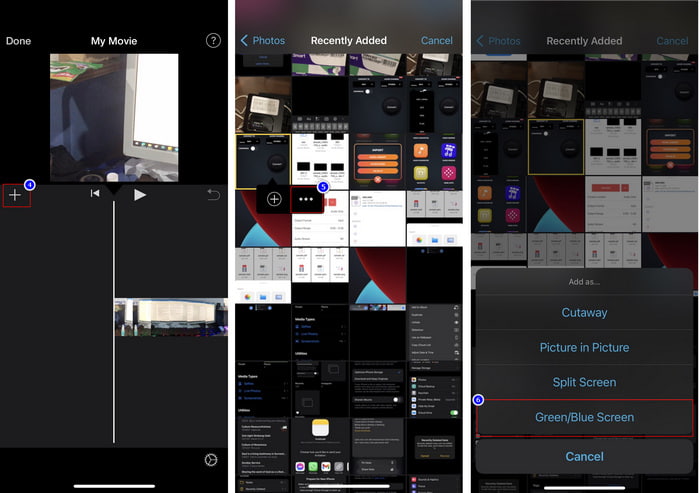
مرحله 3. روی Done بزنید، سپس Export و بعد Save Videos را انتخاب کنید.
تمام مراحلی که در اینجا ارائه کردیم از تجربه عملی استفاده از iMovie در iOS است. اما اگر بهزودی بهروزرسانی در برنامه ویرایشگر انجام شود، ممکن است برخی از مراحل تغییر کند.
بخش 3. ساده ترین راه حل برای قرار دادن عکس در ویدیو با بهترین نرم افزار واترمارک ویدیو در مک
آیا شما هم در اضافه کردن عکس روی ویدیو در iMovie همین دشواریها را دارید؟ سعی کنید از Video Converter Ultimate استفاده کنید، چون این ابزار بهترین جایگزین برای iMovie است. عملکرد کلی آن از سوی میلیونها کاربری که قبلاً از آن استفاده کردهاند مورد تحسین قرار گرفته است. حتی با وجود اینکه مشکلات ویدیویی آنها متفاوت بوده، باز هم این ابزار نهایی را برای حل آنها انتخاب کردهاند. علاوه بر این، با این ابزار تقریباً میتوانید هر کاری را که به ویدیو مربوط است انجام دهید؛ مانند برش، افزودن تصویر، ادغام، کراپ کردن و غیره. هر مشکلی که باشد، این ابزار یک راهحل همهجانبه برای آن است. میخواهید مشکل را حل کنید؟ پس مراحل زیر را که برای سهولت کار شما نوشتهایم دنبال کنید.
قابلیتها:
◆ ابزار نهایی از چندین فرمت پشتیبانی می کند، بنابراین آپلود قالب شما دشوار نخواهد بود.
◆ از یک رابط کاربری آسان برای اضافه کردن سریع تصاویر به هر ویدیو در عرض چند ثانیه پشتیبانی می کند.
◆ از سیستم عامل های مختلف مانند مک و ویندوز پشتیبانی می کند تا به کاربران اجازه دهد در همه سیستم عامل ها لذت ببرند.
مرحله 1. میتوانید با کلیک روی دکمه دانلود زیر، ابزار را دانلود کنید، سپس آن را بهسرعت نصب و بعد از اتمام نصب اجرا کنید.
دانلود رایگانبرای ویندوز 7 یا بالاتردانلود امن
دانلود رایگانبرای MacOS 10.7 یا بالاتردانلود امن
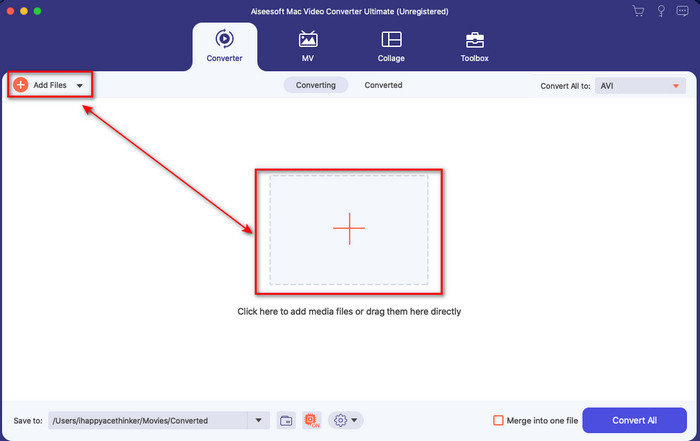
مرحله 2. پس از باز کردن برنامه، روی دکمه + نمایشدادهشده بزنید تا فایل ویدیویی را وارد کنید. بعد از آن پوشهای باز میشود تا فایل ویدیو را انتخاب کنید و روی Open کلیک کنید.
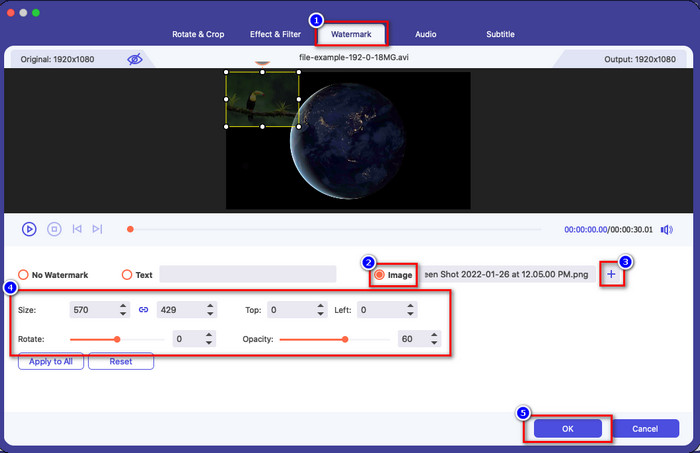
مرحله 3. روی دکمه wand کلیک کنید تا پنجره ویرایش مبدّل باز شود. به بخش Watermark بروید، روی تصویر کلیک کنید، سپس add را بزنید تا تصویر را آپلود کنید. همچنین میتوانید opacity (شفافیت) تصویر را ویرایش کنید یا آن را بر اساس نیاز خود rotate (چرخش) دهید و برای اعمال تغییرات روی OK کلیک کنید.
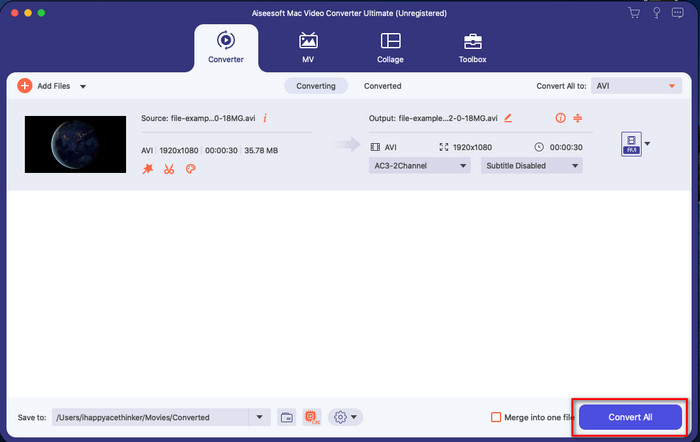
مرحله 4. روی دکمه Convert All کلیک کنید تا فایل ویدیویی خروجی گرفته شود. پس از پایان فرآیند خروجی گرفتن، ویدیو در پوشه رایانه شما ذخیره خواهد شد و به همین سادگی شما یک تصویر واترمارک روی ویدیوی خود دارید. حالا، آیا به توانایی Video Converter Ultimate باور پیدا کردهاید؟ شما به همین سرعت تصویر واترمارک را روی ویدیو اضافه کردید.
مرتبط:
چگونه زیرنویس به ویدیو اضافه کنیم
بخش 4. سؤالات متداول در مورد افزودن عکس به ویدیو در iMovie
آیا محدودیتی در تعداد تصاویر اضافه شده در ویدیوهای iMovie وجود دارد؟
تا کنون، هنگام استفاده از iMovie، با اضافه کردن چندین تصویر روی ویدیو، مشکلی نداشتیم. با این حال، اگر تصاویر زیادی روی ویدیو اضافه کنید، فرآیند صادرات زمان میبرد، اما طبق تجربه، خراب نمیشود.
فرمت های تصویری که می توانم در iMovie استفاده کنم چیست؟
فرمت های عکس ثابت بی شماری iMovie مانند BMP، PNG، JPG یا JPEG، HEIF، PSD، RAW TIFF و TGA پشتیبانی می کند، اما اگر می خواهید یک تصویر متحرک داشته باشید، می توانید از GIF استفاده کنید. اگرچه این فرمتها زیاد هستند، اما هنوز از همه فرمتهای تصویر مانند EXIF، WebP و موارد مشابه پشتیبانی نمیکند.
چرا باید از iMovie استفاده کنم؟
برای کاربران اپل، iMovie یکی از بهترین انتخابها برای ساخت فیلم کوتاه، تبلیغات، وبلاگها و موارد دیگر است. همه اینها رایگان هستند این ویرایشگر یک رابط نیمه پیشرفته ارائه می دهد تا به کاربران کمک کند تا تجربه عملی از نحوه ظاهر یک رابط یا ابزار پیشرفته داشته باشند. همچنین نرم افزار کمتر فنی است اما تخصصی است. دیدن ویرایشگری که نحوه استفاده از آن را با تکنیک کمتری ارائه می دهد، معمول نیست، اما می تواند به شما کمک کند که حرفه ای باشید و برخی از تکنیک های تخصصی ابزارهای پیشرفته را اضافه کنید.
نتیجه
در نهایت میتوان گفت اکنون دانش کافی برای اضافه کردن راحت عکس روی ویدیو در iMovie را داریم. با بهترین ابزار روی دستگاههای اپل، میتوانید ویرایشهای نسبتاً پیچیده را هم اینجا انجام دهید. با این حال، همه قابلیتهایی که نیاز دارید در iMovie وجود ندارد، اما میتوانید از Video Converter Ultimate استفاده کنید تا روی همه پلتفرمها یک ویرایشگر ساده و کارآمد در اختیار داشته باشید. شاید با خود فکر کنید چرا باید از این ابزار نهایی استفاده کنید؟ وقتی درباره این ابزار صحبت میکنیم، توضیح اضافی چندان لازم نیست، چون شواهد را در بالا ارائه کردهایم. حالا چه باید بکنید؟ میتوانید روی دکمه دانلود کلیک کنید تا خودتان بهصورت عملی این ابزار نهایی را امتحان کنید و این مشکل را برطرف سازید.
-
 5 برگزیده ترین برنامه ضبط صدا در Android و iOS [به روز رسانی 2022]
 نمی دانید از چه برنامه ضبط صدا باید استفاده کنید؟ اگر چنین است، این مقاله به شما کمک می کند تا انتخاب کنید کدام برنامه به شما در انجام وظیفه ضبط صدا کمک می کند.
-
 یادداشت صوتی در iOS - مزایا، معایب، ویژگیها و 4 بهترین جایگزین
 یادداشت صوتی چیست؟ آیا بهترین ضبط کننده صدا در iOS است؟ آیا به دنبال پاسخی برای آن سوال هستید؟ بنابراین، دامنه کامل این مقاله را بخوانید تا بیشتر بدانید.
-
 7 آخرین مبدل رایگان MOD برای تغییر فایل MOD به فرمت جدید
 مبدل های MOD که می توانید استفاده کنید چیست؟ به همین سوال فکر می کنید؟ بنابراین در اینجا ما هفت ابزاری را ارائه می دهیم که می توانید برای تبدیل فایل های MOD خود استفاده کنید.
