


 Video Converter Ultimate
 ضبط صفحه
 تعمیر ویدیو
نحوه افزایش سرعت ویدیوهای TikTok در Tiktok یا استفاده از سایر نرم افزارهای جایگزین
یکی از سریعترین اپلیکیشنهای در حال رشد در حوزه سرگرمی ویدیویی که میتوانید روی تلفن همراه خود استفاده کنید، تیکتاک است. هرچند تیکتاک در سال ۲۰۱۶ منتشر شد، اما تنها چند ماه بعد از انتشار بهشدت محبوب شد. یکی از ویرایشهای پرطرفدار در این برنامه، تند کردن ویدیو برای ایجاد جلوه بصری است. پس اگر شما هم یکی از این افراد هستید و میخواهید بدانید چطور این کار را انجام دهید، جای درستی آمدهاید. در این مطلب به ابزارهای مختلفی میپردازیم که به شما کمک میکنند چگونه سرعت ویدیو را در تیکتاک زیاد کنید.

قسمت 1. نحوه افزایش سرعت یک ویدیو در TikTok
همانطور که پیشتر گفته شد، تیکتاک به یکی از مشهورترین پلتفرمهای ویدیوهای کوتاه تبدیل شده است و ویرایش ویدیو در آن بهراحتی انجام میشود. توجه داشته باشید که میتوانید هنگام فیلمبرداری، ویدیو را تند کنید و لازم نیست تا پایان ضبط صبر کنید. همچنین، اگر بخواهید داخل خود تیکتاک سرعت ویدیو را زیاد کنید، باید سرعت کلی را تقریبی تنظیم کنید، بدون اینکه دقیقاً بدانید نتیجه نهایی همان چیزی است که میخواهید یا نه. با این حال، اگر نمیخواهید ابزار جانبی دیگری برای تند کردن ویدیو دانلود کنید، خود تیکتاک این کار را برای شما انجام میدهد. حالا مراحل زیر را دنبال کنید تا یک ویدیو را در تیکتاک تند کنید.
مراحل فیلمبرداری یک ویدیوی تند شده در تیکتاک:
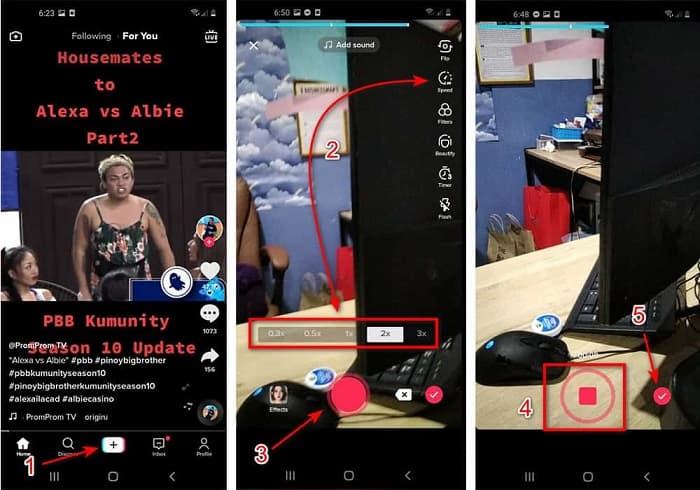
مرحله ۱. ابتدا اپلیکیشن تیکتاک را روی تلفن همراه خود دانلود کنید و بعد از اتمام دانلود آن را اجرا کنید.
مرحله ۲. روی علامت + بزنید تا فیلمبرداری را شروع کنید. سپس برای افزودن موسیقی پسزمینه روی «add sound» بزنید و در صورت تمایل فیلتر اضافه کنید. حال برای تند کردن ویدیو، روی گزینه Speed بزنید و یکی از گزینههای زیر آن را انتخاب کنید. برای شروع ضبط، دکمه گرد را فشار دهید و برای توقف دوباره روی آن بزنید.
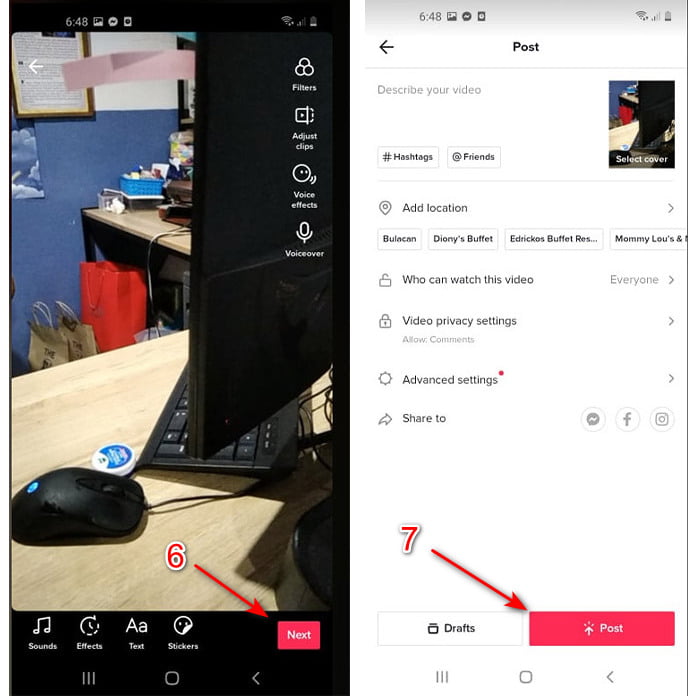
مرحله ۳. برای بررسی ویدیو، دکمه تأیید (check) را بزنید و سپس روی Next کلیک کنید. بعد روی Post بزنید تا ویدیو در تیکتاک آپلود شود.
بخش 2. نحوه افزایش سرعت هر ویدیوی TikTok در Video Converter Ultimate
برخلاف قابلیت ویرایش داخلی که تیکتاک در اختیار شما میگذارد، نرمافزار Video Converter Ultimate این امکان را میدهد که بهصورت دستی و البته سادهتر سرعت را تنظیم کنید. ضمن اینکه هنگام تند کردن، پیشنمایشی از ویدیو میبینید تا تشخیص دهید آیا سرعت انتخابی مطابق سلیقه شما هست یا نه. علاوه بر این، این نرمافزار فوقالعاده به کاربرانش اجازه میدهد تجربهای در حد ابزارهای حرفهای و پیشرفته داشته باشند، اما با مراحلی ساده و قابلفهم. بهدلیل امکانات پیشرفته این ابزار، لازم است مبلغی اندک برای آن پرداخت کنید، اما نگران نباشید، هزینه آن نه هزار دلاری است و نه حتی صد دلاری. اگر میخواهید بدانید با داشتن این ابزار چه مزایا یا قابلیتهای کلیدی بهدست میآورید، نگاهی به فهرست زیر بیندازید.
بهترین قابلیتهای کلیدی که در Video Converter Ultimate پیدا میکنید:
◆ این یک نرم افزار مستقل از پلتفرم است که به این معنی است که می توانید آن را در رایانه شخصی، مک یا لینوکس خود دانلود کنید.
◆ تمامی ویرایش های پیشرفته، مبدل، سازنده GIF و موارد دیگر در این ابزار موجود است.
◆ قابلیت استفاده از ابزار برای هر کسی، حتی برای حرفه ای یا تازه کار، بسیار مفید است.
◆ این امکان را به کاربران می دهد تا جنبه خلاقانه خود را از طریق ویژگی های ویرایش مختلف موجود در اینجا بیان کنند.
◆ اگرچه این ابزار پولی است، اما برای هر کسی که میخواهد آن را امتحان کند، ارزانتر است و بسیار مقرون به صرفه است.
حالا اگر میخواهید بدانید چگونه ویدیوهای تیکتاک را با این ویرایشگر فوقالعاده تند کنید، توضیحات و دستورالعملهای زیر را بخوانید و دنبال کنید تا با موفقیت کامل (۱۰۰٪) به نتیجه برسید.
مراحل تند کردن ویدیوهای تیکتاک با استفاده از Video Converter Ultimate:
مرحله ۱. برای استفاده از نرمافزار، ابتدا باید آن را روی رایانه ویندوز یا مک خود دانلود کنید. سپس نصبش کنید، تنظیمات ساده اولیه را انجام دهید و روی Finish کلیک کنید تا ادامه دهید.
دانلود رایگانبرای ویندوز 7 یا بالاتردانلود امن
دانلود رایگانبرای MacOS 10.7 یا بالاتردانلود امن
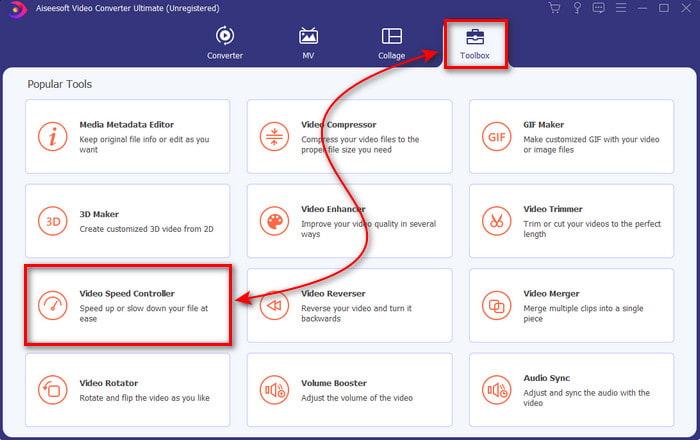
مرحله ۲. روی Toolbox کلیک کنید و از زیرگزینهها، Video Speed Controller را انتخاب کنید.
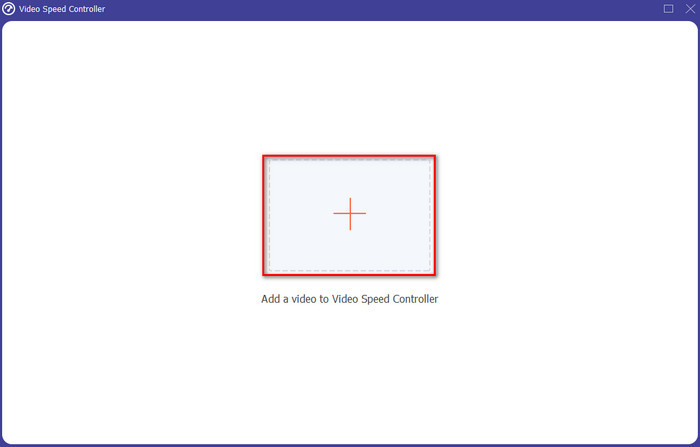
مرحله ۳. برای افزودن فایلی که میخواهید سرعتش را زیاد کنید، روی دکمه + بزنید. سپس فایل مورد نظر را از پوشهای که باز میشود انتخاب کنید و برای ادامه روی Open کلیک کنید.
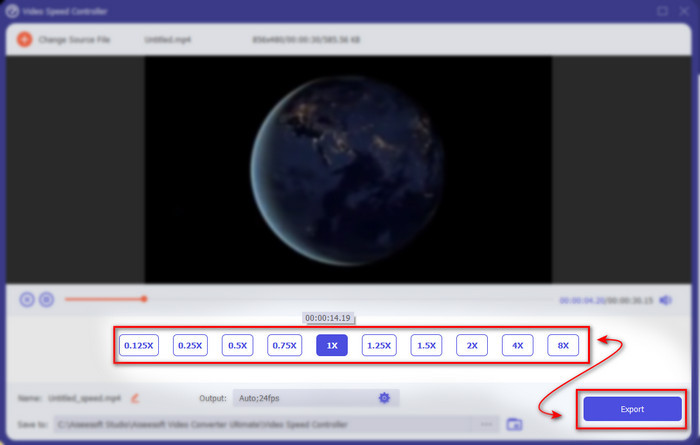
مرحله ۴. برای تنظیم سرعت ویدیو، یکی از گزینههای speed پایین صفحه را انتخاب کنید. و برای دانلود فایل روی Export کلیک کنید تا فرایند خروجی گرفتن و ذخیره شروع شود.
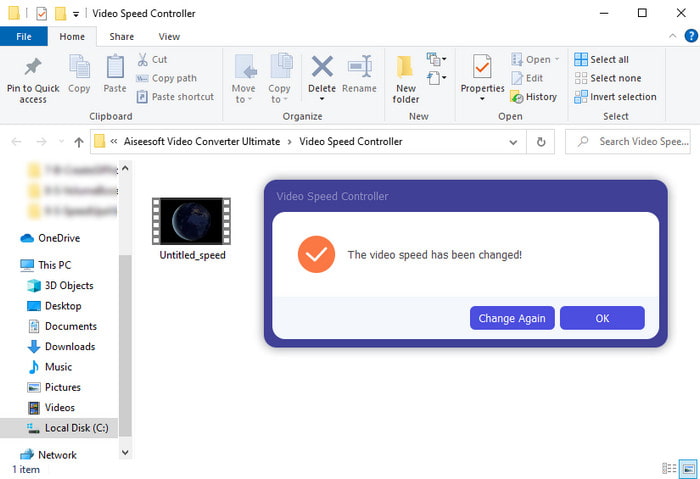
مرحله ۵. لازم نیست یک دقیقه صبر کنید، چون فایل ظرف چند ثانیه آماده خواهد شد. اگر پوشهای روی صفحهنمایش ظاهر شد، یعنی فایل با موفقیت خروجی گرفته شده است. روی فایل کلیک کنید تا ویدیوی تند شده را تماشا کنید.
مرتبط:
بخش 3. سؤالات متداول در مورد افزایش سرعت ویدیو در Tiktok
چگونه سرعت ویدیویی TikTok را که مال شما نیست افزایش دهیم؟
اگر میخواهید سرعت ویدیویی را که متعلق به شما نیست زیاد کنید، باید اول ویدیوی تیکتاک را دانلود کنید. روی دکمه + بزنید و گزینه Upload را انتخاب کنید، سپس ویدیو را از گالری برگزینید. گزینه سرعت را انتخاب کرده و برای آپلود روی Next کلیک کنید. یا اینکه از Video Converter Ultimate برای تند کردن آن استفاده کنید و مراحلی را که بالاتر گفته شد دنبال کنید.
آیا می توانم یک ویدیوی 3 دقیقه ای در Tiktok ضبط کنم؟
کاملاً بله، اگر آنها جداگانه ضبط شده باشند، می توانید، اما نمی توانید یک ویدیوی مستقیم 3 دقیقه ای ضبط کنید. زیرا مدت زمان ضبط با پشتیبانی این اپلیکیشن 15 تا 60 ثانیه کامل است. بنابراین، اگر مدت ویدیویی که می خواهید ضبط کنید بیش از یک دقیقه است، بهتر است آن را جداگانه ضبط کنید. با این حال، اگر شما یکی از کاربرانی هستید که توسط Tiktok انتخاب شده اید تا ضبط 3 دقیقه ای را امتحان کنید، خوش شانس هستید زیرا این فقط برای گروه کوچکی از افراد آزمایش شده است.
آیا می توانم MP3 را به ویدیوهای خود در Tiktok اضافه کنم؟
زمانی که TikTok برای اولین بار منتشر شد، کاربران اجازه داشتند به ویدیوی خود موسیقی اضافه کنند اما اکنون این ویژگی را حذف کرده اند. به دلیل مشکل کپی رایت که در TikTok ثبت شده است. بنابراین، برای جلوگیری از این مشکل، آن را حذف می کنند و یک موسیقی نمونه در دسترس را اضافه می کنند یا می توانید از برنامه دیگری برای انجام این کار برای شما استفاده کنید.
آیا Tiktok محدودیت سنی دارد؟
طبق شرایط و ضوابط TikTok، 13 سال به بالا باید سن کاربری باشد که از این برنامه استفاده می کند. همچنین، Tiktok هنگام ثبت نام تأیید سن ندارد، بنابراین انتظار داشته باشید که محتوای بالای 16 در فید شما ظاهر شود.
نتیجه
حالا که میدانید چگونه سرعت یک ویدیو را در تیکتاک زیاد کنید، وقت آن است که از این قابلیت لذت ببرید. علاوه بر این، راهحلی را انتخاب کنید که بیشتر با نیازهای شما سازگار است. اگر فکر میکنید امکان تند کردن داخلی خود تیکتاک برایتان کافی و مناسب است، از همان استفاده کنید. اما اگر میخواهید تجربهای بهتر با امکان پیشنمایش سرعت داشته باشید، از Video Converter Ultimate کمک بگیرید. فارغ از اینکه کدام گزینه را انتخاب میکنید، بهدلیل قابلیتها و عملکرد کلی هر دو، میتوانید انتظار خروجی بسیار خوبی را داشته باشید.
-
 7 مرحله آسان برای رفع مشکلات تاخیر صوتی OBS [حل شده]
 آیا به دلیل تأخیر صدا هنگام استفاده از OBS Studio، برای تماشای کلیپ ویدیویی خود پس از ضبط مشکل دارید؟ مقاله زیر را بخوانید تا یاد بگیرید چگونه صدای خارج از همگام سازی را به طور موثر برطرف کنید.
-
 راه های عالی ممکن | نحوه رفع تاخیر صوتی VLC [2021]
 آیا برای تماشای فیلم مورد علاقه خود در پخش کننده رسانه VLC خود به دلیل عدم قطعیت صدا مشکل دارید؟ به خواندن این مقاله ادامه دهید تا تمام راه های ممکن برای رفع تاخیر صدای VLC را بدانید.
-
 بهترین راه برای افزایش صدای MP4 به صورت آنلاین و آفلاین
 آیا برای شنیدن صداهای کلیپ خود مشکل دارید؟ مقاله زیر را بخوانید تا بدانید چگونه حجم mp4 را به روش های مختلف افزایش دهید.
