


 Video Converter Ultimate
 ضبط صفحه
 تعمیر ویدیو
تصحیح رنگ چیست و چگونه انجام می شود
آیا تا به حال از فیلمهای کسلکننده یا بیرنگی که عدالت خلاقیت شما را برآورده نمیکنند، ناراضی بودهاید؟ با نگرانی های خود خداحافظی کنید! یک تصحیح رنگ مبتنی بر هوش مصنوعی دقیقاً ایجاد شده است تا فیلم یا فیلمهای ویدیویی شما را زنده کند و اطمینان حاصل کند که هر رنگ، سایه و تن همانطور که میخواهید ظاهر میشود. این فناوری نوآورانه یک فناوری پیشرفته است که قدرت هوش مصنوعی را برای افزایش و ارائه کمال رنگ در ویدیوهای شما تجهیز می کند.
چه در حال اصلاح نواقص رنگی باشید، چه در پی ایجاد یک حالوهوای خاص یا صرفاً صیقلدادن جذابیت بصری کلی، یک اصلاح رنگ ویدیو با هوش مصنوعی روند کار را ساده میکند و نتایجی استثنایی بههمراه میآورد. بیایید با رنگهایی زنده و واقعگرایانه که مخاطب شما را مجذوب میکند و اثری ماندگار بر جا میگذارد، به محتوای ویدیوییتان جان بدهیم. آماده شوید جهان خود را با درخشندگی رنگآمیزی کنید، زیرا در این مقاله عمیقتر وارد موضوع میشویم.
قسمت 1. تصحیح رنگ در ویدیو چیست؟
درک اینکه تعریف تصحیح رنگ در ویدیو چیست بسیار ساده است. این به تقویت و اصلاح رنگ ها و رنگ های ویدیویی برای دستیابی به ظاهر دلخواه یا اطمینان از دقت و سازگاری اشاره دارد. این مانند تنظیم دقیق رنگ ها در یک عکس است اما برای تصاویر متحرک. تصور کنید عکس می گیرید، و رنگ ها کمی کسل کننده، یا بیش از حد پر جنب و جوش به نظر می رسند. این ممکن است در یک ویدیو نیز اتفاق بیفتد، اما اغلب هزاران فریم وجود دارد. تصحیح رنگ به رفع این ناهماهنگیها کمک میکند و اطمینان حاصل میکند که رنگها در طول ویدیو به خوبی مطابقت دارند. به عنوان مثال، اگر صحنه ای در یک روز ابری گرفته شود، ممکن است رنگ ها آرام و آبی به نظر برسند. تصحیح رنگ میتواند تنها را گرمتر کند تا طبیعیتر به نظر برسند یا بلوز را برای جلوههای هنری برجسته کند. همچنین میتواند کنتراست، اشباع، روشنایی و سایر جنبهها را برای ایجاد حالت یا سبک خاصی در یک ویدیو تنظیم کند.
قسمت 2. موقعیت های مختلف با تصحیح رنگ
تصحیح رنگ در شرایط مختلف در تولید ویدئو بسیار مهم است. این برای دستیابی به تأثیر بصری مورد نظر و حفظ ثبات است. در زیر برخی از موقعیتهایی که شامل تصحیح رنگ در یک ویدیو میشوند آورده شده است.
محیطهای نوری ترکیبی – اصلاح رنگ هنگام فیلمبرداری در مکانهایی با منابع نوری متفاوت، مانند نور طبیعی، مهتابی و رشتهای، بسیار مفید است. اصلاح رنگ به متعادلسازی و یکدستکردن رنگها کمک میکند تا تصویر در همه شاتها طبیعی و یکنواخت بهنظر برسد.
مشکلات تراز سفیدی (وایت بالانس) – اصلاح تراز سفیدی تضمین میکند که رنگ سفید بهطور واقعی و بدون تهمایههای ناخواسته رنگی دیده شود؛ مشکلی که اغلب بهدلیل تنظیمات نادرست دوربین یا شرایط نوری متغیر بهوجود میآید.
مشکلات نوردهی – اصلاح رنگ ویدیو میتواند با تصاویر بیشازحد نوردهیشده (بیش از حد روشن) یا کمنور (بیش از حد تیره) مقابله کند، جزئیات را آشکار کرده و تعادل مناسبی بین تونهای روشن و تیره برقرار سازد.
درجهبندی رنگ برای زیباییشناسی – اصلاح رنگ شامل درجهبندی رنگ (Color Grading) نیز میشود؛ جایی که رنگهای ویدیو برای ایجاد حالوهوای خاص یا سبک مشخصی تغییر میکنند. این کار میتواند شامل افزایش کنتراست و اشباع رنگ یا خلق ظاهری وینتیج و قدیمی برای ویدیو باشد.
بازآفرینی زمان روز – تنظیم رنگهای ویدیو برای شبیهسازی زمان مشخصی از روز مفید است؛ مانند اینکه صحنهای روز را طوری نشان دهید که گویی بارانی است، هنگام غروب گرفته شده یا با تغییر رنگها نور صبحگاهی یا عصرگاهی را القا کنید.
قسمت 3. چگونه تصحیح رنگ در ویدئو انجام دهیم؟
اصلاح رنگ در تدوین ویدیو یک فرآیند ضروری است، زیرا کیفیت بصری کلی ویدیوی شما را ارتقا میدهد. یکی از بهترین ابزارهایی که میتوانید روی آن حساب کنید Video Converter Ultimate است. این ابزار قدرتمندِ پالت اصلاح رنگ به شما اجازه میدهد بهسرعت رنگهای ویدیوهایتان را اصلاح کنید و جذابیت و کیفیت بصری آنها را افزایش دهید. با این ابزار میتوانید با گزینههای مختلف اصلاح رنگ آزمایش کنید تا به ظاهری که برای ویدیوی خود میخواهید برسید. قابلیتهای ویرایشی آن این امکان را به کاربران میدهد که ویدیوها را برش دهند، ویرایش کنند، کراپ کنند و افکتهای مختلف به آنها اضافه نمایند.
علاوه بر این، تبدیل یکپارچه بین فرمتهای ویدیویی مختلف را امکانپذیر میکند و تطبیق محتوای ویدیوی شما را برای دستگاههای مختلف آسان میکند. نکته قابل ستایش دیگر در مورد این ابزار، کاربرپسند بودن آن است. با Video Converter Ultimate می توانید به راحتی رنگ ها را تنظیم و تصحیح کنید تا ویدیوی خود را جذاب تر کنید. در اینجا یک راهنمای گام به گام برای آگاهی از نحوه استفاده از این ابزار آورده شده است:
مرحله ۱: دانلود و نصب Video Converter Ultimate
اگر هنوز این ابزار را ندارید، میتوانید Video Converter Ultimate را روی رایانه خود دانلود و نصب کنید. برای این کار، بسته به سیستمعامل رایانهتان روی یکی از دکمههای دانلود رایگان زیر کلیک کرده و دستورالعملهای نصب را دنبال کنید.
دانلود رایگانبرای ویندوز 7 یا بالاتردانلود ایمن
Free Downloadبرای macOS 10.7 یا جدیدتردانلود ایمن
گام ۲: اجرای Video Converter Ultimate
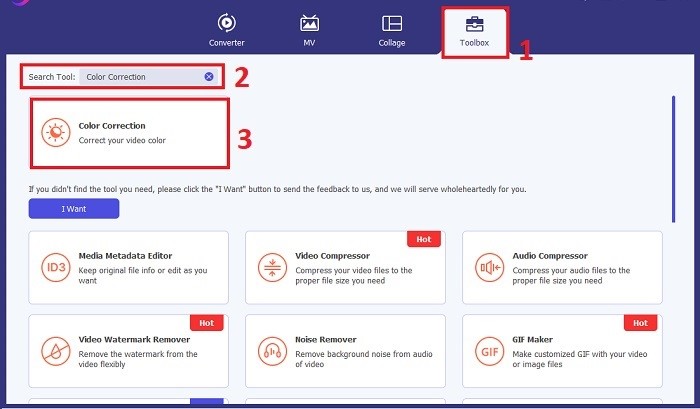
پس از نصب، برنامه اصلاح رنگ ویدیو را روی رایانه خود اجرا کنید تا به رابط اصلی آن دسترسی پیدا کنید. در منوی بالایی، به بخش Toolbox بروید. از اینجا میتوانید قابلیت Color Correction ابزار را پیدا کرده یا جستوجو کنید و روی آن کلیک کنید.
مرحله ۳: وارد کردن ویدیوی موردنظر برای اصلاح رنگ
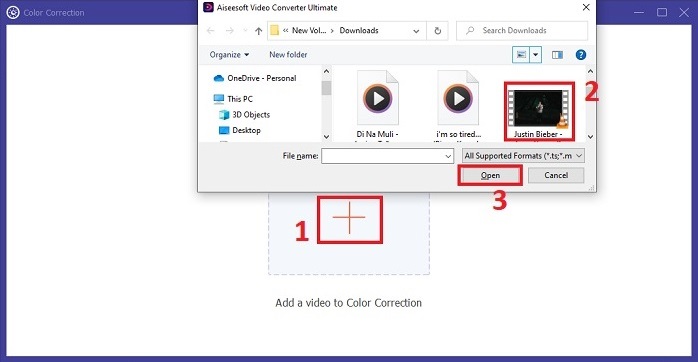
روی دکمه Plus کلیک کنید تا ویدیویی را که میخواهید اصلاح رنگ کنید، وارد نمایید. فایل ویدیو را روی رایانه خود پیدا کرده و روی Open کلیک کنید تا در نرمافزار بارگذاری شود.
مرحله ۴: تنظیم پارامترهای رنگ ویدیو
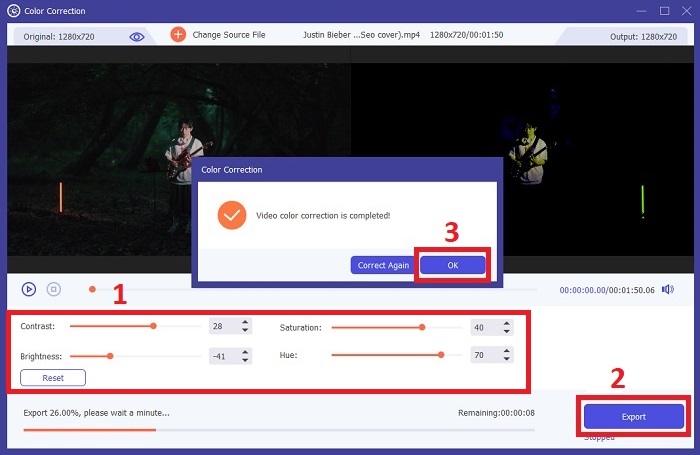
پس از وارد شدن ویدیو، پارامترهایی مانند روشنایی، کنتراست، اشباع و تهرنگ (Hue) را تنظیم کنید تا به اصلاح رنگ دلخواه برسید. هنگام ویرایش ویدیو در این ابزار، میتوانید پیشنمایش تغییرات را بهصورت آنی در پنل سمت راست ببینید. وقتی از تنظیمات رنگ راضی بودید، روی Export کلیک کنید. اجازه دهید ابزار ویدیو را پردازش کرده و نتیجه را در محل دلخواه شما ذخیره کند.
مطالعه بیشتر:
فیلتر ویدیو: ارتقای ویدیوی خود با فیلترها و افکتها در دسکتاپ
سهبعدی چیست؟ هر آنچه باید درباره 3D بدانید و روش ساخت آن
بخش 4. سوالات متداول درباره تصحیح رنگ ویدئو
چگونه بفهمم که نیاز به اصلاح رنگ دارم؟
آیا مطمئن نیستید که ویدیوی شما به اصلاح رنگ نیاز دارد؟ اگر رنگ ها ناهموار، عجیب و غریب به نظر می رسند یا با حالت یا موضوع مورد نظر فیلم ویدیویی شما مطابقت ندارند، اصلاح رنگ ضروری است.
آیا اصلاح رنگ واقعا ضروری است؟
کاملا! تصحیح رنگ ویدئو با هوش مصنوعی در تولید ویدئو ضروری است تا تضمین کند که رنگ ها دقیق و از نظر بصری جذاب هستند. این یکنواختی بصری را بهبود می بخشد و می تواند یک ویدیوی مناسب را به یک ویدیوی خارق العاده ارتقا دهد.
اصلاح کننده رنگ در فیلم چیست؟
تصحیح کننده رنگ در فیلم ابزاری سخت افزاری یا نرم افزاری است که در پس از تولید برای اصلاح و تعادل رنگ ها استفاده می شود. این به فیلمسازان در دستیابی به یک ظاهر، حال و هوا یا فضای خاص کمک می کند، و باعث می شود که بصری در داستان جذاب تر و یکپارچه تر شود.
نتیجه
در نتیجه، اصلاح رنگ ویدیو کلید داشتن یک تجربه بصری جذاب است. همهچیز به تنظیم دقیق رنگها و تونها برای رسیدن به چشمانداز خلاقانه شما برمیگردد، بهطوریکه هر فریم درخشش موردنظر را منتقل کند. استفاده از اصلاح رنگ مبتنی بر هوش مصنوعی، ویدئوهای شما را دگرگون میکند و رنگهایی زنده و واقعگرایانه به آنها میبخشد که اثری ماندگار ایجاد میکنند. از اصلاح نور ترکیبی گرفته تا خلق حالوهوای خاص، این نوآوری روایت تصویری شما را ارتقا میدهد. Video Converter Ultimate بهعنوان همپیمانی قدرتمند ظاهر میشود که فرآیند اصلاح رنگ را ساده کرده و پتانسیل هنری شما را آزاد میسازد.
-
 FPS چیست؟ هر آنچه باید در مورد آن بدانید
 FPS چیست؟ همه اطلاعات مورد نیاز خود را در مورد فریم در ثانیه (FPS) و کارهایی که در موقعیت های مختلف می تواند انجام دهد بیاموزید. برای جزئیات کامل این مقاله را بخوانید.
-
 بهترین برنامه تقویت کننده رنگ عکس در Android و iOS شما به صورت رایگان
 آیا می خواهید یک برنامه تقویت کننده رنگ عکس در گوشی خود داشته باشید؟ خوب، به نظر شما تقویتکنندههایی را انتخاب کنید که بهترین نیاز شما را برآورده میکنند.
-
 راهنمای نهایی برای تغییر رزولوشن ویدیو در چند پلتفرم موجود است
 آیا نیاز به تغییر وضوح ویدیوی ویدیو دارید؟ اگر چنین است، روشهای مختلفی را که میتوانید به راحتی برای تغییر وضوح ویدیوی ویدیویی که در حال تماشای آن هستید انجام دهید، بیاموزید.
