


 Video Converter Ultimate
 Näytön tallennin
 Videon korjaus
 Suojattu lataus
7 helppoa tapaa muuntaa HEIC nopeasti PNG:ksi sekunneissa
Haluatko tehdä HEIC-tiedostostasi laajasti yhteensopivan muiden laitteiden kanssa? Meiltä löytyy etsimäsi ratkaisu! Tässä artikkelissa näytämme parhaat tavat muuntaa HEIC-tiedosto PNG-muotoon helposti. Lähdetään siis matkaan ja tutustutaan vaivattomimpiin tapoihin muuntaa HEIC PNG:ksi.

Osa 1. Miksi muuntaa HEIC PNG-muotoon
HEIC-tiedostomuoto on Applen luoma kuvamuoto. Se on kuvamuoto, jota Applen laitteet käyttävät yleisesti. Vaikka siinä on korkealaatuinen resoluutio, se ei vie liikaa tilaa laitteeltasi. HEIC-tiedostot eivät kuitenkaan ole yhteensopivia muiden kuin Applen laitteiden kanssa. Sitä vastoin PNG, joka tarkoittaa Portable Graphics Format, on kuvatiedostomuoto, joka on luotu korvaamaan GIF-muodot.
Se on eniten käytetty kuvamuoto, joka on pakkaamaton, mikä tarkoittaa, että sillä on valtava tiedostokoko. Siitä huolimatta lähes kaikki laitteet tukevat tätä kuvatiedostomuotoa. Joten jos haluat avata HEIC-kuvasi muilla laitteilla Applen lisäksi, muunna se paremmin PNG-tiedostomuotoon.
Osa 2. 5 helppoa tapaa muuntaa HEIC-tiedosto PNG-tiedostoksi verkossa
On melko vaikeaa etsiä parhaita tapoja muuntaa HEIC PNG: ksi. Etsimme kuitenkin parhaita ja yksinkertaisimpia tapoja muuttaa HEIC PNG-tiedostomuotoon.
Käytä FVC Free HEIC to PNG Converter
Erinomainen tapa muuntaa HEIC PNG-muotoon on käyttää muunnostyökalua. Paras työkalu, jonka löysimme internetistä, on FVC Free HEIC to PNG Converter. Tämä muunnin on verkkotyökalu, joka muuntaa HEIC-tiedostosi kätevästi PNG-tiedostomuotoon. Lisäksi, jos haluat muuntaa useita HEIC-tiedostoja PNG-muotoon kerralla, tästä työkalusta löytyy myös joukkokonversion ominaisuus.
Se on myös käytettävissä lähes kaikissa yleisissä selaimissa, joten se ei ole selaimen rajoitustyökalu. Lisäksi siinä on suoraviivainen ohjelmistokäyttöliittymä, eikä siinä ole tiedostokokorajoitusta, joten voit muuntaa HEIC-tiedostoja ajattelematta tiedostokokoa. Siksi seuraa alla olevaa yksinkertaista opasta, jos olet kiinnostunut käyttämään tätä online-HEIC-PNG-muunninta.
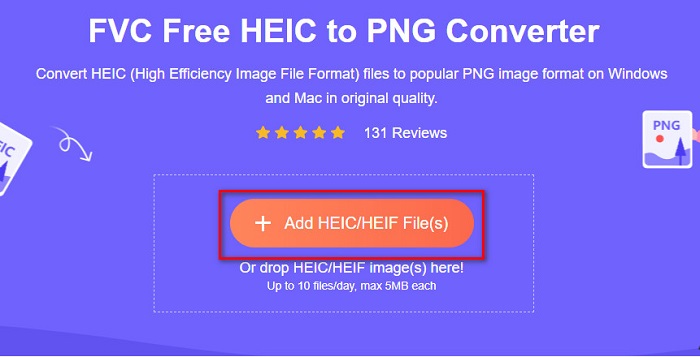
Vaihe 1. Hae selaimessasi FVC Free HEIC to PNG Converter. Voit myös klikata tätä linkkiä siirtyäksesi suoraan heidän sivustolleen. Ensimmäinen käyttöliittymä näyttää tältä:

Vaihe 2. Napsauta sitten Add HEIC/HEIF File(s) -painiketta. Tietokoneesi kansiot avautuvat, ja voit valita HEIC-tiedostosi.
Vaihe 3. Sen jälkeen tietokoneesi kansiot avautuvat, joista valitset HEIC-tiedostosi. Paina Open. Tämän jälkeen HEIC–PNG-muunnos käynnistyy.

Vaihe 4. Lopuksi ohjelmiston käyttöliittymässä klikkaa Download-painiketta ladataksesi PNG-tiedostosi.

Yksinkertaista, eikö? Voit muuntaa HEIC-tiedoston PNG-tiedostoksi noudattamalla näitä helppoja ohjeita.
Käytä Xconvert.com-sivustoa
Xconvert on ilmainen online-HEIC–PNG-muunnin, joka muuntaa HEIC-tiedostot helposti PNG-tiedostoiksi. Tällä verkkotyökalulla on helppokäyttöinen käyttöliittymä, josta on hyötyä etenkin aloittelijoille. Lisäksi voit muuttaa kuvan tarkkuutta käyttäessäsi tätä muunninta. Koska se kuitenkin on internet-yhteydestä riippuvainen työkalu, muunnos voi hidastua, jos verkkoyhteys on hidas. Sivustolla on myös mainoksia, jotka voivat häiritä.
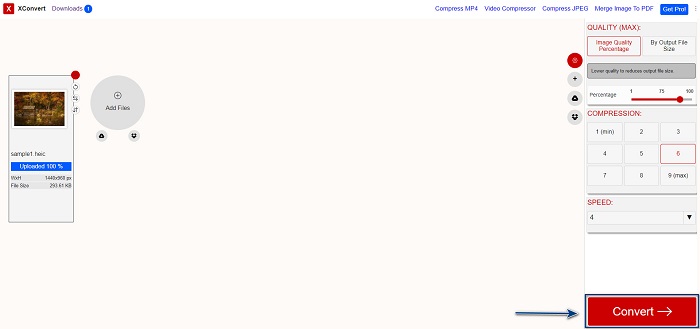
Vaihe 1. Hae selaimessasi Xconvert.com. Sivustolla klikkaa Add Files -painiketta; tietokoneesi tiedostot avautuvat ja valitse HEIC-tiedostosi.

Vaihe 2. Kuvasi ladataan ohjelmiston käyttöliittymään. Latauksen jälkeen klikkaa Convert-painiketta, joka sijaitsee käyttöliittymän oikeassa alakulmassa. Odota sitten, että tiedostosi on valmis ladattavaksi, ja siirry seuraavaan vaiheeseen.
Vaihe 3. Kun tiedostosi on valmis, klikkaa Download-painiketta ladataksesi PNG-tiedoston. Download-painikkeen yläpuolella näet myös tulostiedoston koon sekä muunnokseen kuluneen ajan.

Käytä Zamzaria
Toinen tapa muuntaa HEIC PNG-muotoon verkossa on käyttää Zamzar-verkkokonvertteria. Olet luultavasti nähnyt tämän työkalun etsiessäsi HEIC–PNG-muunninta. Tämä muunnin toimii lähes kaikilla yleisillä selaimilla. Lisäksi sillä on yksinkertainen käyttöliittymä, mikä tekee siitä helppokäyttöisen työkalun. Jos internet-yhteys kuitenkin katkeaa muunnosprosessin aikana, tiedostosi voi vioittua. Siitä huolimatta monet käyttäjät hyödyntävät tätä työkalua muuntaakseen HEIC-tiedostoja PNG-muotoon.
Vaihe 1. Hae käyttämässäsi selaimessa Zamzar. Sivustolla klikkaa Add Files -painiketta. Tietokoneesi tiedostot avautuvat, ja voit ladata HEIC-kuvasi.

Vaihe 2. Kun HEIC-tiedostosi on ladattu, klikkaa pudotusvalikko-painiketta ja valitse PNG tulostiedostomuodoksi.

Vaihe 3. Lopuksi klikkaa Convert Now -painiketta muuntaaksesi HEIC-tiedostosi PNG-muotoon. Lataa sitten PNG-tiedostosi. Odota vain muutama sekunti, ja siinä kaikki!

Käytä Conversion Tools.io:ta
Conversion Tool on online-HEIC–PNG-muunnin, jossa on yksinkertainen käyttöliittymä. Se voi muuntaa HEIC-tiedostosi PNG-muotoon suurella nopeudella. Lisäksi siinä ei ole yhtä paljon mainoksia kuin monissa muissa verkkotyökaluissa. Huonona puolena on, että voit muuntaa vain kymmenen tiedostoa päivässä, ja lisäksi on tiedostokokorajoitus. Jos kuitenkin muunnettavat tiedostot ovat pieniä, tämä työkalu voi sopia sinulle hyvin.
Vaihe 1. Hae selaimessasi Conversion Tools.io. Napsauta sitten ohjelmiston pääkäyttöliittymässä Browse-painiketta tai vedä ja pudota HEIC-tiedostosi Browse-painikkeen päälle.

Vaihe 2. Sen jälkeen klikkaa Run Conversion -painiketta aloittaaksesi HEIC–PNG-muunnoksen. Odota sitten, että kuvatiedostosi käsitellään, ja siirry seuraavaan vaiheeseen.

Vaihe 3. Lopuksi klikkaa Download-painiketta ladataksesi PNG-tiedostosi.

Käytä CDKM:ää
Viimeinen työkalu, jonka esittelemme, on CDKM. Tämän työkalun avulla voit muuntaa HEIC-tiedostot PNG-muotoon vain muutamalla klikkauksella. Tämän verkkotyökalun käyttäminen voi kuitenkin kestää muutaman sekunnin enemmän tai vähemmän internet-yhteytesi nopeudesta riippuen. Sivustolla on myös mainoksia, jotka voivat olla häiritseviä. Toisaalta sillä ei ole tiedostokokorajoitusta, joten sitä kannattaa kokeilla.
Vaihe 1. Hae selaimessasi CDKM online converter. Ohjelmiston pääkäyttöliittymässä klikkaa Choose Files-painiketta. Tietokoneesi kansiot avautuvat, ja valitse ladattava HEIC-tiedostosi.

Vaihe 2. Seuraavaksi klikkaa Start Conversion -painiketta aloittaaksesi muunnosprosessin.

Vaihe 3. Lopuksi selaa hieman alaspäin, kunnes näet Download-painikkeen. Klikkaa Download-painiketta ladataksesi PNG-tiedostosi.

Osa 3. Muunna HEIC PNG:ksi Macissa
Apple-laitteet tukevat HEIC-tiedostomuotoja, ja Macin avulla voit avata HEIC-tiedoston natiivisti. Mutta jos haluat muuntaa HEIC-tiedoston PNG-muotoon, voit muuttaa sen käyttämällä Photo App -sovellusta Macissa. Näin ollen, jos olet Mac-käyttäjä, lue tämä osa paremmin.
Vaihe 1. Vedä ja pudota ensin HEIC-tiedostosi Kuvat (Photo) -sovellukseen. Esikatsele sitten HEIC-kuvaasi ja klikkaa Tiedosto > Vie > Vie 1 kuva (File > Export > Export 1 Photo).

Vaihe 2. Valitse sitten kohdassa Photo Kind haluamasi tulostusmuoto. Valitse PNG-tiedostomuoto.

Vaihe 3. Klikkaa lopuksi Export-painiketta ja valitse tulostiedoston tallennussijainti. Näet, että HEIC-tiedostosi on muunnettu PNG-muotoon.

Osa 4. Muunna HEIC-tiedosto PNG-muotoon iPhonessa
Jos käytät iPhonea, voit avata HEIC-tiedoston laitteellasi. Mutta jos haluat muuntaa HEIC-tiedoston PNG-muotoon iPhone-laitteella, meillä on sinulle tapa. Noudattamalla näitä yksinkertaisia ja helppoja ohjeita alla voit muuntaa HEIC:n PNG-muotoon vaivattomasti.
Vaihe 1. Avaa iPhonen Kuvat (Photo) -sovellus ja napauta näytön yläreunassa olevaa Valitse (Select) -painiketta. Valitse sitten HEIC-tiedostosi ja napauta Jaa-kuvaketta.
Vaihe 2. Pyyhkäise näyttöä ylöspäin; näet Copy Photo -vaihtoehdon, napauta sitä.
Vaihe 3. Siirry lopuksi Tiedostot (Files) -sovellukseen, napauta browse-painiketta ja valitse haluamasi tallennussijainti (napauta iCloud Drive tai On my iPhone). Liitä sen jälkeen HEIC-tiedostosi sinne.

Kun liität tiedoston, näet, että tiedostosi muunnetaan automaattisesti PNG-tiedostoksi.
Osa 5. Laajemmat tiedot HEIC-tiedostoista ja PNG-tiedostoista
Jos olet edelleen epävarma, haluatko muuntaa HEIC-tiedostosi PNG-muotoon, tarjoamme sinulle vertailukaavion, jonka avulla voit erottaa näiden kahden tiedoston väliset erot. Lisäksi se antaa sinulle selkeän yleiskuvan HEIC- ja PNG-ominaisuuksista. Lue huolellisesti tietääksesi eron HEIC-tiedostojen ja PNG-tiedostojen välillä.
| HEIC | PNG | |
| Yhteensopivuus | Vain Apple-laite tukee tätä tiedostomuotoa. | Melkein kaikki laitteet tukevat tätä tiedostoa, mukaan lukien Apple-laitteet. |
| Tiedoston koko | Pieni tiedostokoko. | Voi saavuttaa valtavan tiedostokoon. |
| Kuvanlaatu | Korkea kuvanlaatu. | Siinä on hyvä laatu, mutta ei parempi kuin HEIC-tiedosto. |
| Pakattu/pakkaamaton | Pakattu | Pakkaamaton |
| Muokkaaminen | Säilyttää kuvanlaadun editoitaessa. | Laatu saattaa heikentyä editoitaessa. |
Osa 6. Usein kysyttyä HEIC:n muuntamisesta PNG-muotoon
Vaikuttaako HEIC:n muuntaminen PNG-muotoon tiedoston kokoon?
Joo. Kun muunnat HEIC:n PNG:ksi, tiedostokoko kasvaa, vaikka se ei ole suuri.
Voitko avata PNG-tiedostoja Adobe Photoshopissa?
Varmasti. Voit avata PNG-tiedostoja Adobe Photoshopissa, koska Adobe Photoshop tukee PNG-tiedostomuotoa.
Voitko avata PNG-tiedostomuodon Apple-laitteissa natiivisti?
Joo. Kun otat kuvakaappauksia iPhonesta, ne tallennetaan automaattisesti kameran rullaan PNG-tiedostona.
Johtopäätös
Viimein! Olemme seikkailumme lopussa. Tämä artikkeli tarjoaa parhaat ratkaisut HEIC-tiedostojen muuntamiseen PNG-muotoon. Kaikki yllä esitellyt online-HEIC–PNG-muuntimet voivat muuntaa tiedostosi tehokkaasti ja vaivattomasti. Lisäksi tarjolla on muitakin vaihtoehtoja, jos käytät Macia tai iPhonea. Jos kuitenkin etsit parasta HEIC–PNG-muunninta, jossa on erinomaiset ominaisuudet, FVC Free HEIC to PNG -muunnin on paras valinta sinulle.
-
 Kuinka avata HEIC-tiedosto Windowsissa, Macissa ja verkossa
 Etsitkö tapaa avata HEIC -tiedostoja? Tämä artikkeli tarjoaa sinulle parhaat ratkaisut HEIC-tiedostojen avaamiseen Windowsissa, Macissa ja verkossa.
-
 JPG VS GIF: 3 vaivatonta tapaa muuntaa JPG GIF-muotoon
 Haluatko tietää eron JPG:n ja GIF:n välillä? Vai haluatko vaihtaa JPG:n GIF-animaatiomuotoon? Lue sitten tämä artikkeli saadaksesi idean.
-
 5 parasta tapaa vaihtaa kuva animoituun GIF-muotoon [Päivitetty 2022]
 Tarvitsetko muunnoksen GIF-kuvaksi? Tämä artikkeli tarjoaa viisi parasta muuntajaa, jotka voimme löytää markkinoilta. Tutustutaanpa näihin työkaluihin lukemalla tämä artikkeli.
