


 Video Converter Ultimate
 Enregistreur d'écran
 Réparation vidéo
Convertisseur XviD facile d'accès : Comment convertir des fichiers XviD au format MOV
Le fichier XviD est le codec le plus connu utilisé pour rivaliser avec DivX. Ce codec repose également sur le MPEG‑4 ASP, qui contient des fonctions telles que les images B, le masquage de luminance, la compensation de mouvement globale et au quart de pixel, la quantification par treillis, les matrices de quantification personnalisées et le H.263. Rien qu’avec cela, XviD est devenu un encodeur plus populaire que DivX. Supposons que vous transfériez sur votre iOS un fichier qui utilise le codec XviD. Si le fichier ne se lit pas, ne soyez pas surpris, car ce codec ne prend pas en charge les appareils mobiles comme iOS et d’autres dispositifs. Même si cela semble insoluble, il existe toujours une solution à chaque problème : nous en proposons une en convertissant le fichier XviD en format AVI. Si vous voulez savoir comment convertir des fichiers XviD en MOV, alors suivez cet article.

Partie 1. Introduction de XviD et MOV
Comme nous l’avons déjà dit, votre fichier peut devenir plus léger si vous utilisez XviD pour le compresser sans nuire à sa qualité, tout en permettant une décompression rapide. Bien que XviD soit un compresseur non propriétaire, la compatibilité de ce codec est limitée sur les appareils portables et surtout pour le montage. Donc, si vous voulez regarder ou monter une vidéo encodée avec le codec XviD, il est indispensable de convertir le fichier en MOV. Pourquoi le MOV ? Parce que ce format peut contenir des métadonnées, des fichiers multimédias comme l’audio, la vidéo, ainsi que du texte ou des sous‑titres. De plus, ce format peut lire des vidéos sur les appareils iOS et sur d’autres appareils également. Donc maintenant, pour résoudre votre problème avec votre fichier XviD, découvrons comment convertir XviD en MOV à l’aide de l’outil présenté ci‑dessous.
Partie 2. Meilleur convertisseur pour convertir XviD en MOV sur Windows et Mac
Convertisseur vidéo FVC Ultimate
Vous cherchez le meilleur convertisseur XviD vers MOV capable de convertir le fichier en un clin d’œil ? Alors FVC Video Converter Ultimate est l’unique outil dont vous avez besoin. En plus de sa conversion 30 fois plus rapide offerte aux utilisateurs, vous pouvez monter, fusionner, couper et faire bien plus encore pour rendre votre vidéo plus spectaculaire que les autres. Bien que l’outil propose des fonctions avancées, vous n’avez pas besoin de disposer d’un super‑ordinateur pour le télécharger et l’utiliser.
En plus de cela, ce logiciel inclut également une accélération matérielle et une conversion rapide pour rendre votre expérience de conversion plus rapide et meilleure. Et maintenant, si vous voulez apprendre à convertir des fichiers Xvid en MOV à l'aide de cet outil, passons au didacticiel ci-dessous.
Étapes pour convertir XviD en MOV avec FVC Video Converter Ultimate :
Étape 1. Ce logiciel est téléchargeable sur n’importe quel PC ou Mac OS, vous devrez donc appuyer sur le bouton de téléchargement ci‑dessous. Après l’avoir téléchargé, cliquez sur le fichier pour l’installer, effectuez rapidement la configuration, puis cliquez sur Start Now pour ouvrir immédiatement l’outil.
Téléchargement gratuit pour Windows 7 ou version ultérieure Téléchargement sécurisé
Téléchargement gratuit pour macOS 10.7 ou version ultérieure - Téléchargement sécurisé
Étape 2. Pour importer le fichier .xvid, vous devez cliquer sur le bouton +, le localiser dans le dossier, puis cliquer sur Open. Toutefois, si le fichier .xvid est plus nombreux (plus de deux), nous vous suggérons de faire glisser et déposer les fichiers dans l’interface.
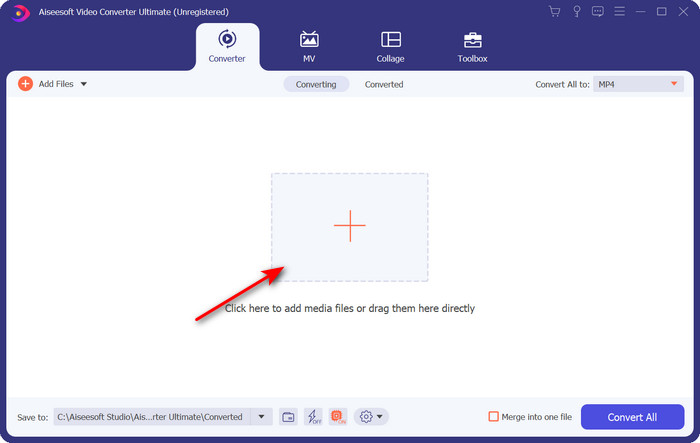
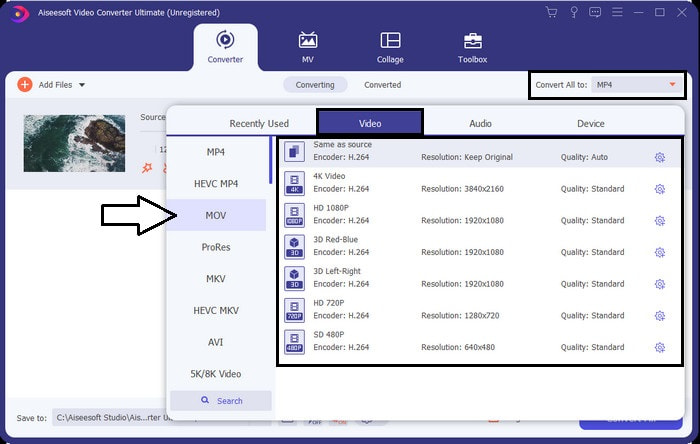
Étape 3. Cliquez sur le bouton drop‑down en haut à droite de l’interface et recherchez le format MOV dans la liste.
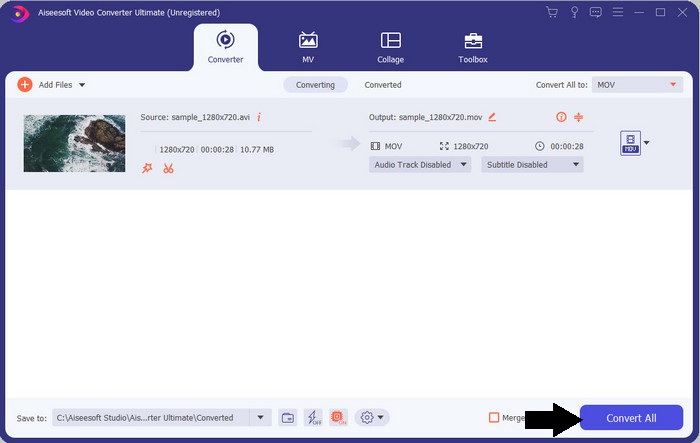
Étape 4. Commençons à transformer vos fichiers XviD en MOV en cliquant sur Convert All.
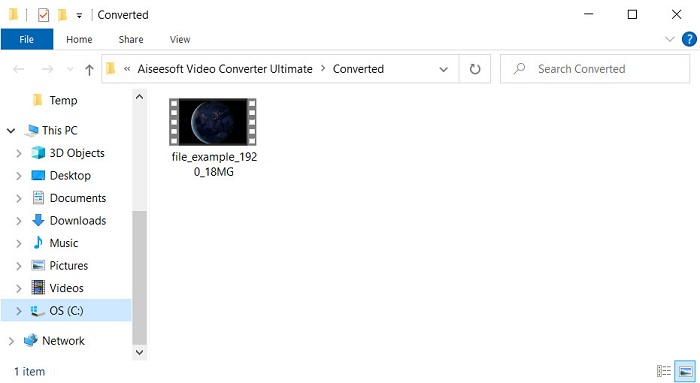
Étape 5. Patientez quelques secondes le temps que le processus se termine. Un dossier s’ouvrira à l’écran avec le fichier .mov ; cliquez sur le fichier pour le lire sur votre lecteur multimédia local et profitez‑en.
Partie 3. Meilleur convertisseur en ligne pour convertir Xvid en MOV
FVC Convertisseur Vidéo Gratuit en Ligne
Vous ne voulez pas vous compliquer la vie à télécharger un logiciel sur votre disque parce que votre stockage est plein et que vous souhaitez simplement convertir un fichier en ligne ? FVC Free Video Converter Online est disponible sur tous les navigateurs web. La conversion du fichier XviD à l’aide de cet outil sera effectuée en moins d’une minute. De plus, cet outil ne vous demande pas de créer un compte pour y accéder et n’affiche aucune publicité dans l’interface. C’est l’un des convertisseurs en ligne les plus épurés que vous puissiez trouver sur le web. Cependant, vous ne pouvez pas y accéder sans connexion Internet, car cet outil dépend du réseau. En outre, cet outil prend en charge une gamme moyenne de formats que vous pouvez choisir et utiliser. Par ailleurs, si vous ne voulez pas télécharger de convertisseur, vous devez utiliser ce convertisseur XviD vers MOV en ligne.
Étapes pour convertir des fichiers XviD en format MOV en ligne avec l’aide de FVC Free Video Converter Online :
Étape 1. Pour accéder à la page principale du convertisseur en ligne, vous devez cliquer sur ce lien.
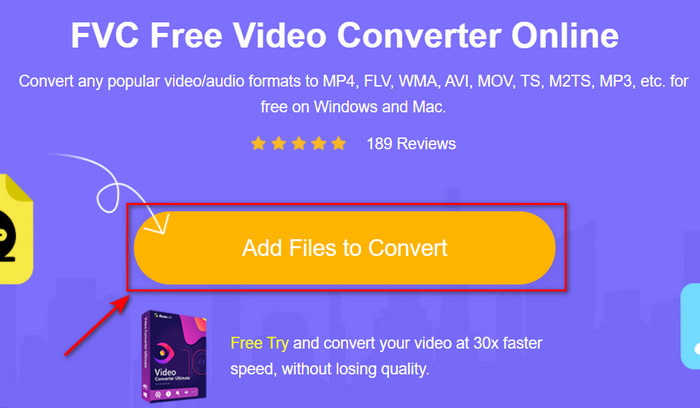
Étape 2. Appuyez sur Add Files to Convert pour lancer l’outil, puis un dossier apparaîtra, dans lequel vous pourrez trouver le fichier XviD que vous souhaitez convertir, et cliquez sur Open pour continuer.
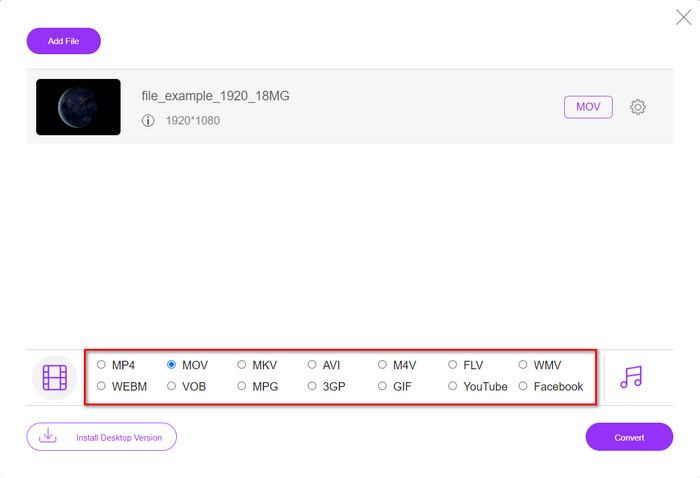
Étape 3. Une nouvelle interface apparaîtra après l’insertion du fichier XviD ; choisissez le format MOV ou un autre format souhaité ci‑dessous.
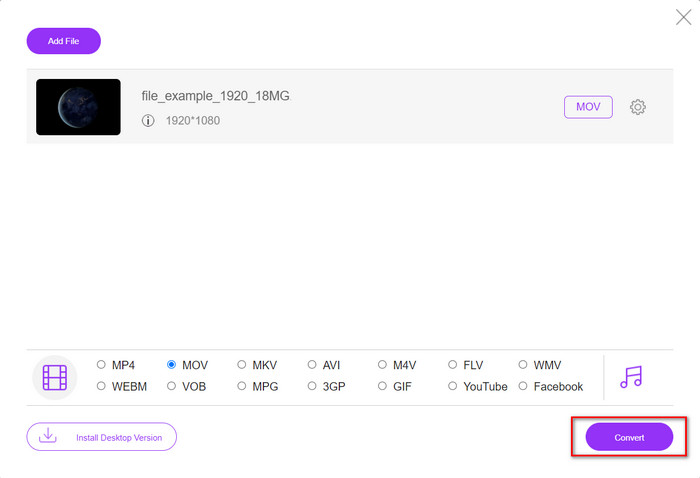
Étape 4. Pour commencer le changement de format, cliquez sur Convert.
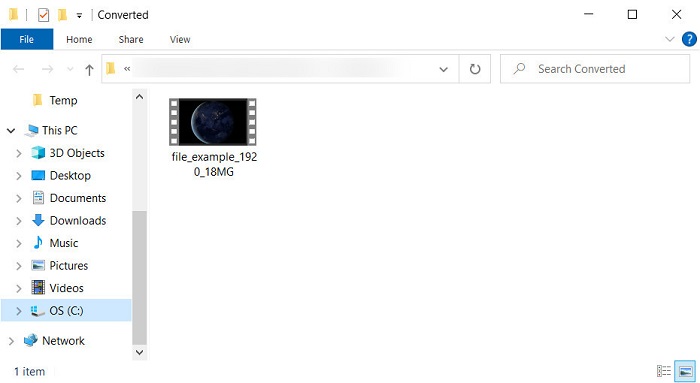
Étape 5. La conversion du fichier prendra moins de temps qu’avec les autres convertisseurs en ligne ; ensuite, un dossier s’ouvrira avec le fichier converti que vous avez créé.
Partie 4. FAQ sur la conversion XviD en MOV
Où puis-je regarder des vidéos XviD ?
Vous pouvez utiliser le lecteur multimédia VLC pour lire les fichiers XviD. Si vous ne voulez pas le télécharger, utilisez Windows Media Player, disponible sur tous les systèmes Windows. Pour les utilisateurs Mac, utilisez QuickTime. Mais si vous voulez regarder une vidéo XviD en haute définition, lisez cet article dans lequel nous avons rassemblé tous les lecteurs XviD possibles que vous pouvez utiliser pour regarder des fichiers XviD.
XviD est-il gratuit ou non ?
XviD est gratuit et disponible pour tous ceux qui souhaitent utiliser et compresser leur fichier pour un transfert rapide via le Web ou économiser de l'espace. Tout cela grâce à la licence de logiciel libre GPL, il a donc été conçu pour être gratuit.
Pourquoi ne puis-je pas éditer des vidéos XviD ?
L'une des principales raisons pour lesquelles vous ne pouvez pas éditer de vidéos sous ce type de codec est qu'il n'est pas pris en charge. Dans ce cas, les éditeurs vidéo minimaux ne prennent en charge que ce type de codec en raison de sa complexité. Donc, supposons que vous souhaitiez éditer une vidéo sous ce format, vous devez d'abord envisager de la convertir. Dans ce cas, il est indispensable d'avoir un convertisseur polyvalent capable de convertir les fichiers XviD en MP4, AVI, MOV ou similaire. Ensuite, après avoir converti le fichier, téléchargez-le ensuite sur l'éditeur pour effectuer l'édition que vous aimez.
Conclusion
Après avoir lu cet article, vos connaissances sur XviD se sont élargies et vous pouvez désormais voir XviD sous différents angles. Donc maintenant, si vous voulez enregistrer ou lire une vidéo sur votre appareil iOS, vous devez d’abord convertir le fichier en MOV. Comme nous l’avons vu précédemment, ces deux convertisseurs mentionnés offrent d’excellentes performances pour convertir le fichier au format MOV. Même si les deux outils paraissent parfaitement convaincants, la vitesse et les performances de FVC Video Converter Ultimate sont inégalées et supérieures à celles de tout autre outil de bureau ou en ligne disponible. Mais si vous souhaitez une conversion en ligne gratuite et sûre, optez pour FVC Free Video Converter Online.
-
 Comment convertir AVI en MOV avec des étapes et des outils faciles
 Voulez-vous savoir comment convertir un AVI en un MOV jouable ? Vous devez suivre cet article pour savoir comment le faire et des conseils pour avoir une conversion réussie.
-
 Importer et convertir AVI au format pris en charge par iMovie [2021]
 Vous rencontrez un problème car vous ne pouvez pas importer votre fichier AVI sur iMovie ? Si vous lisez cet article, vous avez déjà choisi le bon remède à ce problème.
-
 Comment convertir TS en AVI / MKV / MOV / WMV en ligne et gratuitement sur Win / Mac
 Vous voulez convertir rapidement des fichiers TS en AVI / MKV / MOV / WMV? Cet article présente les convertisseurs vidéo en ligne et hors ligne avec un guide complet. Peut-être que vous pouvez obtenir le meilleur convertisseur TS gratuit ici.
