


 Video Converter Ultimate
 Enregistreur d'écran
 Réparation vidéo
Étapes simples à suivre pour convertir 3GP en MOV
The users can store video, audio, effects, or text in the MOV file, a multimedia container file (e.g., subtitles). However, created by the Third Generation Partnership Project (3GPP), it is intended to transmit audio and video data between 3G cell phones and over the Internet. These two video formats have their differences, but to know more about the comparison between them and the converters that can convert 3GP to MOV, read this article thoroughly. Fasten your thoughts, and let's dig in!

Partie 1. Introduction sur 3GP et MOV
Projet de partenariat de troisième génération (3GPP) 3GP est un format de fichier vidéo que les utilisateurs peuvent lire sur des appareils prenant en charge la 3G. Les codecs H.263 ou H.264 et les flux audio basés sur AMR ou AAC, qui sont idéaux pour la compression avec perte de données vidéo, sont inclus dans ce package. Pour les réseaux 3G et les appareils multimédias, ce format vidéo standard ISO a une taille de fichier plus petite qui le rend idéal pour le partage de vidéos. Même s'il a été initialement conçu et destiné aux appareils 3G, il fonctionne toujours sans problème sur les appareils et les systèmes d'exploitation 4G modernes.
Cependant, MOV est un format vidéo créé par Apple. Les utilisateurs peuvent stocker des fichiers vidéo et multimédia dans ce type de conteneur de fichiers. Parce qu'Apple l'a développé, il n'est compatible qu'avec les produits Apple ou les lecteurs vidéo Quicktime. Données vidéo stockées dans des fichiers MOV à des débits binaires élevés avec une compression minimale ou nulle. En raison de la grande taille des fichiers, ils sont néanmoins d'excellente qualité.
Ce ne sont là qu'une brève description de ces deux formats vidéo. Vous rencontrerez tous les convertisseurs, logiciels ou outils en ligne, qui peuvent vous aider à convertir votre format vidéo 3GP en MOV pour une lecture plus approfondie.
Partie 2. Meilleur convertisseur qui aide à convertir 3GP en MOV sur Mac
Let this article introduce you to the best software to consider converting 3GP video files to MOV. Video Converter Ultimate is a free-to-download tool available for Windows and Mac that can convert 3GP to MOV in just a minute. Aside from the great features it holds, this software also supports a massive amount of video formats that other software or online converters don't support.
Vous avez de la chance car en plus de ces fonctionnalités, il dispose également d'outils d'amélioration vidéo qui peuvent améliorer la qualité de votre vidéo de la manière la plus accessible possible. Maintenant que vous avez appris une brève description de ce logiciel, vous pouvez maintenant apprendre toutes les procédures à suivre pour exécuter correctement le processus de conversion.
Step 1. First, you have to click the Free Download button below this step to download the software. This software is available on both Windows and Mac so you don't have to worry about using it on both operating systems. After you download the software, you can now install the software and click Start Now to run it on your computer.
Téléchargement gratuit pour Windows 7 ou version ultérieure Téléchargement sécurisé
Téléchargement gratuit pour macOS 10.7 ou version ultérieure - Téléchargement sécurisé
Step 2. After you run the software, the interface of this software will pop up on your screen displaying the converter feature alongside the other features available in this software.
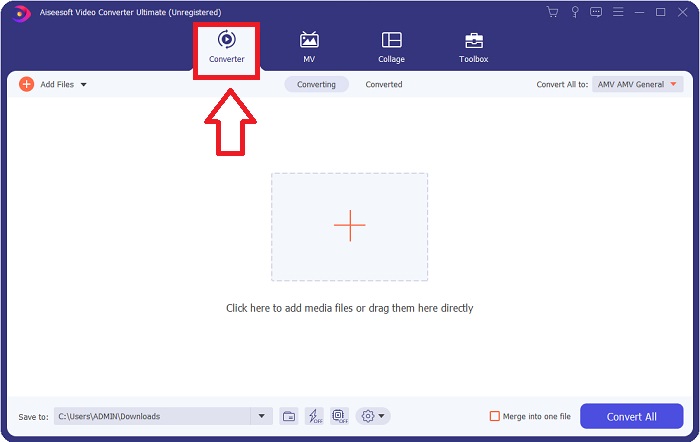
Step 3. You can now start uploading a video file you want to convert in this software by clicking the + icon or you can also drag your files from your desktop.

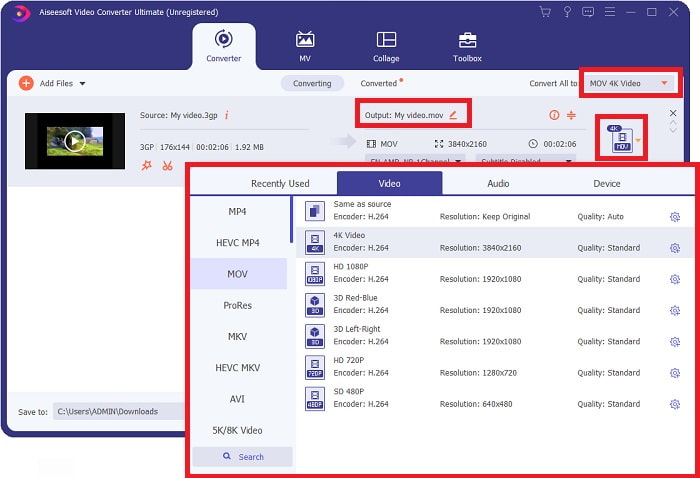
Step 4: Click the selection of format icon on the right corner of the interface. After that, you navigate and click the MOV format, proceed with choosing the preferred resolution you want to apply on your converted video file. In addition, you can also customize the quality or the output of the video by clicking the gear icon.
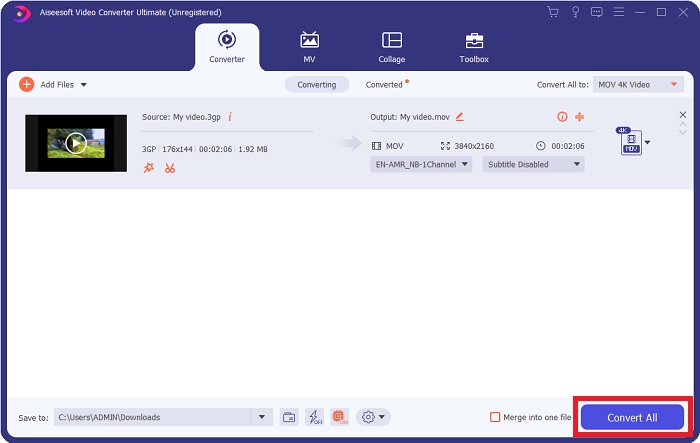
Step 5. After you finished customizing all the details that affect the video quality of the file you want to convert. You can now convert the file by clicking the Convert All button.
Partie 3. Autres conseils ! Comment convertir 3GP en MOV en ligne
Here's another choice you also need to consider using whenever you're in a rush of converting a video and you don't have time to download a software just to convert a file. Introducing Free Video Converter Online, the best online converter available on the internet that has the same feature as Video Converter Ultimate. For instance, it is able to convert a file faster than any other online tool and it also supports numerous video formats. Since this tool is easy to use it doesn't need any tutorial in order for you to use, but for some beginner users here are guidelines of procedure you need to follow:
Step 1: Click this link to proceed to the main webpage of Free Video Converter Online.
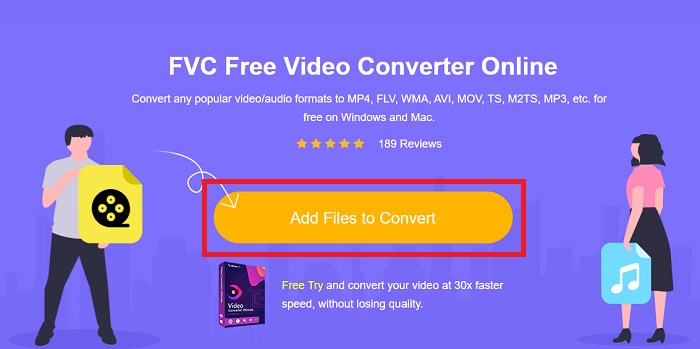
Step 2: When you're on the main webpage of Free Video Converter Online, you can now upload files from your computer by clicking Add Files to Convert.
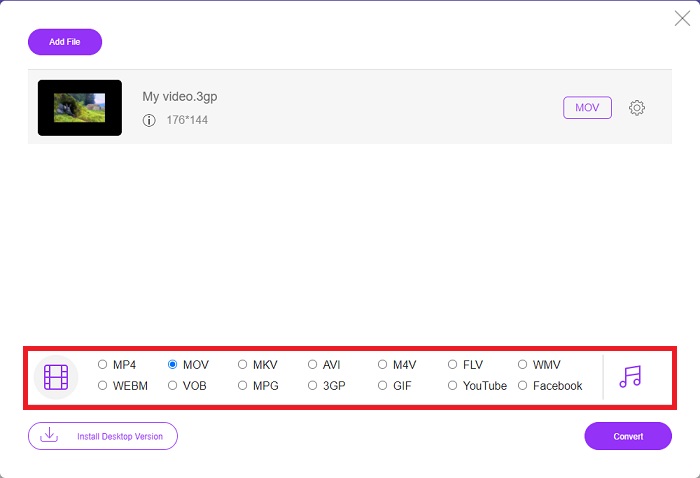
Step 3: After choosing a file you wish to convert, another window will pop up to your screen that displays your file and all the formats available below. Choose MOV at the video format selection.
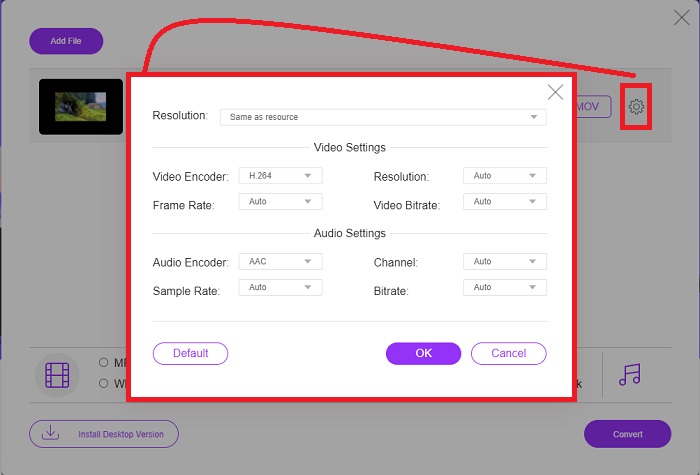
Step 4: You can also customize your video by clicking the gear icon and adjusting the resolution, video encoder, and frame rate of your video output.
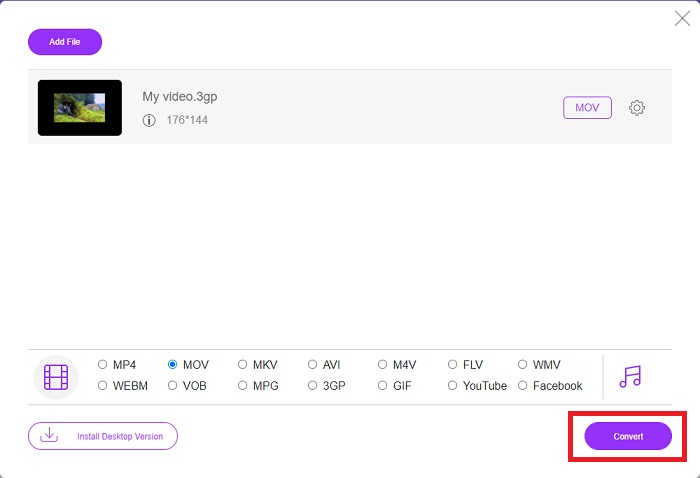
Step 5: After you adjust and customize all the details of the video output, you can now convert the file by clicking Convert.
Partie 4. FAQ sur la conversion de 3GP en MOV
Quels sont les avantages et les inconvénients de MOV ?
Format de fichier vidéo développé par Apple, MOV est largement utilisé. Les fichiers MOV contiennent une variété de types de médias, y compris des vidéos, de l'audio, des sous-titres, des codes temporels, etc. Les versions Mac et Windows de QuickTimePlayer sont prises en charge. Les fichiers MOV occupent beaucoup d'espace sur un ordinateur car ce sont des vidéos de haute qualité.
Le 3GP est-il un format vidéo approprié ?
Le format MP4 est préféré pour diffuser des vidéos sur votre ordinateur de bureau ou sur un lecteur multimédia portable, car il peut prendre en charge des vidéos à plus haute résolution. Le 3GP, en revanche, ne doit être utilisé que sur les téléphones réseau conçus pour la 3G pour cet appareil.
Le 3GP est-il avec ou sans perte ?
3GP, which stands for Third Generation Partnership Project (3GPP), is a video file format supported by 3G-enabled devices and named after its creator. It contains video streams encoded with the H. 263 or H. 264 codecs and audio streams encoded with the AMR or AAC codecs, making it ideal for lossy video compression. If your 3GP files are two large, you can continue reading and learn how to compress 3GP files effortlessly.
Conclusion
À la fin de la discussion, il existe différentes options indiquées ci-dessus pour convertir 3GP en MOV hors ligne ou en ligne. Ces deux options sont la meilleure option que vous puissiez envisager pour convertir un fichier, elles ne diffèrent que par la plate-forme à utiliser, mais elles vous donnent presque une sensation de facilité lors de la restauration d'un fichier.
-
 Les 4 méthodes les plus efficaces pour convertir un fichier 3GP au format AVI [2025]
 Puis-je convertir mes fichiers 3GP en AVI ? Eh bien, vous pouvez le convertir facilement si vous essayez ces outils disponibles car nous avons rassemblé toutes les solutions possibles à votre problème de conversion 3GP en AVI.
-
 Meilleur convertisseur GIF pour convertir des GIF animés au format MOV [2025]
 Convertissez votre GIF au format MOV sans effort sans affecter la qualité du fichier vidéo. Avec des étapes et différents outils également.
-
 Comment convertir AVI en MOV avec des étapes et des outils faciles
 Voulez-vous savoir comment convertir un AVI en un MOV jouable ? Vous devez suivre cet article pour savoir comment le faire et des conseils pour avoir une conversion réussie.
