


 Video Converter Ultimate
 Enregistreur d'écran
 Réparation vidéo
 Téléchargement sécurisé
Supprimer le filigrane Dreamstime avec les 4 façons que vous devez savoir
Si vous avez besoin d'images prêtes à l'emploi pour votre présentation ou votre projet, vous ne pouvez jamais vous tromper en choisissant Dreamstime. Cette application peut vous fournir des photos libres de droits prêtes à être utilisées à tout moment. Il aide déjà les utilisateurs à la recherche d'une image spécifique avec une sortie de haute qualité à bas prix. Bien que vous puissiez télécharger 15 images gratuitement ici, ce produit laisse un filigrane pour promouvoir l'application lorsque vous utilisez l'image que vous téléchargez ici.
On ne peut pas nier que son ergonomie est excellente et que le prix des images est bas, mais nous ne pouvons pas tous nous permettre d’acheter des crédits dessus. Ne vous inquiétez plus ! Car nous avons ce qu’il vous faut : les informations ci‑dessous présentent différentes méthodes que vous pouvez suivre pour retirer le filigrane Dreamstime appliqué sur le résultat final.

Partie 1. Comment supprimer le filigrane Dreamstime en achetant les crédits
Nous ne pouvons pas laisser l'option d'achat derrière nous car c'est l'option de suppression de filigrane Dreamstime la plus efficace que vous puissiez utiliser. Avant de continuer, vous devez savoir que Dreamstime a besoin de vous pour pouvoir acheter une image sans filigrane. Le crédit de nom est une devise Dreamstime ; il utilise de l'argent réel et le convertit en argent numérique accepté par Dreamstime. Supposons que vous n'ayez pas de crédit sur Dreamstime. Dans ce cas, vous pouvez suivre les étapes ci-dessous pour acheter un crédit à télécharger et avoir l'image sans aucun logo des produits restants.
Étape 1. Ouvrez le site officiel de Dreamstime, puis créez un compte avant d’acheter des crédits sur Dreamstime. Si vous avez déjà un compte, connectez‑vous d’abord pour pouvoir l’utiliser correctement.
Étape 2. Une fois connecté à votre compte Dreamstime, cliquez sur Prix et formules de téléchargement, puis allez dans la section Forfait de crédits pour voir les tarifs disponibles qui y sont proposés.
Étape 3. Renseignez entièrement les informations demandées, puis cliquez sur « Complete Checkout » pour traiter le paiement indiqué dans l’outil. Aussi simple que cela : vous disposez maintenant de crédits servant de monnaie pour acheter des images sur Dreamstime.
Partie 2. Comment supprimer gratuitement le filigrane Dreamstime sur le Web
Suppresseur de filigrane gratuit FVC en ligne
L'un des meilleurs dissolvants de filigrane Dreamstime en ligne que vous pouvez utiliser n'est autre que FVC Free Watermark Remover Online. Vous pouvez profiter de cet outil pour supprimer le filigrane qui se trouve dans l'image que vous avez. En termes de performances, cet outil en ligne est plus capable de ce que vous pensez, notamment en supprimant le logo, le filigrane, les tampons, les dates, l'objet, etc., sur l'image. Vous ne doutez pas encore de cet outil ? Dans ce cas, lisez les étapes que nous avons ajoutées ci-dessous, et vous pouvez également les suivre pour supprimer le filigrane ajouté par Dreamstime.
Étape 1. En cliquant sur ce lien, un nouvel onglet s’ouvrira dans votre navigateur.
Étape 2. Cliquez sur Upload Image pour importer les photos que vous avez exportées depuis Dreamstime avec un filigrane.
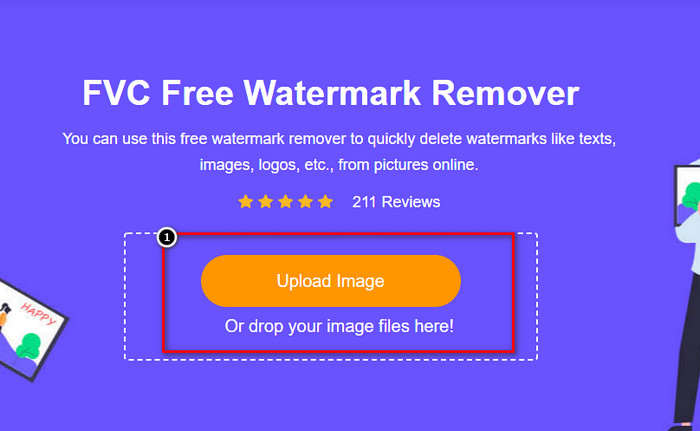
Étape 3. Vous pouvez utiliser les outils pour tracer le filigrane, choisissez‑en un, puis suivez le contour du filigrane avec celui‑ci.
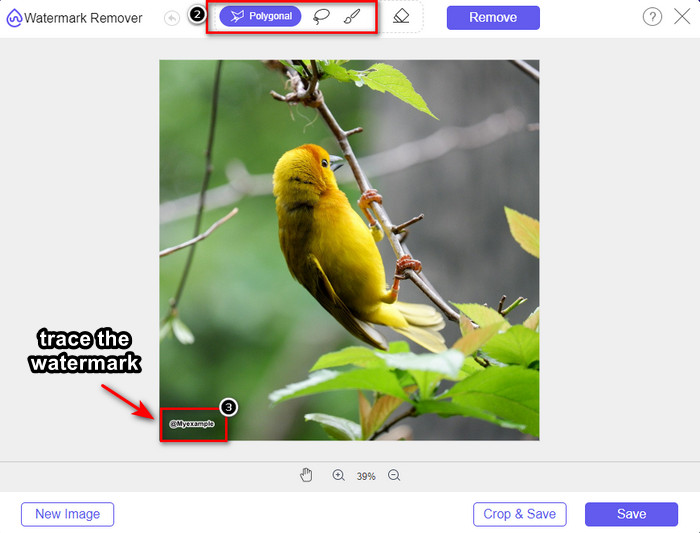
Étape 4. Cliquez d’abord sur l’icône Remove avant de passer à l’exportation de l’image.

Étape 5. Enfin, cliquez sur Download pour enregistrer l’image sans le filigrane intégré que vous avez mis en évidence ici.

WatermarkRemover.IO
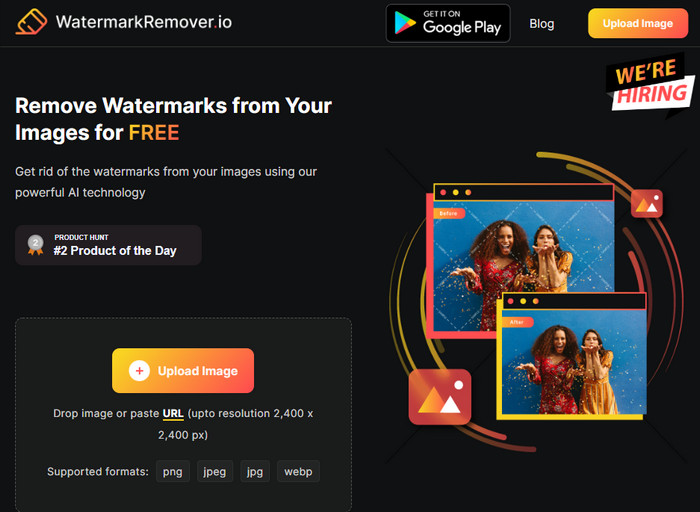
WatermarkRemover.io est un outil en ligne permettant de retirer le filigrane des photos Dreamstime que vous pouvez utiliser sur Internet et qui peut vous accompagner dans cette démarche. Cet outil est gratuit, tout comme le premier outil de suppression de filigrane mentionné en ligne. Vous n’avez pas à vous soucier de vous y inscrire, car il est utilisable sur n’importe quel navigateur. Il utilise également une technologie d’IA pour supprimer le filigrane de vos images lorsque vous l’utilisez. Pour vous aider à le faire, poursuivez votre lecture des informations ci‑dessous.
Étape 1. Ouvrez le site officiel de ce logiciel de suppression de filigrane en le recherchant dans votre navigateur.
Étape 2. Cliquez sur l’icône Upload Image pour téléverser la photo comportant un filigrane que vous souhaitez supprimer.
Étape 3. Une fois le téléversement de l’image avec filigrane terminé, cliquez sur Download Image, car le filigrane sera automatiquement supprimé de votre image.
Partie 3. Comment supprimer le filigrane Dreamstime sur les vidéos à l'aide de la solution ultime
Vous pouvez télécharger un logiciel de suppression de filigrane Dreamstime pour les vidéos, comme l’outil complet FVC Video Converter Ultimate. C’est l’outil le plus flexible, prêt à l’emploi et capable de terminer la tâche à tout moment. Il prend en charge les problèmes que vous pouvez rencontrer avec vos vidéos, tels que la mauvaise qualité audio, la faible résolution, les formats non pris en charge ou les filigranes gênants. Comparé aux autres logiciels que vous pouvez installer pour supprimer les filigranes, celui‑ci est exceptionnel par ses performances, sa vitesse de traitement et sa facilité d’utilisation. Restez avec nous, car nous allons vous montrer comment supprimer le filigrane de vos vidéos avec des étapes détaillées.
Étape 1. Avant toute chose, vous devez télécharger le logiciel sur votre ordinateur de bureau en cliquant sur le bouton de téléchargement ci‑dessous. Veuillez choisir la version appropriée à installer, suivre la courte procédure d’installation, puis lancer le logiciel.
Téléchargement gratuit pour Windows 7 ou version ultérieure Téléchargement sécurisé
Téléchargement gratuit pour macOS 10.7 ou version ultérieure - Téléchargement sécurisé
Étape 2. Ouvrez la Boîte à outils multifonctionnelle intégrée au logiciel, puis sélectionnez Video Watermark Remover.
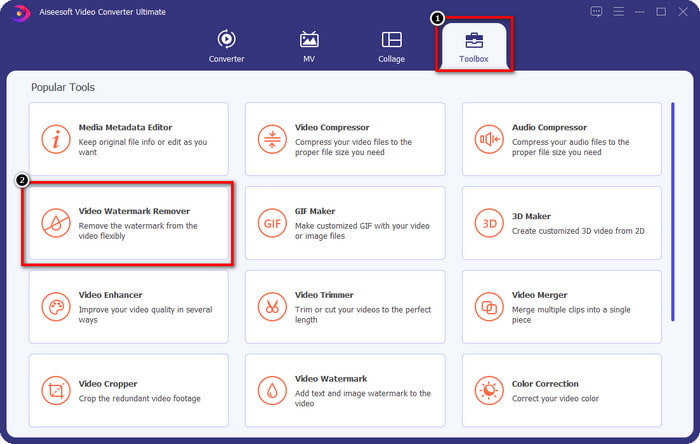
Étape 3. Ensuite, cliquez sur l’icône + pour importer la vidéo que vous avez téléchargée et commencer à supprimer le filigrane Dreamstime.
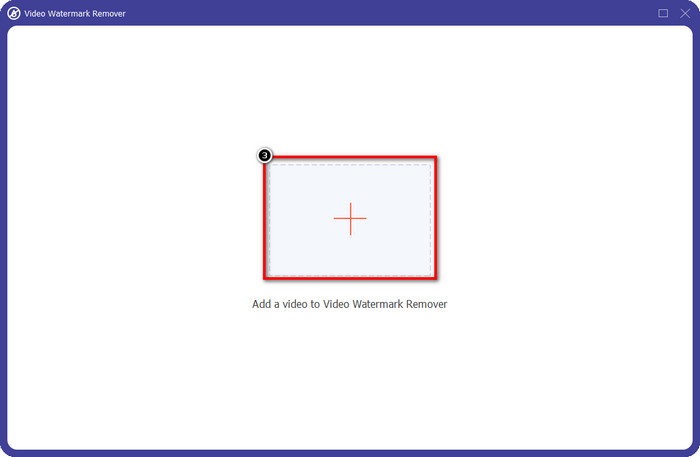
Étape 4. Puis cliquez sur Add Watermark Removing Area pour placer la zone de sélection sur le filigrane.
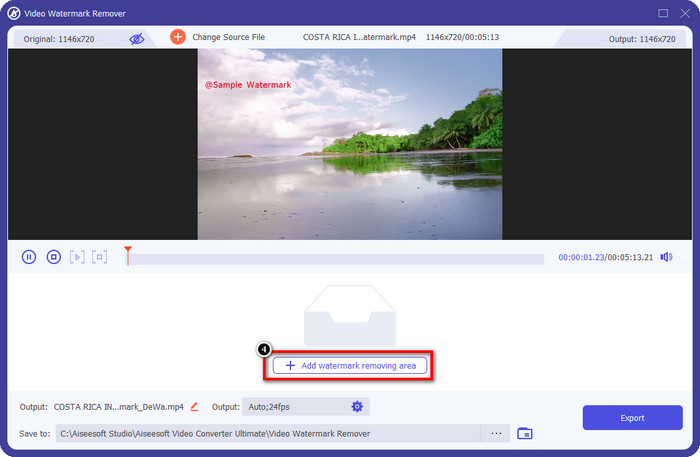
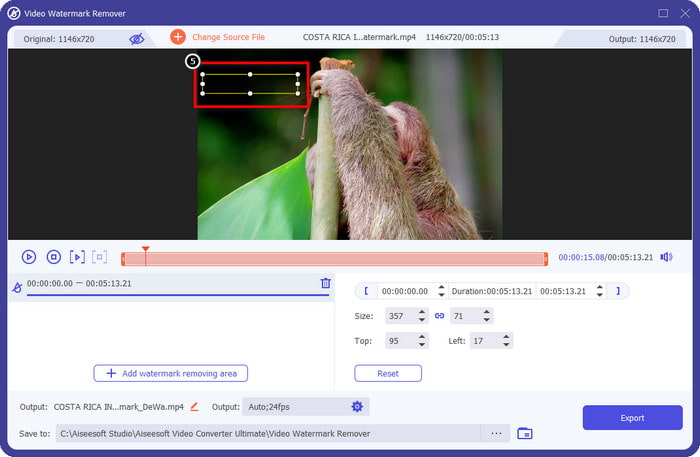
Étape 5. Après avoir cliqué sur Add Watermark Removing Area, un rectangle apparaîtra à l’écran : placez‑le sur le filigrane pour le supprimer.
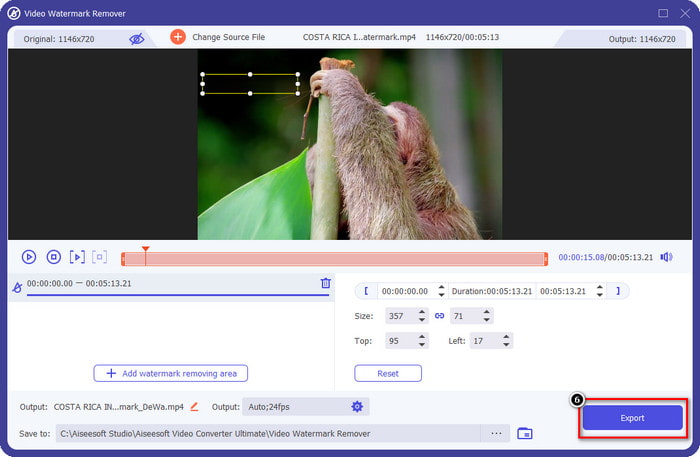
Étape 6. Cliquez sur le bouton Export pour télécharger la vidéo sans le filigrane Dreamstime.
En rapport:
Supprimer le filigrane d’un PDF
Partie 4. FAQ sur la suppression du filigrane Dreamtime
Puis-je supprimer le filigrane sur Dreamtime de manière illimitée après l'avoir acheté ?
Vous ne pouvez pas si vous avez acheté un crédit, mais vous pouvez continuer et faire défiler un peu plus, et vous verrez qu'il y a un accès illimité aux images dont vous pouvez profiter si vous l'utilisez régulièrement. Son prix n'est pas le même dans différentes régions ou endroits du monde.
Quel type de carte prend en charge Dreamstime ?
Maintenant que vous avez décidé d'acheter un crédit ou des frais d'abonnement ici, vous pouvez utiliser votre Master Card, Visa, AMEX et d'autres principales cartes de crédit ; vous pouvez le consulter sur le site officiel pour connaître les autres.
Puis-je utiliser des crédits sur Dreamstime pour acheter des vidéos sans filigrane ?
Vous pouvez utiliser le crédit pour acheter la vidéo ou tout produit de cette plateforme. Le but du crédit n'est pas seulement pour les images et les vidéos ; vous pouvez également l'utiliser pour acheter de l'audio ici.
Conclusion
Comment supprimer le filigrane Dreamstime ? Eh bien, vous savez déjà comment gérer le filigrane dans vos images avec les deux outils que nous avons enrôlés et la vidéo avec le meilleur outil de suppression de filigrane que vous pouvez utiliser. Ainsi, si vous avez un problème de filigrane sur des vidéos ou des images, vous pouvez librement utiliser le logiciel ci-dessus et suivre le tutoriel que nous avons ajouté. Ne dites pas adieu au problème car il est résolu !
-
 2 façons de supprimer rapidement le filigrane VSDC sur Windows et Mac
 Cherchez-vous un moyen de supprimer le filigrane VSDC sur vos vidéos ? Avec cet article, nous fournissons des outils que vous pouvez utiliser pour vous débarrasser du filigrane.
-
 Supprimer le filigrane Animoto sur les vidéos facilement et efficacement
 Comment supprimer le filigrane Animoto sur la vidéo ? Continuez à lire cet article car nous avons fourni un tutoriel complet sur la façon de le faire.
-
 Comment supprimer un filigrane d'une vidéo à l'aide de Final Cut Pro [Guide complet]
 Vous avez un problème avec le filigrane sur les vidéos ? N'en dites pas plus, car nous avons fourni un didacticiel sur la façon de supprimer le filigrane de la vidéo à l'aide de Final Cut Pro.
