


 Video Converter Ultimate
 Enregistreur d'écran
 Réparation vidéo
Comprendre le logiciel de conversion que vous pouvez utiliser pour convertir MPEG en FLV
Le format MPEG est le format standard pour le transfert de données sur internet ou dans les distributions de DVD. En effet, ce format existe depuis 1988. Mais saviez-vous qu’il s’agit d’un système asymétrique ? Car il faut plus de temps pour compresser une vidéo que pour la décompresser. De plus, lors de la compression du fichier, certaines images sont supprimées. Ainsi, la qualité de ce format est inférieure à d’autres formats comme le FLV. Vous voulez savoir comment convertir votre MPEG en FLV et compresser les données sans perdre les images de qualité de votre vidéo ? Alors lisez cet article pour avoir une idée des convertisseurs MPEG que vous pouvez utiliser.

Partie 1. Convertir MPEG en MOV sur Mac et Windows à l'aide de FVC Video Converter Ultimate
FVC Video Converter Ultimate est l’outil le plus adapté pour gérer ce problème de conversion. Il ne s’agit pas seulement d’un convertisseur MPEG en FLV, car cet outil peut, à lui seul, effectuer des conversions entre plus de 200 formats instantanément. N’est-ce pas impressionnant ? De plus, si vous voulez importer plusieurs fichiers et les convertir ici en différents formats, vous pouvez facilement le faire grâce à une conversion par lots très efficace. Vous voulez savoir ce que cet outil offre de plus ? Lisez alors les principales fonctionnalités ci‑dessous.

Convertisseur vidéo FVC Ultimate
Plus de 5 689 200 téléchargements- Il prend en charge tous les formats et encodeurs MP4, MOV, MPEG, FLV, AVI et bien d'autres.
- Il est connu comme le convertisseur le plus rapide et le plus sûr que vous puissiez télécharger sur votre bureau.
- Conversion par lots avec accélération matérielle et conversion rapide.
- Ce convertisseur prend en charge les principales fonctionnalités étendues, telles que l'amélioration vidéo, le compresseur vidéo, etc.
- Prend en charge les deux systèmes d'exploitation avec la même fonctionnalité sur Windows et Mac.
Téléchargement gratuit pour Windows 7 ou version ultérieure Téléchargement sécurisé
Téléchargement gratuit pour macOS 10.7 ou version ultérieure - Téléchargement sécurisé
Alors maintenant que vous avez une idée de la fonction de l'outil, il est temps d'apprendre à convertir MPEG en FLV avec les étapes détaillées ci-dessous.
Étape 1. Pour accéder à l’outil, vous devez d’abord le télécharger sur votre PC ou Mac. Installez‑le, puis effectuez le réglage rapide ; l’outil se lancera automatiquement une fois l’installation terminée.
Téléchargement gratuit pour Windows 7 ou version ultérieure Téléchargement sécurisé
Téléchargement gratuit pour macOS 10.7 ou version ultérieure - Téléchargement sécurisé
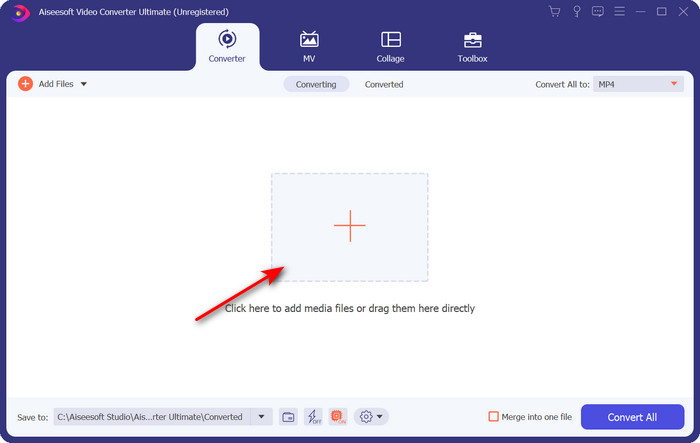
Étape 2. Importez ici votre fichier .mpeg en cliquant sur le signe + au centre de l’interface. Après avoir cliqué, un dossier de votre bureau s’affichera ; sélectionnez le fichier et cliquez sur Ouvrir.
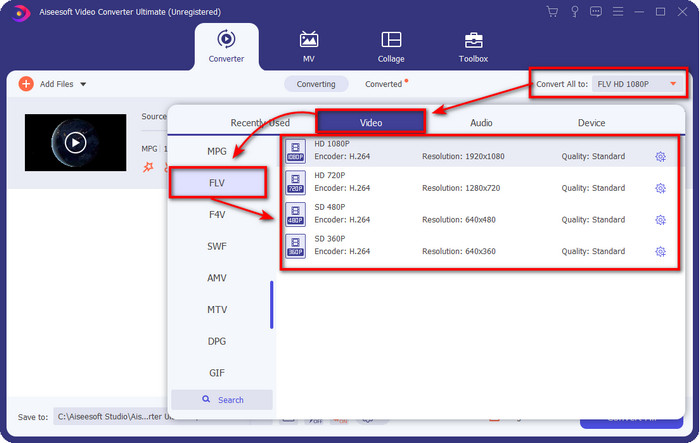
Étape 3. Changez le format en FLV en cliquant et en déroulant le menu Tout convertir en, situé dans la partie supérieure droite de l’interface du convertisseur.
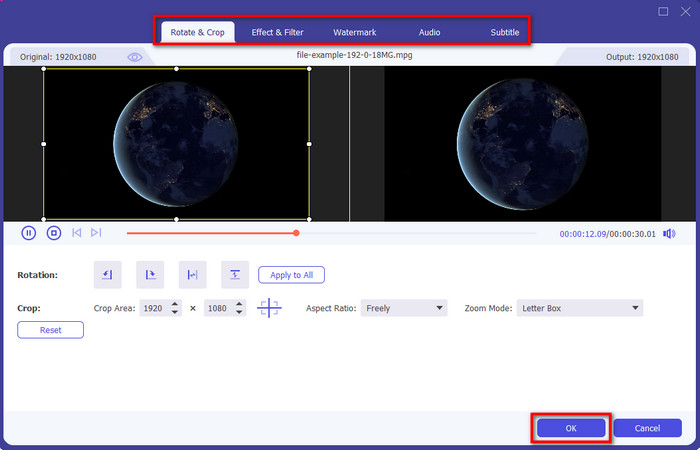
Étape 4. Avant de convertir votre fichier, vous pouvez d’abord monter la vidéo ici en cliquant sur le bouton baguette magique. Dans ce module d’édition, vous pouvez faire pivoter et recadrer la vidéo, ajouter des effets et des filtres, appliquer un filigrane, ajuster l’audio et ajouter des sous‑titres. Une fois le montage terminé et prêt à être enregistré, cliquez sur OK.
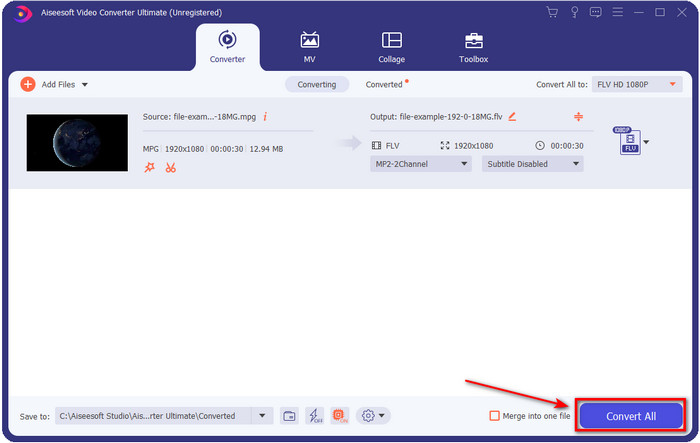
Étape 5. Appuyez sur Tout convertir pour lancer la conversion de MPEG en FLV. Ce processus prendra moins d’une minute grâce à l’Accélération matérielle et à la Conversion rapide activées. Après la conversion, le dossier de sortie s’affichera sur votre écran.
Partie 2. Convertir MPG en MOV en utilisant FFmpeg
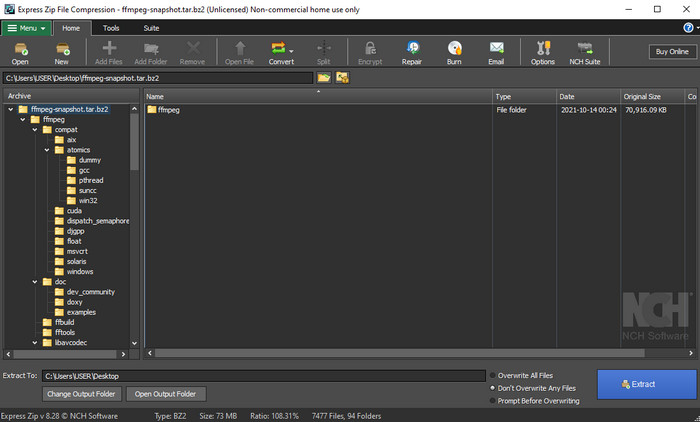
L’un des éditeurs/convertisseurs réputés que vous avez probablement déjà rencontré est FFmpeg. Si ce convertisseur vous paraît nouveau, faisons une brève présentation du logiciel. Ce convertisseur est considéré comme l’un des plus complexes à utiliser. Car avant d’effectuer une conversion ici, vous devez communiquer par texte dans l’invite de commandes (CMD). Bien que l’outil soit complexe, ses performances sont excellentes, en particulier pour la conversion. Au lieu de chercher sur internet comment utiliser FFmpeg pour convertir MPEG en FLV, les étapes ci‑dessous vont vous aider à utiliser cet outil.
Étape 1. Téléchargez FFmpeg sur votre ordinateur de bureau.
Étape 2. Ouvrez le CMD sur votre bureau pour lancer l’invite de commandes.
Étape 3. Recherchez l’emplacement de votre fichier .mpeg à l’aide du CMD. Puis saisissez cette commande dans l’invite : ffmpeg -i input.mpeg -vn -ar 44100 -ac 2 -b:a 192k output.flv, appuyez sur la touche Entrée de votre clavier pour démarrer le processus.
Avantages
- C'est gratuit à télécharger.
- Fonctionne bien dans la conversion du format dans une nouvelle version.
- Disponible sous Windows et Mac.
Les inconvénients
- Ce n'est pas convivial.
- Pas votre convertisseur typique.
Partie 3. Convertir MPG en MOV à l'aide du convertisseur gratuit en ligne MPEG en MOV
Si vous voulez convertir MPEG en FLV gratuitement, utilisez le FVC Free Video Converter Online. Cet outil en ligne est disponible sur tous les moteurs de recherche pour vous aider à résoudre vos problèmes de conversion. Bien que le convertisseur en ligne soit gratuit, ses fonctions et ses fonctionnalités ne sont pas aussi étendues que celles de FVC Video Converter Ultimate. Mais vous pouvez y convertir des fichiers .mpeg ou .mpg plus facilement et plus aisément qu’avec FFmpeg. Un autre avantage de cet outil web est que vous n’avez pas besoin de le télécharger sur votre ordinateur. Vous économisez ainsi de l’espace de stockage en l’utilisant. Vous voulez savoir comment utiliser cet outil ? Si oui, passons aux étapes.
Étape 1. Pour ouvrir le convertisseur MPEG en FLV en ligne, vous devez cliquer sur ce lien.
Étape 2. Une fois le site ouvert, cliquez sur Ajouter des fichiers à convertir pour lancer l’outil en ligne. Un dossier s’affichera sur votre écran ; dedans, trouvez le fichier .mpeg que vous voulez convertir, puis appuyez sur Ouvrir.
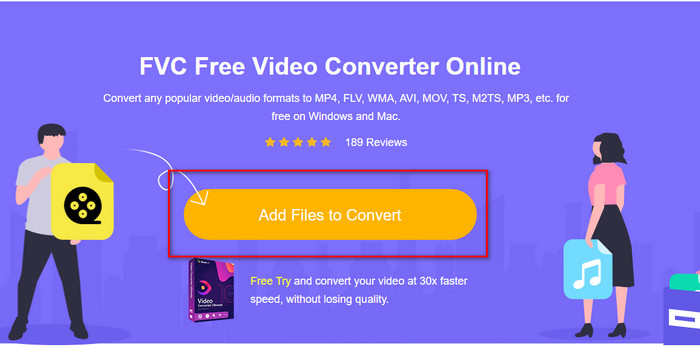
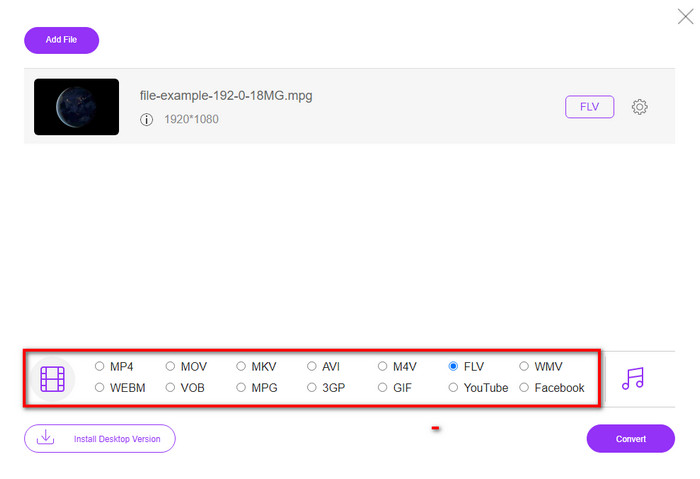
Étape 3. Une nouvelle interface s’affichera ; choisissez le format FLV en bas.
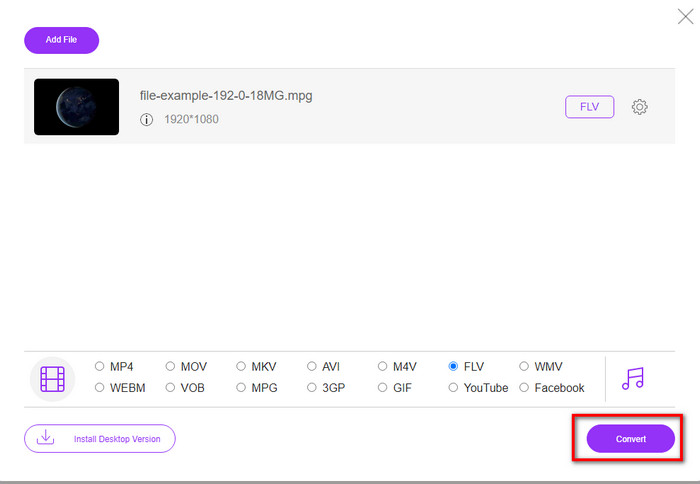
Étape 4. Une fois le format sélectionné, cliquez sur Convertir pour lancer le processus.
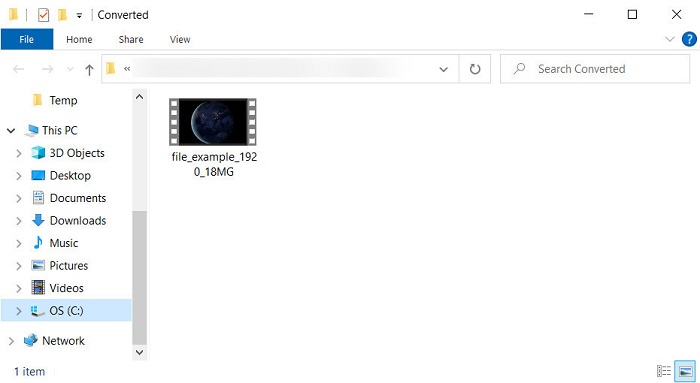
Étape 5. Le dossier contenant le fichier s’affichera après la conversion.
Partie 4. Connaissance approfondie de MPEG et MOV
Moving Pictures Experts Group ou MPEG est l'un des formats standards apparus fin 1988. Ce format compresse considérablement le fichier en MPEG-1 ou MPEG-2 puis le distribue sur Internet ou sur des DVD. Bien que le MPEG utilise une compression particulière, l'extension de ce format peut toujours être .mpg ou le .mpeg d'origine, mais les fichiers et la qualité stockés ne seront pas affectés. Même si la qualité ne sera pas affectée, il ne peut toujours pas stocker de vidéos et de métadonnées haute définition.
Ci-dessus, Flash Video ou FLV est comme MPEG mais d'un point de vue différent. Ces deux formats sont les meilleurs pour transférer le fichier vidéo sur Internet. Cependant, les fichiers FLV sont beaucoup plus compressés et leur qualité est bien meilleure que celle du MPEG. C'est maintenant le format vidéo standard dans le contenu HTML 5 sur le World Wide Web pour le streaming.
Étant donné que le format MPEG a une qualité et une compression inférieures, vous devez reconsidérer la conversion du fichier au format FLV si vous souhaitez une meilleure qualité et une meilleure compression. Ainsi, choisir le bon convertisseur MPEG vers FLV en ligne ou hors ligne est indispensable pour obtenir une meilleure version FLV.
Partie 5. FAQ sur la conversion MPEG vers FLV
Comment fusionner plusieurs fichiers MPEG en un seul ?
Combiner ou fusionner deux fichiers ou plus en un seul est facile si vous utilisez le bon outil. Vous n’avez aucune idée de ce qu’il faut utiliser pour fusionner plusieurs fichiers vidéo en un seul ? Ou de la manière de relier les fichiers ? Si c’est le cas, lisez cet article pour savoir quoi utiliser et comment combiner des fichiers MPEG en un seul.
Où puis-je lire des fichiers MPEG ?
Bien que le format MPEG soit le format le plus connu pour les films et qu’il bénéficie d’un énorme soutien, certains lecteurs multimédias ne lisent pas la vidéo de manière fluide avec l’extension de fichier .mpeg. Si vous recherchez un lecteur multimédia performant, cliquez immédiatement sur ce lien et lisez les informations détaillées sur les lecteurs MPEG.
Puis-je compresser des fichiers MPEG ?
Oui, vous pouvez compresser vos fichiers MPEG si leur taille est trop lourde à charger. En fait, vous pouvez lire cet article et découvrir comment compresser vos fichiers MPEG en des tailles plus petites sans dégrader la qualité de la vidéo.
Conclusion
Au final, nous avons une solide compréhension de la manière de convertir MPEG en FLV grâce aux outils utiles présentés ci‑dessus. Si vous voulez convertir votre MPEG gratuitement, utilisez alors le FVC Free Video Converter Online. Mais si vous disposez déjà de FFmpeg et souhaitez l’utiliser, lisez les explications ci‑dessus. Dans les deux cas, les performances du convertisseur phénoménal restent les meilleures : FVC Video Converter Ultimate. Choisissez maintenant l’outil qui, selon vous, répond le mieux à vos besoins de conversion de fichiers et effectuez une conversion efficace.
-
 [2021] Meilleurs outils et moyens simples pour convertir MPEG en MP3
 Cet article explique principalement comment convertir vos vidéos MPEG en MP3 à l'aide des outils les plus fiables de la liste.
-
 Les 5 meilleurs choix pour convertir MPEG au format AVI [En ligne et hors ligne]
 Avez-vous du mal à chercher un convertisseur pour MPEG ? Essayez ensuite de lire cet article pendant que nous apprenons à changer le format MPEG en AVI avec des étapes détaillées.
-
 3 méthodes efficaces pour convertir MPEG en MOV [hors ligne et en ligne]
 Êtes-vous fatigué de trouver un lecteur multimédia pour lire votre format vidéo MPEG ? Essayez de le convertir dans d'autres formats susceptibles de jouer, en particulier sur Mac, par exemple, un format vidéo MOV. Lisez cet article pour en savoir plus.
