


 Video Converter Ultimate
 Enregistreur d'écran
 Réparation vidéo
 Téléchargement sécurisé
5 solutions étonnantes pour mettre du texte sur un GIF en 2023
Une image vaut mille mots, mais attendez de voir les GIF. Ces images animées ont fait passer le monde des réseaux sociaux à un niveau supérieur en permettant aux gens de s’exprimer comme s’ils parlaient en temps réel, face à face. Cependant, si vous voulez donner encore plus de pep à la création de GIF amusants et accrocheurs, ajouter du texte sera d’une grande aide. Ce guide va vous montrer comment ajouter du texte à un GIF en ligne, hors ligne et à l’aide d’applications mobiles.

Partie 1 : Ajouter du texte au GIF hors ligne
1. Convertisseur vidéo ultime
Quels que soient vos objectifs en créant des GIF, y ajouter du texte est plutôt simple et réalisable avec Video Converter Ultimate. Ce programme va bien au‑delà du simple transcodage d’un format à un autre, puisqu’il peut aussi vous aider à manipuler des images. En utilisant la boîte à outils intégrée au programme, vous accédez à un large éventail de fonctions comme le Fusionneur Vidéo, l’Améliorateur Audio, le Compresseur et, bien sûr, le Créateur de GIF. Si vous voulez réussir à ajouter du texte sur un GIF, voici ce que vous devez faire.
Étape 1. Installer le meilleur créateur de GIF
Commencez par choisir le bouton Téléchargement Gratuit correspondant à votre appareil. Une fois le fichier téléchargé, cliquez dessus et suivez l’assistant d’installation pour lancer le programme sur votre écran.
Téléchargement gratuitPour Windows 7 ou version ultérieureTéléchargement sécurisé
Téléchargement gratuitPour macOS 10.7 ou version ultérieureTéléchargement sécurisé
Étape 2. Ajouter un fichier GIF
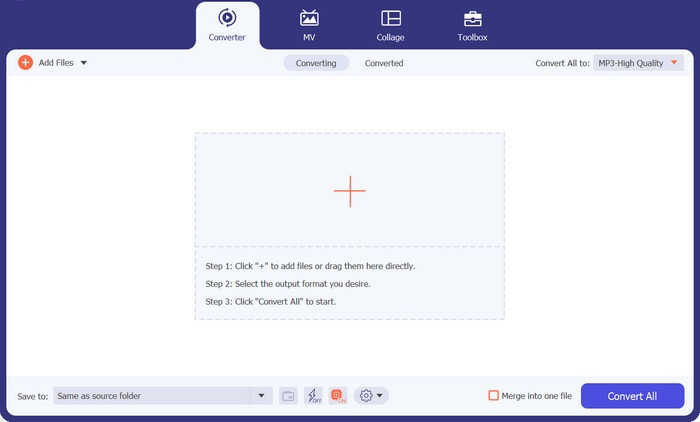
Depuis l’interface principale du programme, cliquez sur le bouton avec le signe Plus pour ajouter votre fichier GIF.
Étape 3. Ajouter du texte au GIF
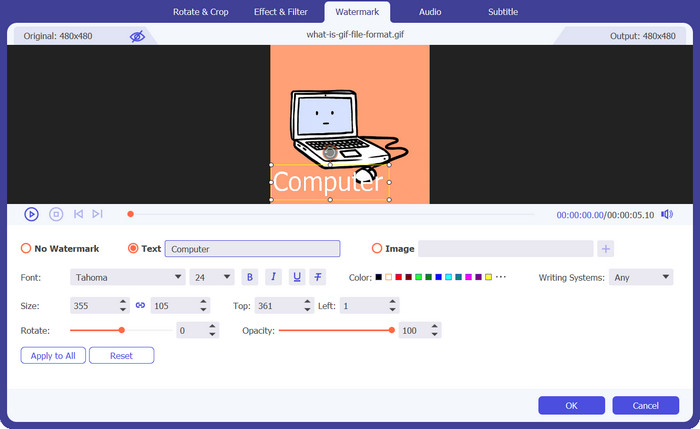
Pour ajouter du texte à votre GIF, cliquez sur le bouton Baguette magique et vous serez dirigé vers l’éditeur. Cochez l’onglet Filigrane et saisissez les mots que vous souhaitez insérer ; vous pouvez également modifier la police, la couleur et le style de votre texte.
Étape 4. Enregistrer le résultat
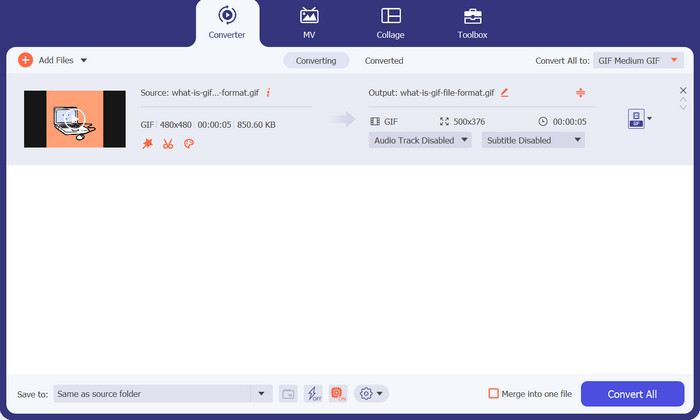
Une fois que vous êtes satisfait de votre travail, il est temps d’enregistrer votre GIF sur votre ordinateur. Pour ce faire, cliquez sur OK pour confirmer les modifications. Dans l’onglet de conversion, recherchez le format GIF sous l’onglet Vidéo et cliquez sur le bouton Tout convertir.
2. Animateur GIF facile
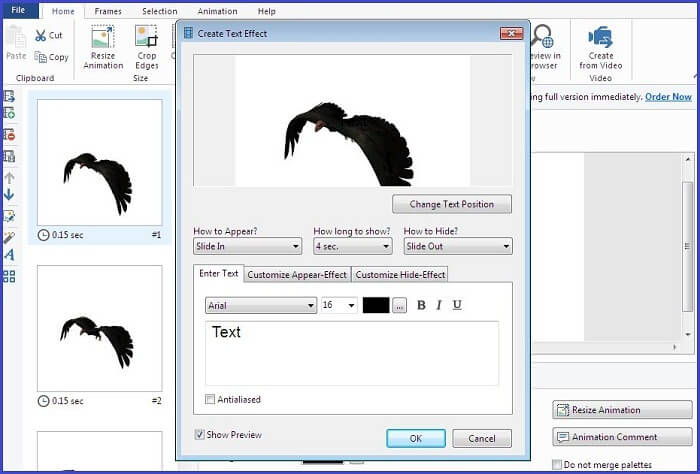
Easy GIF Animator est une autre solution hors ligne qui mérite d'être essayée. Cet outil transforme vos GIF comme aucun autre. Il peut créer des bannières, des boutons, des images animées et même des GIF à partir de vidéos. En plus de cela, cet outil fonctionne mieux pour ajouter un texte sur vos GIF avant de le partager avec vos amis en ligne. De plus, vous pouvez avoir un contrôle total sur la taille du cadre, créer des effets de texte animés sur votre fichier et ajouter des effets visuels ou d'animation.
Étape 1. Commencez par importer votre GIF dans le programme en appuyant sur la touche F3 de votre clavier pour accéder à l’explorateur de fichiers de votre ordinateur.
Étape 2. Une fois que votre GIF apparaît dans le panneau d’édition, touchez le bouton Texte et attendez l’affichage de la zone de texte. À partir de là, saisissez le texte que vous souhaitez superposer.
Étape 3. Pour enregistrer votre GIF modifié, allez dans l’onglet Fichier et cliquez sur Enregistrer.
Partie 2 : Ajouter du texte à un GIF en ligne
1. Créateur de GIF gratuit CapCut
À l'aide d'un programme en ligne, il existe un autre moyen de créer des GIF animés avec du texte. Le premier sur la liste est Capcut. Cet outil fonctionne au-delà de la manipulation vidéo, car il peut vous aider à enflammer les GIF. Il permet aux utilisateurs de profiter des fonctionnalités FastMO et SlowMo s'ils souhaitent ajouter une touche de comédie à leurs GIF. Outre le texte, vous pouvez également joindre des autocollants et d’autres effets à vos précieux fichiers numériques.
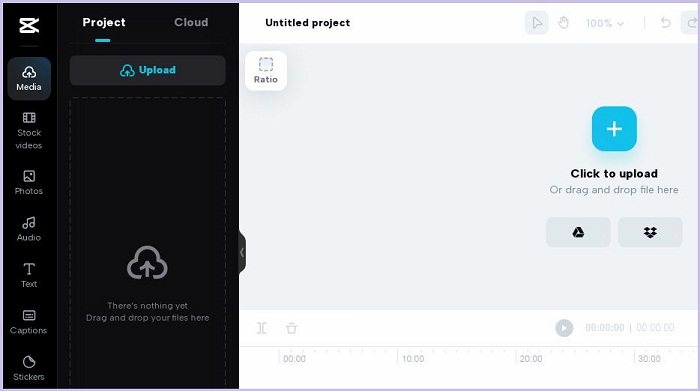
Étape 1. D’abord, accédez à la page d’accueil de CapCut. Ensuite, téléversez votre fichier GIF en cliquant sur le bouton Upload GIF.
Étape 2. Après avoir ajouté du texte à votre GIF en ligne avec CapCut, cliquez sur le bouton Texte pour commencer à ajouter votre légende.
Étape 3. Enfin, cliquez sur le bouton Save pour télécharger votre fichier une fois votre montage terminé.
Avantages
- Ce programme propose un essai gratuit et ne nécessite pas de processus d'inscription.
Les inconvénients
- CapCut Free GIF Maker n'est pas accessible sur les appareils mobiles et les tablettes.
2. EZGIF
Vous aurez tous vos besoins lorsqu'il couvrira toutes les manipulations GIF à effectuer avec EZGIF. Ce programme en ligne est idéal pour convertir des vidéos en GIF et redimensionner un GIF dans un rapport d'image différent. D'autre part, EZGIF propose un optimiseur dans lequel vous pouvez diviser, ajouter du texte, faire pivoter, recadrer et réparer des GIF.
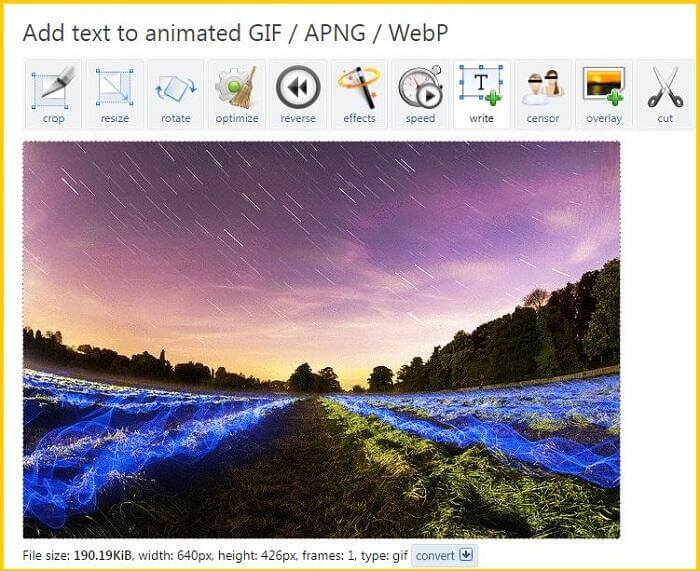
Étape 1. Après être entré sur la page principale d’EZGIF, vous verrez un panneau présentant les outils et fonctions du programme. À partir de là, choisissez Add GIF.
Étape 2. Cliquez sur le bouton Choose File et téléversez le GIF de votre choix. Vous pouvez également copier‑coller l’URL de votre fichier déjà mis en ligne.
Étape 3. Enfin, tapez les mots que vous souhaitez ajouter dans la zone de texte. Une fois satisfait, cliquez sur le bouton Download.
Avantages
- Les débutants peuvent facilement utiliser le programme.
- Aucun frais d'inscription n'est nécessaire.
Les inconvénients
- La page principale du programme contient trop de publicités pop-up.
3. GIFGIF
GIFGIFs est peut-être l'un des meilleurs programmes pour télécharger un fichier GIF pour tous types d'occasions. Ce programme contient des centaines de catégories GIF, notamment des animaux, des vacances, des créatures, des sports et bien d'autres. En plus de cela, cette solution en ligne offre différentes fonctionnalités d'édition GIF telles que l'inverseur GIF, l'optimiseur, le GIF divisé, etc., y compris la fonctionnalité Ajouter du texte au GIF. Pour savoir comment ajouter du texte GIF avec cet outil, suivez le guide que nous avons créé ci-dessous.
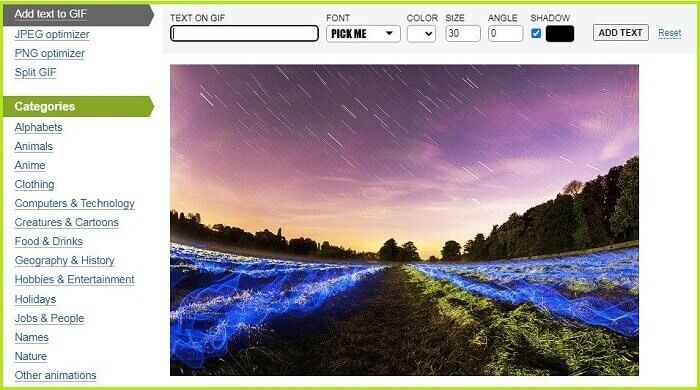
Étape 1. Tout d’abord, cliquez sur le bouton Add Text dans le coin supérieur de l’interface de l’outil et importez votre GIF.
Étape 2. Ensuite, vous pouvez toucher n’importe où sur l’écran, et l’outil affichera automatiquement la zone de texte. Vous pouvez également déplacer le texte du GIF en faisant glisser la zone de texte.
Étape 3. Enfin, cliquez sur Download pour enregistrer votre fichier GIF modifié.
Avantages
- Cet outil est la meilleure option pour enregistrer gratuitement des fichiers GIF.
Les inconvénients
- Il n’est accessible qu’en ligne.
Partie 3 : Ajouter du texte à un GIF sur iPhone et Android
1. Créateur et éditeur GIF - GifBuz
Que vous créiez un GIF à partir de zéro, des photos ou des vidéos, GIF Maker & Editor de GifBuz sera une application unique. Il offre des fonctionnalités intuitives qui vous permettent d'ajuster le rythme de vos GIF. Pendant ce temps, l’ajout de texte au GIF est réalisable en quelques clics. De plus, vous pouvez modifier votre texte en GIF dans différentes polices et couleurs de votre choix. Pour savoir comment ajouter du texte à un GIF sur iPhone et Android, suivez ce guide.
Étape 1. Après avoir lancé l’application sur votre appareil, touchez Edit GIF et choisissez votre fichier.
Étape 2. Pour ajouter du texte, touchez le bouton Manage puis choisissez le bouton Add Text. Après avoir saisi votre texte, vous pouvez ajuster l’ombre, l’arrière‑plan, la couleur et la police de celui‑ci.
Étape 3. Pour enregistrer votre fichier, touchez l’icône en forme de coche dans le coin supérieur de l’écran, définissez le format et la résolution de sortie, puis appuyez sur OK.
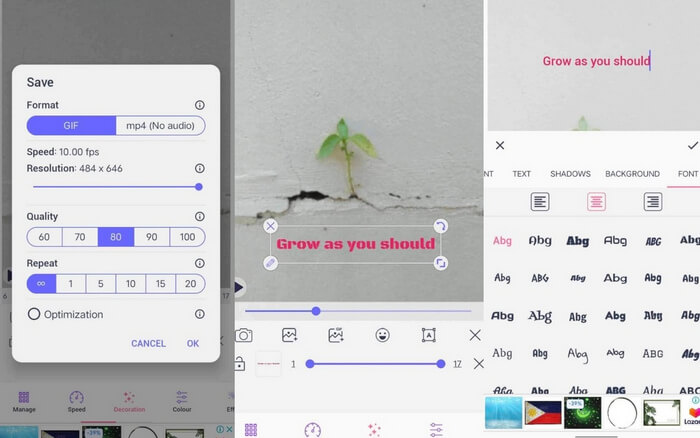
Pour aller plus loin :
3 manières les plus simples d’ajouter un filigrane à un GIF en ligne et hors ligne
Comment diviser des GIF et personnaliser vos GIF animés préférés
Partie 4 : Top 3 des polices de texte GIF les plus populaires
Pour la meilleure partie, si vous avez besoin de guides sur la police à utiliser sur votre GIF, voici les 3 polices les plus recommandées aujourd'hui.
| Polices GIF | Meilleur pour |
| Police Myriade Pro | Une excellente option pour ajouter des GIF texte faciles à lire. |
| Calibres | Les créateurs de GIF utilisent largement cette police sur Tumblr. |
| Montserrat | La police populaire utilisée par Google est adaptée pour ajouter une ambiance classique à vos GIF. |
Partie 5 : FAQ sur le texte sur GIF
Puis-je ajouter du texte à un GIF sur Instagram
Absolument oui. Vous pouvez ajouter du texte et des autocollants sur votre GIf sur Instagram, que vous pouvez directement télécharger dans vos histoires et publier.
Puis-je ajouter du texte animé à un GIF ?
L'ajout d'un texte animé sur GIF est possible à l'aide d'un outil hors ligne et en ligne. Certaines applications proposent une fonctionnalité de texte en mouvement pour ajouter de la vie à votre fichier GIF.
GIMP édite-t-il les GIF ?
Bien que GIMP soit conçu pour pixelliser les images, vous pouvez également l'utiliser pour modifier vos GIF. De plus, vous pouvez toujours utiliser GIMP pour les créer.
Pouvez-vous superposer des GIF les uns sur les autres ?
Définitivement oui! La superposition de plusieurs GIF est possible. Assurez-vous que votre fichier GIF est transparent afin qu'il apparaisse une fois modifié.
Conclusion
Et vous savez désormais tout sur comment mettre du texte sur un GIF. Tous les outils mentionnés dans cet article ont été testés et approuvés. Des solutions hors ligne aux outils en ligne, vous pouvez maintenant ajouter du texte, qu’il soit statique ou animé, à tout moment et sans difficulté.
-
 Combinez des GIF à l'aide des meilleurs combinateurs GIF hors ligne et en ligne
 Vous cherchez à ajouter du piquant à vos publications sur les réseaux sociaux ou à vos campagnes marketing ? Ne cherchez pas plus loin que les meilleurs combinateurs GIF en ligne et hors ligne !
-
 Examen complet d'Ezgif des fonctionnalités et des alternatives
 Si vous utilisez Ezgif et que vous ne savez toujours pas ce qui vous attend. Cette revue Ezgif vous aidera à résoudre ce problème. Continuez à lire pour en savoir plus.
-
 Dévoilement des meilleurs outils pour les plaisirs de bureau, en ligne et mobiles
 Découvrez ce que les éditeurs GIF ont à offrir et découvrez les meilleurs outils que vous pouvez utiliser pour créer des GIF impressionnants et créatifs prêts à être téléchargés en ligne.
