


 Video Converter Ultimate
 Enregistreur d'écran
 Réparation vidéo
 Téléchargement sécurisé
Examen complet du convertisseur WaltR HEIC et de ses meilleures alternatives [2022]
Il ne fait aucun doute que les images HEIC comptent parmi les formats d’image les plus répandus sur Internet, grâce à la petite taille de leurs fichiers et à leur haute résolution. Depuis l’apparition d’iOS 11, de nombreuses personnes rencontrent toutefois des difficultés avec ce format, car il n’est pas lisible dans certaines applications ni sous Windows. C’est pourquoi beaucoup choisissent de le convertir vers d’autres formats comme le JPG. L’un des convertisseurs HEIC vers JPEG les plus populaires est WaltR HEIC Converter. Dans cet article, vous découvrirez ses fonctionnalités et comment convertir un fichier HEIC en JPG avec WaltR HEIC Converter.

Partie 1. WaltR HEIC Converter - Meilleur outil pour convertir HEIC en JPEG
WaltR HEIC Converter est l’un des meilleurs convertisseurs pour passer du format HEIC au format JPEG. Cet outil en ligne vous permet de convertir des fichiers HEIC en JPG hors ligne en toute simplicité. Il est convivial, avec une interface logicielle claire et facile à utiliser. Vous pouvez également convertir plusieurs fichiers HEIC en un seul clic. De plus, il est gratuit et peut convertir vos fichiers HEIC à une vitesse très élevée. Et si vous souhaitez convertir votre image HEIC au format PNG, cet outil peut aussi le faire pour vous.
Avantages et inconvénients du convertisseur WaltR HEIC
Avantages
- Il a une interface utilisateur simple.
- Il peut convertir par lots vos images HEIC en images JPEG et PNG.
- Il est 100% gratuit à utiliser.
- Disponible sur toutes les plateformes multimédias, y compris Windows et Mac.
Les inconvénients
- Il ne prend en charge que les formats de fichiers JPEG et PNG.
Comment utiliser le convertisseur WaltR HEIC
Faites-nous savoir comment convertir le format de fichier HEIC au format JPEG à l'aide de WaltR HEIC Converter.
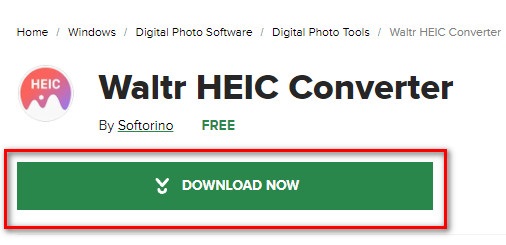
Étape 1. Pour télécharger l’application WaltR HEIC Converter, recherchez WaltR HEIC Converter. Suivez ensuite le processus d’installation et lancez l’application.
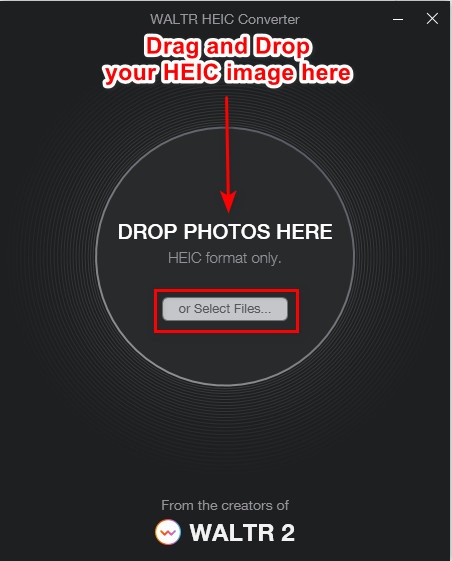
Étape 2. Glissez-déposez votre image HEIC sur l’interface principale du logiciel ou cliquez sur le bouton Select Files pour ajouter votre image HEIC à la file d’attente. Attendez que le fichier HEIC soit téléversé, puis passez à l’étape suivante.
Étape 3. Ensuite, cliquez sur le bouton drop-down à côté de Format pour choisir le format de sortie souhaité. Sélectionnez JPEG.

Étape 4. Enfin, cliquez sur le bouton Convert pour convertir votre image HEIC au format JPEG. Puis choisissez le dossier de destination de votre image, et voilà !
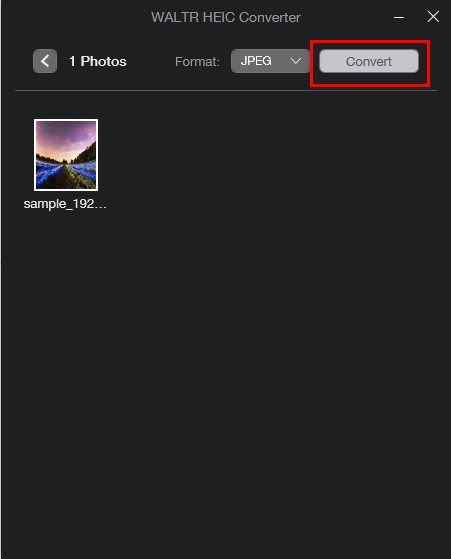
Facile, non ? Vous pouvez convertir l'image HEIC en image JPEG en suivant les étapes ci-dessus.
Partie 2. 4 meilleures alternatives au convertisseur WaltR HEIC
Toutefois, si vous recherchez un moyen plus pratique de convertir HEIC en JPEG, que vous n'avez pas besoin de télécharger, la solution pour vous consiste à utiliser un convertisseur HEIC en JPEG en ligne. Nous avons recherché les meilleurs convertisseurs HEIC en JPEG en ligne sur Internet et avons trouvé que ces outils sont les meilleurs à utiliser. Par conséquent, continuez à lire cet article pour connaître les deux meilleures alternatives pour WaltR HEIC Converter.
Alternative 1. Convertisseur FVC gratuit HEIC en JPEG
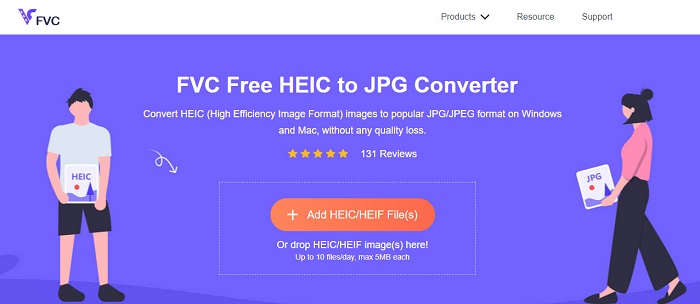
FVC Free HEIC to JPEG Converter est le meilleur outil pour convertir des fichiers HEIC en JPEG en ligne. Ce convertisseur peut transformer votre image HEIC en JPEG sans perte de qualité. Il vous permet également de convertir en lot vos images HEIC en JPEG/JPG en un seul clic. En outre, lors de la conversion, il préserve les données EXIF telles que la taille, les dimensions, la date et l’heure de prise de vue, ainsi que les paramètres d’exposition. Il est également 100% gratuit et sûr. Et contrairement à bien d’autres outils en ligne, FVC Free HEIC to JPEG Converter ne contient pas de publicités intrusives.
Avantages
- Il dispose d'une interface logicielle facile à utiliser.
- Il peut convertir par lots vos images HEIC au format d'image JPEG.
- Il est sûr à utiliser et gratuit 100%.
- Accessible sur tous les navigateurs Web, y compris Google, Firefox et Safari.
Les inconvénients
- Vous pouvez rencontrer un processus de conversion lent lorsque votre connexion Internet est lente.
Alternative 2. OnlineConvert.com

OnlineConvert.com est aussi un outil populaire pour convertir des fichiers HEIC en images JPEG. Ce convertisseur HEIC vers JPEG en ligne vous permet de modifier la taille et la qualité de l’image en sortie. C’est également un outil convivial grâce à son interface graphique simple. Cependant, il contient des publicités envahissantes qui peuvent être gênantes. Malgré cela, de nombreuses personnes continuent de l’utiliser pour convertir leurs images HEIC en JPEG.
Avantages
- Il dispose d'une interface logicielle intuitive.
- Il vous permet de redimensionner et d'ajuster la qualité de votre image.
Les inconvénients
- Il contient des publicités.
- Votre fichier peut être corrompu lorsque la connexion Internet est interrompue.
Alternative 3. CloudConvert
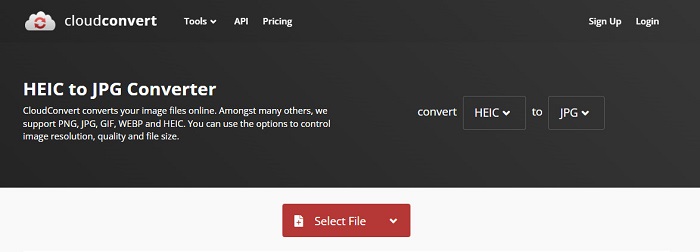
CloudConvert est un convertisseur en ligne qui permet également de transformer des fichiers HEIC en images JPEG. Ce convertisseur dispose d’une interface simple, ce qui en fait un outil facile à prendre en main. Avec ce service, vous pouvez modifier la largeur, la hauteur et la qualité de votre image de sortie. De plus, il prend en charge de nombreux formats, comme HEIC, JPEG, PNG, GIF et WebP.
Malgré cela, lors de l'utilisation de ce convertisseur, votre connexion Internet doit être rapide afin que vous n'attendiez pas trop lors de la conversion de votre image HEIC. Néanmoins, c'est toujours l'un des outils les plus efficaces que vous puissiez trouver sur Internet.
Avantages
- Il est sûr à utiliser et gratuit.
- Il vous permet de modifier la qualité de votre sortie d'image.
- Il a une interface facile à utiliser.
Les inconvénients
- Votre processus de conversion sera lent, en fonction de votre vitesse Internet.
Alternative 4. FreeToolOnline.com
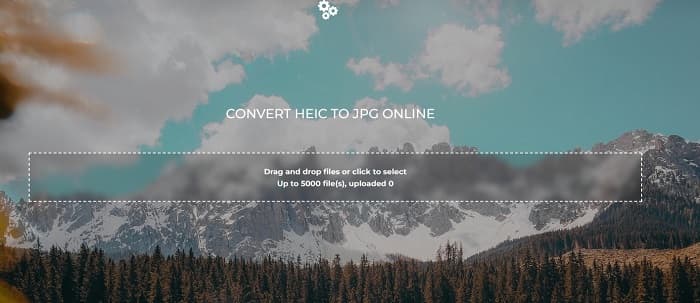
Un autre convertisseur HEIC vers JPEG en ligne que vous devriez essayer est FreeOnlineTool.com. Cet outil peut convertir des images HEIC en JPEG et en PDF. Il est en outre gratuit et sûr. Et si vous voulez convertir plusieurs images HEIC en JPEG en une seule fois, ce convertisseur propose aussi cette fonction. Par ailleurs, il offre une interface intuitive et facile à utiliser. Cependant, comme d’autres convertisseurs, il contient des publicités qui peuvent vous déranger pendant son utilisation.
Avantages
- Il prend en charge la conversion de HEIC au format JPEG et PFD.
- Il a une interface graphique simple.
- Il vous permet de convertir par lots des images HEIC en images JPEG.
Les inconvénients
- Il contient des publicités.
Partie 3. FAQ sur WaltR HEIC Converter
Est-ce que WaltR HEIC Converter est disponible sur les appareils mobiles ?
Malheureusement, WaltR HEIC Converter n'est téléchargeable sur aucun appareil mobile.
Pouvez-vous convertir HEIC en GIF en utilisant WaltR HEIC Converter ?
Non. WaltR HEIC Converter ne prend pas en charge les fichiers image GIF. Mais si vous souhaitez convertir votre image HEIC en format GIF, vous pouvez utiliser cet outil, Aiseesoft Free Image Converter Online, pour convertir une image HEIC en GIF.
WaltR HEIC Converter a-t-il une version en ligne ?
WaltR HEIC Converter n'a pas de version en ligne. Par conséquent, si vous souhaitez convertir HEIC en JPEG en ligne, utilisez les alternatives ci-dessus.
Conclusion
Waltr HEIC Converter est en effet un outil remarquable pour la conversion de HEIC en JPEG. Avec les excellentes fonctionnalités qu’il offre, il n’est pas étonnant qu’il soit autant utilisé. Toutefois, si vous ne souhaitez pas installer une application pour convertir vos fichiers HEIC en JPEG, un outil en ligne sera la meilleure option. Et nous vous recommandons d’utiliser le meilleur outil du marché, FVC Free HEIC to JPEG Converter.
-
 Convertir HEIC en PDF en utilisant les 4 meilleures méthodes améliorées en 2022
 Pour en savoir plus sur le meilleur convertisseur HEIC en PDF, vous pouvez télécharger ce 2022. Vous pouvez lire cet article car nous avons fourni une critique à leur sujet.
-
 5 des meilleurs convertisseurs HEIC en JPG choisis en 2022
 Avec le convertisseur HEIC en JPC, vous pouvez facilement changer le format d'image en un JPG portable. Vous voulez savoir quels sont ces 5 outils ? Lisez cet article.
-
 5 meilleures façons de changer l'image en GIF animé [Mise à jour 2022]
 Besoin d'un convertisseur d'image en GIF ? Cet article fournira les cinq meilleurs convertisseurs que nous pouvons trouver sur le marché. Alors, découvrons ces outils en lisant cet article.
