


 Video Converter Ultimate
 Enregistreur d'écran
 Réparation vidéo
2 convertisseurs utilisés pour convertir DV en MOV sans détériorer la qualité
Les fichiers DV sont le type de fichier le plus courant sur tous les caméscopes, car ils conservent la meilleure qualité vidéo pour le montage et le visionnage. Vous vous demandez peut‑être si vous pouvez utiliser ce format dans iMovie pour le monter ou le lire dans QuickTime. Mais vous ne pouvez pas utiliser ce fichier brut car il s’agit d’une version ancienne et non prise en charge. Cependant, pas d’inquiétude : vous pouvez convertir vos fichiers DV dans un format compatible sur Mac, comme le MOV. En poursuivant la lecture de cet article, nous allons voir en détail pourquoi vous avez besoin de convertir un fichier DV en MOV sur votre Mac.

Partie 1. Convertir des fichiers DV en MOV sur Mac avec le puissant convertisseur hors ligne
FVC Video Converter Ultimate est l’outil exceptionnel que vous utiliserez pour convertir un fichier DV en MOV, aussi bien sur Mac que sur PC. Sans aucun doute, ce convertisseur peut vous aider à transformer vos fichiers dans un nouveau format sans le moindre effort. De plus, certains utilisateurs ont besoin d’une méthode rapide pour convertir un fichier dans un nouveau format ; heureusement, cet outil vous permettra de le faire très rapidement. En plus de la conversion, vous pouvez également y monter vos vidéos, par exemple en les recadrant, en les fusionnant, en les coupant, et bien plus encore. Donc, si vous voulez découvrir les capacités de conversion de cet outil ultime, suivez la démonstration ci‑dessous pour apprendre à l’utiliser.
Comment convertir des fichiers DV en MOV avec le pratique FVC Video Converter Ultimate :
Étape 1. Téléchargez le convertisseur DV sur votre Mac ou votre PC, suivez le processus d’installation et cliquez sur Start Now pour ouvrir le logiciel.
Téléchargement gratuit pour Windows 7 ou version ultérieure Téléchargement sécurisé
Téléchargement gratuit pour macOS 10.7 ou version ultérieure - Téléchargement sécurisé
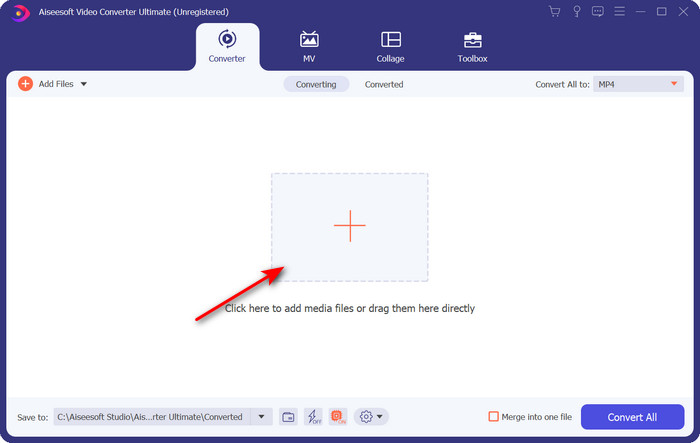
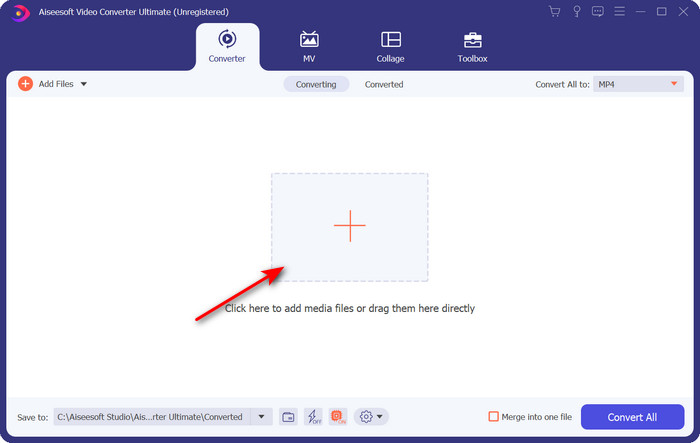
Étape 2. Après le lancement, importez le fichier que vous souhaitez convertir en cliquant sur le bouton + ; un dossier s’ouvrira, localisez le fichier, puis cliquez sur Open.
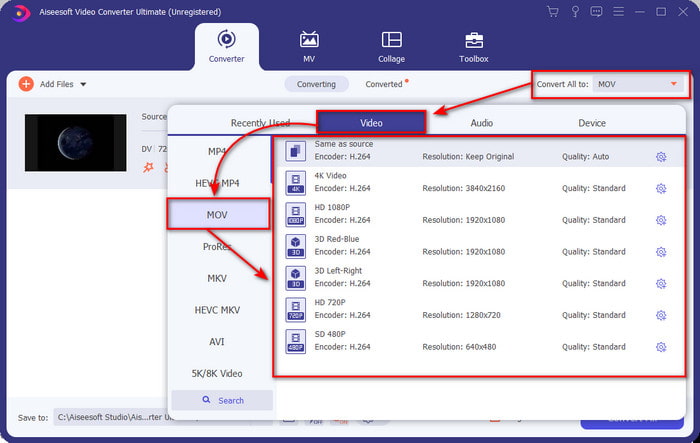
Étape 3. Pour sélectionner le format, cliquez sur le bouton drop-down, choisissez le format MOV ainsi que la résolution souhaitée. La qualité de votre fichier de sortie peut être réglée sur élevée, mais sa taille sera alors bien plus importante que celle du fichier d’origine.
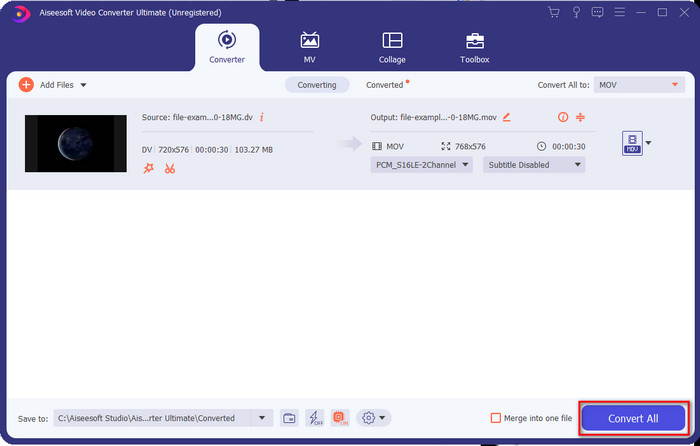
Étape 4. Cliquez sur Convert All pour lancer le processus de conversion du DV en MOV et téléchargez‑le immédiatement.
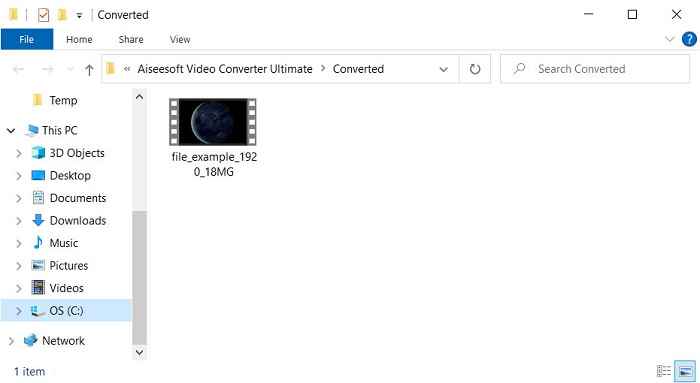
Étape 5. L’emplacement du fichier converti s’affichera ; vous pouvez maintenant regarder ou monter le fichier sur votre Mac sans craindre de ne pas pouvoir l’ouvrir.
Partie 2. Convertir DV en MOV gratuitement avec le convertisseur en ligne
Vous voulez convertir une vidéo directement dans votre navigateur ? Dans ce cas, vous devez utiliser FVC Free Video Converter Online pour convertir gratuitement un DV en MOV. Vous pouvez également modifier la résolution, le débit binaire et la fréquence d’images, en plus de ses capacités de conversion, tout comme avec FVC Video Converter Ultimate. Même si vous pouvez utiliser cet outil gratuitement en ligne, ses performances sont très différentes de celles du convertisseur hors ligne présenté plus haut. Mais si vous souhaitez effectuer une conversion simple et gratuite, ce convertisseur en ligne doit être votre solution de référence. Pour faire court, passons maintenant aux étapes à suivre pour l’utiliser.
Comment convertir des fichiers DV en MOV avec le convertisseur vidéo gratuit FVC en ligne ;” /]Étape 1. Pour ouvrir l’outil en ligne, cliquez sur ce lien ; un nouvel onglet de navigateur s’ouvrira.
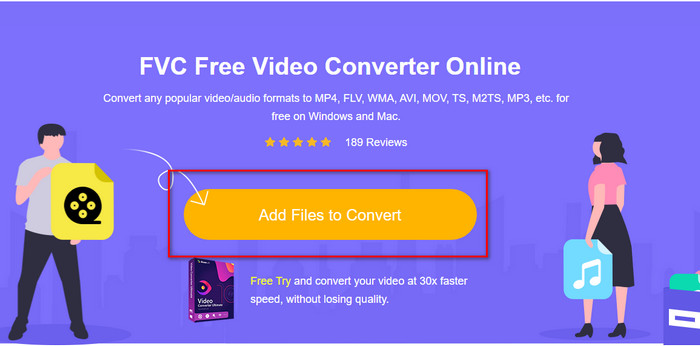
Étape 2. Cliquez sur Add Files to Convert pour lancer le convertisseur en ligne, puis sélectionnez dans le dossier le fichier .dv que vous souhaitez convertir.
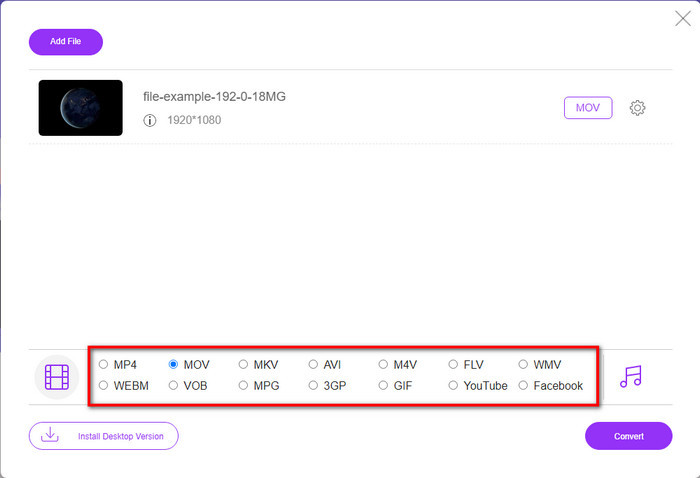
Étape 3. Choisissez le format MOV ou un autre format souhaité dans la liste ci‑dessous.
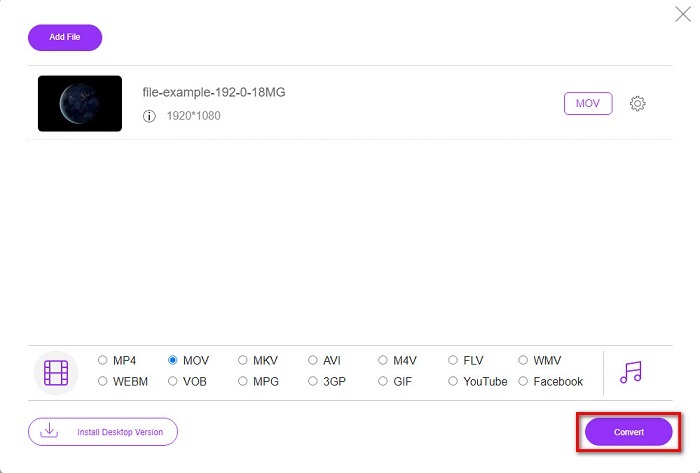
Étape 4. Pour lancer la conversion, cliquez sur Convert et patientez pendant le processus.
Étape 5. Une fois l’opération terminée, un nouveau dossier s’affichera à l’écran avec le fichier converti.
Partie 3. DV contre MOV
Le format DV est idéal pour enregistrer la vidéo et l'audio car il utilise le même algorithme que MPEG. Mais c'est très différent de MPEG car il ne repose pas sur la compression de la fréquence d'images précédente. Ainsi, au lieu de s'appuyer sur la compression intra-taux, il utilise une compression indépendante pour éditer la lecture plus rapidement. En conséquence, les fichiers DV ont été introduits à la fin de 1995 en tant que format vidéo standard sur tous les caméscopes. Mais aujourd'hui, nous verrons moins de caméscopes à bande car nous utilisons désormais un disque dur, des SSD et des cartes mémoire pour stocker les enregistrements.
D'autre part, le format MOV a été développé par Apple pour stocker un fichier multimédia de haute qualité pouvant être utilisé dans tous les éditeurs ou lu avec le lecteur multimédia. Ce format gagne beaucoup de respect car il peut contenir des éléments médiatiques collectifs et chacun peut collecter des données pour la vidéo, l'audio et le texte. Comme avec le DV, la compression fournie par ce format est basée sur l'algorithme.
Pour couronner le tout, vous ne pouvez pas télécharger de fichiers DV directement sur l'application Mac car ce format est obsolète. Il existe maintenant de meilleurs formats que .dv. Mais si vos vidéos sont dans ce format, vous pouvez utiliser un convertisseur DV vers MOV et convertir le fichier pour le lire sur Quicktime ou le modifier sur iMovie.
Partie 4. FAQ sur la conversion DV en MOV
Pourquoi ne puis-je pas lire des fichiers DV sur Mac ?
De nombreuses raisons peuvent varier dans ce cas, en particulier les fichiers DV, qui sont moins compatibles avec presque tous les systèmes d'exploitation. Mais nous énumérons deux raisons possibles pour lesquelles vous ne pouvez pas, et la première est que le lecteur multimédia que vous utilisez ne prend pas en charge ce format. C'est le problème le plus courant dans la plupart des formats pour des raisons de compatibilité et sa solution de conversion. L'autre est que vos fichiers .dv pourraient être cassés ou corrompus. Puisqu'il est endommagé ou corrompu, le fichier ne sera pas lu.
Le fichier DV est-il toujours un format idéal ?
Avant, il était idéal pour enregistrer et éditer des fichiers multimédias, mais aujourd'hui, le format n'est pas le meilleur. La raison principale est qu'il existe de meilleurs formats que .dv, et l'autre raison est la compatibilité.
Comment compresser des fichiers DV ?
Bien que les fichiers DV soient déjà compressés, leur taille en Mo peut devenir très importante si la durée de la vidéo est trop longue. Il est donc indispensable de compresser le fichier pour faciliter son transfert et gagner de l’espace. Pour savoir comment compresser vos fichiers DV ou d’autres fichiers multimédias, lisez cet article pour découvrir comment compresser des vidéos sans perte de qualité.
Conclusion
Pour résumer, les fichiers DV étaient autrefois excellents pour l’enregistrement audio et vidéo, mais aujourd’hui, d’autres formats leur ont succédé. De plus, ce format n’offre pas une compatibilité aussi large que le MOV, en particulier si vous souhaitez monter ou regarder vos vidéos sur Mac. Comme ce format est dépassé, vous devez envisager de le convertir en ligne ou hors ligne à l’aide de l’outil mentionné ci‑dessus. Globalement, le FVC Free Video Converter Online est le meilleur que nous ayons trouvé sur le web. En plus d’être gratuit, les performances de cet outil en ligne se démarquent nettement des autres outils web disponibles. Mais nous devons aussi faire honneur au convertisseur exceptionnel, le FVC Video Converter Ultimate. Cet outil se passe de présentation et vous aidera sans aucun doute à résoudre tous les problèmes de conversion que vous pourriez rencontrer. Il ne tient plus qu’à vous de choisir celui qui vous convient le mieux.
-
 Comment convertir AVI en MOV avec des étapes et des outils faciles
 Voulez-vous savoir comment convertir un AVI en un MOV jouable ? Vous devez suivre cet article pour savoir comment le faire et des conseils pour avoir une conversion réussie.
-
 4 façons de convertir DivX en MOV gratuitement [en ligne et hors ligne]
 Avez-vous du mal avec les limitations d'un DivX, ou n'avez-vous pas les lecteurs multimédias pour accéder aux vidéos dans ce format ? Si vous souhaitez le convertir au format MOV, continuez à lire cet article pour combler les lacunes.
-
 Convertisseur M4V en MOV gratuit - Comment convertir M4V en MOV
 Si votre lecteur multimédia ne prend pas en charge M4V, avez-vous déjà eu du mal à regarder un film sur votre iPhone ? Le sujet principal de cet article est de le convertir en un fichier vidéo MOV.
