


 Video Converter Ultimate
 Enregistreur d'écran
 Réparation vidéo
Meilleurs convertisseurs faciles à utiliser qui convertissent MOV en WMV, vous devez essayer !
Apple a créé les fichiers MOV, et il s’agit de l’un des formats de fichiers les plus courants avec WMV, MP4 et AVI. Les fichiers MOV peuvent être lus sous Windows en utilisant QuickTime. Par conséquent, si vous souhaitez convertir votre fichier MOV, nous vous conseillons de le convertir en fichier WMV, car le système Windows lit généralement ce format. Donc, si vous voulez savoir comment convertir un MOV en WMV, cet article est parfait pour vous.

Partie 1. Convertissez votre MOV en WMV en utilisant le meilleur convertisseur hors ligne
En matière de conversion de fichiers, il ne fait aucun doute que FVC Video Converter Ultimate est l’un des meilleurs outils. Ce convertisseur est un programme hors ligne qui vous permet de convertir votre fichier MOV en WMV, AVI, MP4, M4V, WebM et bien plus encore. Il dispose également de fonctions remarquables pour monter, améliorer, fusionner et compresser votre fichier MOV. De plus, ce convertisseur offre une fonction de conversion ultra-rapide, ce qui vous permet de convertir votre MOV en WMV en un rien de temps.
Comment convertir MOV en WMV à l'aide de FVC Video Converter Ultimate :
Étape 1. Installez FVC Video Converter Ultimate en cliquant sur l’icône Téléchargement gratuit ci‑dessous. Vous pouvez télécharger ce convertisseur aussi bien sous Windows que sous macOS. Suivez ensuite le processus d’installation, puis lancez l’application.
Téléchargement gratuit pour Windows 7 ou version ultérieure Téléchargement sécurisé
Téléchargement gratuit pour macOS 10.7 ou version ultérieure - Téléchargement sécurisé
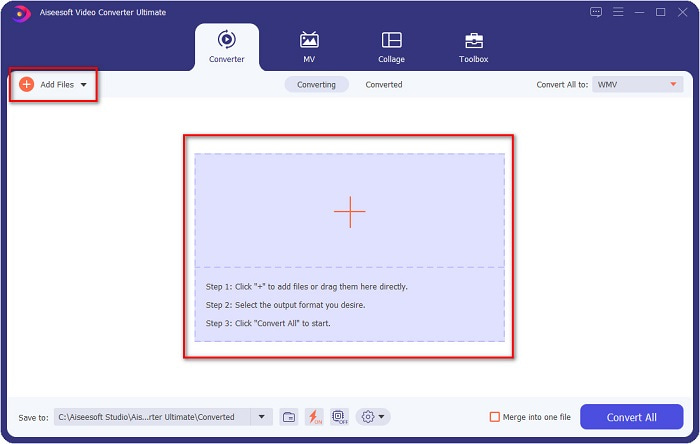
Étape 2. Après avoir lancé le programme, vous verrez l’interface principale du convertisseur. Cliquez sur Ajouter des fichiers, ou vous pouvez glisser‑déposer votre fichier MOV sur le signe + pour commencer la conversion de votre fichier MOV en fichier WMV.
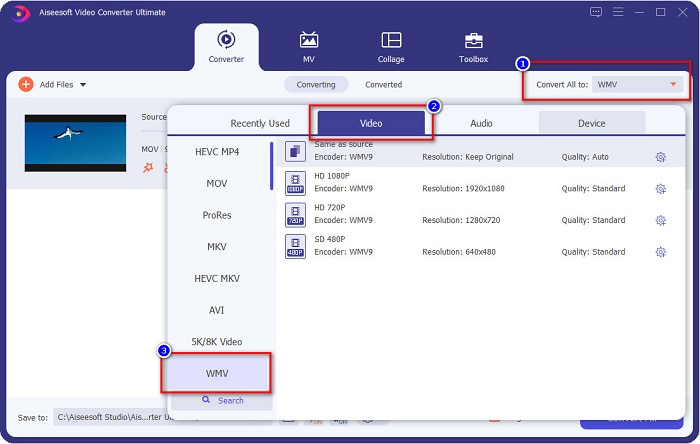
Étape 3. Cliquez ensuite sur le bouton Tout convertir en. Une liste de formats de fichiers s’affichera, dans laquelle vous pourrez sélectionner le format souhaité. Puis cliquez sur le format de fichier WMV.
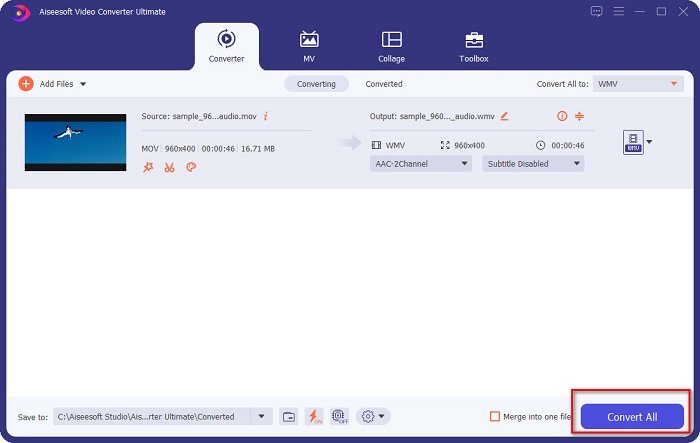
Étape 4. Après avoir choisi le format WMV, cliquez sur le bouton Tout convertir dans le coin inférieur droit pour lancer la conversion. Votre fichier MOV vers WMV commencera alors à se convertir. Enfin, patientez quelques secondes, et c’est terminé ! Avec ces quelques étapes simples, vous pouvez convertir facilement des fichiers MOV en WMV.
Avantages
- A une option où vous pouvez avoir une conversion ultra-rapide.
- Vous permet de modifier, d'améliorer et de compresser votre fichier.
- Peut convertir divers formats de fichiers, notamment MOV, WMV, AVI, MP4, M4V, VOB, MPG, etc.
Les inconvénients
- Pour accéder à ses fonctionnalités spéciales, vous devez d'abord acheter l'application.
Partie 2. Convertir MOC en WMV à l'aide d'un logiciel gratuit
Lors de la conversion de votre fichier MOV en WMV, vous pouvez également utiliser un logiciel gratuit déjà sur votre bureau. L'un des célèbres convertisseurs gratuits disponibles aujourd'hui utilise le lecteur multimédia VLC comme convertisseur. Le lecteur multimédia VLC est un lecteur multimédia qui vous permet de lire divers formats multimédias. De plus, ce logiciel gratuit peut également convertir des fichiers. Par conséquent, lisez les étapes ci-dessous si vous souhaitez convertir MOV en WMV avec un logiciel gratuit utilisant VLC.
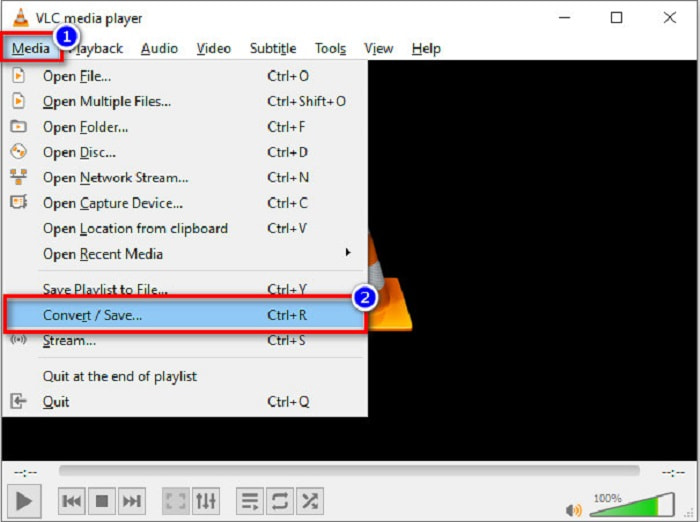
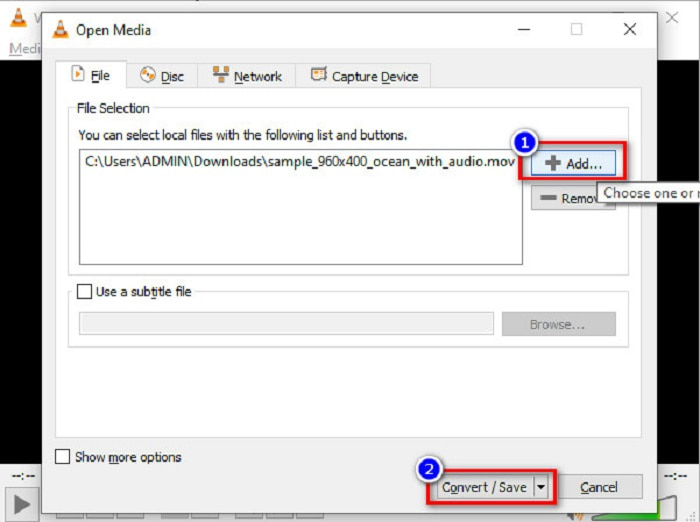
Étape 1. Ouvrez VLC Media Player, cliquez sur l’option Média située en haut de l’interface du logiciel, puis sélectionnez Convertir/Enregistrer.
Étape 2. Ensuite, cliquez sur le bouton Ajouter pour sélectionner votre fichier au format MOV. Le format de fichier apparaîtra dans la liste. Puis cliquez sur le bouton Convertir/Enregistrer pour passer à l’étape suivante.
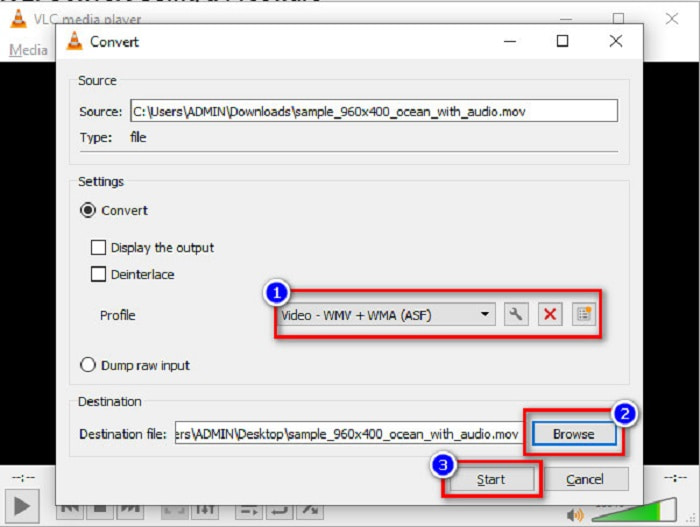
Étape 3. Enfin, sélectionnez WMV et choisissez le dossier de destination en cliquant sur Parcourir, puis cliquez sur le bouton Démarrer pour lancer la conversion.
Partie 3. Convertir MOV en WMV à l'aide d'un convertisseur en ligne
Si vous vous demandez comment convertir des fichiers MOV en fichiers WMV en ligne, nous avons un outil en ligne spécialement pour vous. FVC Free Video Converter Online est un convertisseur en ligne qui vous permet de convertir vos fichiers MOV en WMV, MP4, AVI, MPG et plus encore. Ce convertisseur est simple d’utilisation, vous ne rencontrerez donc aucune difficulté pour convertir vos fichiers. Cependant, vous pouvez subir une conversion lente, car ce convertisseur fonctionne via le Web. Néanmoins, c’est un outil efficace pour convertir des vidéos MOV en WMV en ligne, et il est très utilisé.
Voici les étapes à suivre pour effectuer une conversion à l'aide de ce convertisseur en ligne :
Étape 1. D’abord, ouvrez votre navigateur, puis recherchez FVC Free Video Converter Online.
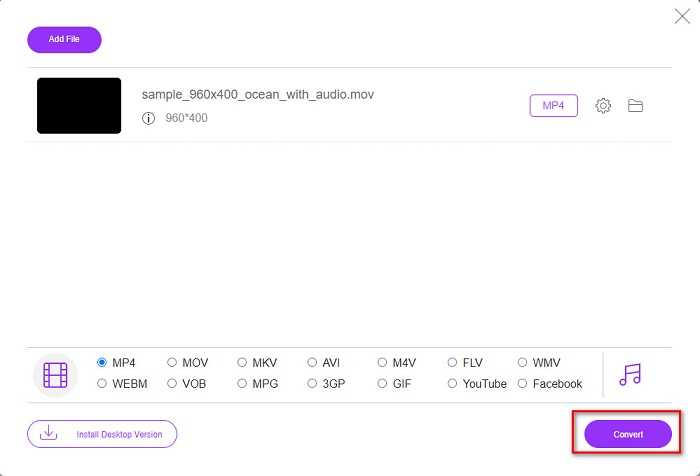
Étape 2. Après avoir ouvert le convertisseur dans le navigateur, cliquez sur Ajouter des fichiers à convertir. Le convertisseur va alors commencer à se lancer. Vous serez ensuite redirigé vers les fichiers de votre ordinateur, où vous choisirez le fichier MOV à convertir.
Téléchargez la version de bureau pour convertir des fichiers par lots.
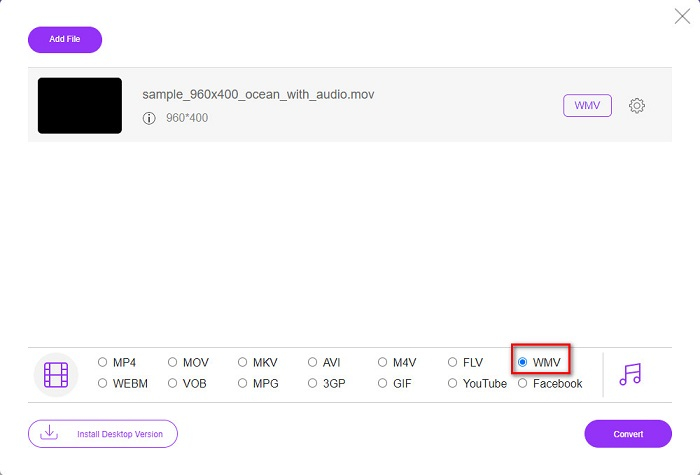
Étape 3. Dans la deuxième interface du logiciel, en bas, vous verrez la liste des formats de fichiers où vous pouvez choisir le format WMV souhaité.
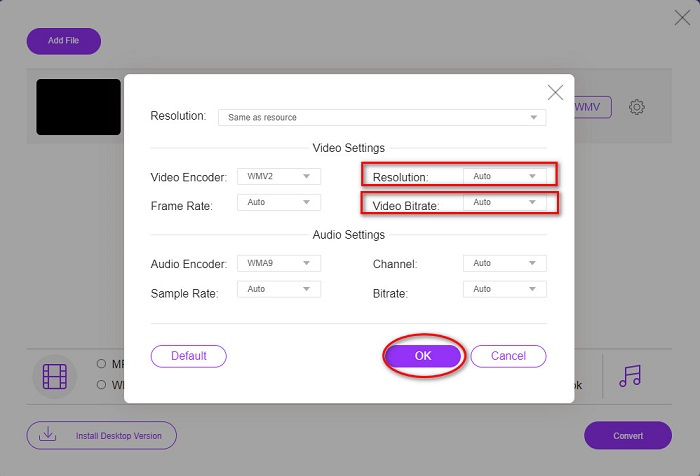
Optionnel. En cliquant sur le bouton Paramètres, vous pouvez modifier la résolution et le débit binaire vidéo de votre fichier. Puis cliquez sur OK pour valider vos réglages.
Étape 4. Après avoir sélectionné le format WMV, cochez le bouton Convertir pour convertir votre fichier MOV en fichier WMV. Enfin, attendez la fin de la conversion. Et voilà ! Aussi simple que cela, vous pouvez convertir un MOV en WMV.
Partie 4. Connaissance approfondie des fichiers MOV et des fichiers WMV
Le format MOV est largement pris en charge par macOS. Bien que vous puissiez lire des fichiers MOV sous Windows, vous avez tout de même besoin du support de QuickTime. De plus, le fichier MOV est enregistré au format QuickTime File Format. Comme il est principalement pris en charge par QuickTime et les plateformes Mac, il est devenu aujourd’hui l’un des formats de fichiers les plus répandus. En comparaison, le format WMV ou Windows Media Video est pris en charge par de nombreux appareils, principalement par le système Windows. En outre, ce format utilise une méthode de compression qui permet de réduire la taille de votre fichier sans affecter la qualité.
MOV contre WMV
Le format MOV peut être utilisé pour stocker un film, une émission de télévision, un court clip vidéo ou un film personnel. Il est en fait enregistré au format de fichier QuickTime (QTFF), introduit par Apple en 1991. Les fichiers MOV sont souvent utilisés lorsque les utilisateurs souhaitent enregistrer une vidéo de haute qualité.
Produit par Microsoft, WMV était l'un des formats vidéo les plus courants dans les années 2000. Il peut être vu sur le Web et lu par divers lecteurs multimédias sous Windows. Et c'est aussi le format de fichier vidéo par défaut de Windows Media Player. Mais il a été repris par d'autres formats récemment.
Partie 5. FAQ sur la conversion de MOV en WMV
La conversion de MOV en WMV affecte-t-elle la qualité de mon fichier ?
Dans certains cas, la qualité de votre fichier sera affectée, selon le convertisseur que vous utiliserez. Certains convertisseurs ne peuvent pas prendre en charge les vidéos pixel de haute qualité.
QuickTime prend-il en charge les fichiers WMV ?
Les lecteurs QuickTime ne prennent pas en charge les fichiers WMV. Cependant, vous pouvez convertir vos fichiers WMV en des formats compatibles avec QuickTime, notamment MOV, MP4, M4V, et d’autres encore. Pour plus d’informations sur la conversion de WMV en MOV, cliquez sur ce lien.
Pouvez-vous compresser les fichiers MOV ?
L’utilisation d’un fichier ZIP permet de compresser des fichiers MOV et d’autres fichiers. Toutefois, compresser des fichiers MOV avec ZIP ne réduira leur taille que de façon limitée. C’est pourquoi nous vous recommandons de convertir votre fichier vers un format de plus petite taille en utilisant les convertisseurs présentés ci‑dessus.
Conclusion
Comme indiqué plus haut, il existe différents convertisseurs parmi lesquels choisir. Vous pouvez opter pour un convertisseur en ligne, hors ligne ou gratuit. Ces convertisseurs possèdent des caractéristiques et des fonctions distinctes que vous pouvez essayer. Cependant, nous vous recommandons d’utiliser FVC Video Converter Ultimate car il propose davantage de fonctionnalités que les autres convertisseurs. De plus, il offre une conversion ultra‑rapide et efficace. Téléchargez‑le maintenant pour profiter des fonctionnalités remarquables offertes par ce convertisseur.
-
 [Gratuit et en ligne] 4 méthodes pour convertir MOV en MP4
 Vous voulez convertir des fichiers MOV (Apple QuickTime Movie) en MP4? Cet article partage 4 méthodes gratuites pour convertir vos fichiers vidéo MOV au format MP4 sous Windows 10/8/7 / XP et Mac OS X.
-
 4 meilleures méthodes pour convertir facilement MOV en MP3 sur Windows et Mac
 Lorsque vous souhaitez extraire les fichiers audio MP3 à partir de fichiers MOV, vous pouvez en savoir plus sur les 4 convertisseurs MOV en MP3 les plus efficaces pour obtenir les fichiers souhaités à partir de l'article.
-
 2 façons simples de convertir des fichiers MOV en FLV sur Windows/Mac
 Comment convertir MOV en FLV gratuitement ? Voici les meilleurs convertisseurs vidéo sur ordinateur et en ligne pour convertir votre fichier MOV en FLV en quelques secondes sans payer un centime.

