


 Video Converter Ultimate
 Enregistreur d'écran
 Réparation vidéo
Les meilleurs convertisseurs gratuits et faciles à utiliser qui convertissent WMV en MOV à ne pas manquer
Microsoft Windows Media Audio (WMA) et Microsoft Windows Media Video (WMV) sont des formats audio et vidéo compressés développés par Microsoft dans le conteneur ASF. Dès que les fichiers WMV ou WMA sont encodés avec les codecs Windows Media Video et Windows Media Audio, ils sont enregistrés avec l’extension .asf. Ces deux formats vidéo créés par Microsoft ne peuvent être lus que par certains lecteurs vidéo spécifiques ou convertis par quelques logiciels ou convertisseurs en ligne limités. Mais si vous recherchez des convertisseurs fiables et dignes de confiance pour convertir WMV en MOV, cet article est fait pour vous. Poursuivez votre lecture pour en savoir plus.

Partie 1. Brève introduction de WMV et MOV
L'extension de fichier WMV représente les fichiers Windows Media Video, compressés à l'aide d'un ou plusieurs formats de compression vidéo de Microsoft. Par exemple, certains programmes tiers l'utilisent pour stocker de brèves animations car il s'agit d'un format typique pour stocker la vidéo dans Windows. Bien que d'apparence similaire aux fichiers Windows Media Video, les fichiers Windows Media Audio ne comprennent que des données audio et ne contiennent pas de vidéo. L'extension WMA est utilisée pour ces fichiers.
Cependant, le QuickTime File Format (QTFF) est un format de fichier conteneur multimédia, et un fichier MOV est un fichier vidéo enregistré au format QuickTime File Format (QTFF). Un ou plusieurs pistes y sont stockées, chacune contenant différents types de données multimédias (telles que la vidéo, l’audio et le texte) (sous-titres). Les fichiers MOV sont couramment utilisés pour stocker des films et d’autres fichiers vidéo, et ils sont faciles à trouver.
Partie 2. Meilleur moyen de convertir WMV en MOV sur Mac et Windows
Cet article propose Video Converter Ultimate pour les utilisateurs Mac qui souhaitent convertir WMV en MOV. Les versions Windows et Mac de ce logiciel sont toutes deux disponibles en téléchargement gratuit. Grâce à son interface conviviale et à ses outils faciles d’accès, ce logiciel peut être utilisé par un large éventail d’utilisateurs. Il intègre un convertisseur vidéo qui prend en charge un grand nombre de formats vidéo et peut convertir des fichiers en moins d’une minute, contrairement à d’autres applications et ressources web. De plus, ce logiciel dispose de nombreuses fonctionnalités supplémentaires qui peuvent vous aider à améliorer encore davantage votre vidéo. En partant du principe que vous avez lu la description du logiciel, commençons :
Étape 1. Pour lancer le téléchargement, faites un clic droit sur l’icône Téléchargement gratuit ci‑dessous. Ce logiciel fonctionne aussi bien sur Windows que sur Macintosh. Il est possible de l’installer et de commencer à l’utiliser immédiatement après le téléchargement en cliquant sur l’option Commencer maintenant.
Téléchargement gratuit pour Windows 7 ou version ultérieure Téléchargement sécurisé
Téléchargement gratuit pour macOS 10.7 ou version ultérieure - Téléchargement sécurisé
Étape 2. Après avoir téléchargé le logiciel, vous devez le lancer. Ces informations apparaîtront dans une fenêtre lors de la toute première ouverture du logiciel. Importez le fichier vidéo que vous souhaitez convertir pour lancer le processus de conversion.
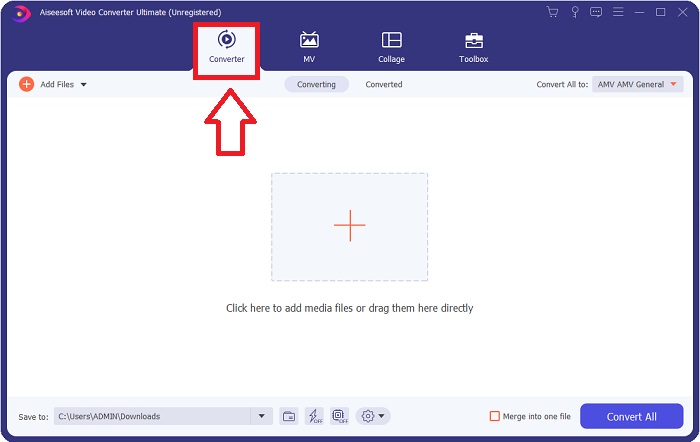
Étape 3. Commencez par charger dans le convertisseur les fichiers que vous souhaitez convertir, en faisant glisser et en déposant le fichier vidéo que vous voulez convertir sur le signe + pour démarrer le processus de conversion.
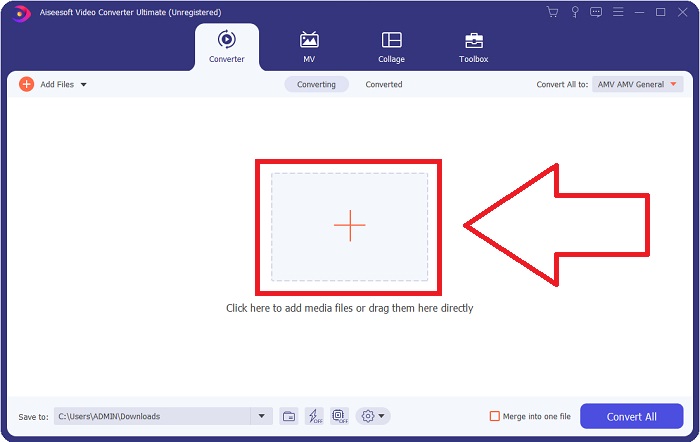
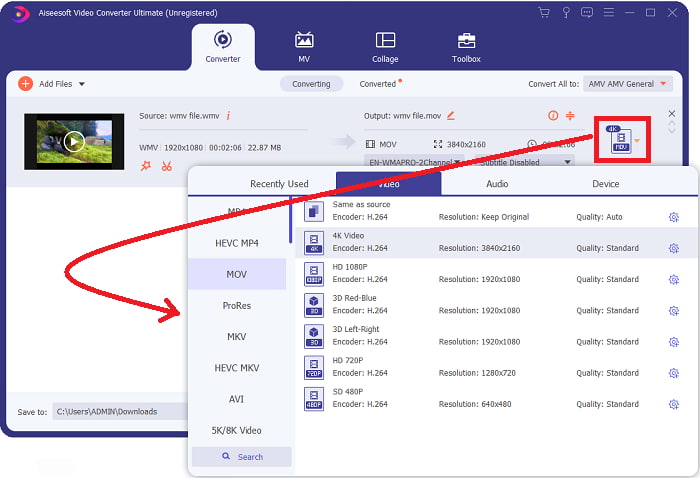
Étape 4: Un menu d’options apparaît dans la partie supérieure droite de l’écran, à partir duquel vous pouvez choisir un format vidéo à lire. Sélectionnez MOV comme format vidéo dans la liste déroulante qui s’affiche. Il est possible de choisir parmi différents niveaux de qualité vidéo selon le fichier MOV que vous avez sélectionné. Si le format de sortie souhaité n’est pas disponible, vous pouvez ajuster les paramètres de qualité sous Windows. Vous pouvez modifier la fréquence d’images de l’affichage et la qualité audio en cliquant sur l’icône en forme de roue dentée dans le coin supérieur droit. Utilisez le bouton Créer nouveau pour enregistrer vos modifications une fois qu’elles sont effectuées.
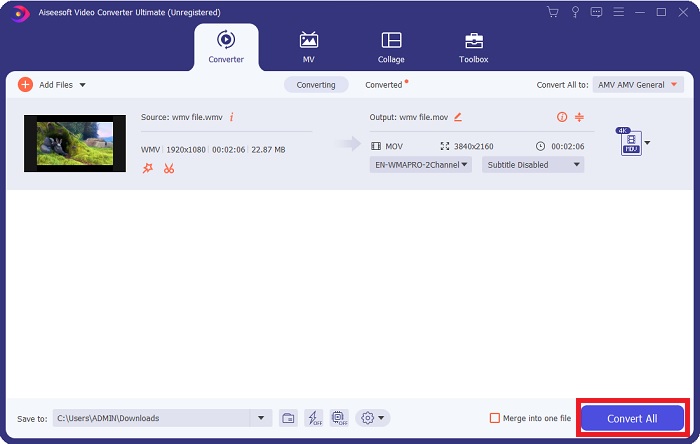
Étape 5. Lorsque vous avez terminé le montage de la vidéo et qu’elle est prête à être convertie, cliquez sur Tout convertir pour commencer le transfert des fichiers.
Partie 3. Autre moyen efficace de convertir WMV en MOV sur Mac et Windows
Méthode 1. Utiliser Free Video Converter Online
Avec FVC Free Video Converter Online, vous pouvez convertir gratuitement un large éventail de fichiers multimédias. Si vous avez une vidéo haute définition, vous pouvez aisément la convertir vers des formats tels que MP4, FLV et WMV sans perte de qualité. Sans compromettre la qualité, il est possible de convertir simultanément un grand nombre de fichiers vidéo ou audio. En utilisant cet outil de conversion vidéo gratuit, les utilisateurs ont accès à un ensemble complet d’options de montage, ce qui leur permet d’ajuster finement leurs vidéos. Alors, préparons‑nous à étudier toutes les étapes :
Étape 1: Veuillez cliquer sur ce lien pour accéder à la page d’accueil du site du convertisseur FVC. Et commencez à convertir vos fichiers en ligne.
Étape 2: Pour obtenir le lanceur pour votre ordinateur, cliquez sur le bouton Ajouter des fichiers à convertir sur le côté droit de l’écran. Il se lancera immédiatement après l’avoir téléchargé à nouveau. Ouvrez le fichier dans votre dossier et relancez le processus de téléchargement.
Téléchargez la version de bureau pour convertir des fichiers par lots.
Étape 3: Pour préparer le lancement du processus de conversion, choisissez le format MOV ci‑dessous.
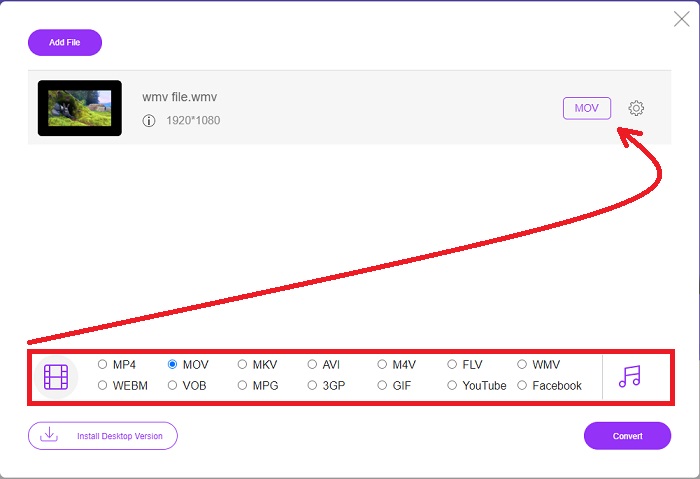
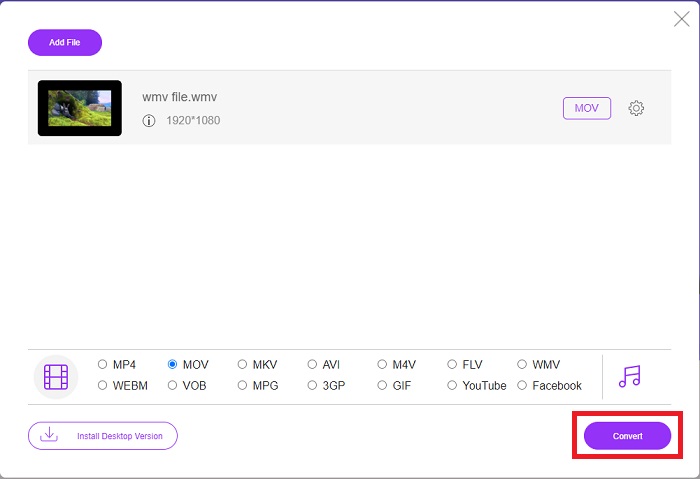
Étape 4: Une fois que vous avez choisi un format à convertir, cliquez sur Convertir pour démarrer la conversion.
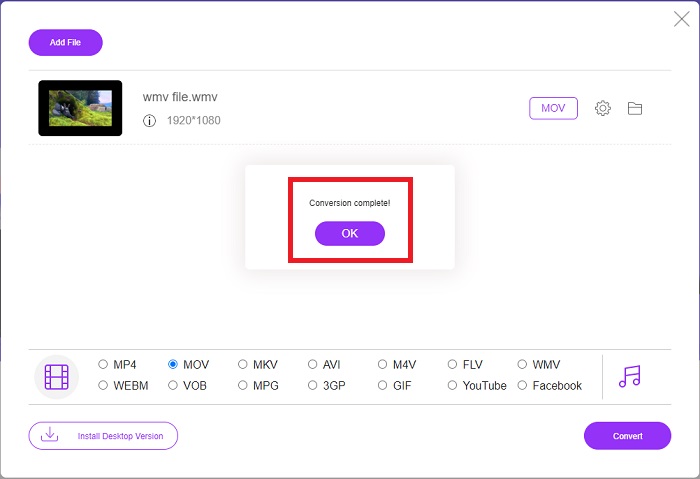
Étape 5: Après quelques minutes, un dossier contenant le fichier converti devrait s’afficher ; vous pourrez alors l’ouvrir et commencer à le lire.
Méthode 2. Utiliser Video Converter
Vous essayez de trouver un convertisseur WMV vers MOV gratuit ? La méthode la plus rapide consiste à utiliser un service Web pour convertir vos fichiers WMV au format MOV. Lorsque vous avez terminé avec vos vidéos, vous pouvez les transférer sur n'importe quel appareil et en profiter plus tard à l'aide de cet outil de conversion de média en ligne ! Voici comment c'est fait.
Étape 1: En cliquant sur le bouton Ajoutez vos médias, vous pouvez importer votre fichier WMV depuis votre ordinateur, Dropbox ou Google Drive pour le convertir en MOV.
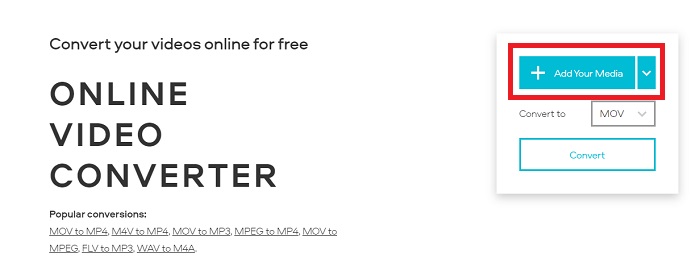
Étape 2: Sélectionnez MOV comme format de sortie souhaité. Utilisez les paramètres avancés pour améliorer la qualité générale de votre vidéo.
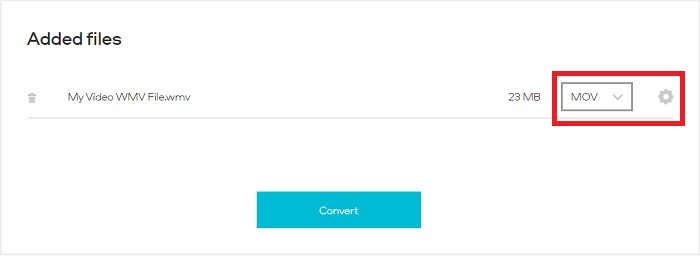
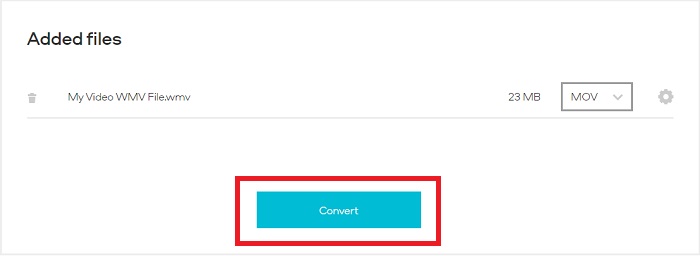
Étape 3: Après avoir effectué tous les réglages nécessaires, vous pouvez maintenant cliquer sur le bouton Convertir.
WMV contre MOV
Produit par Microsoft, WMV était l'un des formats vidéo les plus courants dans les années 2000. Il peut être vu sur le Web et lu par divers lecteurs multimédias sous Windows. Et c'est aussi le format de fichier vidéo par défaut de Windows Media Player. Mais il a été repris par d'autres formats récemment.
Le format MOV peut être utilisé pour stocker un film, une émission de télévision, un court clip vidéo ou un film personnel. Il est en fait enregistré au format de fichier QuickTime (QTFF), introduit par Apple en 1991. Les fichiers MOV sont souvent utilisés lorsque les utilisateurs souhaitent enregistrer une vidéo de haute qualité.
Partie 4. FAQ sur la conversion de WMV en MOV
MOV et WMV sont-ils identiques ?
Les fichiers MOV utilisent le codage MPEG-4 pour être lus avec QuickTime pour Windows, développé par Apple pour QuickTime Player. En plus d'être pris en charge par Facebook et YouTube, MOV fonctionne bien pour l'écoute de la télévision. Les fichiers WMV (Windows Media Viewer) sont comparables au MOV (format vidéo de Mozilla) en termes de qualité et de taille. Microsoft a créé WMV pour une utilisation dans Windows Media Player.
Quels sont les avantages et les inconvénients de MOV ?
Les fichiers MOV sont principalement utilisés pour le montage et peu pour un usage réellement pratique. En plus de QuickTime Player, ce format n’est pris en charge que par un petit nombre de lecteurs multimédias. Les monteurs vidéo professionnels tirent parti de cet avantage. Un inconvénient est le manque d’adoption sur les appareils grand public.
Le WMV est-il toujours utilisé ?
Ce format a été développé par Microsoft et est couramment utilisé dans les lecteurs Windows Media. Le format vidéo WMV permet d’obtenir des fichiers plus petits et plus compressibles que les fichiers MP4. Par conséquent, il est très utilisé pour la diffusion de vidéos en ligne. L’iPhone et le Mac peuvent exécuter Windows Media Player, qui n’est pas compatible avec les appareils Apple.
Conclusion
Comme indiqué ci‑dessus, il existe de nombreux convertisseurs disponibles à télécharger ou à utiliser sur internet à tout moment. Mais en termes d’efficacité et de choix du meilleur convertisseur parmi d’autres, Video Converter Ultimate est celui vers lequel pointe cette conclusion. Grâce à sa capacité à convertir rapidement les formats vidéo et audio, à prendre en charge un large éventail de formats gratuitement et à être disponible à la fois sur Windows et Mac. Qu’attendez‑vous ? Téléchargez‑le dès maintenant !
Téléchargement gratuit pour Windows 7 ou version ultérieure Téléchargement sécurisé
Téléchargement gratuit pour macOS 10.7 ou version ultérieure - Téléchargement sécurisé
-
 Les 3 meilleures façons de convertir FLV en WMV sur Windows et Mac
 Vous cherchez le meilleur moyen de convertir FLV en WMV sans perte de qualité sur PC ou Mac ? Vous avez de la chance puisque nous partageons ici trois méthodes pour faire le travail facilement.
-
 2 façons les plus simples de convertir des fichiers WMV en FLV sur PC/Mac
 Comment convertir WMV en FLV ? Tout d'abord, vous devez lire nos recommandations et trouver votre méthode préférée, puis suivre notre guide pour faire le travail rapidement.
-
 [2 Solutions] Comment convertir gratuitement des vidéos WMV en fichiers GIF
 Si vous souhaitez couper les parties merveilleuses des vidéos WMV et en faire des GIF, vous pouvez découvrir 2 méthodes simples pour transférer des vidéos WMV en GIF dans cet article.

