


 Video Converter Ultimate
 Enregistreur d'écran
 Réparation vidéo
 Téléchargement sécurisé
MOV en MPG : le guide rapide sur la façon de convertir ces formats en 2023
Pour mémoire, les fichiers MOV suscitent aujourd’hui d’excellentes réactions, car ils sont considérés comme l’un des formats les plus adaptés pour stocker des films. Ce type de fichier est largement reconnu comme le format par défaut des produits Apple tels que l’iPhone, l’iPad et le MacBook. Cependant, lorsque vous essayez de téléverser des fichiers MOV sur Internet, vous pouvez rencontrer des difficultés, car ils sont généralement plus volumineux que les autres formats vidéo. Pour y remédier, vous pouvez choisir de convertir un MOV en MPG. Restez donc avec nous dans ce guide, nous allons vous aider à apprendre comment y parvenir.

Partie 1. Convertir MOV en MPG
1. Convertisseur vidéo ultime
Video Converter Ultimate est la solution hors ligne idéale pour répondre à tous vos besoins de conversion de MOV en MPG. En quelques clics, le programme vous permet de transformer un fichier, qu’il soit de grande ou de petite taille. De plus, cet outil est équipé de paramètres de personnalisation de la sortie, permettant aux utilisateurs d’obtenir un format de sortie de haute qualité et d’adapter le résultat à leurs préférences. Voici un aperçu du guide simple pour convertir rapidement un MOV en MPG.
Étape 1. Installer le programme
Pour commencer, cliquez sur le bouton de Téléchargement correspondant à votre appareil ci‑dessous. Ensuite, cliquez sur le fichier d’installation et exécutez‑le pour lancer le programme sur votre écran.
Téléchargement gratuit pour Windows 7 ou version ultérieure Téléchargement sécurisé
Téléchargement gratuitPour MacOS 10.7 ou version ultérieureTéléchargement sécurisé
Étape 2. Importer les fichiers MOV à convertir
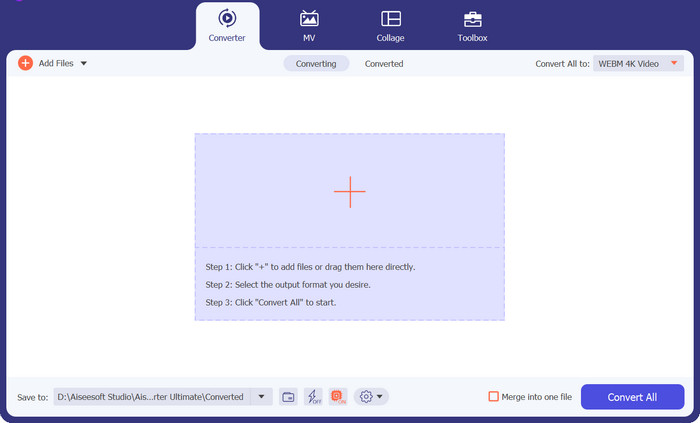
Après avoir installé le programme, cliquez sur le bouton Plus au centre de l’interface. Lorsque l’explorateur de fichiers de votre ordinateur s’ouvre, choisissez le fichier MOV à importer. Par ailleurs, vous pouvez importer plusieurs fichiers à la fois pour une conversion par lot.
Étape 3. Sélectionner le format de sortie
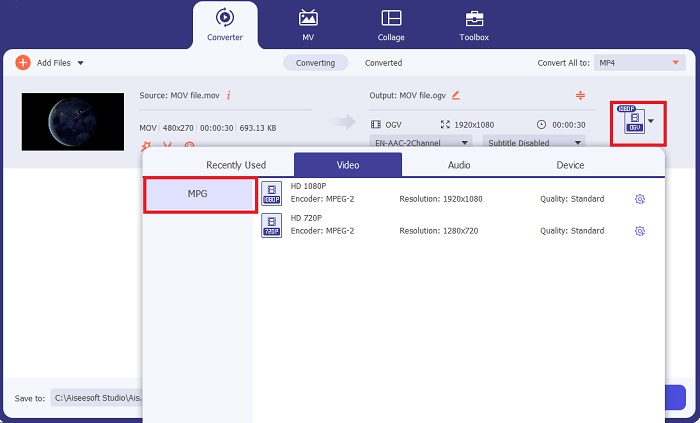
Une vignette de votre fichier MOV s’affichera dans le programme, confirmant la réussite de l’importation. Pour sélectionner votre format de sortie, développez l’onglet Sortie et cliquez sur le panneau Vidéo. À partir de là, faites défiler la liste et sélectionnez MPG.
Étape 4. Lancer la conversion
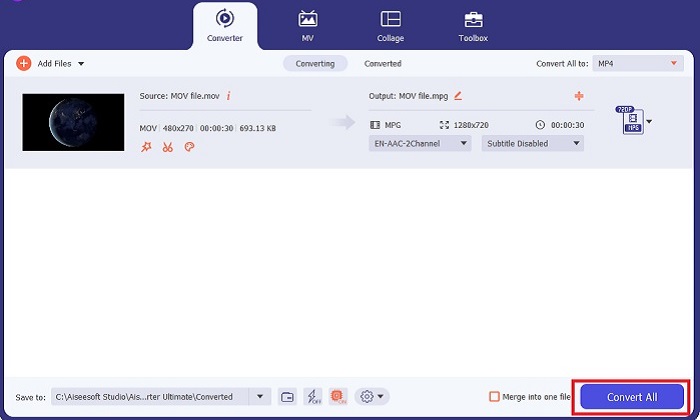
Enfin, ajustez la qualité de sortie en modifiant les paramètres de sortie selon vos besoins. Une fois terminé, cliquez sur le bouton Convertir pour lancer la conversion de votre MOV en MPG.
Fonctionnalités clés
◆ Conversion transparente de MOV en MPG : Une chose que nous aimons à propos de Video Converter Ultimate est son interface conviviale. Cet outil est le meilleur pour tout le monde, qu'il soit débutant ou expérimenté.
◆ Vitesse de conversion 50 fois plus rapide : Grâce à l'aide de la technologie d'encodage d'accélération GPU, Video Converter Ultimate surpasse tous les autres convertisseurs hors ligne en raison de sa conversion rapide sans retard ni plantage.
◆ Fonctionnalité de conversion en masse : avec Video Converter Ultimate, vous pouvez également convertir un dossier de fichiers MOV en un choix de formats 100o+ autres que MPG.
2. Convertisseur vidéo gratuit en ligne
Free Video Converter Online est un autre logiciel qui révolutionne la conversion de formats. Même si ce programme en ligne ne propose pas d’outils aussi complets que certains logiciels hors ligne, il s’impose comme une solution fiable pour convertir un MOV en MPG en ligne. Il permet la conversion par lot et vous donne un contrôle complet sur votre fichier de sortie.
Étape 1. Rendez‑vous d’abord sur le site principal de Free Video Converter Online. Avant d’importer votre fichier MOV, cliquez sur Ajouter des fichiers : il vous sera d’abord demandé de lancer l’outil en ligne.
Étape 2. Pour importer le fichier que vous souhaitez convertir, cliquez de nouveau sur le bouton Ajouter des fichiers et importez votre fichier. Vous pouvez également utiliser la fonction glisser‑déposer.
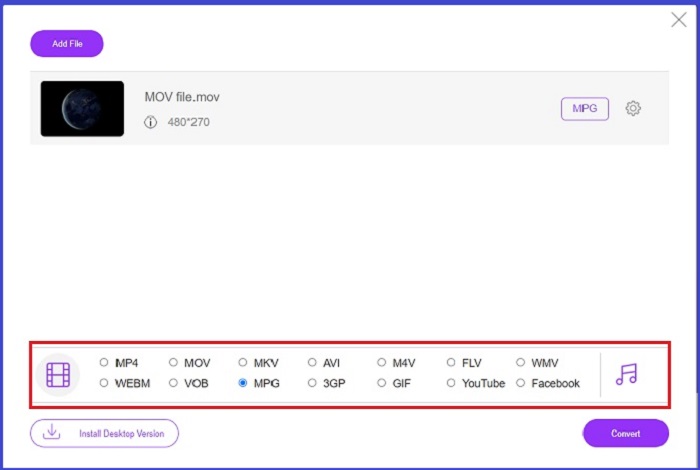
Étape 3. Une fois votre fichier brut affiché, sélectionnez votre format de sortie dans le coin inférieur de l’écran. Dans le panneau Vidéo, vous verrez tous les formats possibles et, dans notre cas, choisissez MPG. Enfin, cliquez sur le bouton Convertir et patientez jusqu’au téléchargement de votre fichier.
Fonctionnalités clés
◆ Convertisseur en ligne multi-plateforme : Que vous soyez sur votre téléphone, votre tablette ou votre ordinateur, cet outil fonctionne parfaitement bien, ce qui rend possible la conversion vidéo ou audio.
◆ Garantie de confidentialité : qui souhaite que des informations privées soient envahies ? Avec Free Video Converter Online, vous ne devriez faire face à aucun dilemme à propos de ce problème. Cet outil en ligne permet aux utilisateurs de convertir MOV en MPG gratuitement sans nécessiter de processus d'inscription.
◆ Aucune exigence d'installation : cet outil est un autre convertisseur sans tracas pour vous aider à vous en sortir avec des installations trépidantes, surtout si vous manquez d'espace numérique.
Partie 2. Convertir MPG en MOV
1. Convertisseur vidéo ultime
Encore une fois, Video Converter Ultimate reste la meilleure solution que nous puissions vous proposer pour convertir un MOV en MPG sur Mac et Windows. Cet outil prend en charge plus de 1000 formats vidéo et audio, y compris ceux spécialement optimisés pour des appareils comme Samsung, Apple, Sony et bien d’autres. Suivez le guide ci‑dessous pour convertir n’importe lequel de vos fichiers MPG en MOV.
Téléchargement gratuit pour Windows 7 ou version ultérieure Téléchargement sécurisé
Téléchargement gratuitPour MacOS 10.7 ou version ultérieureTéléchargement sécurisé
Étape 1. Cliquez sur le bouton Ajouter des fichiers pour importer votre MPG dans le programme.
Étape 2. Une fois votre fichier chargé à l’écran, sélectionnez le format de sortie en cliquant sur Sortie > Vidéo > MOV. Pour une meilleure qualité, vous pouvez également modifier les paramètres de la vidéo.
Étape 3. Cliquez sur le bouton Convertir pour demander au programme de convertir les fichiers de MPG en MOV. Vous pourrez vérifier le résultat directement dans le programme une fois la conversion terminée.
2. AnyConv
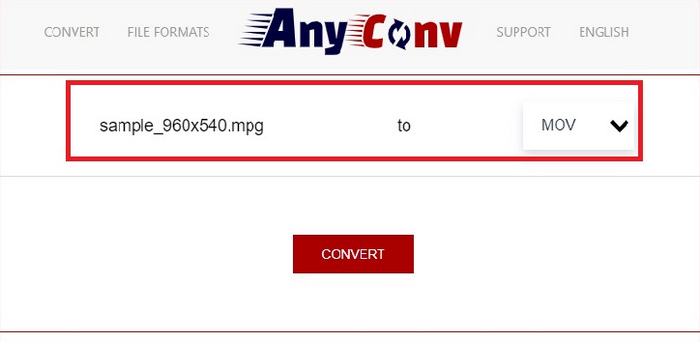
AnyConv est un convertisseur MPG en MOV gratuit en ligne. Ce programme fonctionne bien sur n'importe quel appareil et offre une fonction de glisser-déposer lorsque vous téléchargez vos fichiers MPG. De plus, cette solution en ligne sécurise les données des utilisateurs en supprimant leurs fichiers convertis au bout d'une heure. Outre MOV, vous pouvez convertir vos fichiers MPG en 3GP, AVCHD, MP4, MKV, etc.
Étape 1. Commencez par ouvrir le site Web d’AnyConv. Lorsqu’il apparaît sur votre écran, cliquez sur Choisir un fichier et sélectionnez la séquence MOV que vous souhaitez convertir.
Étape 2. Une fois votre fichier MOV importé, choisissez MPG dans la liste des formats de sortie, dans la colonne Output au centre.
Étape 3. Pour finir, cliquez sur le bouton Convertir et attendez que votre fichier soit téléchargé.
Pour aller plus loin :
3 meilleures façons de convertir rapidement MPG en MP4
5 meilleurs convertisseurs ultimes de MOV vers 3GP à ne pas manquer
Partie 3. FAQ sur la conversion de MPG en MOV
Existe-t-il un convertisseur MOV en MPG gratuit ?
Définitivement oui! Les convertisseurs en ligne sont votre premier choix pour éviter de payer des frais. Vous pouvez choisir le convertisseur vidéo en ligne gratuit pour convertir MOV en MPG gratuitement.
MPG est-il meilleur que MOV ?
MOV est meilleur que MPG en raison de leurs différences de type. MOV est un format de conteneur qui enregistre toutes vos données d'origine. Dans le même temps, MPG est un codec compressé utilisé pour réduire la taille du fichier d'une vidéo pour un transfert de fichier plus rapide via Internet.
Quel est l'avantage d'un fichier MOV ?
Les fichiers MOV conviennent au montage et sont considérés comme des normes pour choisir le meilleur format vidéo. Un inconvénient de ce fichier est que seuls quelques lecteurs multimédias ouvrent ce format.
MOV en MPG réduit-il la qualité ?
Oui. La conversion de vos fichiers MOV en MPG réduira non seulement la taille du fichier de votre vidéo, mais réduira également la qualité. Les deux fichiers sont parfaits dans tous les cas, vous pourriez en avoir besoin.
Puis-je lire MOV dans Windows Media Player ?
Heureusement, les fichiers MOV sur Windows Media Player peuvent être lus tant qu'ils sont en version 12 ou supérieure.
Conclusion
Vous connaissez maintenant les différentes façons de convertir MPG en MOV ou inversement. Ces deux formats répondront au mieux à vos besoins variés. Avec les convertisseurs en ligne, vous bénéficiez d’une conversion simple et directe. En revanche, si vous souhaitez peaufiner vos fichiers en en modifiant la qualité, voire en les éditant, nous vous recommandons Video Converter Ultimate.
-
 FLV en MPG - Comment convertir FLV en MPG sur Mac, PC et en ligne gratuit
 Comment convertir FLV en MPEG ? Puis-je convertir FLV en MPG gratuitement ? Cet article partage 3 convertisseurs vidéo gratuits pour vous aider à convertir FLV en MPG sans perte de qualité.
-
 Comment convertir MPG en M4V sur Mac et utiliser l'outil en ligne
 Êtes-vous un nouvel utilisateur Mac et ne savez-vous pas comment convertir MPG en M4V ? Ensuite, vous pouvez lire cet article pour en savoir plus et découvrir comment convertir des fichiers à l'aide de votre Mac.
-
 8 meilleurs lecteurs MOV pour lire des fichiers MOV QuickTime avec une qualité originale
 Apprenez-en plus sur les 8 meilleurs lecteurs MOV disponibles pour Windows et Mac. Vous pouvez choisir celui souhaité et approprié pour lire les fichiers MOV avec la qualité d'origine.
