


 Video Converter Ultimate
 Enregistreur d'écran
 Réparation vidéo
 Téléchargement sécurisé
Comment se débarrasser gratuitement du filigrane Power Director [100% Working]
Pour choisir un éditeur et créateur vidéo complet, vous ne pouvez pas vous tromper en optant pour PowerDirector sur votre appareil. Attendez-vous à obtenir un résultat fantastique lorsque vous l’utiliserez pour monter vos vidéos de présentations, vlogs, tutoriels, démonstrations et bien plus encore. Sachez toutefois qu’un filigrane est ajouté aux vidéos montées si vous utilisez actuellement la version gratuite. Certains utilisateurs se retrouvent frustrés de voir un filigrane appliqué sur la vidéo sur laquelle ils ont beaucoup travaillé. Plutôt que de vous énerver, pourquoi ne pas lire cet article ? Découvrons ensemble comment supprimer gratuitement le filigrane PowerDirector afin de résoudre le problème une bonne fois pour toutes.

Partie 1. Comment se débarrasser gratuitement du filigrane Power Director avec les meilleures solutions du marché
Convertisseur vidéo FVC Ultimate
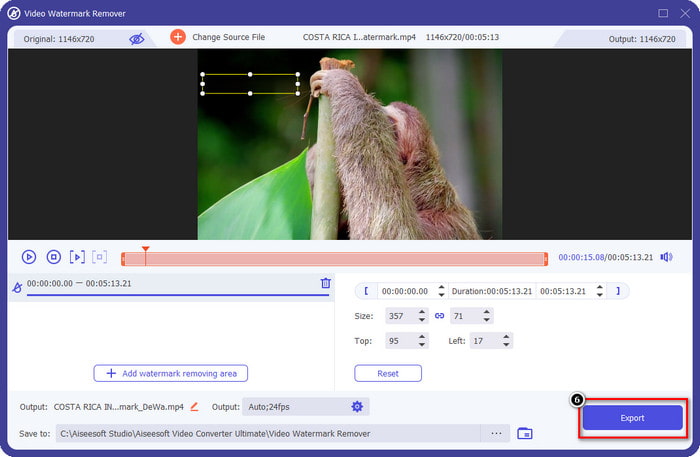
La version mise à jour de FVC Video Converter Ultimate dispose d'un outil de suppression de filigrane vidéo que vous pouvez utiliser pour avoir la vidéo sur PowerDirector pour PC sans filigrane. Cet outil est devenu l'outil complet qui peut effectuer simultanément une tâche polyvalente et le faire de manière professionnelle avec un traitement rapide. Ce qui nous étonne avec cet outil, c'est sa facilité d'utilisation. Si vous l'utilisez, vous n'avez pas besoin de devenir un professionnel pour supprimer le filigrane sur votre vidéo. Pour les utilisateurs à la recherche du meilleur outil de suppression de filigrane, vous ne pouvez pas vous tromper en téléchargeant gratuitement ce logiciel sur votre bureau. Toujours pas convaincu ? La seule façon de vous convaincre qu'il fait une performance ultime est de copier le tutoriel que nous ajoutons pour que vous le suiviez.
Étape 1. Vous pouvez télécharger gratuitement ce logiciel sur Windows ou macOS en cliquant sur le bouton de téléchargement ci‑dessous. Après avoir choisi la version que vous souhaitez télécharger, installez immédiatement le logiciel, puis ouvrez‑le.
Téléchargement gratuit pour Windows 7 ou version ultérieure Téléchargement sécurisé
Téléchargement gratuit pour macOS 10.7 ou version ultérieure - Téléchargement sécurisé
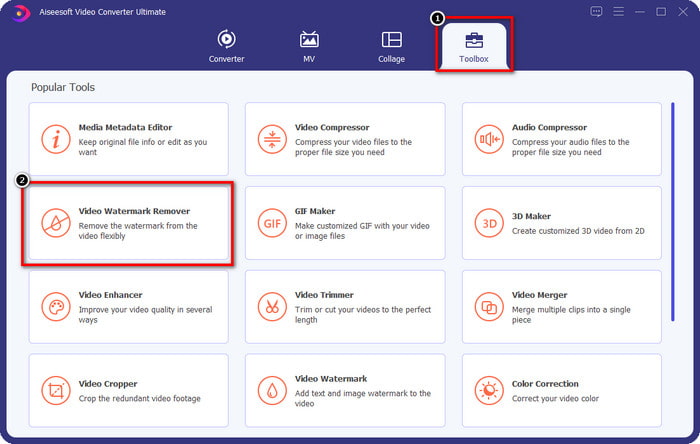
Étape 2. Maintenant qu’il est en cours d’exécution sur le système, allez dans la Boîte à outils et recherchez Suppresseur de filigrane vidéo dans l’ensemble des fonctionnalités.
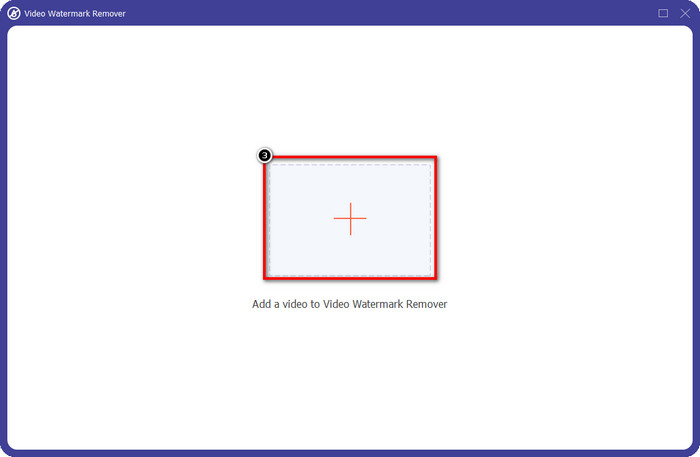
Étape 3. Ensuite, cliquez sur l’icône + pour importer la vidéo avec laquelle vous rencontrez un problème.
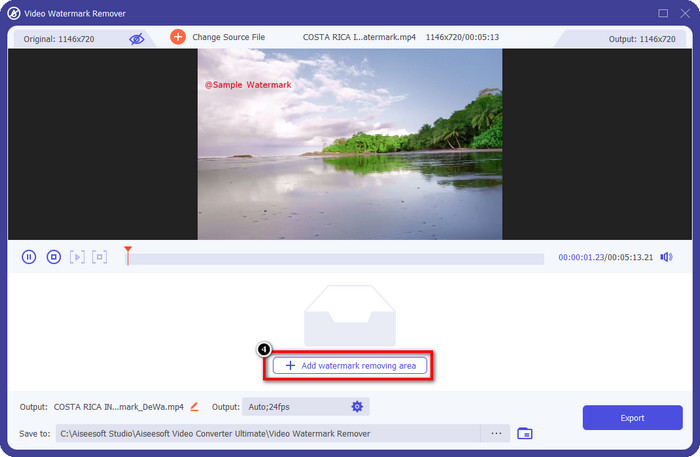
Étape 4. Appuyez sur Ajouter une zone de suppression de filigrane pour commencer à utiliser l’outil du logiciel.
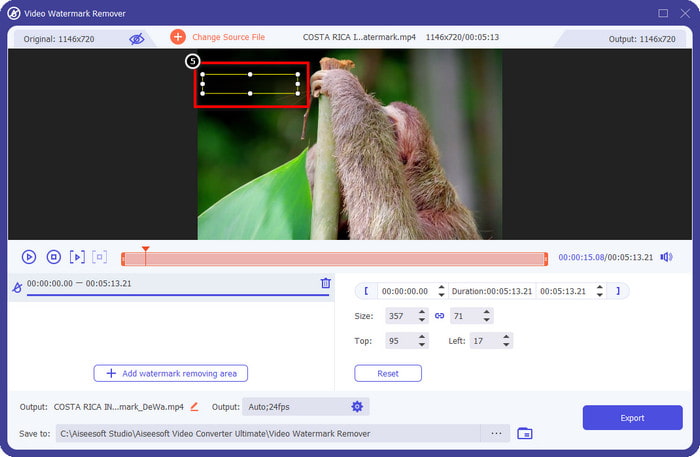
Étape 5. Avec votre souris, faites glisser le rectangle jusqu’à la zone du filigrane, puis relâchez. Vous pouvez ajuster la forme rectangulaire pour bien couvrir le filigrane.
Étape 6. Cliquez sur le bouton Exporter pour lancer le processus de suppression du filigrane. Une fois terminé, un dossier contextuel apparaîtra à l’écran ; cliquez sur le fichier pour regarder la vidéo sans filigrane.
VLC Media Player
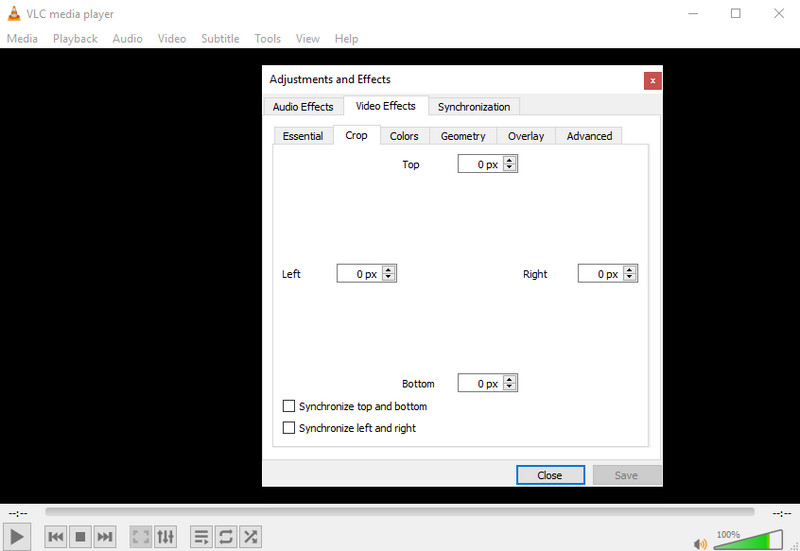
VLC Media Player n’est pas un outil spécialement conçu pour supprimer les filigranes. Néanmoins, il peut faire le travail en recadrant la zone où se trouve le filigrane dans votre vidéo. Cet outil n’est pas seulement un lecteur et un recadreur vidéo ; ce célèbre lecteur multimédia offre bien d’autres fonctions. Mais ne vous attendez pas à ce que cet outil permette un montage professionnel ni qu’il soit particulièrement simple à utiliser, car ce n’est pas le cas. Pour recadrer la vidéo, vous devrez saisir les mesures exactes afin de retirer le filigrane de l’image. Donc, si vous connaissez les coordonnées x et y exactes de la vidéo, vous pouvez suivre cette méthode pour supprimer le filigrane « edited by PowerDirector » avec ce lecteur multimédia.
Étape 1. Après avoir téléchargé le logiciel sur VideoLAN.org, ouvrez‑le. Cliquez sur Média, puis sur Ouvrir un fichier, et recherchez sur votre disque local la vidéo que vous montez dans PowerDirector, qui s’affichera à l’écran.
Étape 2. La vidéo commencera à se lire ; cliquez sur Outils, puis sur Effets et filtres. Vous pouvez utiliser votre clavier en appuyant sur Ctrl + E sous Windows et Commande + E sur Mac.
Étape 3. Allez dans Effets vidéo, Recadrage, puis saisissez les mesures sur la vidéo afin de recadrer la zone du filigrane.
Étape 4. Pour appliquer les réglages effectués, cliquez sur Enregistrer.
Kapwing
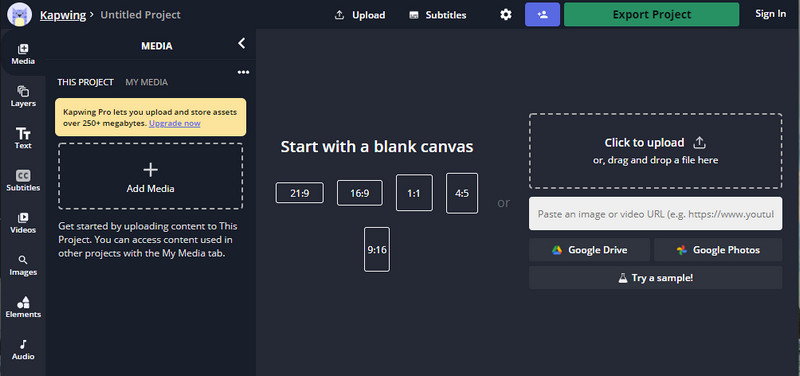
Besoin d'un éditeur vidéo en ligne ? Essayez d'utiliser Kapwing. Il s'agit d'un outil Web intuitif que vous pouvez utiliser pour éditer des vidéos comme ce que vous pouvez faire sur Power Director. Pourtant, ce n'est pas au niveau du directeur de puissance. La plupart des montages vidéo dont vous pourriez avoir besoin sont déjà là, comme le recadrage du filigrane. Bien que l'outil fasse le même travail que VLC lors de la suppression du filigrane, cet outil dispose d'un volet de prévisualisation où vous pouvez voir la vidéo recadrée avant l'exportation. Ainsi, si vous souhaitez enregistrer des vidéos, vous éditez sur Powerdirector sans filigrane pour PC ; vous devez d'abord les recadrer ici.
Étape 1. Ouvrez l’outil en ligne en le recherchant dans votre navigateur, puis cliquez sur Ajouter un média pour importer ici le fichier vidéo. Un processus de téléversement va démarrer, vous devrez donc attendre avant de pouvoir utiliser la vidéo que vous avez envoyée.
Étape 2. Cliquez sur Recadrer sur le côté gauche de l’interface pour ouvrir les fonctions de recadrage.
Étape 3. Ajustez le cadre et assurez‑vous que le filigrane de la vidéo n’est pas inclus dans ce cadre.
Optionnel : Si vous ne souhaitez pas modifier manuellement les dimensions de la vidéo, des options prédéfinies sont disponibles en dessous et vous pouvez les utiliser librement.
rame et assurez-vous que le filigrane de la vidéo n'est pas inclus sur le cadre.” /]Étape 4. Lorsque vous avez terminé, cliquez sur Terminer le recadrage pour enregistrer la vidéo que vous avez recadrée avec Kapwing.
En rapport:
Comment supprimer le filigrane des vidéos exportées depuis Renderforest
Comment supprimer le filigrane Viva Video sur les vidéos
Partie 2. FAQ sur la suppression du filigrane Power Director
Est-il sûr de télécharger Powerdirector sans filigrane apk gratuitement pour Android ?
Oui, vous pouvez visiter le Play Store et rechercher son nom pour télécharger l'application Power Director. Cependant, la version d'essai gratuite de cet outil ajoute un filigrane. Supposons que vous essayez de télécharger l'application sur des sites Web tiers pour obtenir la version complète. Dans ce cas, vous ne devez pas le faire car il pourrait y avoir des virus malveillants dans le fichier une fois téléchargé sur votre Android. Pour supprimer le filigrane sur Powerdirector, vous devez acheter une clé de licence.
Combien coûte l'application Power Director sur PC ?
Vous pouvez avoir le prix de départ Power Director 365 pour $ 4.08 tous les mois, vous pouvez accéder aux plans et à l'abonnement sur son site officiel. Vous pouvez également voir les fonctionnalités incluses que vous pouvez obtenir une fois que vous avez utilisé le plan de votre choix.
Cyberlink PowerDirector a-t-il un filigrane ?
Oui, il ajoute un filigrane une fois que vous avez exporté la vidéo sur la version gratuite de l'application, mais c'est évitable. Si vous achetez le logiciel d'un plan ou d'un abonnement, vous n'aurez pas à vous soucier du filigrane car aucun filigrane de produit ne sera ajouté une fois exporté.
Conclusion
Si vous souhaitez exporter les vidéos, vous les créez sur PowerDirector pour PC sans filigrane. Vous devez acheter une clé de licence pour ce programme. Mais si vous ne voulez pas dépenser au moins un centime, choisissez les outils que nous ajoutons à cet article car ces outils peuvent supprimer efficacement le filigrane sur vos vidéos éditées. Vous n'êtes toujours pas convaincu par l'outil que nous avons ajouté dans cet article ? Ensuite, il serait utile que vous les essayiez d'abord, en commençant par l'outil ultime pour supprimer le filigrane du Power Director.
-
 Supprimer le filigrane Animoto sur les vidéos facilement et efficacement
 Comment supprimer le filigrane Animoto sur la vidéo ? Continuez à lire cet article car nous avons fourni un tutoriel complet sur la façon de le faire.
-
 Comment supprimer un filigrane d'une vidéo à l'aide de Final Cut Pro [Guide complet]
 Vous avez un problème avec le filigrane sur les vidéos ? N'en dites pas plus, car nous avons fourni un didacticiel sur la façon de supprimer le filigrane de la vidéo à l'aide de Final Cut Pro.
-
 3 façons de supprimer le filigrane WeVideo avec un effet instantané
 Avez-vous du mal à résoudre le problème de filigrane laissé par WeVideo ? Ne vous inquiétez plus, car nous ajoutons les informations que vous devez connaître.
