


 Video Converter Ultimate
 Enregistreur d'écran
 Réparation vidéo
[Résolu] Comment utiliser les filtres vidéo pour améliorer parfaitement votre vidéo
Rendez vos contenus visuels plus remarquables que les autres en utilisant un filtre vidéo. Ces filtres peuvent renforcer le ton, créer une certaine cohérence, ajouter une ambiance, et bien plus encore. Même s’il existe de nombreuses applications de filtres sur le marché, nous espérons toujours pouvoir effectuer le montage vidéo dans Video Converter Ultimate, notamment pour l’ajout de filtres. Mais avant de proposer un tutoriel sur l’utilisation de cet outil ultime, voyons d’abord ce qu’est un filtre vidéo et les types de filtres que vous pouvez utiliser pour créer une vidéo parfaite. Consultez-les d’abord pour en avoir un aperçu.

Partie 1. Qu'est-ce qu'un filtre vidéo
Le filtre vidéo est très populaire sur le web et aide les utilisateurs à créer des contenus visuels plus travaillés sans ajouter d’effets spéciaux. Ces filtres sont intégrés, ce qui signifie qu’ils appliquent différents traitements à l’image en améliorant le ton, la luminosité, la profondeur, la température, etc. Bien que les filtres puissent vous aider à améliorer la vidéo, leur objectif n’est pas toujours le même. Par exemple, si vous essayez de filmer un portrait, vous aurez besoin d’un filtre adapté. Les informations suivantes vous indiqueront les critères essentiels à considérer pour trouver la meilleure application de filtre vidéo à télécharger ou à utiliser.
La liste ici n'est pas les différents filtres mais parlera des processus, des avantages et des normes des filtres.
1. Correction des couleurs réglable
La correction des couleurs est un processus de contrôle de la quantité de lumière qui ira sur le film. En tant que photographe, votre objectif est d'avoir l'imagerie parfaite en équilibrant le tri. Cependant, vous n'aurez pas toujours le mélange idéal sur tout ce qui peut améliorer votre photographie. Mais avec le filtre de correction des couleurs pour équilibrer votre vidéographie en filtrant la scène éclairée en noir, la luminosité et le contraste.
2. Filtres pour le travail parfait
Il existe de nombreux filtres de visage vidéo différents sur le marché, mais certains ne sont pas aussi bons que d'autres. Bien que les éditeurs vidéo disposent d'un ensemble de filtres, la recherche du filtre parfait peut être difficile à comprendre, surtout si vous n'avez pas une grande idée de ces filtres. Même si vous pouvez tous les essayer, cela prendra un peu de temps si jamais vous le faites. Donc, si vous voulez avoir plus d'idée sur les filtres les plus sélectionnés sur l'éditeur vidéo, vous pouvez passer à la deuxième partie.
3. Meilleur éditeur vidéo en déplacement
L'outil que vous devez sélectionner doit disposer de fonctionnalités d'édition vidéo pour vous aider à couper, fusionner, recadrer et en faire plus. Cependant, si vous choisissez un outil à modifier, vous devez tenir compte des éléments ci-dessous. Si vous êtes un pro ou un débutant, vous devez regarder vos standards pour avoir le meilleur éditeur vidéo.
Pour les professionnels :
◆ Un éditeur vidéo effectue un montage vidéo avancé pour vous aider à effectuer une tâche complexe en une seule fois.
◆ Il prend en charge différents types de fichiers à importer et à exporter.
◆ Il prend en charge l'importation de fichiers vidéo bruts à partir d'appareils photo, de téléphones portables ou de reflex numériques.
Pour les débutants :
◆ Il doit être facile à utiliser pour effectuer efficacement le montage vidéo.
◆ Bien qu'il ne soit pas bon en tant qu'outil professionnel, il devrait disposer des meilleurs outils d'édition dont un débutant a besoin.
◆ L'interface graphique doit être moins lourde pour éviter toute confusion sur les fonctionnalités de l'outil.
Partie 2. Quels sont les meilleurs filtres vidéo que vous pouvez utiliser
Les détails répertoriés ici sont les filtres que vous pouvez utiliser pour vous aider à mettre à niveau la vidéo. Veuillez noter que les filtres ne peuvent pas modifier la qualité de la vidéo, mais ils peuvent aider votre vidéo à être excellente.
1. Filtre de visage d'animaux

La plupart des utilisateurs adorent utiliser des filtres pour chiens ou chats sur la vidéo car ils sont uniques et nous font bien rire. Ce filtre anime un animal différent et d'autres trucs hilarants, contrairement aux autres filtres. Bien que cela n'améliore pas votre photographie, vous pouvez toujours l'utiliser si vous souhaitez avoir un filtre animé dans un but différent. De plus, la meilleure application de filtrage que vous pouvez télécharger a déjà ajouté des filtres animés pour ses utilisateurs.
2. Filtre gris
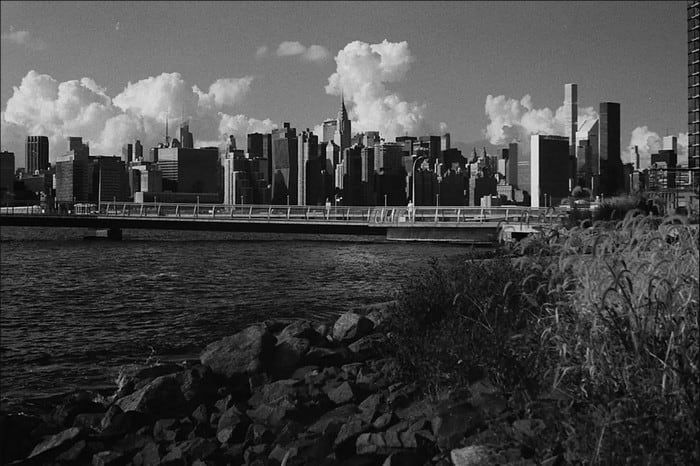
Les années 90 vous manquent et vous voulez tourner une vidéo en noir et blanc ? Alors le filtre gris peut vous aider à obtenir une vidéo au style des années 90. Ce filtre n’est pas comme les autres filtres à fort contraste et couleurs vives, car il utilise une combinaison de noir et blanc pour recréer l’ambiance des années 90.
3. Filtre Beauté
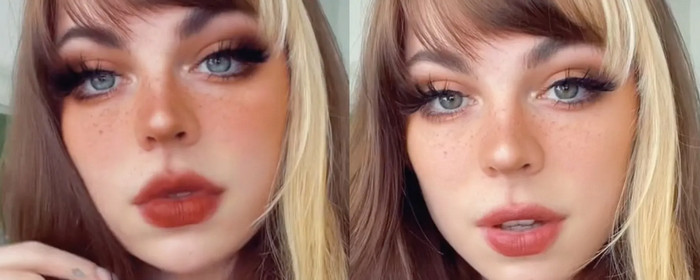
Vous voulez filmer des vidéos et avoir un filtre vidéo lissant la peau ? Eh bien, un filtre de beauté peut vous aider à améliorer votre photo de vous-même. Avec ce filtre, vous pouvez voir de nombreuses différences entre la photographie originale et améliorée. Certains influenceurs et artistes choisissent ce filtre pour améliorer leurs films et leurs images.
4. Filtre chaud

Un autre filtre peut réchauffer une image trop pâle et atténuer une dominante bleue. Le filtre chaud donne à votre vidéo un aspect plus chaleureux où les teints de peau sont améliorés, aussi bien en intérieur sous éclairage artificiel qu’en extérieur à l’ombre. Bien qu’il puisse absorber une dominante bleue, certaines dominantes bleues très marquées ne peuvent pas être totalement corrigées par ce filtre. Mais c’est le filtre idéal si vous voulez filmer des vidéos avec le ciel en arrière‑plan.
5. Filtre ordinaire

Le filtre neutre peut apporter un léger adoucissement à une vidéo que vous avez tournée. Ce filtre procure des bords plus doux et des couleurs légèrement plus claires que la vidéo brute. Bien que ce soit un filtre, son effet sur la vidéo reste discret, car il conserve le rendu d’origine en l’améliorant légèrement. Il est parfait si vous ne voulez pas ajouter trop de filtre à votre vidéo et préférez mettre en valeur le contenu original.
Bien que nous n'ayons pas mentionné tous les filtres, ce sont les filtres les plus couramment utilisés sur n'importe quelle application de filtrage vidéo. Cependant, leur nom peut varier selon les différents outils, mais l'apparence de leur filtre serait la même.
Partie 3. Meilleur programme à télécharger pour ajouter des filtres vidéo sur n'importe quelle vidéo ou clip sur Windows et Mac
Vous pouvez obtenir ces quatre filtres et bien d’autres encore en téléchargeant Video Converter Ultimate. Ce logiciel offre la façon la plus efficace d’ajouter des filtres à n’importe quelle vidéo capturée sur tout type d’appareil, comme les caméras et les téléphones ; même si vous utilisez un reflex numérique (DSLR), vous pouvez importer le clip dans cet outil et y appliquer un filtre. Contrairement à d’autres applications de filtrage, cette application ne convient pas uniquement aux débutants ; même en tant que professionnel, vous pouvez compter sur cet outil.
De plus, si vous voulez avoir le meilleur éditeur vidéo sur Windows et Mac, heureusement, vous pouvez l'utiliser. Alors maintenant, si vous allez ajouter un filtre vidéo, suivez le tutoriel facile à suivre ci-dessous pour ajouter un filtre sur n'importe quelle vidéo avec succès.
Étape 1. Téléchargez l’éditeur vidéo sur votre ordinateur de bureau en cliquant sur le bouton de téléchargement ci‑dessous. Après avoir téléchargé l’outil, installez‑le en suivant le processus d’installation, puis ouvrez‑le.
Téléchargement gratuit pour Windows 7 ou version ultérieure Téléchargement sécurisé
Téléchargement gratuit pour macOS 10.7 ou version ultérieure - Téléchargement sécurisé
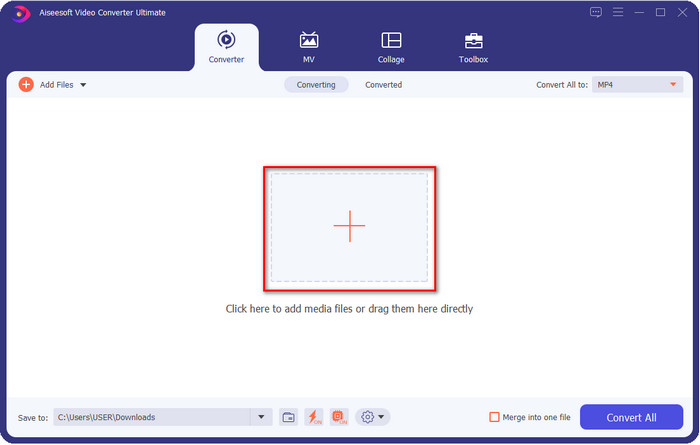
Étape 2. Pour ajouter un fichier à l’éditeur vidéo, cliquez sur le bouton +. Sélectionnez le fichier vidéo dans le dossier qui s’affiche à l’écran et appuyez sur Ouvrir pour l’ajouter à la file d’attente de filtrage.
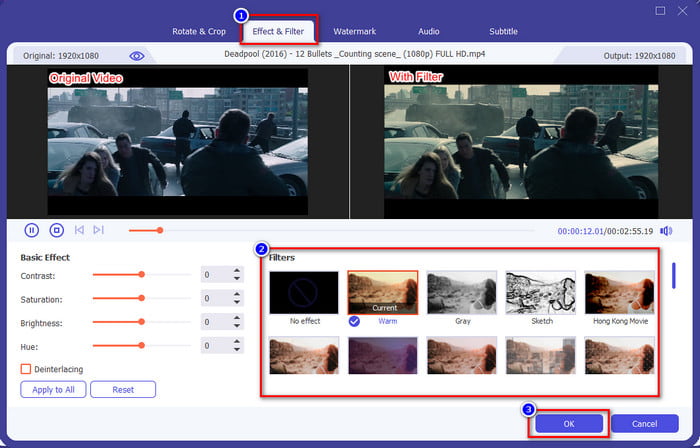
Étape 3. Une nouvelle fenêtre d’édition s’affichera à l’écran si vous cliquez sur le bouton baguette magique. Cliquez sur Effets & Filtres dans la partie supérieure, choisissez le filtre que vous voulez utiliser, testez‑les tous si vous le souhaitez, puis cliquez sur OK lorsque vous êtes satisfait du filtre sélectionné.
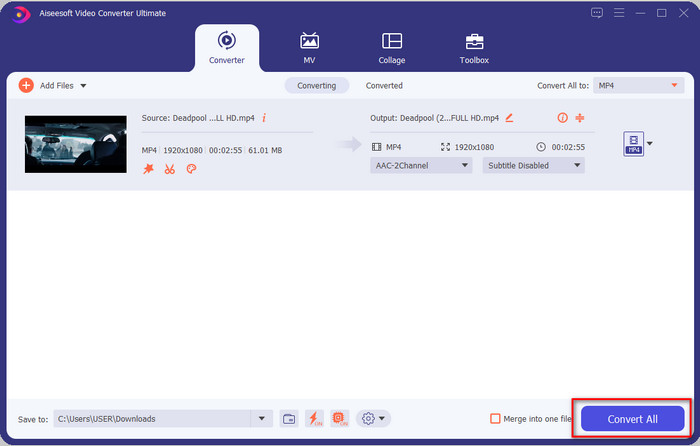
Étape 4. Exportez la vidéo dans l’éditeur en cliquant sur Tout convertir. Patientez quelques secondes pour que le fichier vidéo soit enregistré sur votre ordinateur, et voilà : vous disposez maintenant de la meilleure vidéo filtrée grâce au meilleur éditeur vidéo sur Windows et Mac.
En rapport:
Ajouter des sous-titres à la vidéo
Ajouter un filigrane à la vidéo
Partie 4. FAQ sur les filtres vidéo
Est-il sûr de télécharger une application de filtrage vidéo ?
Cela dépend du site Web sur lequel vous le téléchargez. Bien qu'il soit sûr de télécharger un éditeur vidéo sur le Web, vous devez vous assurer que le site Web que vous visitez est sûr. Ou bien certains peuvent obtenir vos données et des informations privées vous concernant.
Les filtres dégradent-ils la qualité vidéo ?
La qualité vidéo peut changer en raison des effets du filtre que vous ajoutez. Donc, si vous souhaitez conserver une résolution de haute qualité, vous devez penser au filtre que vous utilisez, car cela modifiera la qualité vidéo. Mais si vous utilisez un filtre pixélisé, cela affectera la qualité vidéo.
Pourquoi le format a-t-il changé après l'ajout du filtre ?
Le format défini dans l’outil que vous utilisez est, par défaut, le format standard. Pour éviter cela, avec Video Converter Ultimate, vous devez suivre les étapes suivantes. Après avoir ajouté le filtre, allez dans Tout convertir en, recherchez le format d’origine et cliquez dessus. Suivez l’étape finale, et votre format d’origine sera conservé avec le filtre ajouté à la vidéo.
Conclusion
Nous avons désormais une meilleure compréhension des filtres vidéo et des filtres les plus utilisés. Maintenant que nous avons expliqué ce que c’est et les filtres que vous pouvez appliquer, il est temps de télécharger Video Converter Ultimate pour ajouter un filtre à votre vidéo et la rendre spectaculaire. Cet outil ne vous aide pas seulement à ajouter des filtres à votre vidéo, il permet aussi de la monter de façon simple et intuitive. Vous pouvez obtenir cet excellent outil en cliquant sur le bouton de téléchargement et en l’achetant pour profiter de toutes ses fonctionnalités.
-
 Comment ajouter de l'audio et de la musique à une vidéo gratuitement sur votre ordinateur / téléphone
 Cet article présente 4 moyens simples d'ajouter gratuitement de l'audio à une vidéo. Quelle que soit la piste audio que vous souhaitez ajouter à votre vidéo, vous pouvez obtenir des résultats satisfaisants ici.
-
 Transformez GIF en format vidéo : convertissez les mèmes GIF en vidéo [2021]
 Déterminez comment transformer GIF en format vidéo à l'aide des outils répertoriés ci-dessous. Choisissez lequel et apprenez comment le faire, car nous recueillons suffisamment de preuves à leur sujet.
-
 Marvelous GIF to Video Apps pour les appareils Android et iOS
 Saviez-vous que vous pouvez convertir des GIF dans n'importe quel format vidéo que vous aimeriez utiliser sur votre téléphone ? Choisissez les meilleures applications sur votre Android ou iOS.
