


 ממיר וידאו אולטימטיבי
 מקליט מסך
 תיקון וידאו
 הורדה מאובטחת
4 הדרכים המובילות בחינם להמיר MTS ל- MOV
צילמתי כמה קטעי וידאו עם מצלמת הווידי של סוני שלי שייצאה קבצי MTS. אני שם לב שלא ניתן לתמוך ב- MTS על ידי נגן המדיה שלי ו- iMovie. אני משתמש ב- Mac ורוצה לערוך את קטעי ה MTS שנתפסו. כל עזרה? האם יש דרך פשוטה, במיוחד דרך חופשית להמיר MTS ל- MOV?
פורמט MTS הוא פורמט וידאו באיכות גבוהה (High Definition) הנפוץ במצלמות וידיאו של Sony ו‑Panasonic, והוא סיומת הקובץ של AVCHD (Advanced Video Coding High Definition). לאחר הקלטת וידאו באמצעות המצלמה הדיגיטלית שלך, סביר להניח שתקבל קובץ MTS. הוא תומך ב‑HD 720p/1080i ויכול לספק איכות וידאו גבוהה יותר. עם זאת, MTS איננו פורמט פופולרי הנתמך על‑ידי רוב נגני המדיה או תוכנות העריכה.

כאשר יש לך צורך לערוך קובצי MTS ב‑iMovie או לנגן אותם בנגן מדיה, כדאי לך להמיר MTS ל‑MOV או MP4 לצורך תאימות טובה יותר. בפוסט הזה נראה לך 4 ממירי MTS חינמיים שיעזרו לך להמיר MTS ל‑MOV בקלות.
חלק 1. הדרך החינמית הטובה ביותר להמיר MTS ל- MOV ללא אובדן איכות
ברשת מוצעים מספר רב של כלי המרה ל‑MTS שיכולים לעזור לך להמיר MTS ל‑MOV באיכות גבוהה. בחלק הראשון נמליץ על תוכנת ההמרה החינמית הטובה ביותר מ‑MTS ל‑MOV, Free MTS Converter.
הוא תוכנן במיוחד כדי להתמודד עם כל מיני המרות. זה תואם כמעט לכל פורמטי הווידאו והשמע כמו MP4, MOV, MKV, MTS, AVI, FLV, WMV, MP3, AAC, FLAC ועוד. אתה יכול להוריד אותו בחינם ולקחת את המדריך הבא כדי להמיר MTS ל- MOV בחינם.
הורדה חינמיתל‑Windows 7 ומעלההורדה מאובטחת
הורדה חינמיתל‑macOS 10.7 ומעלההורדה מאובטחת
שלב 1. ראשית, עליך להתקין ולהפעיל ממיר MTS MOV זה בחינם במחשב שלך. הוא מציע הורדת גרסאות Windows ו- Mac.
שלב 2. לחץ על Add File(s) כדי לייבא את קובצי ה‑MTS שברצונך להמיר. באפשרותך להמיר קובץ MTS אחד או יותר בכל פעם.
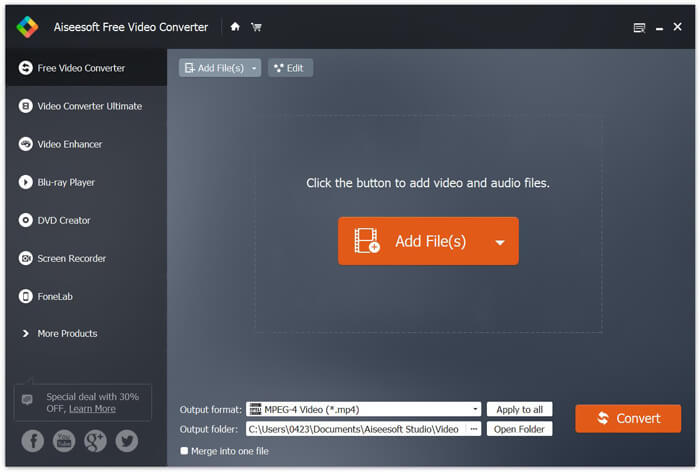
שלב 3. בחר MOV כפורמט היעד מתוך רשימת Output format. לאחר מכן לחץ על כפתור Convert כדי להתחיל את ההמרה מ‑MTS ל‑MOV.
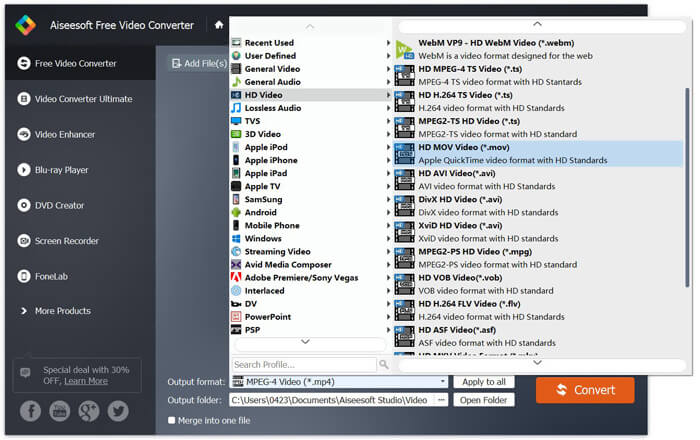
כפי שניתן לראות מלמעלה, ממיר MTS MOV זה בחינם נושא גם כמה תכונות עריכה בסיסיות. לפני ההמרה הסופית, אתה יכול להשתמש בהם כדי להתאים אישית את קובץ MTS שלך. בהשוואה לממירים מקוונים, ממיר וידאו חינם זה יכול לתת לך מהירות המרה מהירה יותר ואיכות וידאו גבוהה יותר. לכן אנו הופכים אותה להמלצה הראשונה שלנו.
חלק 2. ממיר מקוון חינם עוזר לך להמיר קטעי וידאו בקלות
כאשר מחפשים בגוגל כיצד להמיר MTS ל‑MOV, מתקבלים תוצאות רבות של ממירים מקוונים בחינם. כאן נציג בפניך ממיר MTS ל‑MOV מקוון, פשוט לשימוש ובחינם, FVC Free Online Video Converter. בלי להתקין שום תוכנה, אפשר להמיר כל פורמט וידאו נפוץ ל‑MP4, AVI, MOV ועוד, ללא תשלום. אינך צריך לדאוג לדבר, משום שההמרה בטוחה ויציבה, ולא יאבדו נתונים במהלך תהליך ההמרה.
שלב 1. פתח את הקישור שלמעלה ולחץ על הכפתור Add Files to Convert. לפני ההמרה, הורד והתקן את FVC launcher. זה לוקח רק כמה שניות.

שלב 2. לאחר התקנה ועדכון של ה‑launcher, בחר את הווידאו שברצונך להמיר. לאחר מכן בחר את הפורמט הדרוש ולחץ על Convert.

שלב 3. פתח את הקישור שלמעלה ולחץ על הכפתור Add Files to Convert. לפני ההמרה, הורד והתקן את FVC launcher. זה לוקח רק כמה שניות.
חלק 3. כיצד להמיר MTS ל- MOV חינם באופן מקוון עם ZAMZAR
ZAMZAR היא אחת מתוכנות המרת הווידאו המקוונות הפופולריות ביותר שיכולה לעזור לך להמיר MTS בחינם ל- MOV. הוא תוכנן עם ממשק תמציתי ותכונת המרה פשוטה. אתה יכול לקחת את המדריך הבא כדי לבצע המרת וידאו MTS.
שלב 1. פתח את הדפדפן ונווט אל האתר הרשמי של ZAMZAR. כאן תוכלו לעבור ישירות לדף https://www.zamzar.com/convert/mts-to-mov/. כאן אתה רשאי להמיר MTS ישירות ל- MOV מבלי לבצע הגדרות אחרות.
שלב 2. לחץ על כפתור הוסף קבצים כדי לטעון את קובץ ה- MTS שברצונך להמיר. אתה יכול לגרור ולשחרר להעלאת קובץ MTS. דבר אחד שעליך לדעת הוא שממיר MTS מקוון זה בחינם מאפשר לך להמיר רק קובץ MTS הנמוך מ -150 מגה.
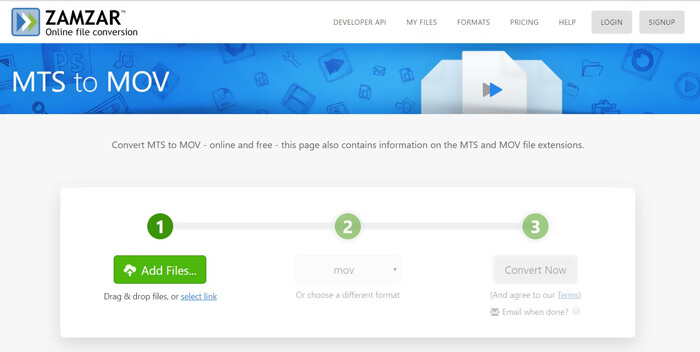
שלב 3. לאחר ההעלאה תוכל ללחוץ על כפתור Convert Now כדי להתחיל להמיר MTS ל‑MOV באופן מקוון וחינמי.
חלק 4. דרך מקוונת להמיר MTS ל- MOV עם FreeConvert
FreeConvert הוא ממיר וידאו מקוון פופולרי נוסף, היכול לבצע המרה מ‑MTS ל‑MOV בחינם. ממיר MTS ל‑MOV חינמי זה תומך היטב ב‑MTS וב‑M2TS. הוא מאפשר לך להעלות קובץ MTS בנפח של עד 1GB. נוסף על כך, הוא מאפשר להעלות עד 20 קובצי MTS בבת אחת לצורך המרה. כעת באפשרותך לעקוב אחר השלבים שלהלן כדי להמיר את קובצי ה‑MTS שלך ל‑MOV.
שלב 1. ראשית, עליך להיכנס אל FreeConvert.com בדפדפן שלך. כאן באפשרותך לגשת ישירות ל‑https://www.freeconvert.com/mts-to-mov לצורך ההמרה.
שלב 2. לחץ על הכפתור הכחול הגדול Choose MTS Files כדי להעלות את קובץ ה‑MTS שברצונך להמיר ל‑MOV. כפי שצוין למעלה, כאן מותר לך להעלות קובץ MTS אחד או יותר לצורך ההמרה.
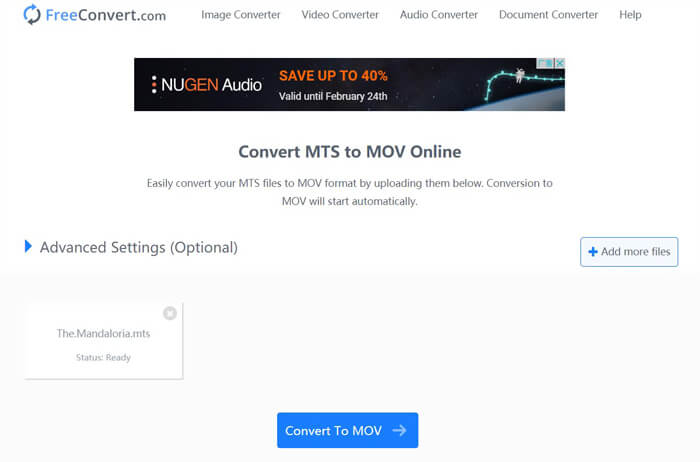
שלב 3. לחץ על כפתור Convert To MOV כדי להתחיל את תהליך ההעלאה וההמרה. לאחר מכן עליך ללחוץ על כפתור Download כדי לשמור את הקובץ שהומר במחשב שלך.
כאשר בוחרים ממירים מקוונים חינמיים כדי להמיר MTS ל‑MOV, זמן ההעלאה וההמרה עשוי להיות ארוך יחסית. לכן עדיף להמיר קובצי MTS קטנים באמצעות תוכנות המרה מקוונות. אם ברצונך להמיר וידאו MTS או M2TS גדול, מומלץ להיעזר בתוכנת Free Video Converter המומלצת מאוד.
-
 6 דרכים קלות להמיר TS ל- AVI / MKV / MOV / WMV ב- Windows / Mac
 רוצה להמיר קבצי TS במהירות ל- AVI / MKV / MOV / WMV? מאמר זה מציג ממירי וידאו מקוונים ולא מקוונים עם מדריך מלא. אולי תוכל להשיג את ממיר ה- TS החינמי הטוב ביותר כאן.
-
 MOV VS MP4 - איזה מהם טוב יותר
 MOV VS MP4, איזה מהם עדיף? פוסט זה מציג את ההבדל בין MP4 ל- MOV, כך שתוכל לקבל את הבחירה הטובה יותר לשימוש בקבצי הווידאו שלך.
-
 כיצד להצטרף לקבצי MOV (QuickTime) בחינם
 זה יכול להיות קשה למתחילים להצטרף לכמה קטעי וידיאו MOV יחד. אז האם יש דרך פשוטה ומהירה לשלב קבצי MOV? אם יש, אז איך להשתמש בזה? פוסט זה יעזור לך לקבל את התשובות האלה.
