


 ממיר וידאו אולטימטיבי
 מקליט מסך
 תיקון וידאו
איזה מהם הוא הממיר הטוב ביותר לשימוש בהמרת MP3 ל-WAV
MP3 הוא פורמט האודיו המוכר ביותר ברחבי העולם. למעשה, זהו פורמט ברירת המחדל לשמירה והקלטה של קבצי אודיו. למרות שהפורמט הזה בשימוש נרחב, עדיין קיימים פורמטים נוספים שמפיקים איכות צליל גבוהה יותר מ‑MP3, כמו WAV. אז אם אתה רוצה לדעת איך להמיר MP3 ל‑WAV כדי ליהנות מהאזנה למוזיקה או להקלטות שביצעת, עליך להישאר בקצב, כי זו עלולה להיות ריצה ארוכה. בלי הקדמות נוספות, בוא נצא לדרך.

חלק 1. כיצד להמיר MP3 ל-WAV ב-Windows & Mac עם שלבים מפורטים
1. ממיר וידאו FVC Ultimate
האם אתה רוצה לדעת איך להמיר MP3 ל‑WAV ב‑Mac וב‑PC ולהפיק אודיו באיכות גבוהה? אז FVC Video Converter Ultimate הוא בדיוק מה שאתה צריך. בנוסף, מהירות ההמרה שלו מהירה כמו SSC Tuatara וגם בטוחה. המר כמה קבצים שתרצה בו‑זמנית, משום שאין כאן הגבלה על מספר קבצי המדיה שניתן להמיר. לא רק זאת, ניתן גם להשתמש בכלי הזה ליצירת MV, קולאז'ים ותכונות נוספות. אם ברצונך לדעת כיצד להשתמש בו, עקוב אחר השלבים הבאים ונתחיל בתהליך ההמרה.
שלב 1. בחר בין PC או Mac ולחץ על כפתור ההורדה המתאים. התקן את הכלי, עקוב אחר תהליך ההגדרה ואז לחץ על Finish כדי לשמור את השינויים.
הורדה חינמיתל-Windows 7 ומעלההורדה מאובטחת
הורדה חינמיתל-MacOS 10.7 ומעלההורדה מאובטחת
שלב 2. לאחר ההתקנה, לחץ על Add Files כדי להוסיף את קובץ ה‑MP3 שברצונך להמיר. אם יש יותר משני קבצים, עדיף לגרור ולשחרר אותם אל הממשק.
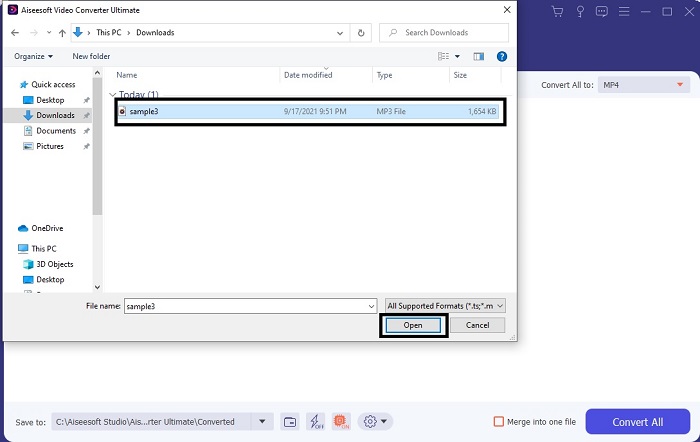
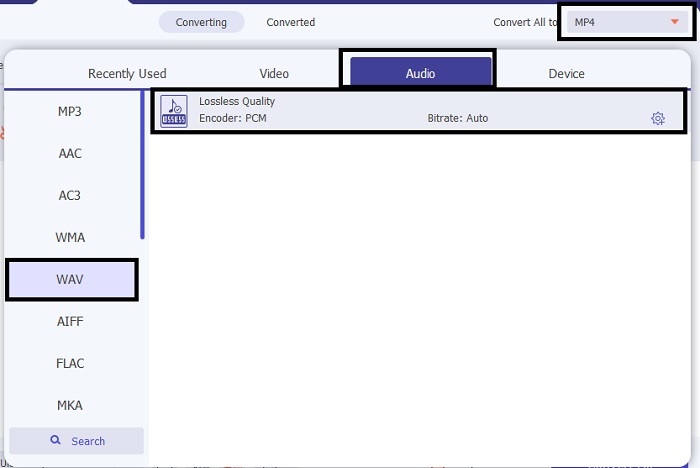
שלב 3. שנה את MP3 ל‑WAV או לכל פורמט אודיו אחר שתרצה בתפריט המשנה.
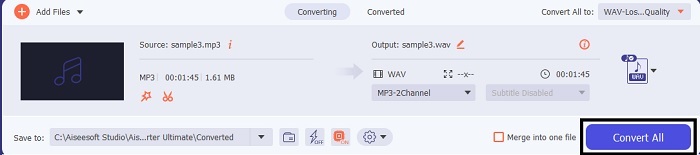
שלב 4. אם הכול כבר מוכן, לחץ על Convert All כדי להתחיל בהמרה.
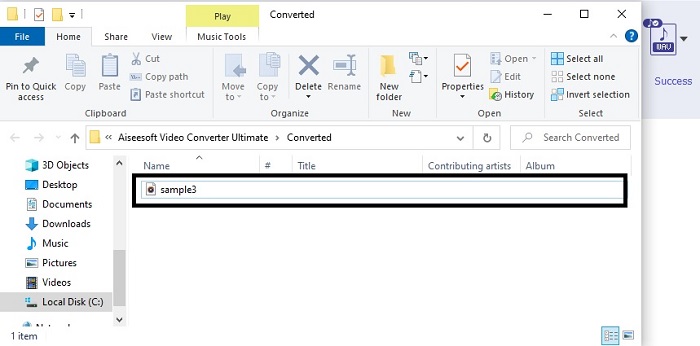
שלב 5. לאחר שההמרה מסתיימת, מנהל קבצים ייפתח אוטומטית על המסך. לחץ על קובץ האודיו שהומר ותיהנה מהאזנה לגרסה החדשה שלו. בנוסף, אם האודיו מעט חלש עבורך, עבור אל שורת הכלים ואתר את Audio Booster כדי לקבל צליל ברור ואיכותי יותר.
2. iTunes
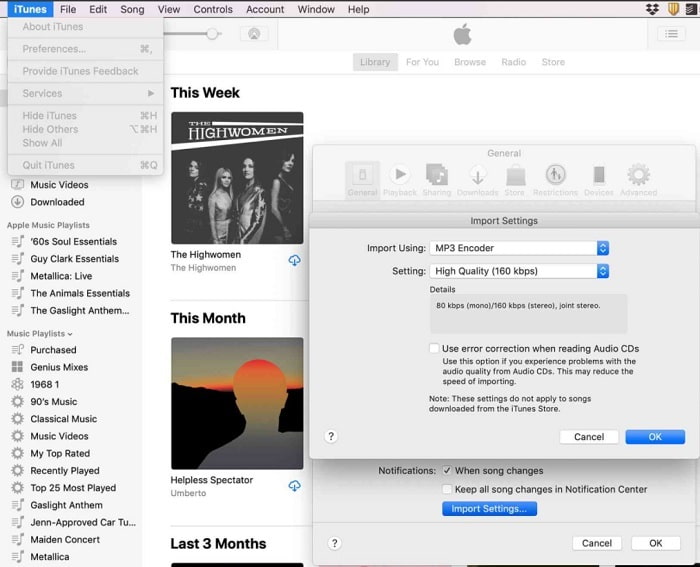
iTunes משמשת באופן נרחב לניגון מוזיקה ב‑Mac ובמוצרי iOS. אבל האם ידעת שניתן להמיר MP3 ל‑WAV ב‑iTunes? התשובה היא כן. ניגון והמרה – הכול בכלי אחד, אך אי‑אפשר להשתמש בו באנדרואיד וב‑Windows, משום שהוא נגן המדיה המובנה של אפל במוצריה. לכן, אם אין לך מוצר של אפל, עדיין באפשרותך לבצע המרה בעזרת FVC Video Converter Ultimate. אבל אם יש לך מוצר כזה, מומלץ להשתמש בiTunes ולעקוב אחרי השלבים הבאים.
שלב 1. פתח את התוכנה במכשיר שלך.
שלב 2. בחר את קובץ ה‑MP3 שברצונך להמיר.
שלב 3. לאחר מכן לחץ על Convert והמתן עד לסיום התהליך.
חלק 2. 5 ממירי MP3 ל-WAV המקוונים הטובים ביותר בחינם באינטרנט
1. ממיר שמע FVC חינם
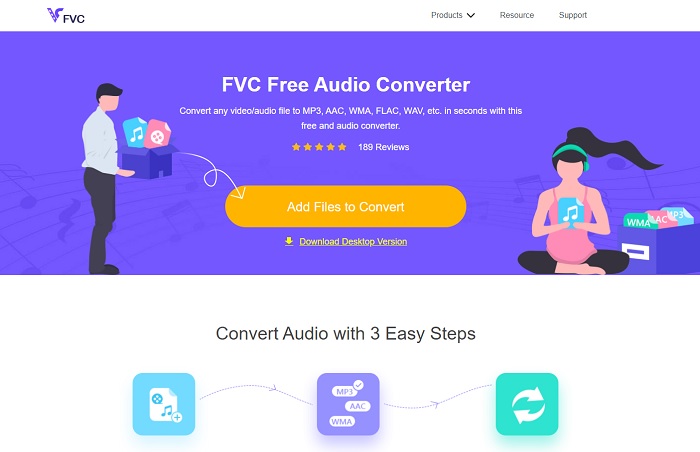
FVC Free Audio Converter הוא ממיר MP3 ל‑WAV המקוון הטוב ביותר. הוא מציע את אותן פונקציות משניות ש‑FVC Video Converter Ultimate מספק. לכן צפה לאיכות גבוהה גם כאן, למרות שהפונקציות המרכזיות של הגרסה בתשלום אינן זמינות, משום שהכלי חינמי. אם ברצונך לנסות אותו, באפשרותך ללחוץ על הקישור שסופק עבורך. אז לפני הכול, נתחיל באופן השימוש בממיר מבוסס‑האינטרנט הזה.
שלב 1. כדי לגשת לכלי, עליך ללחוץ על הקישור הזה.
שלב 2. לחץ על Add Files to Convert כדי להפעיל את הכלי.
הורד את גרסת הדסקטופ כדי להמיר קבצים במצב אצווה.
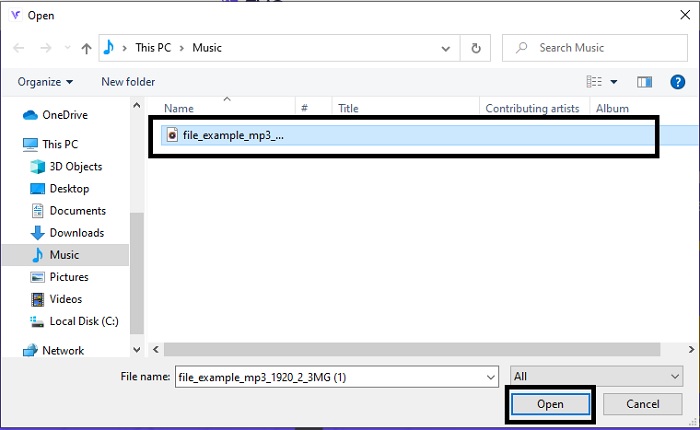
שלב 3. לאחר הפעלת הכלי, בחר את קובץ ה‑MP3 שברצונך להמיר ולחץ על open.
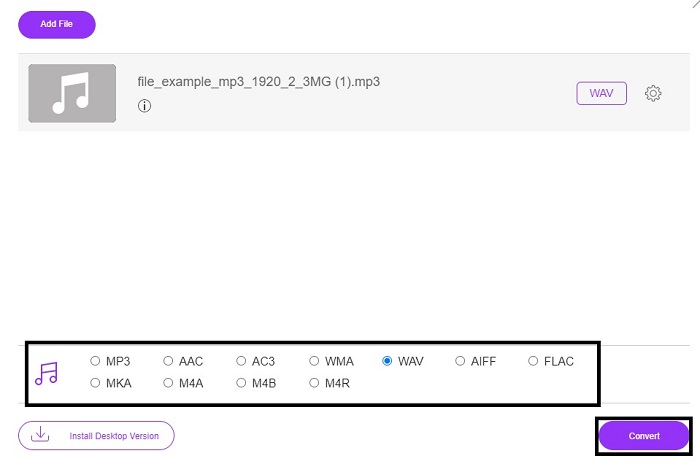
שלב 4. בחר את הפורמט למטה ואז לחץ על Convert כדי להתחיל בתהליך.
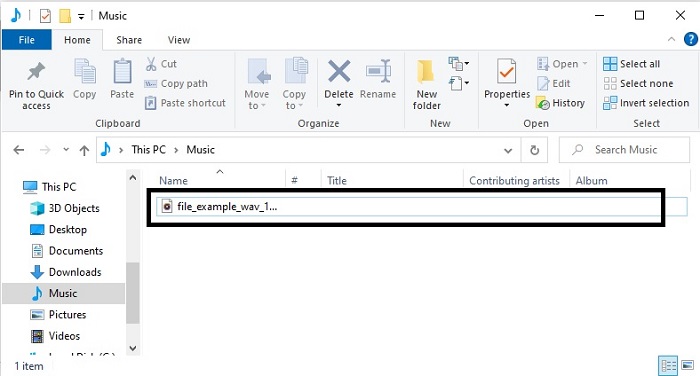
שלב 5. זה יימשך רק כמה דקות, ולאחר שההמרה תסתיים, לחץ על folder כדי לאתר את הקובץ שזה עתה המרת.
2. המרת ענן
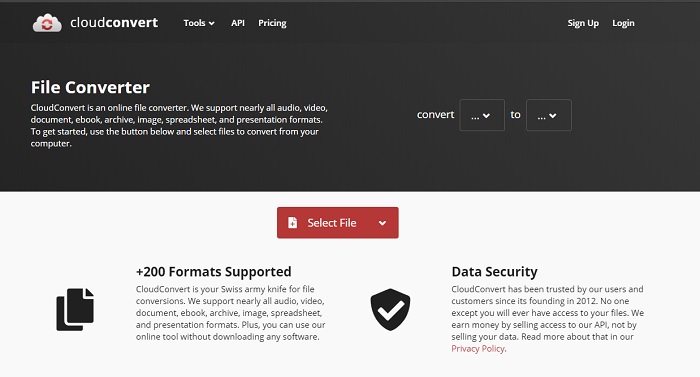
כלי נוסף שניתן לגשת אליו דרך האינטרנט הוא Cloud Convert להמרה לפורמט חדש. זהו אחד הכלים הטובים בשוק כשמדובר בהמרה, אך אי‑אפשר לכוונן או לשנות בו את קצב הסיביות (bitrate), ה‑fps והקודקים. עם זאת, אם ברצונך להמיר קובצי טקסט לפורמט חדש, זהו כלי שחובה לנסות.
3. המרה
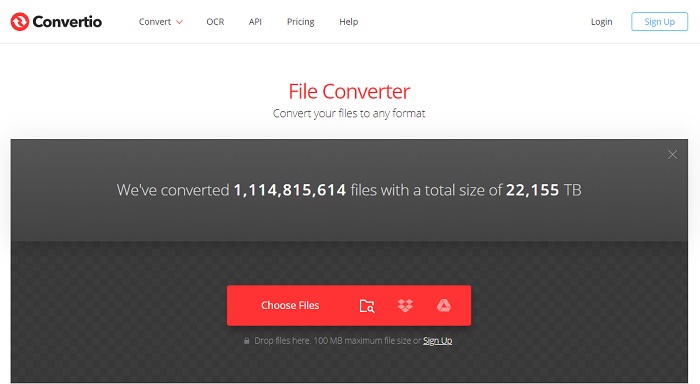
בדומה ל‑Cloud Convert, גם Convertio נוצר להיות חינמי. בכל הקשור להמרה, הוא מציע גם יכולות דחיסה והמרה חזקות. רבים משתמשים בכלי הזה להמרה בזכות ההנחיות המדויקות והפשטות שלו. למרות שניתן לגשת לכלי דרך האינטרנט, באתר הראשי יש לא מעט פרסומות בממשק האינטרנט, מה שעלול להיות מעט מעצבן – במיוחד אם אינך רוצה שיופריעו לך בזמן ההמרה.
4. המרה מקוונת
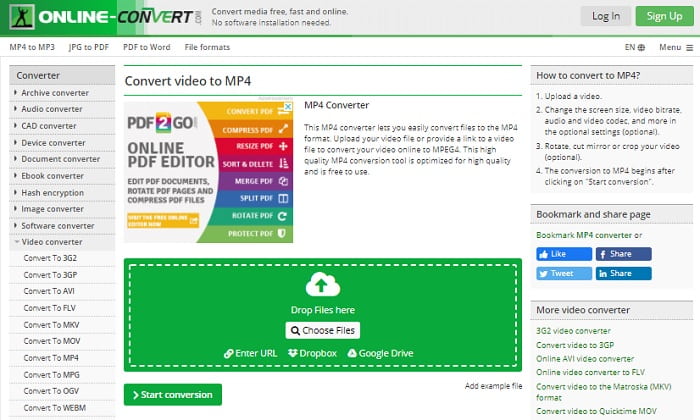
לכלי הזה יש הרבה מה להציע בתחום ההמרה, והוא גם מאוד אינפורמטיבי. Online-Convert מספק תכונות מתקדמות, שבאמצעותן ניתן לשנות את קצב הסיביות, הרזולוציה והערוצים. אם אתה חדש בתחום ההמרה, ייתכן שהכלי הזה יהיה מעט מכביד לשימוש. בנוסף, לאחר העלאת הקובץ לממשק האינטרנט, עליך להמתין עד לסיום העיבוד. לא רק זאת – קיימת הגבלת גודל להמרה של עד 100MB בלבד, כך שאם ברצונך להמיר מספר גדול של קבצים, עליך לרכוש את גרסת הפרימיום וגם להסיר את הפרסומות.
5. 123 אפליקציות- ממיר אודיו
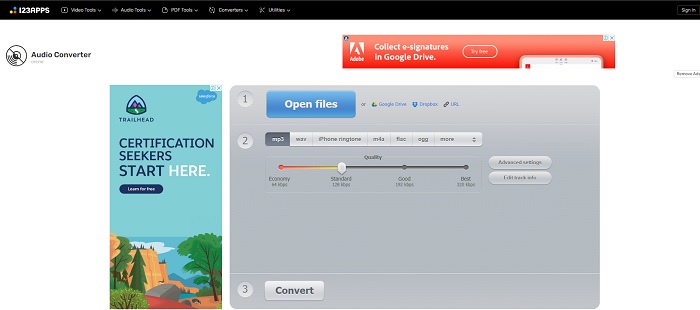
בכלי אינטרנט זה ניתן לבצע המרה ביעילות ובצורה מהירה, למרות שהוא תומך רק בשלושה פורמטי אודיו. 123 Apps - Audio Converter הוא אחד הכלים הפשוטים ביותר. כל שעליך לעשות הוא לפתוח את הכלי, להעלות את הקובץ, לבחור את הפורמט ולהמיר – פשוט כך. אך החיסרון הוא שלפי דיווחים מסוימים, לאחר ההמרה איכות האודיו עלולה לרדת.
חלק 3. טבלת השוואה של הממירים ברשימה
למד את ההבדלים של כל כלי ובואו נשווה אותם בהתאם.
| תכונות | ממיר וידיאו אולטימטיבי | iTunes | ממיר שמע חינם FVC | המרת ענן | המרה | מקוון-המר | 123 אפליקציות- ממיר אודיו |
| ממיר אודיו |  | | | | | | |
| תכונות עריכה | |  | | | | | |
| שינוי קצב סיביות, Fps, רזולוציה או דומים | | | | | | | |
| תוכנית נתמכת | כלי מבוסס שולחן עבודה | כלי ברירת מחדל מבוסס שולחן עבודה | כלי מבוסס אינטרנט | כלי מבוסס אינטרנט | כלי מבוסס אינטרנט | כלי מבוסס אינטרנט | כלי מבוסס אינטרנט |
| מערכת הפעלה נתמכת | זמין בכל מערכת ההפעלה | המוצר הנתמך של אפל בלבד | זמין בכל מערכת ההפעלה | זמין בכל מערכת ההפעלה | זמין בכל מערכת ההפעלה | זמין בכל מערכת ההפעלה | זמין בכל מערכת ההפעלה |
| טווח מחירים | לחודש אחד: $25.00 לשנה: $31.20 עבור רישיון לכל החיים: $55.20 | כדי להסיר מודעות: $10 לחודש $15 לחודש למשפחה בת שש נפשות $5 לחודש לסטודנטים | בחינם | בחינם | בחינם | עבור 8GB הנוספים: מנוי חודשי $70 USD מחויב מדי חודש מנוי שנתי $672 USD | בחינם |
MP3 לעומת WAV
פורמט MP3 שוחרר בשנת 1993 על ידי Moving Picture Experts Group (MPEG). זה היה הסטנדרט לאחסון מוזיקה מכיוון שהוא יכול לדחוס אודיו לגודל קטן בהרבה מאשר פורמטים לא דחוסים אחרים. זה עדיין נמצא בשימוש נרחב בימינו, במיוחד להפצת אודיו באינטרנט.
WAV, הידוע גם כפורמט WAVE, מבוסס על פורמט ה-Resource Interchange File Format (RIFF). הוא פותח על ידי מיקרוסופט ו-IBM ביחד בתחילת שנות ה-90. זוהי אפשרות לשמירת אודיו גולמי ולא דחוס ב-Microsoft Windows. לפיכך, קבצי WAV מושמעים לעתים קרובות יותר במחשבי Windows.
חלק 4. שאלות נפוצות לגבי MP3 ל-WAV
מה המשמעות של WAV?
WAV פירושו Waveform Audio Files; זהו פורמט לא דחוס ללא אובדן.
מה גדול יותר בגודל הקובץ? MP3 או WAV?
למרות ששני הפורמטים מאחסנים קובצי אודיו, WAV גדול בהרבה מ‑MP3. במקרים מסוימים הוא יכול להיות גדול עד פי 15 מ‑MP3 משום שהוא לא דחוס. תוכל ללחוץ כאן כדי ללמוד איך להמיר WAV ל‑MP3.
איפה אני יכול להקליט WAV?
כדי להקליט, עליך להשתמש בכלי שאין לו מתחרים ברשת. במיוחד משום שהפורמט הזה אינו דחוס, ולכן עליך להיזהר שלא לאבד נתונים בזמן ההקלטה. בהקשר זה, FVC Screen Recorder הוא מקליט WAV שאין לו מתחרים. הוא מסוגל גם להקליט וגם לערוך, כדי לשפר את איכות התמונה והסאונד של התוצאה הסופית שלך. כדי ללמוד עוד, עליך להוריד את התוכנה לכונן שלך.
סיכום
כשהמרוץ מגיע לסופו, כבר ברור שיש מנצח אחד. רק מעצם השימוש בכלי הזה תרגיש כמו מלך העולם בהקלטה. FVC Video Converter Ultimate מבצע את מרבית המשימות ששאר המקליטים אינם יכולים לבצע. אם יש לך בעיה בהקלטת וידאו, אודיו או משחקי מחשב, תוכל לזכות ביתרון אם תבחר נכון. שים את כל ההימור שלך על FVC Video Converter Ultimate וקבל ניצחון קל בדרך.
הורדה חינמיתל-Windows 7 ומעלההורדה מאובטחת
הורדה חינמיתל-MacOS 10.7 ומעלההורדה מאובטחת
-
 כיצד להמיר בחינם MP4 ל-WAV בשולחן העבודה או באינטרנט [2021]
 מתאמץ להמיר MP4 ל-WAV? לא יודע איזה ממיר יכול לעזור לך בזה בצורה מושלמת מבלי לשלם אגורה? קרא את הפוסט הזה וכל השאלות שלך ייענו.
-
 נגן WAV - חמשת אפליקציות הנגן WAV המובילות לאנדרואיד, אייפון, PC ו- Mac
 איך מנגנים קבצי WAV בטלפון אנדרואיד? איזה שחקן יכול לשחק WAV? פוסט זה משתף 5 נגני WAV בחינם הטובים ביותר עבור Android, iPhone, Mac ו- PC.
-
 FLV ל- WAV - המרת FLV ל- WAV באופן מקוון בחינם וב- Mac / PC
 כיצד ניתן להמיר קובץ FLV? האם VLC יכול להמיר את YouTube FLV ל- WAV? הודעה זו מציגה 3 דרכים חינמיות להמיר FLV ל- WAV ללא אובדן איכות.

