


 वीडियो कनवर्टर अंतिम
 स्क्रीन अभिलेखी
 वीडियो मरम्मत
 सुरक्षित डाउनलोड
कैसे कम गुणवत्ता के बिना MP4 करने के लिए M2TS कन्वर्ट करने के लिए
"जब मैं अपने सोनी कैमरे से कंप्यूटर पर वीडियो डालता हूं, तो वे एम 2 टीएस फाइलें होती हैं, जिन्हें फेसबुक या यूट्यूब पर साझा नहीं किया जा सकता है। फ़ाइलों को MP4 में बदलने और अपने कंप्यूटर पर देखने के लिए मुझे वीडियो कनवर्टर कहां मिल सकता है?”
कभी-कभी आप M2TS फाइलों को कुछ पोर्टेबल डिवाइस पर चलाना चाहते हैं, या उन्हें YouTube या Facebook पर अपलोड करना चाहते हैं। ऐसे में उन्हें MP4 जैसे किसी आम वीडियो फॉर्मेट में बदलना समझदारी है। इस पोस्ट में, हम Windows और Mac पर M2TS को MP4 में कनवर्ट करने के 5 मुफ्त तरीके साझा करेंगे।.

भाग १। M2TS को MP4 में मुफ्त में बदलने का सबसे अच्छा तरीका
सभी मीडिया प्लेयर M2TS फाइलों को सपोर्ट नहीं करते। HD कैमकॉर्डर से आए M2TS वीडियो को बेहतर तरीके से देखने के लिए, इन्हें प्लेबैक के लिए प्रचलित MP4 फॉर्मेट में बदलना बेहतर है। FVC Free M2TS Converter एक ऑल‑इन‑वन M2TS कनवर्टर और एडिटर है। आप न सिर्फ M2TS फाइलों को MP4, MKV, AVI, MOV आदि में कनवर्ट कर सकते हैं, बल्कि उन्हें कॉम्प्रेस, मर्ज, थीम जोड़ने व अन्य एडिट भी कर सकते हैं।.
मुफ़्त डाउनलोडWindows 7 या बाद के संस्करणों के लिएसुरक्षित डाउनलोड
मुफ़्त डाउनलोडMacOS 10.7 या बाद के संस्करणों के लिएसुरक्षित डाउनलोड
स्टेप 1.Free Download बटन पर क्लिक करके आप जल्दी से Free M2TS Converter डाउनलोड कर सकते हैं। फिर इसे अपने Windows कंप्यूटर पर इंस्टॉल करें और लॉन्च करें। प्रोग्राम में M2TS फाइल इम्पोर्ट करने के लिए Add File(s) बटन पर क्लिक करें।.
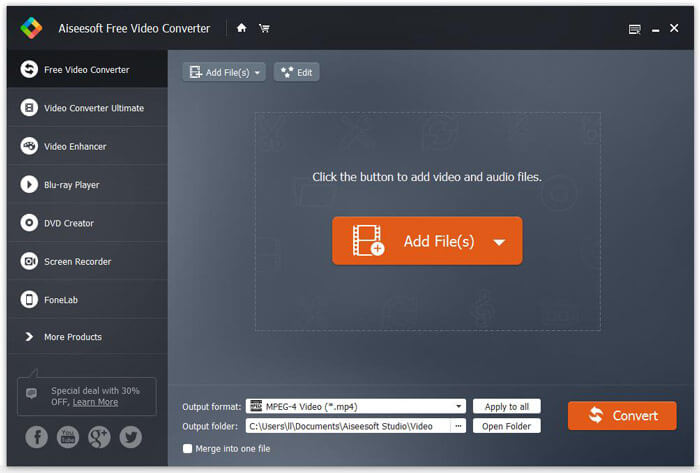
स्टेप 2.Output format के ड्रॉप‑डाउन बटन पर क्लिक करें, और आउटपुट फॉर्मेट के रूप में MPEG-4 Video (*.mp4) चुनें। आप कनवर्ट की गई फाइल को सेव करने के लिए आउटपुट फोल्डर भी सेट कर सकते हैं।.

स्टेप 3.अगर आप वीडियो के लिए कोई खास थीम जोड़ना चाहते हैं, तो ऊपर वाले मेनू में Edit बटन पर क्लिक करके उपयुक्त थीम चुन सकते हैं। सभी सेटिंग्स हो जाने के बाद, M2TS फाइल को MP4 में बदलना शुरू करने के लिए Convert बटन पर क्लिक करें।.

भाग 2. M2TS को MP4 ऑनलाइन में कैसे बदलें
अगर आप M2TS को MP4 में ऑनलाइन और मुफ्त कनवर्ट करना चाहते हैं, तो FVC Free Online Video Converter एक बेहतरीन विकल्प होगा। यह एक फ्री ऑनलाइन मल्टीमीडिया कनवर्टर है, जो लगभग सभी मुख्यधारा के वीडियो और ऑडियो को MP4, FLV, MKV, MOV, M4V, MTS, TS, M2TS, WMV, ASF, VOB, MP3, AAC आदि में कनवर्ट करने का समर्थन करता है। इसके अलावा, इसका उपयोग करना भी काफी आसान है।.
स्टेप 1. FVC Free Online Video Converter की वेबसाइट पर जाएं। ऊपर Add Files to Convert पर क्लिक करें। फिर FVC launcher को डाउनलोड और इंस्टॉल करें।.

स्टेप 2. जिस वीडियो को आप कनवर्ट करना चाहते हैं उसे चुनें। अगर आपको MP4 वीडियो चाहिए, तो बस MP4 पर क्लिक करें। फिर Convert पर क्लिक करें।.

स्टेप 3. आप MP4 वीडियो को सीधे डेस्कटॉप पर सेव कर सकते हैं। उसके बाद, कनवर्ज़न अपने‑आप शुरू हो जाएगा।.
भाग 3. ConvertFiles के साथ M2TS को MP4 में कैसे बदलें
ConvertFiles वेब-आधारित M2TS से MP4 कनवर्टर है जो वीडियो, ऑडियो, छवियों, दस्तावेज़ों, प्रस्तुतियों और अभिलेखागार के 200+ स्वरूपों का समर्थन करता है। M2TS फ़ाइल को MP4 में ऑनलाइन कनवर्ट करना प्रारंभ करने के लिए नीचे दिए गए सरल चरणों का पालन करें।
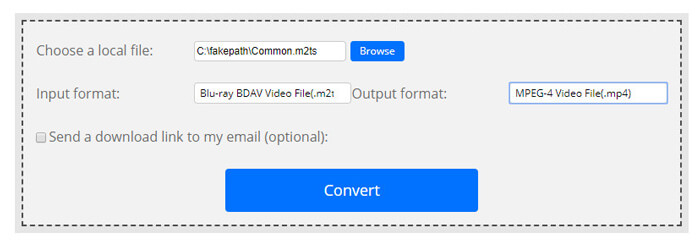
स्टेप 1.ConvertFiles के आधिकारिक पेज पर जाएं। अपनी लोकल M2TS फाइल अपलोड करने के लिए Browse बटन पर क्लिक करें।.
स्टेप 2.Input format बॉक्स पर क्लिक करें और HDV Video File(.m2ts) चुनें, और Output format बॉक्स पर क्लिक करके आउटपुट फॉर्मेट के रूप में MPEG-4 Video File(.mp4) चुनें।.
स्टेप 3.M2TS को मुफ्त में MP4 में बदलना शुरू करने के लिए Convert बटन पर क्लिक करें। कनवर्ज़न में कुछ ही मिनट लग सकते हैं। उसके बाद, आप डाउनलोड लिंक पर क्लिक करके कनवर्ट की गई MP4 फाइल डाउनलोड कर सकते हैं।.
कभी-कभी अमान्य इनपुट प्रारूप के कारण रूपांतरण विफल हो सकता है। उच्च सफलता दर प्राप्त करने के लिए, आप इसके बजाय मुफ़्त M2TS कनवर्टर आज़मा सकते हैं।
भाग 4. VLC के साथ M2TS को MP4 में कैसे बदलें
वीएलसी मीडिया प्लेयर विंडोज, मैक, लिनक्स, आईओएस और एंड्रॉइड के लिए एक ओपन सोर्स मल्टीमीडिया प्लेयर है। यह M2TS फ़ाइलों को MP4, MOV, AVI, और बहुत कुछ में बदलने के लिए एक महान M2TS से MP4 कनवर्टर के रूप में भी काम करता है। क्या अधिक है, आप M2TS फ़ाइलों को संपादित कर सकते हैं जैसे क्रॉप, कट, रोटेट, छवि प्रभाव जोड़ें और बहुत कुछ।
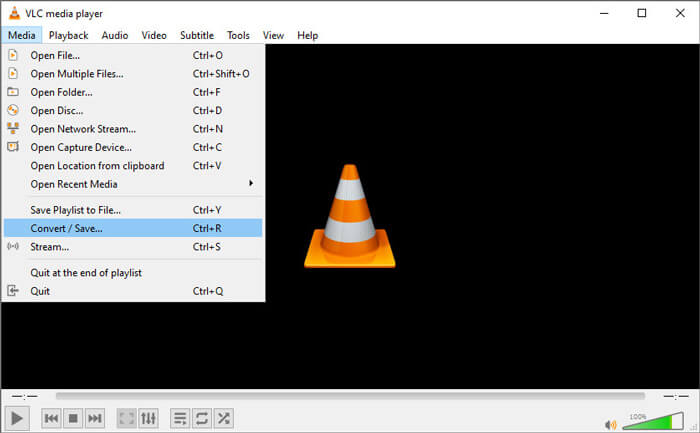
स्टेप 1.VLC Media Player को अपने कंप्यूटर पर फ्री डाउनलोड, इंस्टॉल और रन करें। आगे बढ़ने के लिए Media > Convert / Save... पर क्लिक करें। फिर अपनी M2TS फाइल जोड़ने के लिए Add... बटन पर क्लिक करें।.
स्टेप 2.Convert विंडो में जाने के लिए Convert / Save बटन पर क्लिक करें। आउटपुट फॉर्मेट के रूप में Video - H.264 + MP3 (MP4) चुनने के लिए Profile ड्रॉप‑डाउन बटन पर क्लिक करें।.
स्टेप 3.डेस्टिनेशन फोल्डर चुनने के लिए Browse बटन पर क्लिक करें। फिर M2TS को MP4 में कनवर्ट करना शुरू करने के लिए Start बटन पर क्लिक करें।.
भाग 5. MP4 को M2TS से हैंडब्रेक के साथ कैसे निर्यात करें
हैंडब्रेक एक और फ्री और ओपन सोर्स वीडियो ट्रांसकोडर है जो लगभग किसी भी फॉर्मेट से वीडियो को कन्वर्ट कर सकता है। आप निम्न चरणों के साथ M2TS फ़ाइल को MP4 में बदलने के लिए हैंडब्रेक आज़मा सकते हैं।
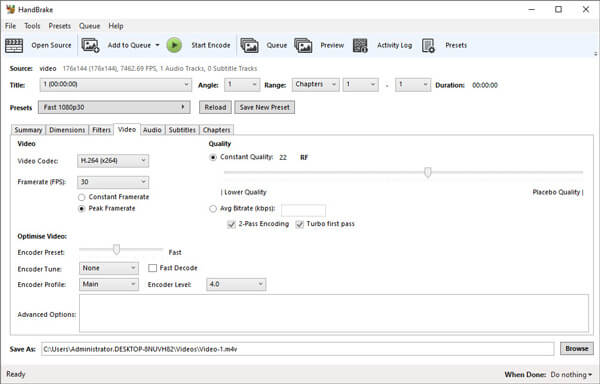
स्टेप 1.अपने Windows/Mac पर HandBrake को फ्री डाउनलोड, इंस्टॉल और लॉन्च करें। अपनी लोकल फोल्डर से M2TS फाइल इम्पोर्ट करने के लिए बाएं कोने में Open Source पर क्लिक करें।.
स्टेप 2.आप M2TS फाइल के लिए सेटिंग्स समायोजित कर सकते हैं। Summary टैब में Format के ड्रॉप‑डाउन बटन से MP4 चुनें। Video टैब में आप वीडियो कोडेक, वीडियो क्वालिटी, फ्रेमरेट और वीडियो ऑप्टिमाइज़ेशन सेट कर सकते हैं।.
स्टेप 3.डेस्टिनेशन फोल्डर सेट करने के लिए Browse बटन पर क्लिक करें। फिर M2TS को मुफ्त में MP4 में कनवर्ट करना शुरू करने के लिए Start Encode बटन पर क्लिक करें।.
भाग 6. M2TS को MP4 में बदलने के अक्सर पूछे जाने वाले प्रश्न
M2TS और MP4 में क्या अंतर है?
M2TS का मतलब MPEG-2 ट्रांसपोर्ट सिस्टम है। यह एक ब्लू-रे डिस्क ऑडियो वीडियो कंटेनर फ़ाइल स्वरूप है, और वीडियो, ऑडियो और अन्य धाराओं के बहुसंकेतन के लिए उपयोग किया जाता है। आम तौर पर M2TS फ़ाइलें समान गुणवत्ता वाली MP4 फ़ाइलों से बड़ी होती हैं। MP4 फ़ाइलें लगभग सभी मीडिया प्लेयर पर समर्थित हैं, लेकिन M2TS फ़ाइलें केवल कुछ खिलाड़ियों पर ही चलाई जा सकती हैं।
मैं अपने PC पर M2TS फाइलें कैसे चलाऊं?
आप Windows Media Player, VLC Media Player, 5K Player, SMPlayer, Splash, आदि सहित कुछ लोकप्रिय मीडिया प्लेयर अनुप्रयोगों में सीधे M2TS फ़ाइलें खोल सकते हैं। आप Sony Picture Motion Browser सॉफ़्टवेयर के साथ M2TS फ़ाइलें भी चला सकते हैं।
क्या VLC M2TS फाइलें चला सकता है?
हाँ। आप Windows और Mac पर VLC Media Player के साथ M2TS फ़ाइलें चला सकते हैं। बस वीएलसी मीडिया प्लेयर चलाएं, और वीएलसी में एम2टीएस फाइल चलाने के लिए मीडिया टू ओपन फाइल पर क्लिक करें। यदि वह कोडेक समस्या के लिए काम नहीं करता है, तो आपको पहले M2TS को VLC समर्थित वीडियो प्रारूप में बदलना चाहिए।
निष्कर्ष
ऊपर दी गई 5 मुफ्त विधियों के साथ, आप M2TS फ़ाइलों को MP4 में आसानी से बदल सकते हैं। तुलना के बाद, FVC फ्री M2TS कन्वर्टर MP4 कनवर्टर के लिए सबसे अच्छा M2TS होना चाहिए। हार्डवेयर त्वरण तकनीक के साथ, यह MP4 फ़ाइलों को मिनटों में उच्च गुणवत्ता में निर्यात करता है। आप इस मुफ्त कनवर्टर को एक बार में आजमा सकते हैं।
-
 कैसे MP4 करने के लिए टीएस कन्वर्ट करने के लिए पर व्यापक गाइड
 टीएस फाइलें क्या हैं और टीएस को MP4 में बदलना चाहते हैं? इस पोस्ट में, हम आपको TS को MP4 में बदलने के लिए मुफ्त और ऑनलाइन तरीके साझा करेंगे।
-
 MTS फाइल को MP4 में कैसे कन्वर्ट करें
 MTS फ़ाइल को MP4 में बदलने का तरीका नहीं जानते? इस गाइड में, आपको एमटीएस प्रारूप को एमपी 4 में विंडोज या मैक पर गुणवत्ता के नुकसान के बिना बदलने के 6 स्वतंत्र और आसान तरीके मिलेंगे।
-
 एमपी 3 को एमपी 3 में बदलने के लिए 2 सरल तरीके
 एमटीएस फ़ाइल से एमपी 3 ऑडियो निकालने की आवश्यकता है लेकिन पता नहीं कैसे? यह पोस्ट उच्च ऑडियो गुणवत्ता के साथ MTS/M2TS को MP3 में बदलने में आपकी मदद करने के 2 आसान तरीके साझा करती है।
