


 Video Converter Ultimate
 Screen Recorder
 Videó javítás
 Biztonságos letöltés
Hihetetlenül konvertáljon MOV-t DivX-re ingyen a legjobb konverterek segítségével
Manapság számos fájlformátum létezik, ezért nehéz eldönteni, milyen típusú fájlt használj a platformodon. És minden fájlnak más-más funkciói, kodekjei és fájlmérete van. Ez a cikk két ilyen formátumot mutat be, és azt, hogyan alakíthatod át MOV fájlodat DivX fájlformátummá. Olvasd végig a cikket, hogy megtudd, hogyan konvertálhatod ingyen a MOV fájlt DivX formátumba Macen és Windowson.

1. rész: Miért lehet a MOV-t DivX-re konvertálni?
A MOV fájl egy QuickTime fájlformátumban (QTFF) mentett médiafájl formátum. Ez egy gyakran használt formátum, mert képes filmeket, TV-műsorokat és videoklipeket tárolni. Ezenkívül az Apple kifejlesztette ezt a fájlformátumot, így minden olyan médialejátszón lejátszható, amelyet a Mac támogat. Ezért, ha a MOV-fájlt más Windows operációs rendszerű médialejátszókon is lejátszhatóvá szeretné tenni, a MOV-t DivX fájlformátumba kell konvertálnia.
2. rész: MOV konvertálása DivX formátumba Mac rendszeren az Ultimate Converter segítségével
Az egyik leggyakrabban használt és valószínűleg legjobb offline konverter, amelyet a piacon találsz, a FVC Video Converter Ultimate. Ez a konverter fantasztikus funkciókat kínál, például effektek hozzáadását a fájlhoz, vágást és forgatást, valamint 3D készítőt. Emellett rengeteg fájlformátumot támogat, például MOV, DivX, XviD, AVI, MP4, MKV, FLV, WMV és további több mint 1000 formátumot. Noha ez a konverter professzionális minőségben tud MOV fájlt DivX fájllá alakítani, mégis egyszerűen használható a felülete, így felhasználóbarát eszköz. Olvasd el az alábbi leírásokat, hogy többet tudj meg a FVC Video Converter Ultimate programról.
Funkciók:
◆ Villámgyors konvertálási folyamattal képes konvertálni a fájlokat.
◆ Több mint 1000 fájlformátumot támogat, beleértve a MOV, DivX, XviD, MP4, AVI, WebM, M4V és még sok más fájlt.
◆ Kötegelt átalakítást kínál több fájlformátum egyesítéséhez.
◆ Speciális funkciókkal rendelkezik, mint például a fájl szerkesztése, javítása és tömörítése.
◆ Letölthető minden multimédiás platformon, beleértve a Mac-et és a Windows-t is.
Íme az egyszerű lépések a MOV konvertálásához DivX formátumba az FVC Video Converter Ultimate használatával.
1. lépés. Töltsd le a FVC Video Converter Ultimate programot az alábbi Download gombra kattintva Macre. Ezután kövesd a telepítési folyamatot.
Ingyenes letöltés Windows 7 vagy újabb rendszerre Biztonságos letöltés
Ingyenes letöltés macOS 10.7 vagy újabb rendszerre Biztonságos letöltés
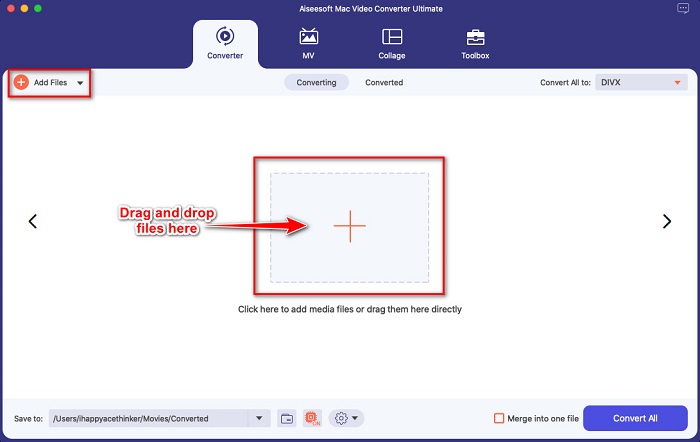
2. lépés. A szoftver fő felületén kattints az Add Files gombra, vagy húzd rá a MOV fájlodat a + jelre.
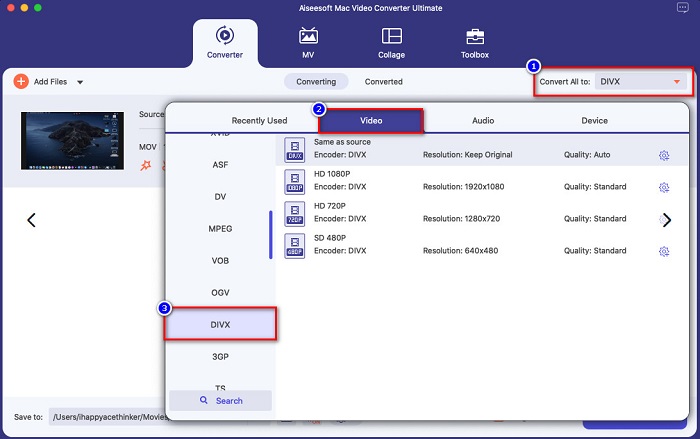
3. lépés. Válaszd ki a kimeneti fájlformátumot a Convert All to gombra kattintva, majd jelöld ki a Divx fájlformátumot.
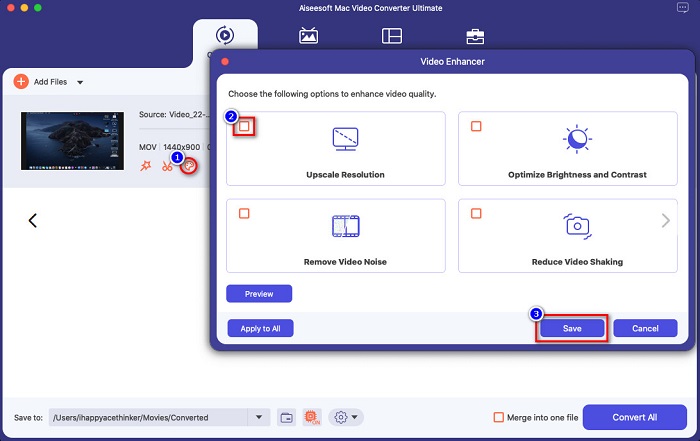
Opcionális. Ha szeretnéd javítani a videófájlodat, kattints az ecsethez hasonló ikonra. Ezután pipáld ki azokat az opciókat, amelyekkel javítani szeretnéd a fájlt. A módosítások alkalmazásához kattints a Save gombra. Ha nem szeretnél változtatni, lépj tovább a következő részre.
4. lépés. Végül kattints a Convert All gombra, hogy elindítsd a MOV fájl DivX formátummá történő átkódolását.
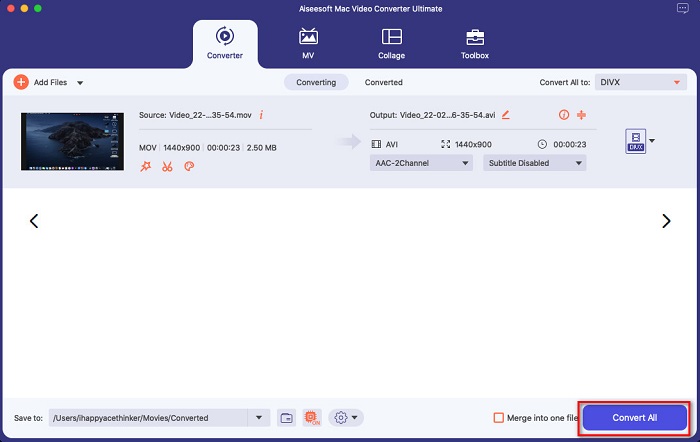
Csak várj néhány másodpercet, és kész! A MOV fájlt olyan egyszerűen DivX fájllá konvertálhatja, mint az ABC.
3. rész. 2 A MOV DivX Online konvertálásának lehetőségei
Ha nem szeretne semmit letölteni, amikor MOV fájlját DivX formátumba konvertálja, akkor két lehetőségünk van. Kipróbáltuk a neten megtalálható híres konvertereket, és kiválasztottuk közülük a két legjobbat.
Opció 1. Convertio
Valószínűleg találkozni fogsz ezzel a konverterrel a találati listában, amikor MOV–DivX átalakítót keresel. A Convertio egy online konverter, amely lehetővé teszi, hogy ingyen, online alakítsd át a MOV fájlokat DivX formátumba. Számos formátumot támogat, például MOV, DivX, MPG, WebM, M4V és továbbiakat. Emellett könnyen kezelhető a felülete, így kezdők számára is ideális eszköz. Mivel azonban internetkapcsolatra támaszkodik, előfordulhat, hogy a konvertálás folyamata lassú lesz.
1. lépés. Keresd meg a Convertio webhelyét a böngésződben. Az eszköz fő felületén kattints a Choose Files gombra. Megjelennek a számítógépen lévő fájlok, majd válaszd ki a MOV fájlodat.

2. lépés. Ezután kattints a drop-down gombra, és válaszd ki a kívánt kimeneti formátumot. Kattints a Video panelre, majd válaszd a DivX fájlformátumot.

3. lépés. Kattints a Convert gombra, hogy elindítsd a konvertálási folyamatot az utolsó lépésként.

2. lehetőség Evano
Ha Macet használsz, valószínűleg már láttad ezt az online konvertert. Az Evano egy online átalakító, amellyel MOV fájlokat alakíthatsz át DivX formátumba. Egyszerű felhasználói felülettel rendelkezik, és számos hang- és videóformátumot támogat. Emellett nem tartalmaz hirdetéseket, ellentétben sok más online konverterrel.
1. lépés. Megbízható böngésződben keresd meg az Evano online átalakítót. A szoftver fő felületén kattints a Choos File gombra, ekkor megjelennek a számítógéped mappái, ahol kiválasztod a feltöltendő MOV fájlt.
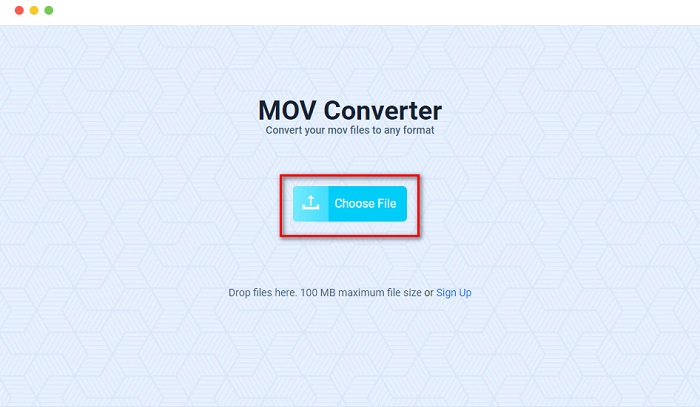
2. lépés. Miután feltöltötted a fájlt, kattints a Select opcióra, hogy kiválaszd a kívánt kimeneti formátumot. Ezután kattints a DivX formátumra.
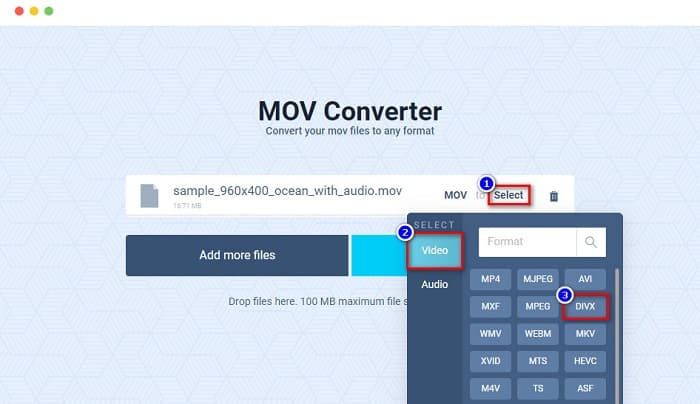
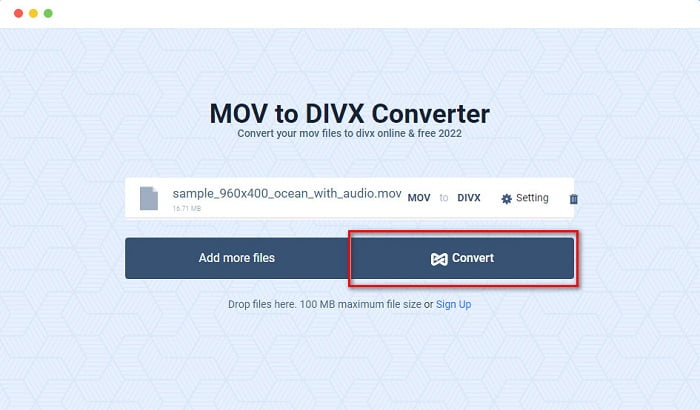
3. lépés. Ezután kattints a Convert gombra, hogy a MOV fájlt DivX formátummá alakítsd.
4. rész Konvertálás ingyenes konverter segítségével
Egy másik módja a MOV fájl DivX fájllá alakításának egy ingyenes konverter használata. Az egyik leggyakrabban használt ingyenes konverter a Prism Video File Converter. Ez a konverter ingyenesen letölthető, és elérhető Windowsra és Macre egyaránt. Használata biztonságos, ezért sokan ezzel az alkalmazással konvertálnak fájlokat. Másoknak azonban nehézséget okoz a használata, mert a felülete valamelyest nehezen átlátható. Ennek ellenére továbbra is kiváló megoldás a MOV–DivX konvertálásra ingyen.
1. lépés. Töltsd le a Prism Video File Converter programot Mac eszközödre. Kövesd a telepítési folyamatot, majd nyisd meg az alkalmazást. Kattints az Add File(s) gombra, hogy feltöltsd a MOV fájlt a szoftver fő felületére.
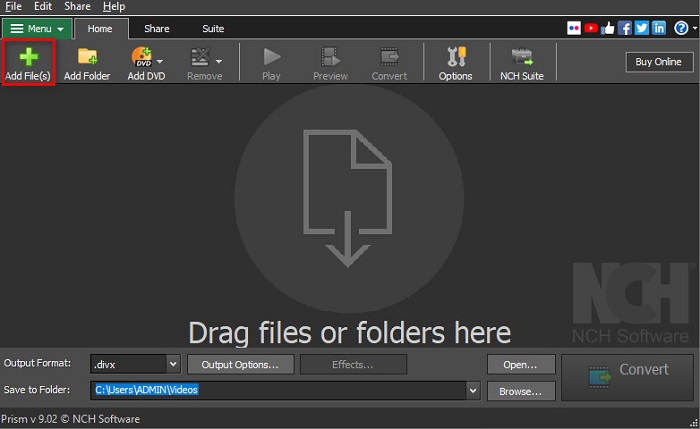
2. lépés. Ezután az Output Format melletti drop-down gombra kattintva válaszd ki a DivX fájlformátumot.
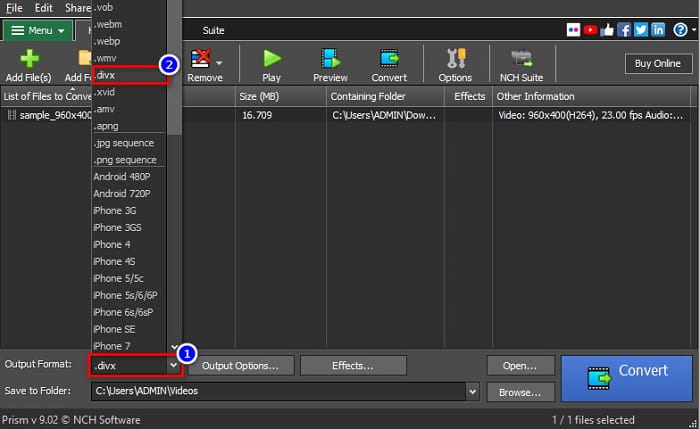
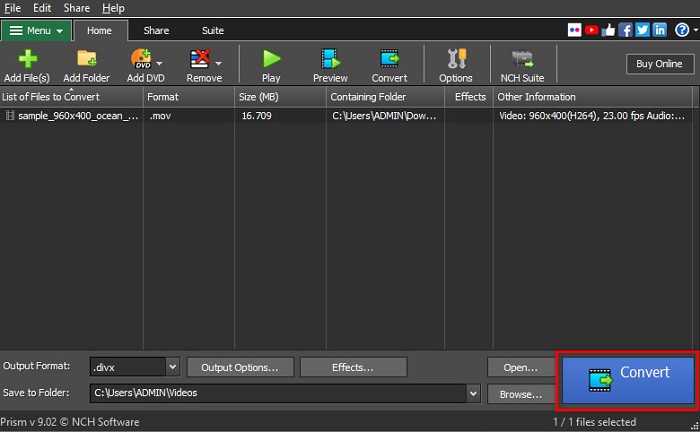
3. lépés. Végül kattints a Convert gombra, amely a szoftver felületének jobb alsó sarkában található.
5. rész. A MOV és a DivX összehasonlítása
| MOV | VS | DivX |
| Csak Apple eszközök támogatják | Támogatott eszköz | Szinte minden eszköz támogatja, beleértve a Mac-et és a Windows-t is |
| Tömörítetlen | Tömörítve/Tömörítetlen | Összenyomva |
| Nagy fájlméretet tartalmaz | Fájl méret | Kis fájlmérettel rendelkezik |
| A MOV a legjobban használható videószerkesztéshez | Legjobb felhasználási célra | A DivX a legjobb módszer a fájlméret tömörítésére az eredeti fájlméret tizenkettedére |
| Videó | Codec | Videó |
6. rész. GYIK a MOV DivX formátumba konvertálásával kapcsolatban
Le tudod játszani a MOV-ot a Windows Media Playerrel?
Sajnos nem. A Windows Media Player nem támogatja a MOV fájlformátumot. Ha azonban MOV fájlt szeretnél lejátszani Windows Media Playerben, átalakíthatod MOV-ról WMV formátumra. Ha többet szeretnél megtudni a MOV–WMV konvertálásról, kattints erre a linkre.
A MOV konvertálása DivX-be befolyásolja a fájl méretét?
Igen. A fájl mérete kisebb lesz, mivel a DivX fájl az eredeti méret tizenkettedéig képes tömöríteni.
A QuickTime támogatja a DivX fájlokat?
Nem. A QuickTime egy beépített médialejátszó Macre, amely nem támogatja a DivX fájlformátumokat. Ugyanakkor átalakíthatod a DivX fájlokat MKV formátumba, amelyet a QuickTime támogat.
Következtetés
Nos, ennyi! Nem kell tovább keresned a megoldást a MOV–DivX átalakításra, mert itt mindent megtalálsz. A fent bemutatott offline, online és ingyenes konverterek jelentik a legjobb módot arra, hogy MOV fájlodat DivX formátummá alakítsd. Rajtad áll, melyik konvertert választod, de ha a legjobb teljesítményűt szeretnéd használni, töltsd le most a FVC Video Converter Ultimate programot.
-
 2 egyszerű módszer a MOV fájlok FLV formátumba konvertálására Windows / Mac rendszeren
 Hogyan lehet átalakítani MOV-t FLV-re ingyen? Itt vannak a legjobb video-átalakítók asztali és online, amelyek MOV fájljait másodpercek alatt FLV-vé konvertálják, fillér fizetése nélkül.
-
 MOV GIF -re - Hogyan lehet átalakítani a MOV -t animált GIF -re Mac, PC és online ingyen
 Mi az a GIF? Hogyan lehet átalakítani a videót GIF -re? Hogyan lehet a MOV -ot animált GIF -re váltani online? Ez a bejegyzés 3 módszert ismertet, amellyel a MOV -t GIF -re konvertálhatja online, Mac/PC -n.
-
 4 hatékony módszer a MOV AVI-vé konvertálására PC-n és Mac-en [2021]
 Szeretné tudni, melyik a legjobb MOV-AVI konverter a weben? És miért lehet az FVC Ultimate Video Converter a megfelelő az Ön számára.
