


 ビデオコンバーター究極
 スクリーンレコーダー
 ビデオ修復
ビデオ修復デスクトップと電話で使用できる7つの最高のボリュームブースターアプリを知る
動画の音量が小さすぎて、こちらで音量を最大にしてもほとんど変わらないとイライラしませんか? 音量が小さくなってしまう原因はいくつかありますが、その動画にストレスを感じるよりも、ブースターを使って音量を大きく、そしてはっきりさせてみてはどうでしょうか。そこで今日は、いくつかの音量ブースターをご紹介します。ここで紹介するツールはすべて、この記事の筆者自身が実際に使用したものです。現在お使いのプラットフォームごとに、それぞれのツールの特徴をお伝えしていきます。それでは、Windows、Mac、iPhone、Android で使えるさまざまなサウンドブースターを順番に見ていきましょう。

パート1。WindowsPC、Mac、オンラインに最適なボリュームブースターの4つ
1.ビデオコンバーターアルティメット
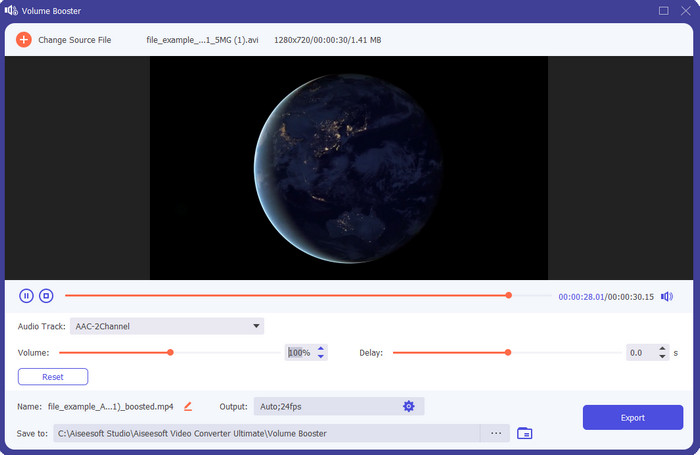
最高の音量ブースターアプリを探しているなら、Video Converter Ultimate がその候補になるはずです。このツールはスピーカーに負担をかけずに音質を向上させることができます。つまり、このツールで音量を調整しても、スピーカーからパチパチとした破裂音が出る心配はほとんどありません。さらに、音質が悪い音声であっても、このツールで強化することが可能です。プロでなくても、誰でも簡単に音量をブーストできるのも特長です。そしてそれだけではなく、このソフトにはダウンロードしておきたくなる便利な機能が数多く備わっています。このリストにある他のオーディオブースターとは異なり、音質を良くするためのさまざまな強化機能が用意されています。また、音声の遅延に悩んでいる場合にも、このツールで調整することができます。ここで紹介しているツールの中で、総合力では群を抜いて優秀と言ってよいでしょう。8D や 16D のような立体的で迫力のあるサウンドを体感したいなら、今すぐこのツールをダウンロードしてみてください。
無料ダウンロードWindows 7 以降に対応安全なダウンロード
無料ダウンロードMacOS 10.7 以降に対応安全なダウンロード
長所
- イコライザーとプリセットの調整を自動的に行い、作業をより簡単に、より良くします。
- オーディオの最終出力は、以前よりもはるかに良くなり、聴覚やスピーカーさえも破壊することはありませんでした。
- ブーストの経験がないユーザーでもできることは非常に直感的です。
短所
- デスクトップでのみ利用可能で、電話バージョンでは利用できません。
- アクセスする前に購入してください。ただし、それほど高価ではありません。
2.VLCメディアプレーヤー
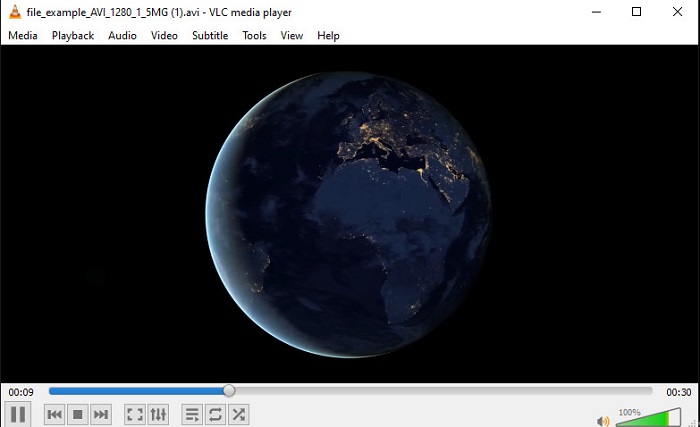
VLCメディアプレーヤーは、ネット上からダウンロードできる最高クラスのメディアプレーヤーのひとつです。このツールには、無料で使える音量ブースター機能が標準搭載されており、音量を最大で 125% パーセントまで上げることもできます。ただし、このデスクトップツールはスピーカーの耐久度を監視してくれるわけではありません。つまり、音量を常に最大近くで鳴らし続けると、特に内蔵スピーカーの場合、長期的には軽いビリつきや歪みが出てくる可能性があります。それでも、このツールはブースターとプレーヤーを兼ね備えた唯一のアプリです。動画を視聴しながら同時に音量をブーストしたいなら、一度試してみる価値があります。ただ音量を上げることはできますが、それだけで音質が劇的に良くなるとは限らない点には注意してください。
長所
- オーディオブースターを内蔵。
- オーディオを125%までブーストして、サウンドを大きくします。
- PCまたはMacに無料でダウンロードできます。
短所
- このツールには、オーディオの品質を向上させるためのイコライザーが組み込まれていません。
- オーディオの音量は監視されません。
関連記事:
3.ブーム3D
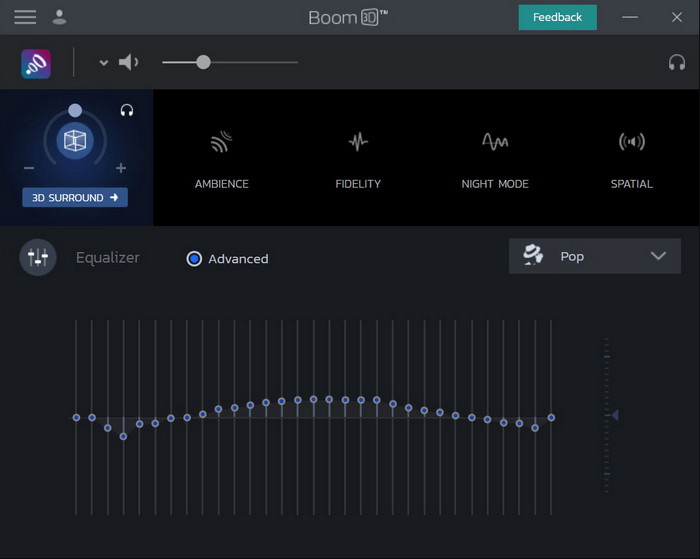
Boom 3Dは、オーディオ強化ツールの中でも最先端に位置する存在です。このWindows 10用およびMac用音量ブースターは、多彩なエンハンサー機能を備えているのが特徴です。また、Video Converter Ultimate とは異なり、イコライザーやプリセットを自分で細かく調整することができます。見た目にも高機能で魅力的なツールではありますが、使用にあたってはいくつかのデメリットもあります。特に初心者にとっては、セットアップや設定項目が多く、扱いづらく感じるかもしれません。それでも、使い方をしっかり学ぶには少し時間がかかりますが、その分だけ得られる効果は十分に見合うものです。
長所
- イコライザーとプリセットを手動でオーバーライドします。
- ツールにアクセスするためにインターネットは必要ありません。
- 高品質のオーディオを求めているプロが使用するのは素晴らしいことです。
短所
- イコライザーとプリセットが何であるかを知らない初心者にとっては最良の選択ではありません。
- このツールの使用方法を学ぶには多くの時間が必要です。
4.ボリュームブースター
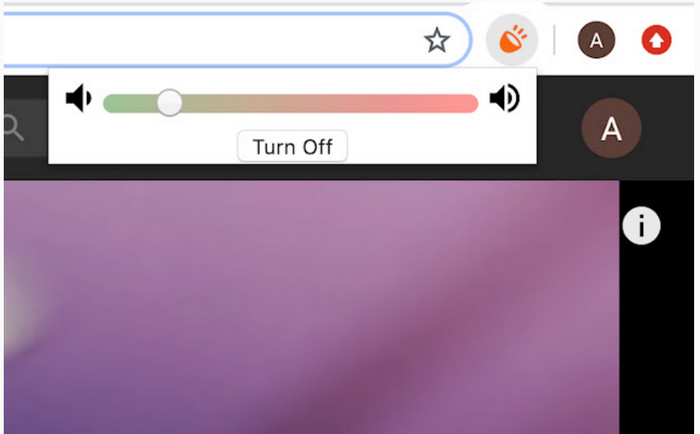
Volume Boosterは、インターネットさえあればすぐに利用できるChrome用音量ブースター拡張機能です。このツールは誰でも無料で使え、Chrome ウェブストアから提供されているため、安全性の面でも安心しやすいと言えます。この拡張機能を使えば、これから再生する音声をしっかりとブーストすることが期待できます。ただし、この拡張機能はあくまで Chrome 上でしか利用できません。そのため、ローカルドライブに保存してある音声ファイルなど、ブラウザの外で再生する音声を強化することはできません。さらに、音量を最大近くまで上げると、実際の検証ではパチパチとしたノイズが発生することもありました。これを避けるには、ブースト量を控えめに設定するのがおすすめです。
長所
- それはクロムの拡張であるため、ツールは安全です。
- 使いやすい。
短所
- クロームの外では使用できません。
- 最大にすると、オーディオのクラッキングが聞こえます。
- イコライザーはサポートしていません。
パート2。iPhoneとAndroid用のトップ3ボリュームブースターアプリ
1.ボリュームブースター–イコライザーFX
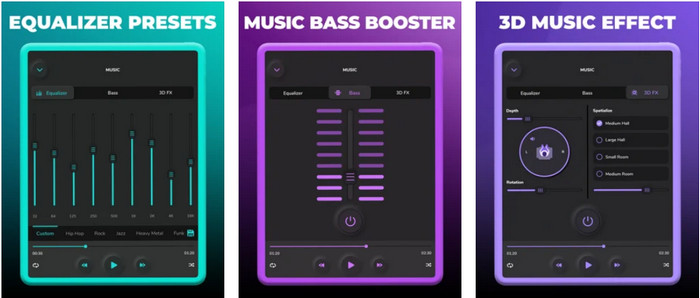
Volume Booster – Equalizer FXは、iPhone の音量上限を引き上げて、より大きく、迫力のあるサウンドを実現するアプリです。このiPhone向け音量ブースターは、多くのiOSユーザーが自分好みに音声をイコライジングするために利用してきました。アプリの評価は 3.9 と、悪くもなく、かといって絶賛というほどでもない、まずまずといったところです。また、このツールはオンラインストリーミング音声のブーストには対応しておらず、広告の多さが不評の原因にもなっています。さらに、クラッシュやバグなどの問題も依然として報告されています。それでも、iPhone で重低音(ベース)を強化したいなら、一度試してみる価値のあるアプリです。
長所
- これはiPhoneユーザーにとって良いブースターです。
- 基本的なイコライジングとオーディオ調整を実行できます。
短所
- ほとんどの場合、ツールはクラッシュします。
- オーディオブーストを使用できる場所に制限があります。
2.AmpMe –スピーカーと音楽の同期
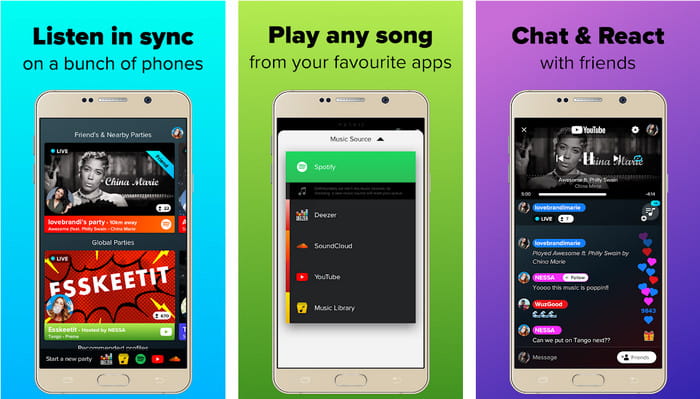
AmpMe - Speaker & Music Syncは、Androidデバイス向けの優れた音量ブースターアプリです。単なるブースターにとどまらず、自分がホストとなってプレイリストを再生したり、アプリ上のライブパーティーに参加したりすることもできます。つまり、このアプリを使えば、音楽を聴きながらほかのユーザーとチャットで交流するといった楽しみ方も可能です。高機能で魅力的なツールではありますが、使用中にバグやクラッシュが起こることもあります。また、一部のユーザーはプレイリストに楽曲を追加しづらいと感じており、その点が煩わしいという声もあります。機能が多いぶん、使い方を理解していないと少し扱いにくく感じるかもしれませんが、総合的にはAndroidユーザーにとって十分に魅力的なアプリと言えるでしょう。
長所
- あなたはAmpMeであなた自身のDJになり、同じアプリで近くの他の人々とそれを共有することができます。
- 聞くと同時にチャットする。
- 高品質のオーディオを生成します。
短所
- 安く行きたいのなら、購読料が高すぎて払えません。
- アカウントを削除しても、サブスクリプションをキャンセルすることは困難です。
- ライブパーティーに参加すると、アプリが自動的に切断されることがあります。
3.ボリュームブースターGOODEV
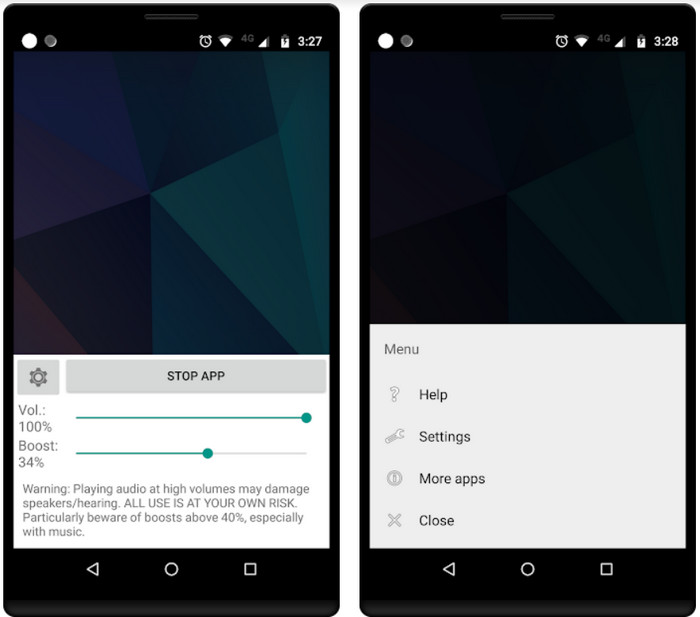
Volume Booster GOODEVは、シンプルで直感的に操作しやすいインターフェースを備えています。この音量ブースターは、ユーザーから 4.4 という高評価を獲得しており、多くのレビューで「用途に対して非常に優れている」と称賛されています。ただし、現在では使用中にクラッシュが発生したり、アプリを起動しても音量がブーストされないといった不具合が報告されています。その場合は、スマートフォンを再起動するか、アプリを再起動することで機能が戻るケースが多いようです。
長所
- Android携帯に簡単にダウンロードできるわかりやすいオーディオブースター。
- 使いやすい。
短所
- 広告はどこからともなく表示されています。
- ほとんどの場合、不明な理由なしにアプリが自動的にクラッシュします。
- このアプリの古いバージョンは、更新されたバージョンよりもはるかに優れています。
パート3。どれが最高のボリュームブースターですか
これは、他のツールにないツールと使用できるツール機能を比較するために表示される比較チャートです。
| ツール機能/ s | ビデオコンバーター究極 | VLCメディアプレーヤー | ブーム3D | ボリュームブースター | ボリュームブースター–イコライザーFX | AmpMe –スピーカーと音楽の同期 | ボリュームブースターGOODEV |
| オーディオブースター |  | | | | | | |
| オーディオエンハンサー | |  | | | | | |
| オーディオとビデオの同期機能 | | | | | | | |
| 使いやすい | | | | | | | |
| サポートされているプラットフォーム | デスクトップベースのツール | デスクトップベースのツール | デスクトップベースのツール | Chrome拡張ツール | iOSダウンロードベースのツール | Androidのダウンロード可能なツール | Androidのダウンロード可能なツール |
| 価格帯 | 1か月:$25.00 生涯ライセンス:$55.20 マルチユーザーライセンスの有効期間/ 5台のPC:$119.00 | 無料でダウンロード | $11.99および$23.99 | 自由 | 3〜20 $ | $0.99 –アイテムあたり$99.99 | 自由 |
パート4。ボリュームブースターに関するFAQ
音量を上げると聴覚にダメージを与えますか?
実はそうです。特に、イヤホンまたはヘッドセットを使用していて、オーディオの音量を最大にした場合は、音量ブースターを追加します。次に、長期的には聴覚がゆっくりと破壊されることを期待してください。したがって、これを回避することができます。中または低に制限し、最大にしないことをお勧めします。
スピーカーのオーディオブーストの他の欠点は何ですか?
オーディオブースターを使用して、音が小さい場合にオーディオをよりよく聞きます。しかし、スピーカーにも可能なヘルツ制限があることをほとんど知りませんでした。ヘルツが高いほど音量は大きくなりますが、一部の内蔵スピーカーでは超大きな音を処理できません。そのため、スピーカーがパチパチ音を立てて、スピーカーが音声を処理できない可能性があります。
スピーカーの低音と高音の違いは何ですか?
これらの2つは、最もよく知られている内蔵スピーカーですが、スピーカーを使用する理由には独自の目的があります。低音の場合、低周波数のオーディオを処理でき、高周波数を処理できません。また、音楽のブームを感じさせることに特化しています。高音域は低音域では処理できない高音域に焦点を当てています。
結論
まとめると、PC、Mac、オンライン、モバイル端末向けの音量ブースターを使えば、これまで聞き取りにくかった低品質の音声でもしっかり楽しめるようになります。ここで紹介したツールは、音楽を新たなレベルで味わいたいすべての人に役立つものばかりです。その中でも、特にユーザーの手間を減らしながら、より簡単かつ高品質に音量をブーストできるツールがあります。それが、イコライザー調整やプリセット設定を自動で行ってくれる Video Converter Ultimate です。このツールの優秀さを実感するには、まず一度自分で試してみるのが一番です。ストレージにダウンロードして、その使い心地を確かめてみてください。
-
 コンピュータ/電話で無料でビデオにオーディオと音楽を追加する方法
 この記事では、ビデオにオーディオを無料で追加する4つの簡単な方法を紹介します。ビデオに追加するオーディオトラックに関係なく、ここで満足のいく結果を得ることができます。
-
 偏りのないシンチレビューオーディオレコーダーと最良の代替品
 Cinch Audio Recorderは、ストリーミングサイトから音楽をダウンロードするための最良の方法です。公平なレビューと記事からの最良の代替案についてもっと学びましょう。
-
 VLCプレーヤーでオーディオを録音する方法の実現可能な方法
 記事を読んで、VLCプレーヤーやその他の実用的なツールでオーディオを録音するための最良の方法を学びましょう。
