


 ビデオコンバーター究極
 スクリーンレコーダー
 ビデオ修復
ビデオ修復
 安全なダウンロード
FLVをMOVに変換するトップ3の方法
サポートされていない形式などの理由で、特にMacを使用している場合に、FLVをMOVに変換する必要があることがあります。
ご存じのように、FLVファイルはQuickTime PlayerやiMovieでネイティブにサポートされていません。そのため、Mac上でFLVを直接開いたり編集したりすることはできません。理由が何であれ、この記事ではFLVをMOVに変換する方法を紹介します。

幸いなことに、多くのビデオコンバーター(無料のオンラインツールを含む)があり、FLVファイルを簡単にMOVへ変換できます。この記事では、優れたFLVからMOVへのコンバーターを3つ紹介します。動画共有サイトからFLV動画をダウンロードした場合でも、これらのツールを使ってFLVからMOVへの変換を行うことができます。
パート1。FLVをMOVオンライン無料に変換する
前述のとおり、市場には多くの無料オンラインFLVからMOVへのコンバーターがあります。どれを使えばよいか分からない場合のために、ここではFLVをQuickTime MOVに変換するための人気オンラインツールであるFVC Free Online Video Converterをおすすめします。
ステップ1: ブラウザを開き、このオンラインFLVからMOVへのコンバーターのサイトにアクセスします。Chrome、IE、Safari、Firefoxなど、どのWebブラウザでも利用できます。
ファイルを一括変換するには、デスクトップ版をダウンロードしてください。
ステップ2: Add Files to Convertボタンをクリックして、FLV変換用ランチャーを素早くインストールします。その後、FLVファイルを参照してアップロードするためのポップアップウィンドウが表示されます。

ステップ3: メインのコンバーター画面に入ると、MP4、MOV、AVI、FLV、M4V、MKV、VOB、MPG、WMVなどの人気動画形式が一覧表示されます。ここで出力形式としてMOVを選択します。
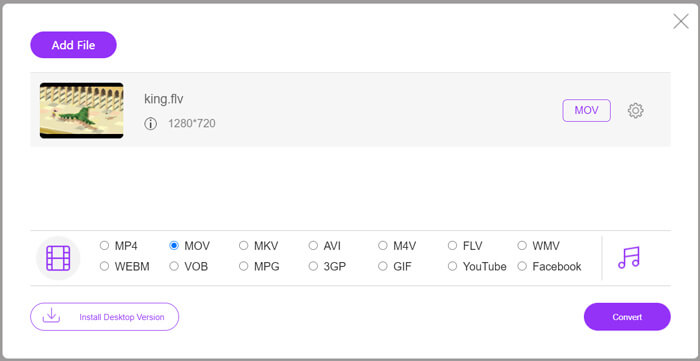
ステップ4: 最後にFLVからMOVへの変換を行う前に、Settingsアイコンをクリックして、動画解像度、エンコーダー、ビットレート、フレームレート、音量、オーディオチャンネルなど、より詳細な動画・音声設定をカスタマイズできます。その後、Convertボタンをクリックして、オンラインでのFLVからMOVへの変換を開始します。
パート2。VLCでFLVをMOVに変更する
VLCはオープンソースのメディアプレーヤーで、基本的な変換機能も備えています。MacやWindows PCにVLC Media Playerをインストールしている場合は、それを使ってFLVファイルを変換できます。
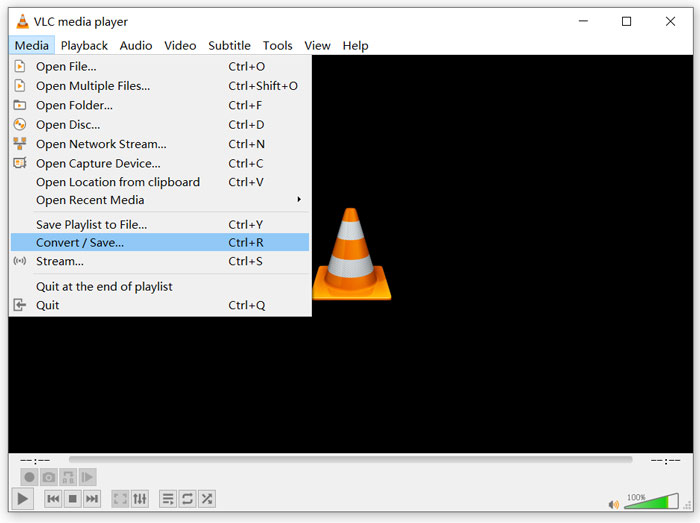
ステップ1: パソコンでVLC Media Playerを開き、Mediaメニューをクリックします。ドロップダウンリストからConvert/Saveオプションを選択します。MacでVLCを使用している場合は、Fileメニューをクリックし、Convert/Streamオプションを選択してください。
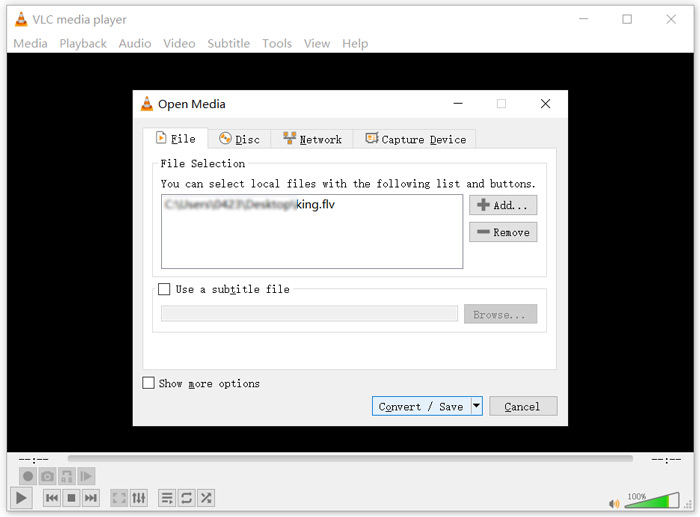
ステップ2: するとOpen Mediaウィンドウが表示されます。ここでAddボタンをクリックし、変換したいFLVファイルを読み込みます。その後、Convert/Saveボタンをクリックして次へ進みます。
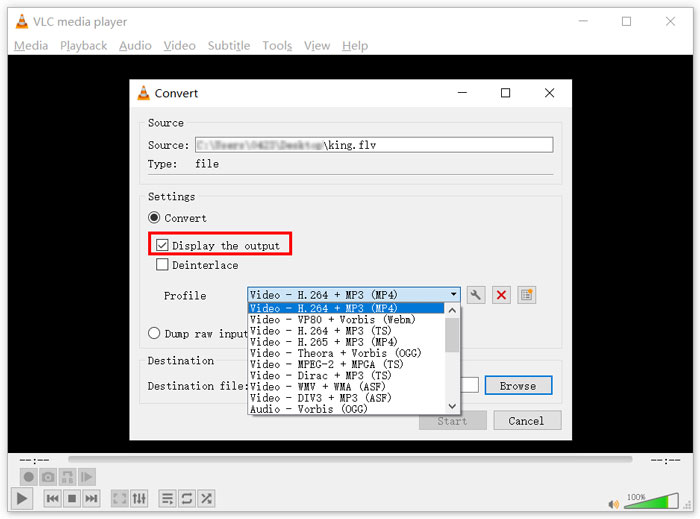
ステップ3: Profileのドロップダウンリストから、適切な出力形式を選択します。ここでは、FLVをMP4、TS、OGG、WebM、YouTube HD、MP3、FLACなどに変換できます。Display the outputオプションの前のチェックボックスにチェックを入れます。Browseボタンをクリックして、変換後のFLVを保存する適切な出力フォルダを指定します。このとき、出力動画の拡張子を.movに設定できます。
ステップ4: これらの操作が完了したら、StartボタンをクリックしてFLVの変換を開始します。
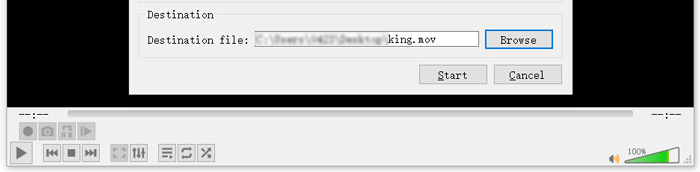
VLC Media Playerは自動的に出力動画の再生を開始します。VLC画面上部にはConverting fileという表示が出ます。変換が完了するまで、VLCを完全に閉じないようにしてください。
パート3。品質を損なうことなくFLVをMOVに変換する最良の方法
FLVをMOVに変換したい場合は、プロ向けのソリューションを利用することもできます。ここでは、多機能なFLVからMOVへの変換ソフトウェアであるVideo Converter Ultimateを強くおすすめします。無料オンラインFLVからMOVへのコンバーターやVLCと比べて、より多くの機能を備え、対応形式も豊富です。さらに重要なのは、元の画質を保ったままFLVをMOVに変換できる点です。
- 1. MKV、AVI、MP4、WMV、FLVなどのビデオを品質を損なうことなくMOVに変換します。
- 2. 8K / 5K / 4K、1080p / 720p HDおよびSDビデオを、MOV、MP4、AVI、MP3などの500を超える形式に変換します。
- 3.カット、回転、トリミング、マージなどのビデオを編集し、フィルターと効果を追加して、品質を向上させます。
- 4. Toolboxは、FLVの圧縮、FLVメタデータ情報の編集、FLVからのGIFの作成などを行うことができます。
無料ダウンロードWindows 7 以降に対応安全なダウンロード
無料ダウンロードMacOS 10.7 以降に対応安全なダウンロード
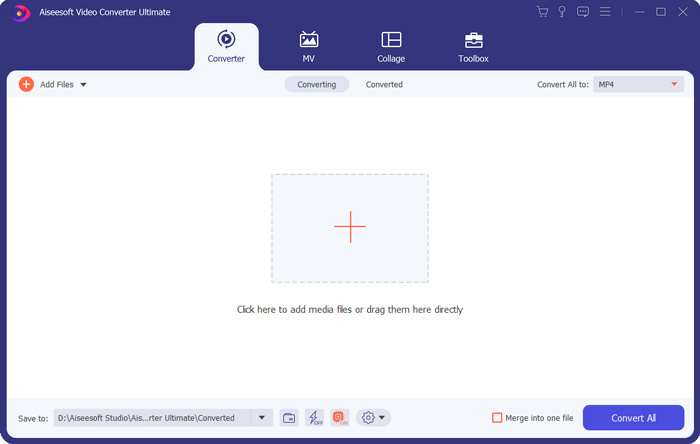
ステップ1: このFLVからMOVへのコンバーターをMacまたはWindows PCに無料でインストールして起動します。Converter機能を使用していることを確認し、大きなプラスアイコンをクリックしてFLVファイルを追加します。
ステップ2: 取り込んだFLVファイルの右側にあるformatアイコンをクリックします。ドロップダウンリストから出力形式としてMOVを設定します。
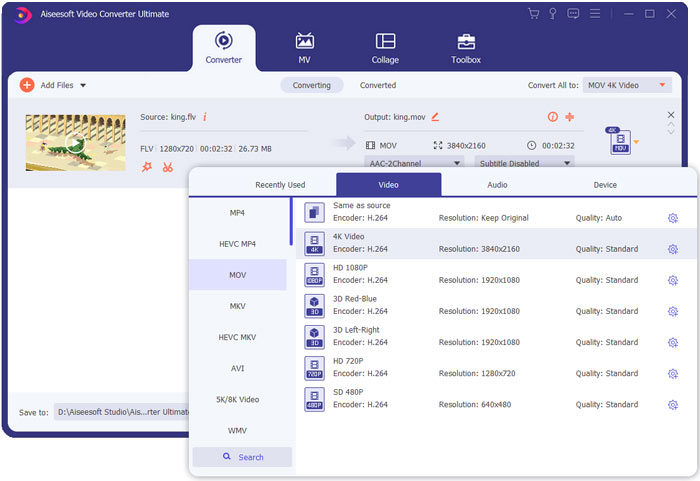
ステップ3: 上記のとおり、このFLVコンバーターには多くの編集機能が搭載されています。そのため、FLVからMOVへの変換前に、動画を編集したり、フィルターやエフェクトを追加したり、ニーズに応じてその他の設定をカスタマイズしたりできます。その後、Convert Allボタンをクリックして変換処理を開始します。
FLVとMOV
Adobe Flash Playerは、FLVを使用して、映画やテレビ番組などのビデオコンテンツを配信しました。現在、アドビはプレーヤーを開発しておらず、セキュリティ上の理由からユーザーにアンインストールすることを推奨しています。ただし、Adobe/Macromedia以外の多くのプログラムでは引き続きFLV形式を使用できます。
MOV形式は、映画、テレビ番組、短いビデオクリップ、またはホームムービーの保存に使用できます。実際には、1991年にAppleによって導入されたQuickTime File Format(QTFF)で保存されます。MOVファイルは、人々が高品質のビデオを保存したいときによく使用されます。
パート4。FLVをMOVに変換する際のFAQ
FLVとMOV、FLVとMOVの違いは何ですか?
FLV(Flash Video File)は、Adobe Systemsが開発したFlash対応の動画ファイルです。短いヘッダー、インタリーブされた動画・音声・メタデータパケットを含んでいます。FLVはもともとAdobeアプリケーション内に動画ストリームを埋め込むために設計されました。一般的なFLVファイルには、640×360の動画ストリームと、44.1KHz・2チャンネル・AACの音声ストリームが含まれます。
MOVはAppleデバイスおよびQuickTime PlayerやiMovieなど関連ソフトの標準動画形式です。国際標準化機構(ISO)のMPEG-4ファイル形式のベースとなっています。MOVファイルには、動画、音声、テキスト、字幕、画像、その他のデータを保存できます。
FLV形式はMac、iPhone、iPad、iPod touchなどのAppleデバイスではサポートされていません。さらに、MOVと比較すると、FLVは画質が劣る傾向があります。
iMovieはFLVを編集できますか?
いいえ。上記からわかるように、FLVはAppleのデバイスやソフトウェアではサポートできません。 MacおよびiOSデバイスのデフォルトのビデオエディタとして、iMovieはFLVファイルとも互換性がありません。
Windows Media PlayerはMOVファイルを開くことができますか?
ほとんどのWindowsMedia Playerバージョンは、MOV形式をサポートしていません。ただし、最新のWindows Media Player12.0ではMOVファイルを開くことができます。
結論
この記事では、FLVをMOVに変換する3つの簡単な方法を紹介しました。FLVファイルが再生できない・編集できないときは、ここでおすすめしたコンバーターを使ってMOVまたはMP4に変換してください。
-
 デスクトップとオンラインでFLVビデオをMP3オーディオファイルに変換する方法
 FLVをMP3ファイルに変換する方法は?あなたがする必要があるのは、この記事を注意深く読み、あなたの好きな方法を見つけて、あなたが望むものを得るために私たちのステップバイステップガイドに従うことです。
-
 あなたが試してみなければならないWindows10 / 8/7、Mac、iOS、Android用の10の最高のFLVビデオプレーヤー(2021最新)
 FLVプレーヤーを使用すると、Windows、Mac、Android、iOSデバイスでFLVファイルに簡単にアクセスできます。あなたが今ダウンロードできる最高のFLVファイルプレーヤーをチェックしてください。
-
 MP4をFLVOnline / Mac / Windowsに無料で変換する方法
 この投稿は、MP4からFLVへの変換の詳細なガイドです。上位3つの無料コンバーターを使用して、WindowsまたはMacコンピューターでMP4をFLVにオンラインで簡単に変更できます。

