


 ビデオコンバーター究極
 スクリーンレコーダー
 ビデオ修復
ビデオ修復
 安全なダウンロード
3つのMTSからFLVへのコンバーターでMTSをFLVに変換する方法
MTS ファイルを FLV に変換したいですか?AVCHD ビデオカメラで録画した動画は、通常 MTS または M2TS 形式で保存されます。MTS ファイルは一部のメディアプレーヤーでは一般的にサポートされておらず、YouTube や Facebook へのアップロードにも対応していません。Sony、Panasonic、Canon などの AVCHD ビデオカメラをお持ちなら、録画した MTS 動画を Flash ビデオ形式に変換したいと思うかもしれません。そうすれば、ほとんどのメディアプレーヤーで再生できるようになります。そこで、Windows と Mac でMTS ファイルを FLV に変換する 3 つの方法を紹介する本記事を読み進める価値があります。

パート1。無料でMTSをFLVに変換する専門的な方法
MTS ファイルをアップロード用の Flash ビデオに変換するには、FVC Free MTS Converter のようなプロフェッショナルツールが必要です。これは MTS を FLV に変換できるコンバーターで、MTS ファイルを FLV、MP4、WMV、MOV などの各種動画・音声形式に一括変換することができます。内蔵の動画編集ツールを使えば、変換前に MTS ファイルを編集することも可能です。

FVCフリーMTSコンバーター
1,286,400以上のダウンロード- Windows 10/8/7 / Vista / XPおよびMacOSXでMTSをFLVに変換します。
- MTSファイルに他のビデオ効果を圧縮、マージ、および追加します。
- 休日、家族、誕生日など、MTSファイルに特別なテーマを追加します。
- MTSをFLV、MP4、MKVなどに50倍速い速度でバッチ変換します。
無料ダウンロードWindows 7 以降用安全なダウンロード
無料ダウンロードMacOS 10.7 以降用安全なダウンロード
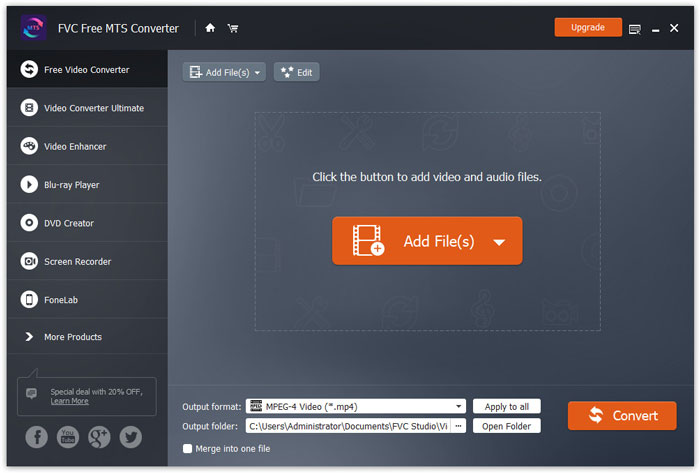
ステップ 1. MTS ファイルを追加
FVC Free MTS Converter を無料でダウンロードしてインストールし、起動します。ファイルを追加ボタンをクリックして、MTS ファイルを読み込みます。複数の MTS ファイルをドラッグ&ドロップして、無料で一度に追加することもできます。
ステップ 2. MTS ファイルを編集
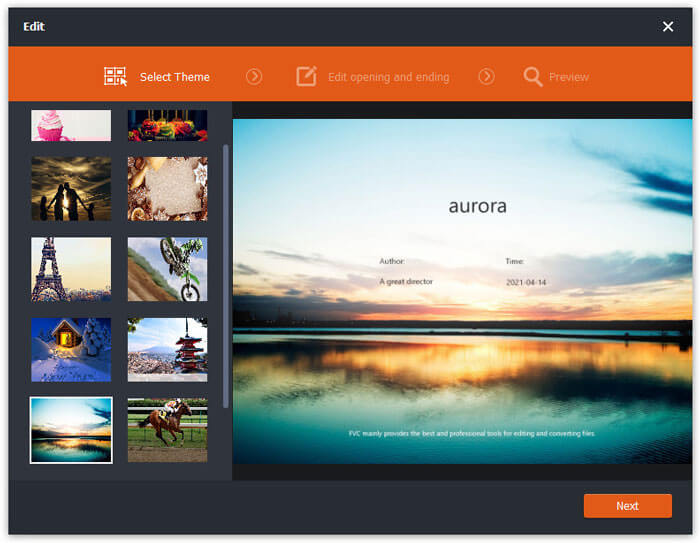
編集ボタンをクリックして、MTS ファイルの編集を開始します。任意のテーマを選択したり、オープニングとエンディングのタイトル、作者名、時間などを編集できます。
ステップ 3. 出力を FLV に設定
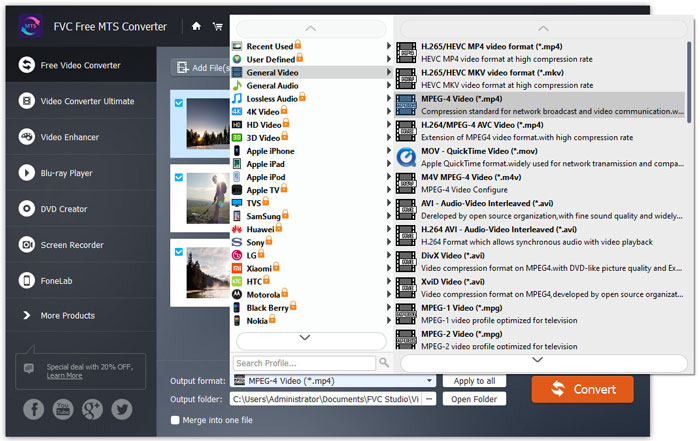
次に、出力形式エリアに進み、汎用動画カテゴリーを選択します。FLV - Flash Video Format (.flv)を見つけて、出力形式として設定します。この形式は、ネットワーク動画のストリーミングメディアとして広く利用されています。
ステップ 4. MTS を FLV に変換
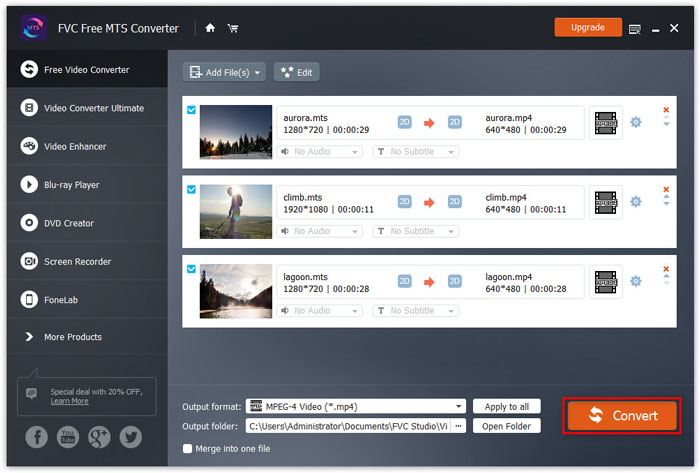
最後に、出力フォルダーエリアで、変換後の FLV ファイルを保存する保存先を選択します。変換ボタンをクリックすると、MTS から FLV ファイルへの無料変換が開始されます。
その後、変換されたFLVファイルをYouTube、Vimeo、Facebook、Googleビデオ、またはその他のメディアプラットフォームにアップロードできます。
パート2。MTSをFLV無料オンラインに変更する方法
ソフトをインストールせずオンラインツールを使いたい場合は、FVC のFree Online Video Converter を利用できます。これは使いやすく無料のオンライン MTS から FLV へのコンバーターで、Windows と Mac の両方で、MTS を FLV、MP4、WMV、AVI、MOV、MP3 などの人気の動画・音声形式に完全無料で変換できます。この無料オンラインツールで MTS を FLV に変換する詳しい手順も確認できます。
ステップ 1. FVC Free Online Video Converter(https://www.free-videoconverter.net/free-online-video-converter/)の公式サイトにアクセスします。変換するファイルを追加ボタンをクリックして、ランチャーをダウンロード・インストールします。

ステップ 2. 変換したい MTS ファイルをパソコンから選択します。
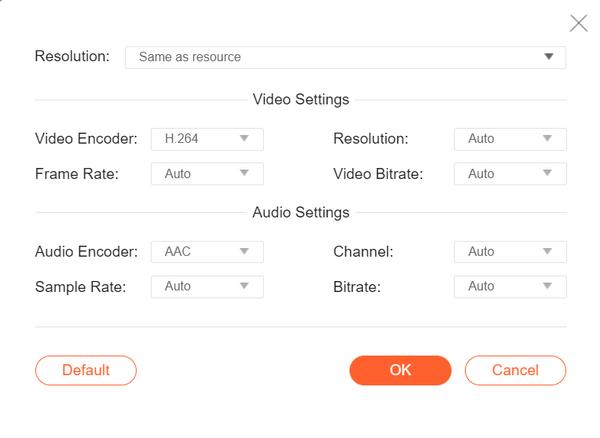
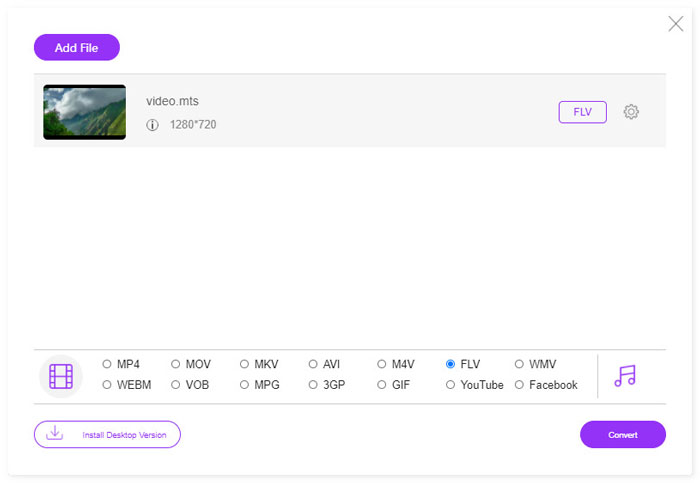
ステップ 3. 画面下部で出力形式としてFLVを設定します。さらに詳細な設定を行いたい場合は、歯車アイコンをクリックして、ビデオエンコーダー、解像度、フレームレート、ビットレートなどの動画設定や、オーディオエンコーダー、チャンネル、サンプルレート、ビットレートなどの音声設定を調整できます。
ステップ 4. 変換ボタンをクリックして、MTS ファイルを FLV に変換し始めます。
パート3。VLCを使用してMTSファイルからFlashビデオを無料でエクスポート
VLC media player は、単なる動画・音声プレーヤーではなく、多くの便利な機能を備えた動画変換ソフトとしても利用できます。幅広い対応ファイルの変換に対応した、優れた MTS から FLV へのコンバーターとして動作します。完全無料で、制限もありません。VLC を使えば、Windows や Mac で MTS ファイルから Flash ビデオを無料で書き出すことができます。MTS ファイルを FLV に変換するには、まずパソコンに VLC をダウンロードしてインストールする必要があります。
ステップ 1. VLC media player を起動し、メディアメニューから変換/保存をクリックします。
ステップ 2. 追加ボタンをクリックして MTS ファイルを追加し、変換/保存ボタンをクリックして続行します。
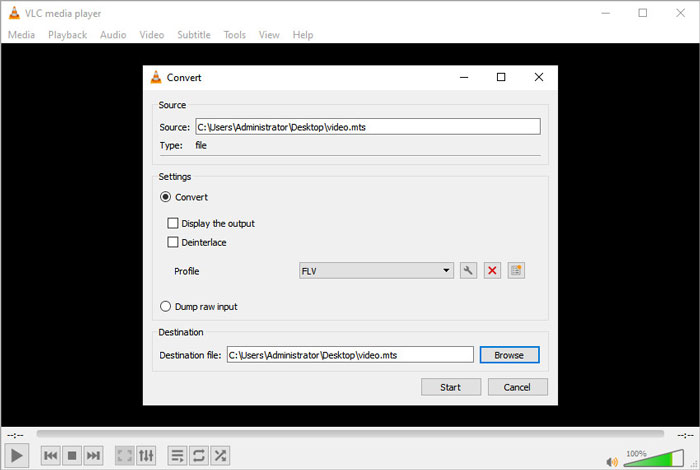
ステップ 3. 設定エリアで変換にチェックを入れ、ドロップダウン矢印をクリックして、出力形式としてFLVを選択します。FLV の出力プロファイルがない場合は、「新しいプロファイルを作成」アイコンをクリックして、新しい FLV プロファイルを作成できます。
ステップ 4. 次に、変換先エリアに進み、参照ボタンをクリックして、出力フォルダーを設定します。
ステップ 5. すべての設定が完了したことを確認したら、開始ボタンをクリックして、VLC で MTS から FLV への変換を開始します。
パート4。MTSをFLVに変換する際のFAQ
MTSビデオフォーマットとは何ですか?
MTS ファイルとは、Advanced Video Coding High Definition(AVCHD)形式で保存された動画ファイルです。MTS ファイルは、多くの Sony および Panasonic 製 HD ビデオカメラで使用されている標準的な動画形式です。また、Blu-ray ディスク上にハイビジョン動画を保存する際にも利用されます。
MTSファイルをMP4に変換するにはどうすればよいですか?
FVC Free MTS Converter を使えば、MTS ファイルを MP4 に変換することもできます。[ファイルを追加]ボタンをクリックして MTS ファイルを読み込み、出力形式で MP4 を選択します。その後、[変換]ボタンをクリックすると、MTS から MP4 への無料変換が開始されます。
Windows 10はMTSファイルを再生できますか?
はい。 Windows MediaPlayerを使用してMTSファイルを再生できます。 MTSファイルの再生に失敗した場合は、VLC Media Player、5K Player、FVC Free VideoPlayerなどの他のMTSプレーヤーを試すことができます。
結論
この記事では、MTSファイルを無料でFLVに変換する3つの方法について主に説明しました。上記のすべてのMTSからFLVへのコンバーターを試して、アップロード用のフラッシュビデオファイルをエクスポートできます。この無料のMTSコンバーターは、MTSファイルをFLV、MP4、WMV、VOB、MP3などに高速で簡単に変更できます。
-
 2021年のWindows、Mac、iOS、Android向けのトップ10FLVプレーヤー
 FLVプレーヤーを使用すると、Windows、Mac、Android、iOSデバイスでFLVファイルに簡単にアクセスできます。あなたが今ダウンロードできる最高のFLVファイルプレーヤーをチェックしてください。
-
 VOBをFLVに変換する最良の方法
 VOBファイルをFLVファイルに変換したいですか?デスクトップまたはオンラインコンバーターを使用して、タスクを簡単に完了することができます。このガイドを読み、VOBをFLVに簡単かつ迅速に変換する方法を学びます。
-
 MTS VS M2TS –MTSとM2TSの違い
 MTSまたはM2TSファイルとは何ですか? M2TSとMTSの違いは何ですか?ビデオカメラで録画したMTSまたはM2TSファイルを見るにはどうすればよいですか?この投稿ですべての答えを見つけてください。
