


 ビデオコンバーター究極
 スクリーンレコーダー
 ビデオ修復
ビデオ修復
 安全なダウンロード
最高かつ最速のコンバーターで驚くほど HEIC を SVG に変換
HEICファイルは、高画質な解像度を保ちながらファイルサイズを小さくできる画像形式です。しかし、ウェブサイトを作成したりページ用のロゴを作成したりする場合は、別の画像形式を使うことを検討したほうがよいかもしれません。ウェブサイトに最適な画像形式のひとつが SVG 画像ファイルです。そこで本記事では、HEIC を SVG 画像形式に変換するのに役立つおすすめツールをご紹介します。

パート 1. HEIC と SVG
HEIC は、Apple が開発した画像形式です。高解像度でありながらデバイス上であまり容量をとらないため、現在もっとも一般的に使われている画像形式のひとつになっています。さらに、iPhone や Mac をはじめとする Apple 製デバイスでは、HEIC 画像を標準で開くことができます。しかし、Windows デバイスを使用している場合は、HEIC 画像をそのまま表示することはできません。ほかの形式と異なり、SVG 画像形式は画像をベクターとして保存します。
これらの画像形式は、品質を損なうことなく拡大および縮小できます。さらに、SVG 画像は、専門的な Web サイト、ロゴ、アイコン、およびインフォグラフィックで一般的に使用されています。また、すべての Web ブラウザが SVG ファイルをサポートしています。したがって、SVG ファイルを開くのは難しくありません。
パート 2. 最高のオンライン コンバーターを使用して HEIC を SVG に簡単に変換する
多くのオンライン コンバーターは、HEIC を SVG に変換できます。ただし、すべてのコンバーターが使いやすく安全であるとは限りません。したがって、この部分では、ユーザーフレンドリーで安全な最高のコンバーターを知ることができます.したがって、HEICをSVGに簡単に変換する方法を学ぶので、座ってリラックスしてください.
Aconvert.com
Aconvert.com は、インターネット上で利用できる最も人気のあるオンライン コンバーターの 1 つです。このツールを使用すると、品質を気にせずに HEIC を SVG に変換できます。高速な変換プロセスにより、HEIC ファイルを SVG に簡単に変換できます。ただし、これは Web ベースのアプリケーションであるため、邪魔になる可能性のある広告が含まれています。それにもかかわらず、多くの人がこのオンライン コンバーターを最初の選択肢として使用しています。
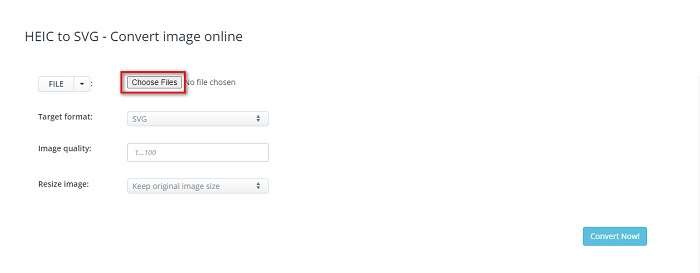
ステップ1. ブラウザで Aconvert.com を検索します。次に、ソフトのメイン画面にある[Choose Files]ボタンをクリックします。パソコン上のファイルが表示されるので、HEIC 画像を選択し、Open をクリックしてアップロードします。
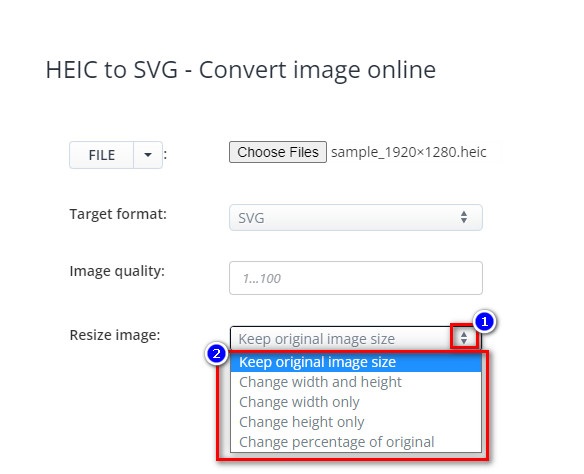
ステップ2. HEIC ファイルをアップロードしたら、up-down ボタンをクリックして、出力したい形式を選択します。その後、Convert Now ボタンをクリックします。
![[今すぐ変換] ボタンをクリックします](/images/2022/04/click-convert-now-buttons.jpg)
Resize Image の横にある up-down ボタンをクリックすると、画像サイズを変更できます。
ステップ3. 最後に、Save アイコンをクリックして SVG 画像をダウンロードします。

長所
- HEICをSVGにすばやく変換できます。
- 画像のサイズを変更したり、品質を調整したりできます。
- Google、Safari、Firefox、Edge など、ほぼすべての Web ブラウザーでアクセスできます。
短所
- 広告が含まれています。
FreeConvert.com
FreeConvert.com も、HEIC 画像を SVG 画像に変換できるオンラインツールです。このコンバーターはインターフェースがシンプルで、初心者にも使いやすいツールです。また、詳細設定を使えば、画像の背景色や色数を調整することもできます。ただし、インターネット接続が遅い場合は、変換処理にも時間がかかることがあります。
ステップ1. まず、ブラウザで FreeConvert.com を検索します。ソフトのメイン画面で Choose Files ボタンをクリックします。パソコン上のファイルが表示されたら、HEIC 画像を選択します。

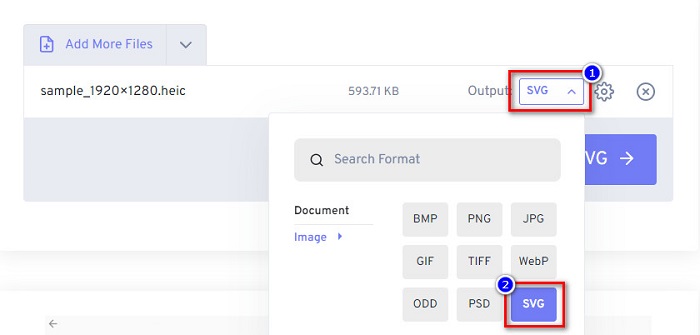
ステップ2. 次に、Output の横にあるドロップダウンボタンをクリックし、出力したい画像ファイル形式を選択します。
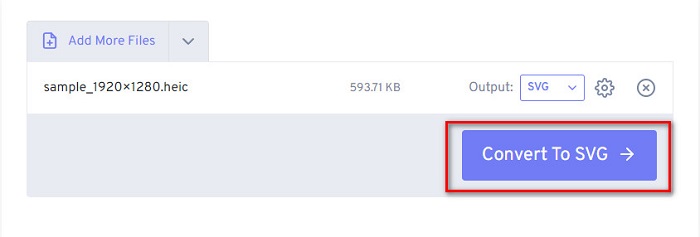
ステップ3. 最後に、Convert to SVG ボタンをクリックし、ファイルの変換が完了するまで待ってから、Download ボタンをクリックします。
長所
- 安全に使用できます。
- HEICをSVGにすばやく変換できます。
- シンプルなユーザーインターフェースを備えています。
短所
- 厄介な広告が含まれています。
MConverter
使用する価値のあるもう 1 つのオンライン コンバーターは MConverter です。この HEIC から SVG へのオンライン コンバーターには、わかりやすいソフトウェア インターフェイスがあります。このツールは安全に使用できるため、データについて心配する必要はありません。さらに、HEIC、SVG、BMP、GIF、PNG などの多くの画像形式をサポートしています。ただし、変換できるのはファイル サイズが 200MB 未満の画像のみです。
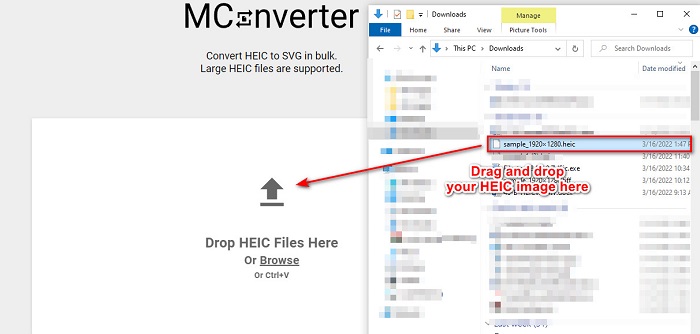
ステップ1. ブラウザで MConverter を検索します。次に、ソフトのメイン画面に HEIC 画像をドラッグ&ドロップします。
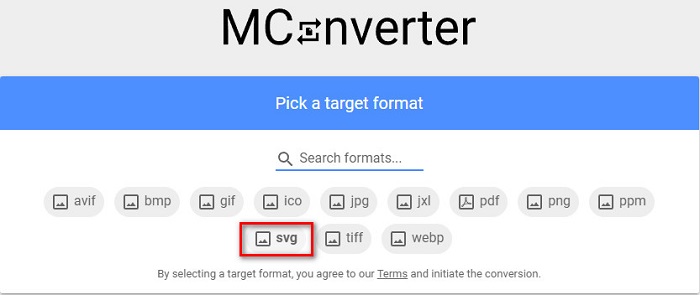
ステップ2. 次の画面で、出力形式として SVG 画像形式をクリックします。すると、画像の変換が開始されます。
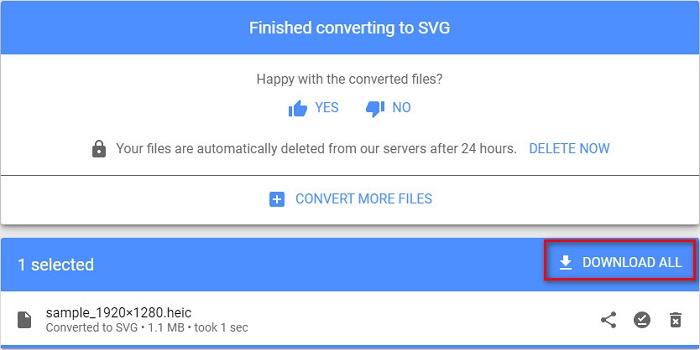
ステップ3. その後、Download All ボタンをクリックして、SVG 画像をダウンロードします。
長所
- 使いやすいソフトウェアインターフェースを備えています。
- HEIC、SVG、BMP、JPG、PNGなど、さまざまなファイル形式をサポートしています。
- 安全に使用できます。
短所
- 邪魔な広告が含まれています。
パート 3. 推奨事項: 最高の HEIC コンバーターで HEIC ファイルを変換する
上記のツールは本当に素晴らしいです。ただし、Web ベースではなく、変換速度が速いコンバーターを探している場合は、このアプリケーションをダウンロードすることをお勧めします。 Aiseesfoft HEIC Converter は、オフラインの HEIC コンバーターです。 HEIC 画像を JPG や PNG などの最も標準的な画像形式に変換できます。したがって、Windows で HEIC 画像を表示する方法を探している場合は、このコンバーターが最適です。さらに、HEICファイルをJPGおよびPNG画像にバッチ変換できる機能があります。
さらに驚くべきことは、変換時に EXIF データを保持することです。これは、他のコンバーターではできないことです。このコンバーターを使用して、画像の品質を調整することもできます。
Aiseesoft HEIC Converter の主な機能:
- HEIC を PNG および JPG 形式に変換できます。
- 超高速変換プロセスを備えています。
- ファイルの EXIF データを保持できます。
- Windows と Mac を含むすべてのクロスメディア プラットフォームでダウンロード可能。
パート 4. HEIC から SVG への変換に関する FAQ
HEIC と SVG のどちらの画像形式が優れていますか?
HEIC と SVG はどちらも高品質の解像度と小さいファイル サイズを備えています。ただし、HEIC は Apple デバイス以外のデバイスには対応していません。ほぼすべてのデバイスと画像編集アプリケーションと互換性のある SVG とは異なります。
SVG はロスレス ファイルですか?
はい。 SVG 画像はロスレス ファイル圧縮であるため、圧縮してもデータが失われることはありません。
SVG ファイルを使用することの欠点は何ですか?
SVG はベクトル化された画像形式です。つまり、ピクセル化されていませんが、代わりに画像をベクトルとして使用します。ただし、ピクセルではなくポイントとパスに依存しているため、画像の詳細は描写されません。
結論
ここまでご紹介した情報は、どれも正確で信頼できるものです。オンラインの HEIC から SVG へのコンバーターを使えば、HEIC を SVG 画像形式に簡単に変換できます。ただし、ここで取り上げたコンバーターはそれぞれ機能が異なるため、どれを選ぶかはあなた次第です。一方で、HEIC を JPG や PNG にオフラインかつ無料で変換できるソフトを探しているなら、Aiseesoft HEIC Converter が最適なツールです。ぜひダウンロードして、そのユニークな機能を体験してみてください。
-
 2022年の上位4つの改善された方法を使用してHEICをPDFに変換する
 最高のHEICからPDFへのコンバーターの詳細については、この2022をダウンロードできます。レビューを提供したので、この記事を読むことができます。
-
 最高のHEICからJPGへのコンバーターの5つがこの2022を選びます
 HEICからJPCへのコンバーターを使用すると、画像形式をポータブルJPGに簡単に変更できます。これらの5つのツールが何であるか知りたいですか?この記事を読んでください。
-
 あなたが知っておくべき最高の無料&有料HEICコンバーター[2022年更新]
 HEICコンバーターとは何か知りたいですか?その場合、HEIC形式を変更するために使用できる上位5つの無料および有料のHEICコンバーターが含まれています。
