


 ビデオコンバーター究極
 スクリーンレコーダー
 ビデオ修復
ビデオ修復
 安全なダウンロード
JPGをオンラインおよびオフラインでHEICに変換する簡単で最良の方法
PG形式は、多くの人が使用する標準の画像ファイル形式です。インターネット上で最も共有されている画像形式であることが知られています。また、JPGファイルは優れた品質を備えており、WindowsやMacなどのすべてのメディアプラットフォームで表示できます。ただし、JPGファイルのファイルサイズは非常に大きいため、MacデバイスでコンパイルするJPGファイルが多すぎると、デバイスのストレージを占有する可能性があります。
つまり、あなたにとって最適な方法は、Apple デバイスがネイティブに対応している HEIC 形式に JPG を変換することです。さらに、HEIC ファイルは画質が高いにもかかわらず、ファイルサイズが小さいという利点があります。ゆっくり構えていて大丈夫です。これから、JPG を HEIC に変換するための、最良の JPG から HEIC へのコンバーターをご紹介します。

パート1。最高のオンラインコンバーターを使用してJPGをHEICに変換する方法
JPGをHEICに変換できるツールはごくわずかです。したがって、最高のJPGからHEICへのコンバーターを探すのは非常に困難です。したがって、このパートでは、最高のオンラインJPGからHEICへのコンバーターとその使用方法を理解できます。
Convertio
インターネット上で利用できる最もよく知られた JPG から HEIC へのコンバーターのひとつが、Convertio です。Convertio はオンラインの JPG から HEIC へのコンバーターで、シンプルなユーザーインターフェースを備えているため、操作が簡単です。さらに、JPG ファイルをすぐに HEIC に変換できます。また、動画コンバーターを探している場合にも、このツールにはその機能が搭載されています。ただし、Web ベースのアプリであるため、変換処理が遅く感じられる場合があります。それでもなお、多くの人が JPG を HEIC に変換するためにこのツールを利用しています。
手順 1. まず、ブラウザーで Convertio を検索します。ソフトのメイン画面で Choose Files ボタンをクリックします。パソコン内のファイルが表示されるので、JPG ファイルを選択します。すると、JPG ファイルがソフトのメイン画面にアップロードされます。

手順 2. JPG ファイルをアップロードしたら、ドロップダウンボタンをクリックし、出力ファイル形式として HEIC を選択します。
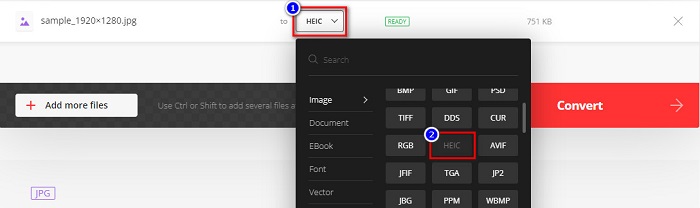
手順 3. 最後に、Convert ボタンをクリックして JPG ファイルを HEIC 形式に変換します。変換が完了するまで待ち、準備ができたら Download をクリックして HEIC ファイルを保存します。
![[変換ボタン]をクリックします](/images/2022/04/click-convert-buttons.jpg)
長所
- 変換プロセスが高速です。
- 安全で無料で使用できます。
- 使いやすいソフトウェアインターフェースを備えています。
- JPG、HEIC、PNG、JPEG、GIFなどのさまざまな画像ファイル形式をサポートしています。
短所
- インターネット接続が不安定な場合、変換プロセスが遅くなることがあります。
Aconvert
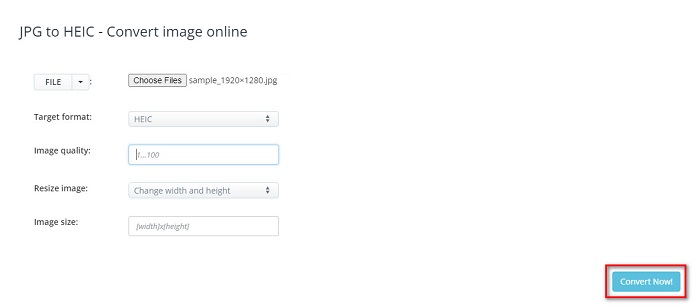
Aconvert は、JPG ファイルを簡単に HEIC に変換できるオンラインの JPG から HEIC へのコンバーターです。このオンラインコンバーターは、シンプルな GUI を備えているため、ユーザーフレンドリーなツールです。さらに、このツールを使って画像のサイズ変更も可能です。加えて、出力画像の品質を調整することもできます。ただし、煩わしい広告が表示されるため、気になる場合があるかもしれません。
手順 1. ブラウザーで Aconvert オンラインコンバーターを検索します。メイン画面で Choose Files ボタンをクリックして、JPG 画像をアップロードします。
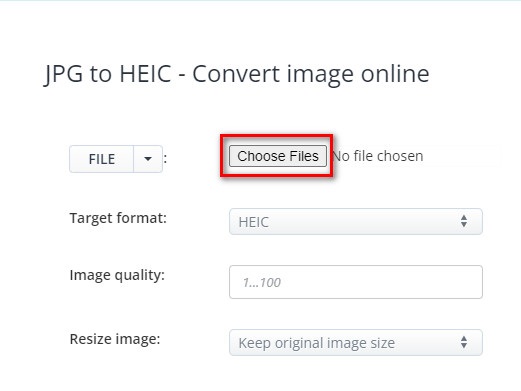
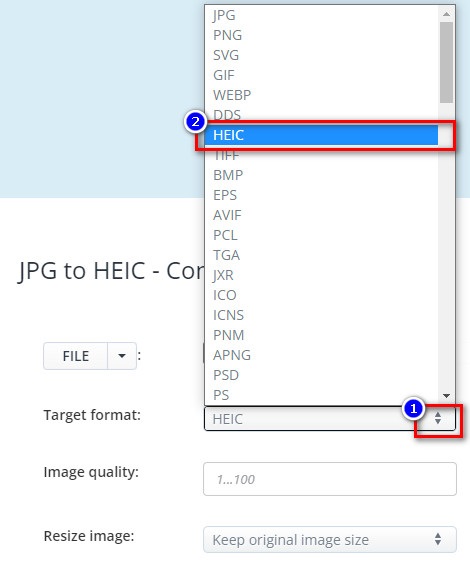
手順 2. 次に、up/down ボタンをクリックして、希望する出力形式を選択します。HEIC ファイル形式をクリックします。
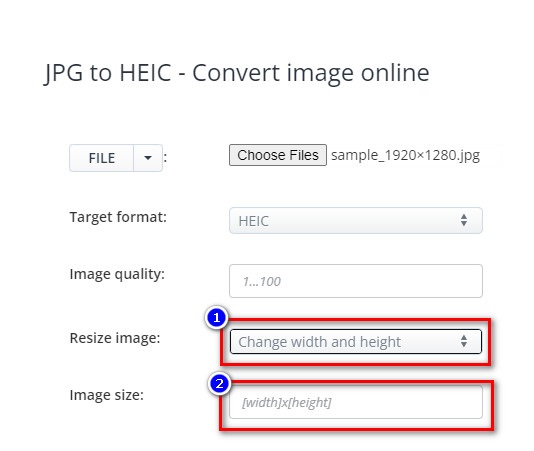
JPG ファイルのサイズを変更したい場合は、Resize Image オプションの横にある up/down ボタンをクリックします。変更したいオプションをクリックして、ファイルの幅と高さを調整します。そのうえで、画像に設定したい幅または高さを入力します。画像サイズを変更したくない場合は、次の手順に進みます。
手順 3. 最後に、Convert Now ボタンをクリックして、JPG ファイルを HEIC ファイルに変換します。数秒待てば、HEIC ファイルをダウンロードできるようになります。
長所
- 操作が簡単なユーザーインターフェイスを備えています。
- 安全で安全に使用できます。
- 画像の品質を調整する機能があります。
短所
- 広告が含まれています。
AnyConv
最後に説明するコンバーターはAnyConvコンバーターです。このオンラインJPGからHEICへのコンバーターは無料で安全です。 JPGファイルをHEICにバッチ変換する場合、このコンバーターにはその機能があります。さらに、使いやすいソフトウェアインターフェースを備えているため、初心者に優しいコンバーターです。多くの邪魔な広告が含まれていますが、JPGからHEICへのコンバーターを探しているユーザーには有名です。
手順 1. 使用しているブラウザーで、検索ボックスに AnyConv と入力して検索します。検索結果ページから AnyConv コンバーターをクリックします。続いて、ソフトのメイン画面で Choose File ボタンをクリックします。
![[ファイルの選択]をクリックします](/images/2022/04/click-choose-file.jpg)
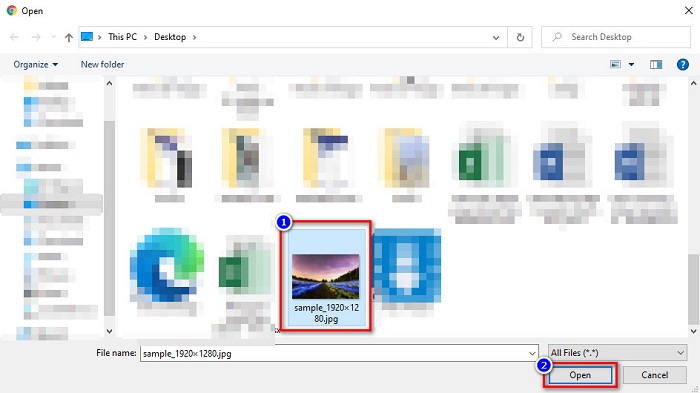
手順 2. Choose File ボタンをクリックすると、コンピューターのフォルダーが表示されます。JPG ファイルを選択し、Open をクリックします。
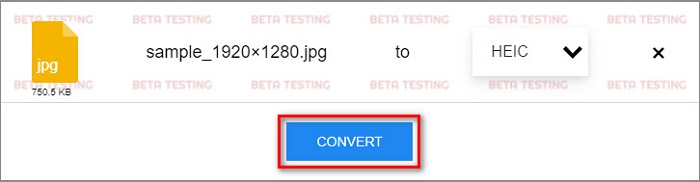
手順 3. その後、最後のステップとして Convert ボタンをクリックします。ファイルの変換が完了するまで待ち、終わったら HEIC ファイルをデバイスにダウンロードします。
長所
- シンプルなユーザーインターフェースを備えています。
- JPGファイルをHEICファイルにバッチ変換できます。
- Google、Firefox、Safariを含むほぼすべてのWebブラウザでアクセスできます。
短所
- 読み込みプロセスが遅い場合があります。
パート2.推奨事項:HEICファイルを変換するための最良のHEICコンバーター
JPGからHEICファイルへの変換は、上記のJPGからHEICへのコンバーターを使用すると簡単に聞こえるかもしれません。ただし、HEICファイルを他のメディアプラットフォームと互換性のある他のファイル形式に変換する方法を探している場合は、このツールの使用を検討してください。 Aiseesoft HEIC Converterは、HEICファイルをJPGおよびPNG形式に変換するオフラインコンバーターです。
プロフェッショナルな出力を生成できるにもかかわらず、使いやすいツールです。さらに、出力ファイルの品質を調整し、ファイルのEXIFデータを保持することができます。さらに、HEICファイルをPNGまたはJPG形式にバッチ変換することもできます。すごいですね。したがって、最高の機能と100%フリーのHEICコンバーターをお探しの場合は、このツールが最適なコンバーターです。
無料ダウンロードWindows 7 以降に対応安全なダウンロード
無料ダウンロードMacOS 10.7 以降に対応安全なダウンロード
Aiseesoft HEIC Converter の主な機能:
-使いやすいGUIを備えています。
- HEIC ファイルを PNG や JPG 形式に変換できます。
-ファイルのEXIFデータを保持します。
-HEICファイルをJPGまたはPNG形式にバッチ変換できます。
-WindowsやMacを含むすべてのクロスメディアプラットフォームで利用できます。
パート3。JPGをHEICに変換する方法に関するFAQ
JPGをHEICに変換すると、ファイルのファイルサイズに影響しますか?
はい、HEICは圧縮ファイル形式であるため、JPGをHEICに変換すると、JPGファイルのファイルサイズが小さくなります。
JPGとHEICのどちらが良いですか?
画像の品質とファイルサイズに関しては、HEICの方が優れています。ただし、JPGファイル形式は、HEICイメージ以外のプラットフォームとの互換性が高くなります。
WindowsでHEICファイルを表示できますか?
残念ながら、Windows システムは HEIC 画像に対応していないため、Windows で HEIC ファイルを直接開くことはできません。しかし、Windows でHEIC ファイルを開きたい場合は、HEIC を Windows がサポートしている JPG または PNG 形式に変換すれば表示できます。
結論
すべてを要約すると、JPGをHEIC形式に変換する方法はたくさんあります。ただし、すべてのコンバーターが同じ機能を使用できるわけではありません。しかし、上記のオンラインJPGからHEICへのコンバーターは、インターネット上で最も人気があり、最も使用されているコンバーターです。それでも、HEICコンバーターをお探しの場合は、HEIC変換に最適なツールであるAiseesoftHEICConverterをダウンロードしてください。
-
 PCおよびMac用のベスト9HEICからPNGへのコンバーター[オンラインおよびオフライン]
 ここで最高のオンラインおよびオフラインコンバーターを見つけてください。 WindowsおよびMac用のトップで無料のHEICからPNGへのコンバーターを紹介します。
-
 CopyTrans HEICのレビュー、機能、および代替案
 CopyTrans HEICで何ができるかを知りたい場合は、ツールの機能、利点、および代替手段を提供します。
-
 オンラインおよびオフラインで最高のHEICビューア[無料]
 最高のHEICビューアをお探しの場合は、お探しのものが揃っています。これらのツールを使用して、HEIC画像を無料で表示します。
