


 ビデオコンバーター究極
 スクリーンレコーダー
 ビデオ修復
ビデオ修復
 安全なダウンロード
WaltRHEICコンバーターとその最良の代替品の完全なレビュー[2022]
HEIC画像は、ファイルサイズが小さいうえに高解像度という特徴から、インターネット上でよく目にする人気の画像形式のひとつであることは間違いありません。しかし、iOS 11 の登場以降、この画像形式は他のアプリケーションや Windows システムでは表示できないため、多くの人が扱いに苦労してきました。その結果、多くのユーザーが JPG などの別形式に変換しています。最も人気のある HEIC から JPEG へのコンバーターのひとつが WaltR HEIC Converter です。この記事では、その機能と、WaltR HEIC Converter を使って HEIC を JPG に変換する方法を紹介します。

パート1。WaltRHEICコンバーター-HEICをJPEGに変換するための最良のツール
WaltR HEIC Converter は、HEIC を JPEG 形式に変換する際に使える、優れたコンバーターのひとつです。このオンラインツールを使えば、HEIC を JPG に手軽にオフライン変換できます。ソフトウェアのインターフェースがシンプルで操作も簡単なため、ユーザーフレンドリーなツールと言えます。また、複数の HEIC ファイルをワンクリックでまとめて変換することも可能です。さらに無料で利用でき、HEIC ファイルを非常に高速に変換できます。加えて、HEIC 画像を PNG 形式に変換したい場合にも、このツールで対応できます。
WaltRHEICConverterの長所と短所
長所
- シンプルなユーザーインターフェースを備えています。
- HEIC画像をJPEGおよびPNG画像にバッチ変換できます。
- 100%は無料でご利用いただけます。
- WindowsやMacを含むすべてのメディアプラットフォームで利用できます。
短所
- JPEGおよびPNGファイル形式のみをサポートします。
WaltRHEICConverterの使用方法
WaltRHEICConverterを使用してHEICをJPEGファイル形式に変換する方法を教えてください。
ステップ 1. WaltR HEIC Converter アプリケーションをダウンロードするには、WaltR HEIC Converter と検索します。その後、インストール手順に従い、アプリケーションを起動します。
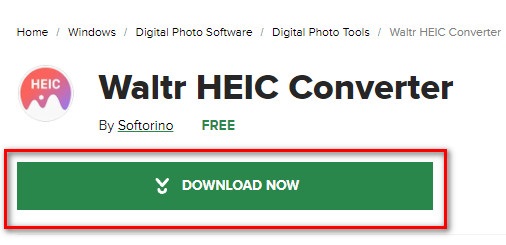
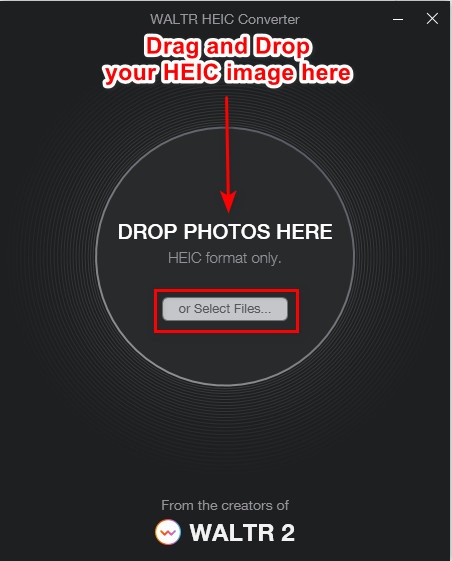
ステップ 2. メイン画面に HEIC 画像をドラッグ&ドロップするか、Select Files ボタンをクリックして HEIC 画像をキューに追加します。HEIC 画像の読み込みが完了するまで待ち、次のステップに進みます。
ステップ 3. 次に、Format の横にあるドロップダウンボタンをクリックし、出力したい形式を選択します。JPEG をクリックします。

ステップ 4. 最後に[Convert]ボタンをクリックして、HEIC 画像を JPEG 形式に変換します。その後、画像の保存先を選択すれば完了です。
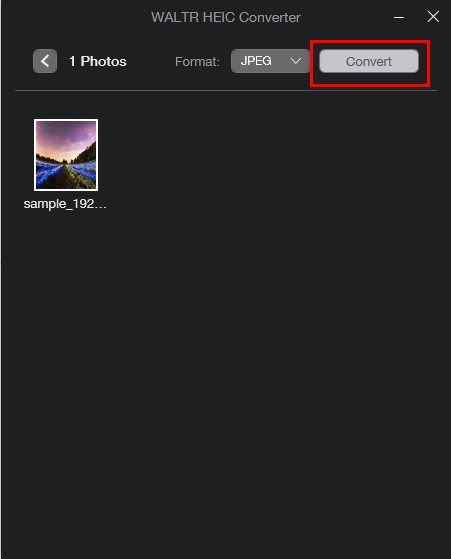
簡単ですよね?上記の手順に従って、HEIC画像をJPEG画像に変換できます。
パート2。WaltRHEICコンバーターの4つの最良の代替案
ただし、ダウンロードする必要のないHEICをJPEGに変換するためのより便利な方法を探している場合、解決策はオンラインのHEICからJPEGへのコンバーターを使用することです。インターネット上で最高のオンラインHEICからJPEGへのコンバーターを検索したところ、これらのツールが最適であることがわかりました。したがって、この記事を読み続けて、WaltRHEICConverterの2つの最良の代替案を理解してください。
代替案1.FVCフリーのHEICからJPEGへのコンバーター
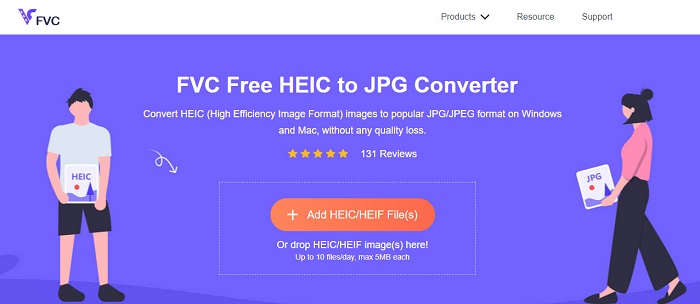
FVC Free HEIC to JPEG Converter は、HEIC を JPEG にオンライン変換するのに最適なツールです。このコンバーターなら、画質を落とさずに HEIC 画像を JPEG に変換できます。また、複数の HEIC 画像を JPEG/JPG に一括変換することも、ワンクリックで可能です。さらに、変換時には画像のサイズ、解像度、撮影日時、露出設定などの EXIF データも保持されます。完全に無料で安全に利用できる点も特徴です。そして他の多くのオンラインツールと異なり、FVC Free HEIC to JPEG Converter には煩わしい広告が表示されません。
長所
- 使いやすいソフトウェアインターフェースを備えています。
- HEIC画像をJPEG画像形式にバッチ変換できます。
- 安全に使用でき、100%は無料です。
- Google、Firefox、Safariを含むすべてのWebブラウザでアクセスできます。
短所
- インターネット接続が遅い場合、変換プロセスが遅くなることがあります。
代替案2.OnlineConvert.com

OnlineConvert.com も、HEIC を JPEG 画像に変換できる有名なツールです。このオンライン HEIC–JPEG コンバーターでは、出力画像のサイズや画質を変更できます。また、シンプルな GUI を備えているため、ユーザーフレンドリーなツールと言えます。しかし、煩わしい広告が表示されるため、気になる人もいるかもしれません。それでも、多くのユーザーが HEIC 画像を JPEG に変換するためにこのコンバーターを利用しています。
長所
- 直感的なソフトウェアインターフェースを備えています。
- 画像のサイズを変更したり、品質を調整したりできます。
短所
- 広告が含まれています。
- インターネット接続が中断されると、ファイルが破損する可能性があります。
代替案3.CloudConvert
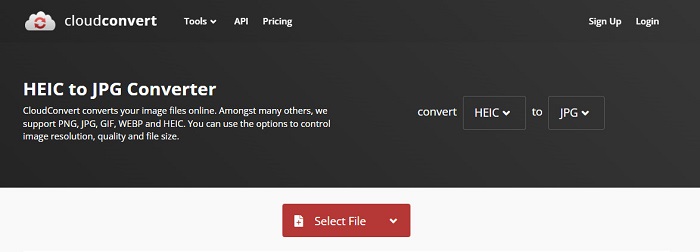
CloudConvert は、HEIC を JPEG 画像に変換できるオンラインコンバーターです。インターフェースがシンプルで、使いやすいツールになっています。このコンバーターを利用すると、出力画像の幅や高さ、画質を変更できます。さらに、HEIC、JPEG、PNG、GIF、WebP など、さまざまなファイル形式をサポートしています。
それにもかかわらず、このコンバーターを使用するときは、HEICイメージを変換するときにあまり待たないように、インターネット接続が高速である必要があります。それでもなお、インターネット上で見つけることができる最も効率的なツールの1つです。
長所
- 安全に使用でき、無料です。
- これにより、画像出力の品質を変更できます。
- 使いやすいインターフェースを備えています。
短所
- インターネットの速度によっては、変換プロセスが遅くなります。
代替案4.FreeToolOnline.com
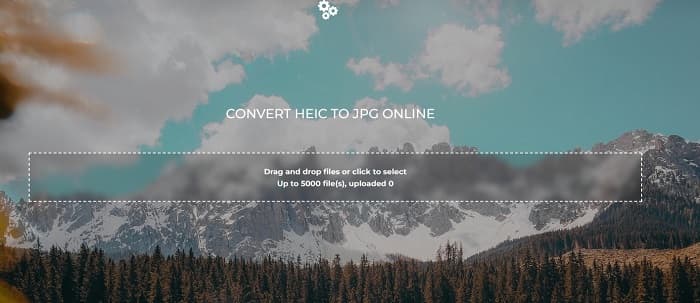
試してみる価値のある別のオンライン HEIC–JPEG コンバーターが、FreeOnlineTool.com です。このツールは HEIC 画像を JPEG と PDF 形式に変換できます。また、このオンラインコンバーターは安全かつ無料で利用できます。複数の HEIC 画像を一度に JPEG に変換したい場合にも対応しています。さらに、直感的で使いやすいインターフェースを備えています。ただし、他のコンバーターと同様に広告が表示されるため、利用中に煩わしく感じることがあるかもしれません。
長所
- HEICからJPEGおよびPFD形式への変換をサポートします。
- シンプルなGUIを備えています。
- HEIC画像をJPEG画像にバッチ変換できます。
短所
- 広告が含まれています。
パート3。WaltRHEICコンバータに関するFAQ
WaltR HEIC Converterはモバイルデバイスで利用できますか?
残念ながら、WaltRHEICConverterはどのモバイルデバイスにもダウンロードできません。
WaltR HEIC Converterを使用してHEICをGIFに変換できますか?
いいえ。WaltR HEIC Converter は GIF 画像ファイルに対応していません。ただし、HEIC 画像を GIF 形式に変換したい場合は、Aiseesoft Free Image Converter Online を使用して、HEIC 画像を GIF に変換できます。
WaltR HEIC Converterにはオンラインバージョンがありますか?
WaltRHEICConverterにはオンラインバージョンがありません。したがって、HEICをオンラインでJPEGに変換する場合は、上記の代替手段を使用してください。
結論
Waltr HEIC Converter は、HEIC から JPEG への変換において、確かに優れたツールです。豊富な機能を備えているため、多くの人に利用されているのも不思議ではありません。しかし、HEIC を JPEG に変換するためにアプリをダウンロードしたくない場合は、オンラインツールを使うのが最適です。その際には、市場で最もおすすめのツールである FVC Free HEIC to JPEG Converter の利用を推奨します。
-
 2022年の上位4つの改善された方法を使用してHEICをPDFに変換する
 最高のHEICからPDFへのコンバーターの詳細については、この2022をダウンロードできます。レビューを提供したので、この記事を読むことができます。
-
 最高のHEICからJPGへのコンバーターの5つがこの2022を選びます
 HEICからJPCへのコンバーターを使用すると、画像形式をポータブルJPGに簡単に変更できます。これらの5つのツールが何であるか知りたいですか?この記事を読んでください。
-
 画像をアニメーションGIFに変更する5つの最良の方法[2022年更新]
 画像をGIFに変換する必要がありますか?この記事では、市場で見つけることができる5つの最高のコンバーターを提供します。それでは、この記事を読んでこれらのツールを見つけましょう。
