


 ビデオコンバーター究極
 スクリーンレコーダー
 ビデオ修復
ビデオ修復
 安全なダウンロード
オンライン/Windows/Mac用無料コンバータートップ10
動画用の最高の無料 AVI 動画変換ソフトを探すのに疲れていませんか? もう探し回る必要はありません! 動画編集のプロであっても、これから始める初心者であっても、適切なツールを持っているかどうかで仕上がりは大きく変わります。この記事では、検索を簡単にするために、高評価の AVI 動画変換ソフトを厳選して紹介します。使いやすいオンラインコンバーターから高機能なデスクトップソフトまで、幅広く網羅しています。さまざまな可能性を試しながら、自分のニーズにぴったりの動画変換ソリューションを見つけましょう!

パート 1. 最高の無料オンライン AVI ビデオ コンバーター
FVC 無料オンライン動画変換
FVC 無料オンライン動画変換は、AVI 動画をさまざまな形式に変換することに特化したツールです。HD 動画の元の画質を保ったまま、高速で変換できます。さらに、このツールは一括変換にも対応しており、複数の AVI ファイルを同時に、画質を損なうことなく変換できます。
| プラットホーム | Webベース |
| こんな方に最適 | ビデオやオーディオ ファイルを変換するための使いやすいツールを必要とする人に最適です。 |
| サポートされている形式 | ほぼすべての主流のビデオとオーディオを MP4、FLV、MKV、MOV、M4V、MTS、TS、M2TS、WMV、ASF、VOB、MP3、AAC、AVI、MOV、WMV、MKV に変換できます。 |
これを使用するには、次の手順に従います。
手順 1. FVC 無料オンライン動画変換の公式サイトにアクセスします。
手順 2. 変換したい動画を追加するために、Add Files to Convert ボタンをクリックします。
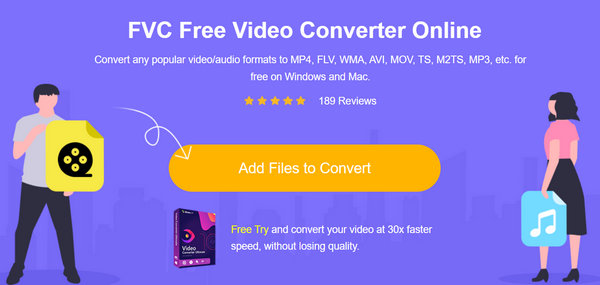
手順 3. 希望する出力形式を選択します。
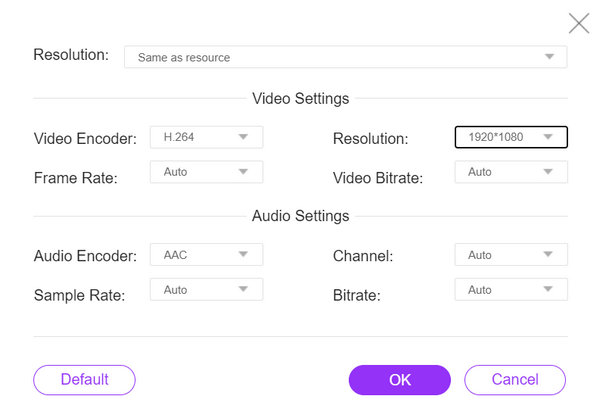
動画に適した設定を自動で設定することもできます。
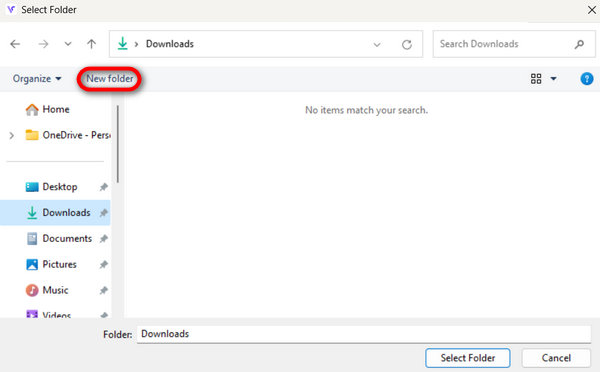
手順 4. 変換を開始するには、Convert ボタンをクリックします。その後、動画が自動的に保存されるNew Folderを選択または作成します。
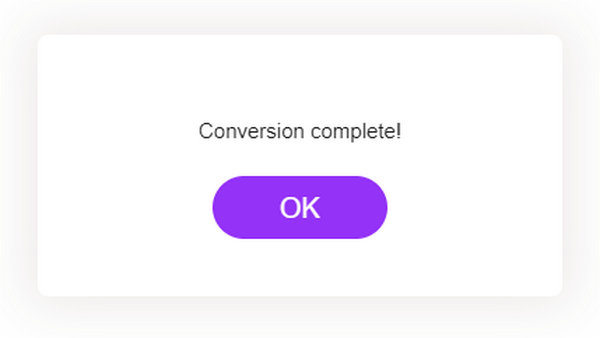
完了すると、変換が完了したことを示すテキストプロンプトが表示されます。
FVC 無料オンラインビデオコンバーターは信頼性が高く効率的なソリューションを提供し、変換プロセスを手間なく便利にします。
パート 2. デスクトップで使える無料の AVI ビデオコンバーター トップ 4
Aiseesoft 無料ビデオコンバーター
Aiseesoft は、さまざまな形式間で動画を変換できる無料の動画変換ソフトを提供しています。Aiseesoft Free Video Converter は、AVI、MP4、MOV など、一般的な動画形式に対応しています。トリミングやクロップといった基本的な編集にも利用できます。
対応プラットフォーム: Windows および Mac。
おすすめのユーザー: シンプルな操作で、基本的な編集機能も備えた動画変換ツールを求めるすべてのユーザー。
長所
- ユーザーフレンドリーなインターフェース。
- 基本的な編集機能。
- 複数の形式をサポートします。
短所
- 高度な機能が不足している可能性があります。
手順 1. お使いのデバイスに Aiseesoft Free Video Converter Online をダウンロードしてインストールします。
無料ダウンロードWindows 7 以降に対応安全なダウンロード
無料ダウンロードMacOS 10.7 以降に対応安全なダウンロード
手順 2. Add Files ボタンをクリックし、変換したい AVI 動画を追加します。
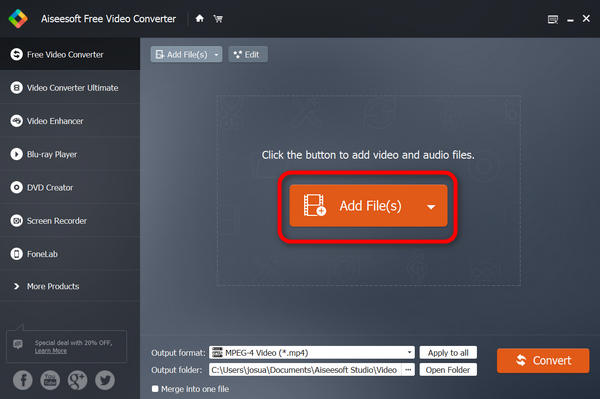
手順 3. Output Format に進み、希望する出力形式を選択します。
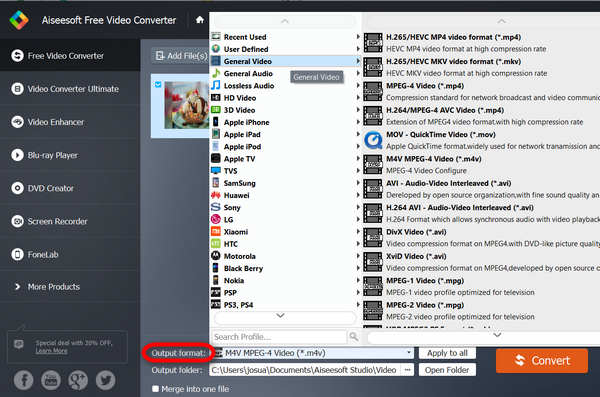
手順 4. 最後に、Convert をクリックして変換を開始します。
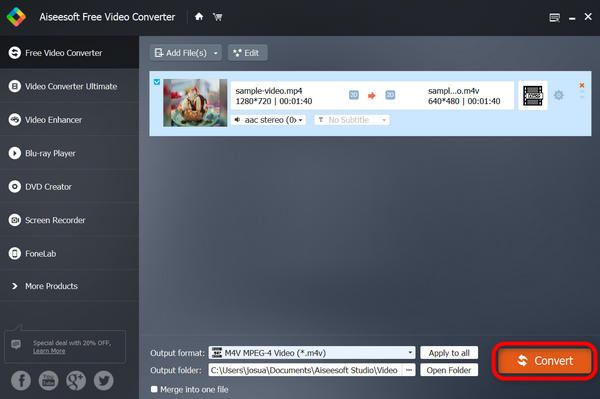
ビデオは自動的にデバイスに保存され、変換が成功すると下部に「完了」と表示されます。
Aiseesoft Free Video Converter は、あらゆる形式のスムーズで簡単な無料変換を保証する、オンラインの最高の無料 AVI ビデオ コンバーターの 1 つです。無料でありながら効果的なビデオ コンバーターをお探しの場合は、これを強くお勧めします。
VLCメディアプレーヤー
VLC メディア プレーヤーは、さまざまなオーディオおよびビデオ形式を再生できるだけでなく、無料の AVI ビデオ コンバーターとしても機能するマルチメディア ソフトウェアです。このツールを使用すると、ユーザーはビデオ ファイルを任意の形式に変換できます。また、マルチメディア コンテンツの管理において汎用性と利便性も提供します。
対応プラットフォーム: Windows、Mac、Linux。
おすすめのユーザー: マルチメディアファイルの再生をメインに、必要に応じて動画変換も行いたいユーザーに最適です。
長所
- 汎用性
- 高度な機能。
短所
- インターフェースは初心者にとって直感的ではないかもしれません。
手順 1. まず、お使いのデバイスに VLC をダウンロードしてインストールします。
手順 2. プログラムを起動し、Media タブから Convert/Save を選択します。
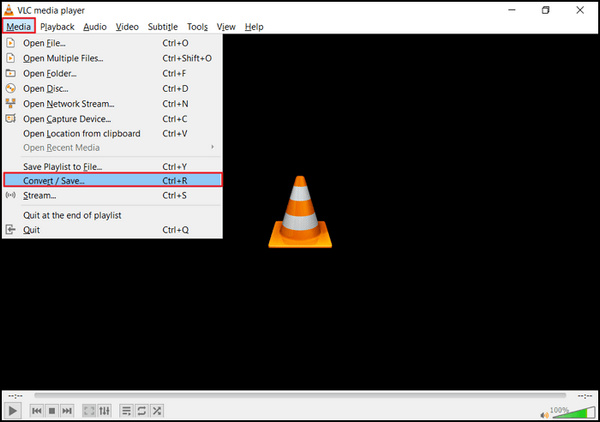
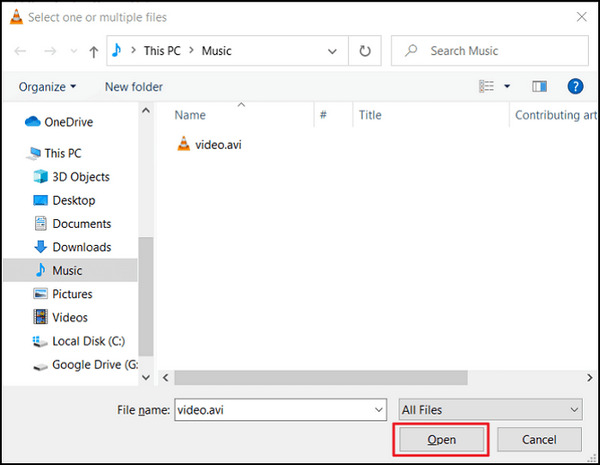
手順 3. Add ボタンをクリックし、変換したい AVI 動画を取り込みます。
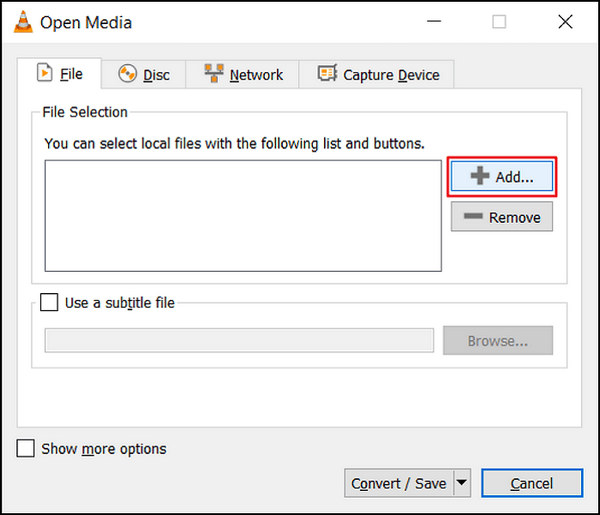
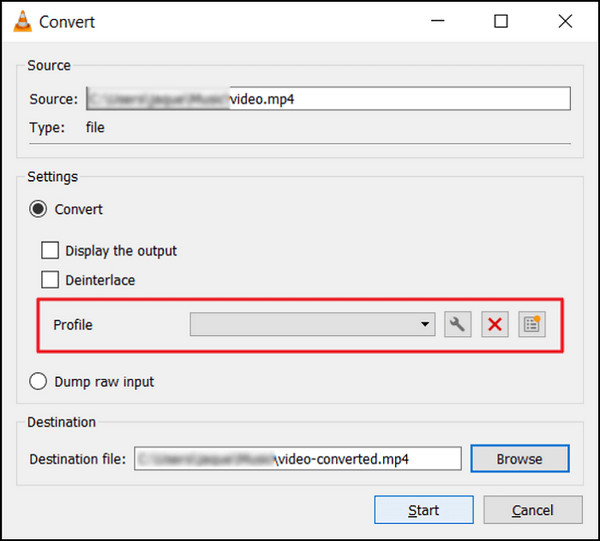
ステップ4. Convert ボックスでファイル名と保存先を指定します。
手順 5. Convert/Save を選択し、開始をクリックする前に希望する出力形式を選びます。
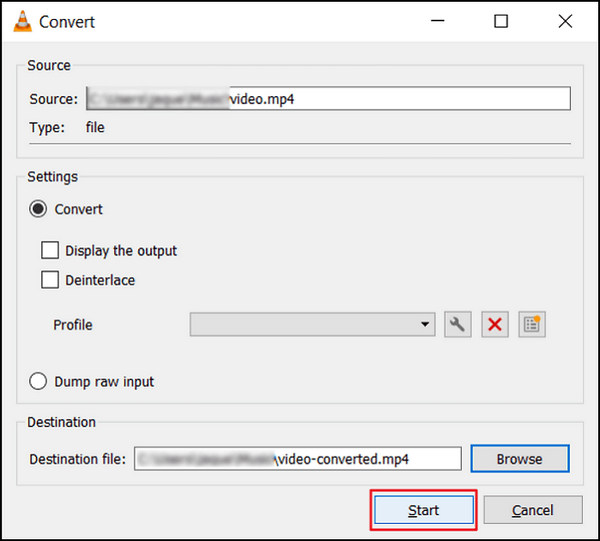
手順 6. 最後に、Start をクリックして変換を開始します。あとは VLC Media Player が処理を行います。
VLC は単なるメディアプレーヤーにとどまらず、AVI 動画の変換にも対応しています。ただし、この多機能ソフトには、専用の動画変換ソフトによく搭載されている高度な編集機能がない点には注意が必要です。VLC と同様のツールを探している場合は、こちらをチェックしてください。
Freemake Video Converter
Freemake Video Converter は、オーディオ ファイルと画像のサポートに加えて、ユーザーが AVI ビデオをさまざまな形式間で自由に変換できるようにするマルチメディア ソフトウェアです。
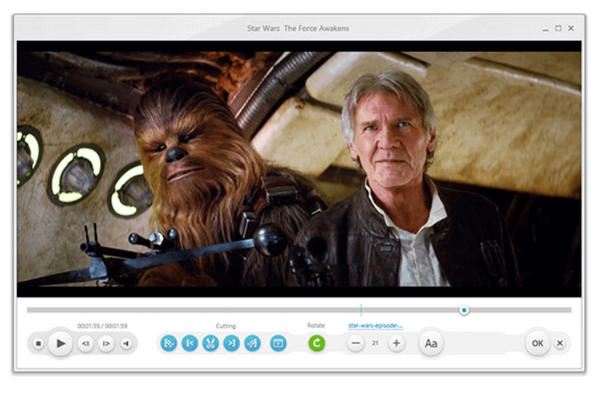
対応プラットフォーム: Windows のみ。
おすすめのユーザー: 特定のデバイスやプラットフォーム向けに動画を変換する必要がある人。
長所
- 多数のプリセット プロファイルが利用可能です。
- ユーザーフレンドリーなインターフェース
短所
- インストール中はバンドルソフトウェアに注意してください。
- 透かし
手順 1. お使いのデバイスに Freemake Video Converter をダウンロードしてインストールします。
手順 2. Add Files をクリックし、変換したい AVI 動画ファイルをプログラムに追加します。
手順 3. Output Format リストを開き、MP4、MOV など、希望する出力形式を選択します。
手順 4. Downward Arrow ボタンをクリックして、変換後のファイルを保存する出力先フォルダーを指定します。
手順 5. 最後に、Run ボタンをクリックします。
Freemake Video Converter は、デスクトップで無料で使用できる AVI ビデオ コンバーターとしてはより優れた選択肢です。ただし、無料版には他の無料ビデオ コンバーターで利用できる機能がいくつか欠けています。
ハンドブレーキ
HandBrakeは、AVIやその他の広くサポートされているコーデックを含むほぼすべての形式からAVIビデオを変換するために使用されるオープンソースツールです。このツールを使用すると、簡単に変換できます。
対応プラットフォーム: Windows、Mac、Linux
長所
- 軽量。
- カスタマイズ可能な設定。
短所
- 高度な機能が制限されています。
手順 1. お使いのデバイスに HandBrake をダウンロードしてインストールします。
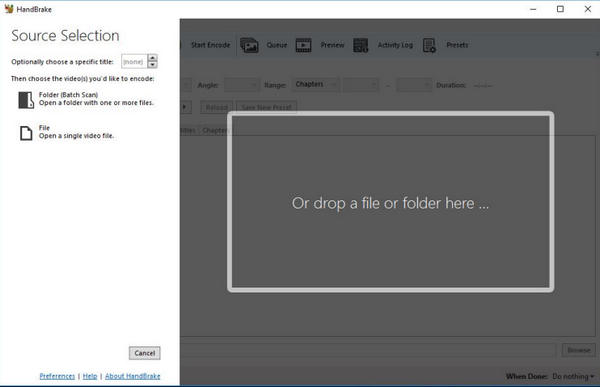
手順 2. File または Open Source をクリックし、変換したい AVI 動画を読み込みます。
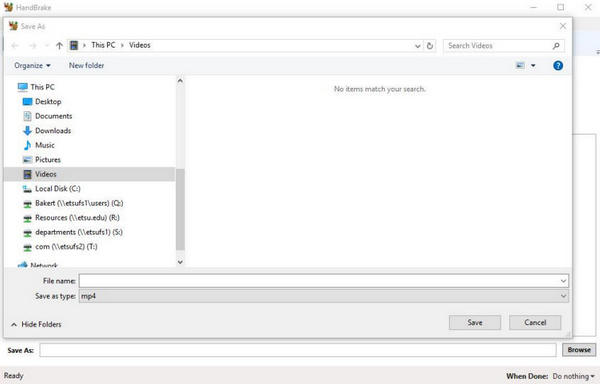
手順 3. Destination セクションで、変換後のファイルの保存先とファイル名を指定します。
手順 4. より高度な設定を行うには、Output Settings を開きます。ここで希望の出力形式も選択します。
手順 5. 最後に Start ボタンをクリックして、AVI を MP4 などに変換する処理を開始します。
HandBrake は進行状況を表示し、完了すると通知します。変換が完了すると、指定した場所に新しいビデオ ファイルが作成されます。
パート3. AVIビデオコンバータに関するよくある質問
無料の AVI ビデオコンバーターを使用して AVI ビデオを他の形式に変換できますか?
はい。ほとんどの無料 AVI ビデオ コンバーターは、AVI ビデオをさまざまな一般的な形式に変換できます。上記の記事を確認すると、各ビデオ変換プログラムでサポートされている形式がわかります。
ビデオコンバーターを使用して AVI ビデオを変換すると、ビデオの品質に影響しますか?
ビデオ品質への影響は、変換プロセス中に選択された設定とオプションに大きく依存します。一般的に、評判の良い AVI ビデオ コンバーターを使用し、同様の設定を維持すれば、品質の低下は最小限に抑えられます。
無料の AVI ビデオコンバーターは安全に使用できますか?
評判の良い無料の AVI ビデオ コンバーターの多くは安全に使用でき、有害なマルウェアやウイルスは含まれていません。ただし、公式 Web サイトまたはその他の信頼できるソースからダウンロードすることが重要です。
無料の AVI ビデオ コンバーターを使用して複数の AVI ビデオを同時に変換できますか?
はい。ほとんどの無料 AVI ビデオ コンバーターはバッチ変換機能を備えているため、複数の AVI ビデオを一度に変換でき、時間と労力を節約できます。
無料の AVI ビデオコンバーターを使用する場合、何か制限はありますか?
無料の AVI ビデオ コンバーターは基本的な変換機能を提供しますが、有料ソフトウェアと比較すると、サポートされる形式が少ない、変換速度が遅い、高度な編集機能が少ないなどの制限がある場合があります。
結論
まとめると、無料の AVI 動画変換ソフトを選ぶ際には、対応フォーマット、使いやすさ、追加機能などの要素を考慮することが重要です。各コンバーターにはそれぞれ特長があり、ユーザーのさまざまなニーズに応えられるようになっています。FVC 無料オンライン動画変換のような Web ベースのソリューションから、Aiseesoft Free Video Converter のようなデスクトップアプリまで、好みや用途に応じて選べる幅広い選択肢があります。
-
 Windows / Mac / Onlineで大きなAVIファイルを無料で圧縮する方法
 コンピューターでAVIファイルを圧縮する3つの無料の方法を読んで入手してください。品質を損なうことなく、AVIビデオのファイルサイズを小さくすることができます。 AVIビデオのサイズは想像するほど小さくすることができます。
-
 スクリーンビデオをAVIファイルとしてキャプチャするためのトップ4の無料AVIスクリーンレコーダー
 高品質の AVI ファイルで画面を録画するには、この記事でトップ 4 の無料 AVI スクリーン レコーダーを特定して共有します。これを読んで、必要なものを入手してください。
-
 簡単な手順とツールでAVIをMOVに変換する方法
 AVIを再生可能なMOVに変換する方法を知りたいですか?変換を成功させるための方法とヒントを知るには、この記事に従う必要があります。
