


 ビデオコンバーター究極
 スクリーンレコーダー
 ビデオ修復
ビデオ修復
 安全なダウンロード
オンライン ビデオ ローテーターを利用して、逆さまのビデオに別れを告げましょう
デジタル時代において、動画コンテンツは私たちの生活に欠かせないものです。動画は、特別な瞬間を思い出したい場合でも、ソーシャル メディアやビジネス向けの刺激的なコンテンツを作成したい場合でも、メッセージを伝えるのに最適な方法です。しかし、間違った場所で録画された、または水平または垂直に反転する必要があるため、ビデオを正しい位置に配置する必要がある場合があります。
この記事では、動画を希望する向きに変換するのに役立つ、優秀なオンライン動画回転ツールを紹介します。この記事を読み進めて、さまざまなツールをチェックしてみてください。

パート1.オンラインで最高のビデオローテーター
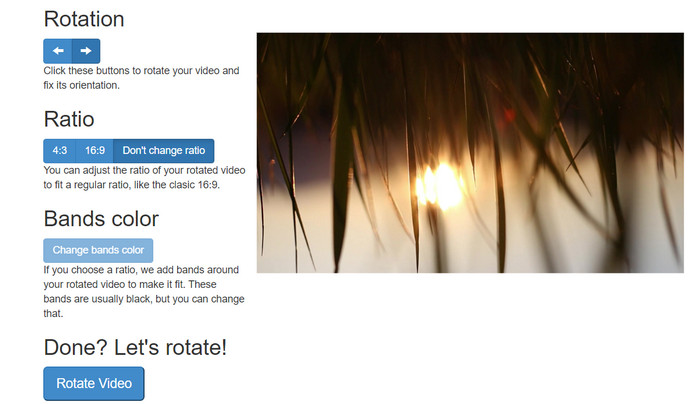
1.RotateMyVideo
RotateMyVideo は、特別なソフトウェアを必要とせずに動画を任意の方向に回転および反転できるシンプルで無料のオンライン ツールです。このツールを使用すると、動画を一度に 90 度回転させることができ、プロセスをすばやく簡単にするシンプルなインターフェイスを備えています。 RotateMyVideo は、個人的またはビジネス上の理由でビデオを回転する必要がある場合に適しています。時間と労力を節約できます。
長所
- 隠された料金なしで無料でオンラインでビデオを回転させます。
- 90 度単位での回転をサポートします。
- ビデオを水平または垂直に反転します。
短所
- サイズが 500 MB 未満のビデオのみを回転できます。
- ビデオ変換プロセスには時間がかかる場合があります。
- ユーザー インターフェイスが魅力的でない場合があります。
RotateMyVideo を使用してオンラインで動画を回転させる手順:
ステップ1. Webブラウザーを開き、RotateMyVideo のサイトにアクセスします。
ステップ2. Pick Videoボタンをクリックして、回転したい動画をアップロードします。
ステップ3. 次に、任意のボタンをクリックして、希望する動画の向きを選択します。動画を左または右に回転したり、水平方向・垂直方向に反転したり、元の向きのままにすることもできます。
ステップ4. 回転後の動画に満足したら、Rotate videoボタンをクリックして変更を保存します。
2.クリデオ
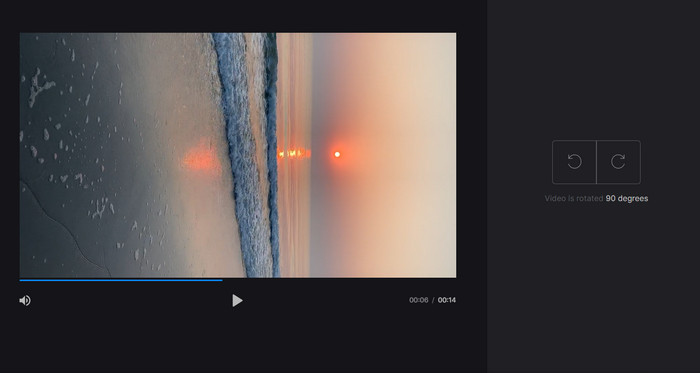
Clideo は直感的で多機能なオンライン動画編集プラットフォームで、動画回転をはじめとするさまざまな強力な編集ツールを提供しています。さらに、動画のトリミング、結合、音声の追加など多くの機能を備えており、総合的な動画編集ツールとして利用できます。他の動画編集ソフトと異なり、Clideo は完全なWebベースのサービスのため、ソフトをダウンロードしたりインストールしたりする必要がありません。
長所
- さまざまなソースから動画をアップロードします。
- 複数のビデオフォーマットに対応。
- ユーザーフレンドリーなインターフェース。
短所
- 高度なビデオ編集のニーズには適していません。
- 無料版には制限があります。
縦向きから横向きのビデオ コンバーターをオンラインで使用するための手順:
ステップ1. Webブラウザーで Clideo のサイトにアクセスします。トップページから、すべてのツールを表示させます。
ステップ2. メニューからRotate Videoオプションを選択し、Choose fileをクリックして回転させたい動画をアップロードします。動画ファイルをサイト上にドラッグ&ドロップして読み込むこともできます。
ステップ3. 動画プレーヤー右側にあるRotateボタンをクリックします。対応するボタンをクリックして、動画の回転方向を選択します。動画は時計回り・反時計回り、あるいは水平方向・垂直方向に回転できます。
3.フレックスクリップ
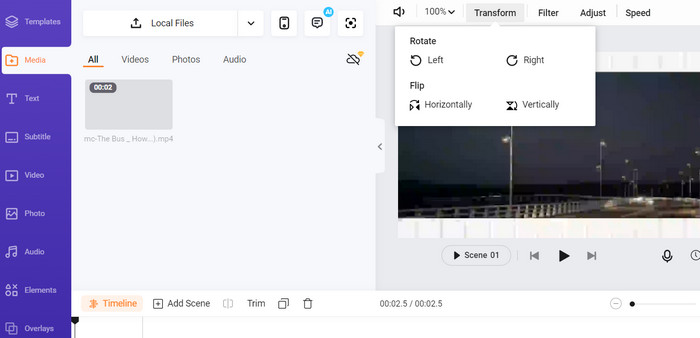
Flexclip は、手間をかけずにプロ並みのビデオを作成できる印象的なオンライン ビデオ編集ツールです。 Flexclip の最も優れた点の 1 つは、ビデオ編集プロセスを開始するために使用できるテンプレートの豊富なライブラリです。また、透かしなしで最大 1 分間の長さのビデオを作成できる無料バージョンも提供しています。
長所
- テンプレートの豊富なライブラリ。
- さまざまなカスタマイズ オプションを提供します。
短所
- 一部のユーザーにとっては価格が高額になる可能性があります
- ビデオ品質の限定的な制御
Flexclip を使用して透かしなしでビデオをオンラインで回転する手順:
ステップ1. Flexclip のサイトにアクセスし、無料アカウントを作成するか、すでにアカウントがある場合はログインします。ログインしたら、Start from Scratchボタンをクリックします。
ステップ2. Uploadボタンをクリックして、回転したい動画をアップロードします。あるいは、エディター画面に動画ファイルをドラッグ&ドロップして読み込むこともできます。
ステップ3. 動画がアップロードされたら、プレビュー上部のメニューにあるTransformボタンをクリックします。ボタンを使って、動画が希望の向きになるまで時計回りまたは反時計回りに回転させます。
4.カプウィング
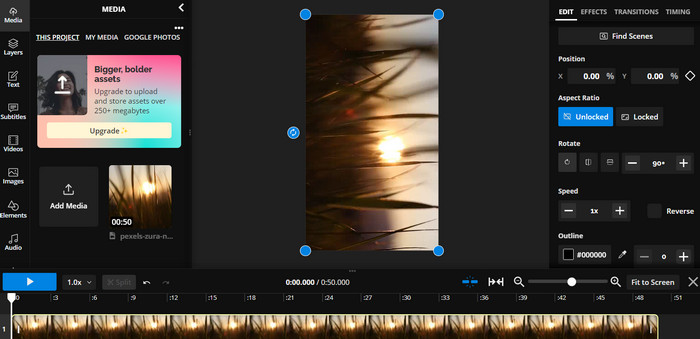
これは、動画を回転できるもう一つの無料オンラインツールです。同様に90度単位での回転に対応しており、動画の反転も可能です。テキストの追加、音楽や特殊効果の追加といった高度な機能を備えているため、総合的な動画編集ツールとして利用できます。また、分かりやすいインターフェースと豊富なツール・テンプレートのライブラリにより、初心者にも使いやすい選択肢となっています。
長所
- 多彩なビデオ編集。
- オンラインおよびクラウドベース。
短所
- 限られたビデオの長さ。
- ファイルサイズの制限。
Kapwing を使用してビデオをオンラインで回転させる手順:
ステップ1. Kapwing のサイトにアクセスし、無料ユーザーアカウントを作成するか、すでにアカウントがある場合はサインインします。Start Editingボタンをクリックして新しいプロジェクトを開始します。
ステップ2. Uploadボタンをクリックして、回転させたい動画をアップロードします。
ステップ3. 次に、タイムライン上のメディアファイルをクリックすると、右側のメニューに編集オプションが表示されます。
ステップ4. Rotateオプションを選択し、動画を回転させたい方向を指定します。回転角度を度数で入力して指定します。これで完了です。
5.オンラインビデオカッター
これは、動画を任意の方向に回転できる無料のオンライン ツールです。ビデオをアップロードしてから、回転ツールを使用してビデオの向きを調整できます。
長所
- 高速かつ効率的。
- 自由に使用できます。
短所
- インターネット接続が必要です。
- ビデオ品質の低下。
オンライン ビデオ カッターを使用してオンラインでビデオを回転させる手順:
ステップ1. Online Video Cutter の公式サイトにアクセスします。
ステップ2. Open fileボタンをクリックして、編集したい動画をアップロードします。
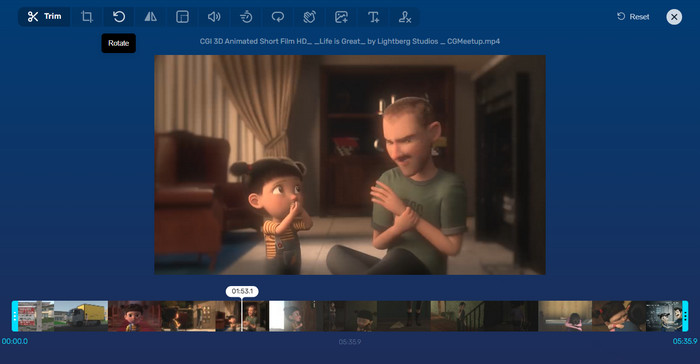
ステップ3. 動画が読み込まれると、編集画面に移動します。そこでメニューからRotateボタンをクリックします。
ステップ4. 動画の回転結果に満足したら、画面右下のSaveボタンをクリックします。
パート 2. 代替ツール: Video Rotator Offline
FVC Video Converter Ultimateは、Windows と Mac に対応したデスクトップアプリです。オフライン環境で動画の変換や回転を行うことができます。動画を90度、180度、270度の単位で、時計回り・反時計回りに回転させることが可能です。豊富な動画編集ツールが搭載されており、トリミング、結合、動画設定の調整など、さまざまな編集作業を行えます。この動画回転ツールの使い方を見ていきましょう。
ステップ1. ツールを入手してインストール
まず、プログラムをダウンロードしてコンピュータにインストールします。直後、すぐに起動します。
無料ダウンロードWindows 7 以降対応安全なダウンロード
無料ダウンロードMacOS 10.7 以降に対応安全なダウンロード
ステップ2. 回転したい動画をアップロード
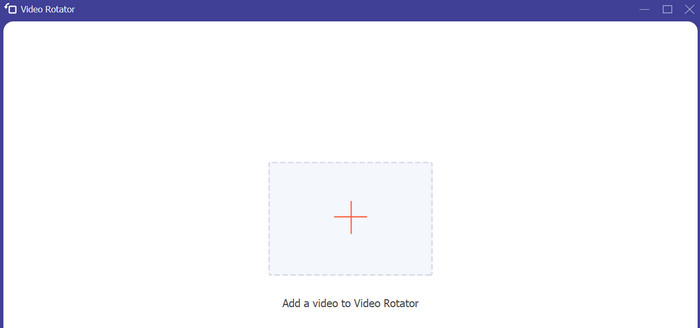
次に、Toolboxタブに移動し、プログラムのVideo Rotatorオプションにアクセスします。このオプションをクリックすると、動画のアップロードを促す画面が表示されます。ここでプラスアイコンのボタンをクリックして、回転したい動画を追加します。
ステップ3. 動画を回転
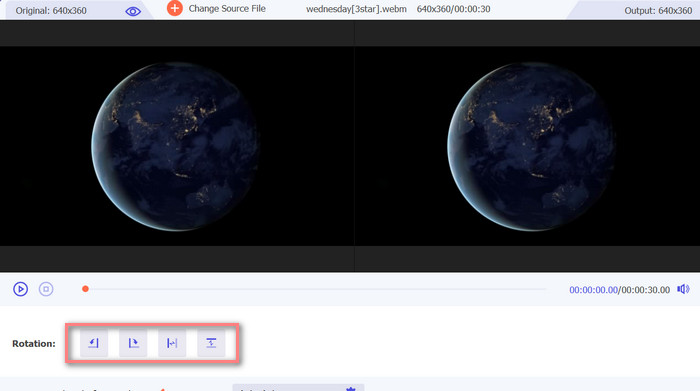
この時点で、適切な回転ボタンをクリックして、目的のビデオの向きを取得します。プレビューはリアルタイムなので、すばやく調整できます。
ステップ4. 回転後の動画を出力
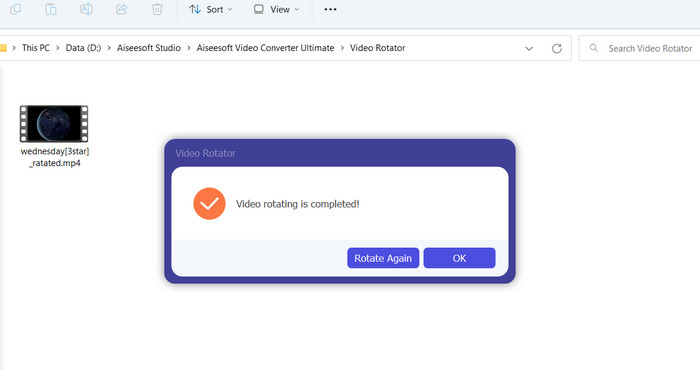
最後に、Exportボタンをクリックして、編集した動画を書き出します。完了すると通知が表示され、動画が保存されているフォルダーが自動的に開きます。
パート 3. Video Rotators Online に関するよくある質問
オンラインビデオローテーターは安全に使用できますか?
ほとんどのインターネット ビデオ ローテーターは安全に使用できます。データとプライバシーを確実に保護するには、有名で信頼性の高いツールを選択することが不可欠です。
スマートフォンで動画を回転できますか?
はい、多くのオンライン ビデオ ローテーターはモバイル フレンドリーで、スマートフォンの Web ブラウザーからアクセスできます。
オンライン ビデオ ローテーターの使用に制限はありますか?
はい、一部のオンライン ビデオ ローテータには、ファイル サイズの制限、編集機能の制限、ビデオ品質の低下などの制限がある場合があります。
結論
オンライン動画回転ツールは、ソフトをダウンロード・インストールすることなく動画を回転できる、手軽でユーザーフレンドリーな方法です。インターネット接続さえあれば、どのデバイスからでもアクセスでき、外出先でも利用できます。ただし、ファイルサイズの制限や画質の低下など、機能面での制約がある場合があります。そのため、こうした制限を解消できるオフラインの代替ツールも併せて紹介しました。
-
 [4つの方法]オンラインで動画を簡単に高速化する方法
 オンラインでビデオをスピードアップしたいですか?さまざまな方法でビデオを高速化する方法について詳しくは、この記事をお読みください。
-
 ビデオをオンラインで便利にカットする優れた方法
 ビデオのカットは、ビデオのハイライトを作成する最良の方法です。したがって、この投稿では、ビデオをオンラインで簡単にトリミングする方法を紹介します。詳細については、こちらをご覧ください。
-
 オンライン GIF メーカー [2023] で最高のアニメーション GIF を作成
 Web上ですでに遭遇したかどうかにかかわらず、これらの単純なオンラインGIFメーカーを使用してGIFを作成する方法についての有益なレビュー。
