


 Video Converter Ultimate
 Perakam Skrin
 Pembaikan Video
 Muat Turun Selamat
4 Kaedah Percuma Teratas untuk Menukar MTS ke MOV
Saya telah merakam beberapa video dengan camcorder Sony saya yang mengeksport fail MTS. Saya perhatikan bahawa MTS tidak dapat disokong oleh pemain media dan iMovie saya. Saya menggunakan Mac dan ingin mengedit video MTS yang ditangkap ini. Sebarang bantuan? Adakah cara mudah, terutamanya kaedah percuma untuk menukar MTS ke MOV?
MTS ialah format video definisi tinggi yang digunakan secara meluas oleh kamera video Sony dan Panasonic, sebagai sambungan fail bagi AVCHD (Advanced Video Coding High Definition). Selepas merakam video dengan kamera digital anda, anda berkemungkinan besar akan mendapat fail MTS. Ia menyokong HD 720p/1080i dan dapat memberikan kualiti video yang lebih tinggi. Namun begitu, MTS bukan format yang popular dan tidak disokong oleh kebanyakan pemain media atau perisian penyuntingan.

Apabila anda perlu menyunting MTS dalam iMovie atau memainkannya dengan pemain media, anda perlu menukar MTS kepada MOV atau MP4 untuk mendapatkan keserasian yang lebih baik. Di dalam artikel ini, kami akan menunjukkan kepada anda 4 penukar MTS percuma untuk membantu anda menukar MTS kepada MOV dengan mudah.
Bahagian 1. Cara Percuma Terbaik untuk Menukar MTS ke MOV tanpa Kerugian Berkualiti
Terdapat banyak alat penukaran MTS yang ditawarkan di internet yang boleh membantu anda menukar MTS kepada MOV dengan kualiti tinggi. Dalam bahagian pertama ini, kami ingin mengesyorkan perisian penukaran MTS ke MOV percuma yang terbaik, iaitu Free MTS Converter untuk anda.
Ia direka khas untuk menangani semua jenis penukaran. Ia serasi dengan hampir semua format video dan audio seperti MP4, MOV, MKV, MTS, AVI, FLV, WMV, MP3, AAC, FLAC, dan banyak lagi. Anda boleh memuat turunnya secara percuma dan mengambil panduan berikut untuk menukar MTS ke MOV secara percuma.
Muat Turun PercumaUntuk Windows 7 atau versi lebih baharuMuat Turun Selamat
Muat Turun PercumaUntuk MacOS 10.7 atau versi lebih baharuMuat Turun Selamat
Langkah 1. Pertama, anda perlu memasang dan menjalankan penukar MTS ke MOV percuma ini di komputer anda. Ia menawarkan versi Windows dan Mac untuk anda muat turun.
Langkah 2. Klik Add File(s) untuk mengimport fail MTS yang anda ingin tukar. Anda boleh menukar satu atau lebih fail MTS pada satu masa.
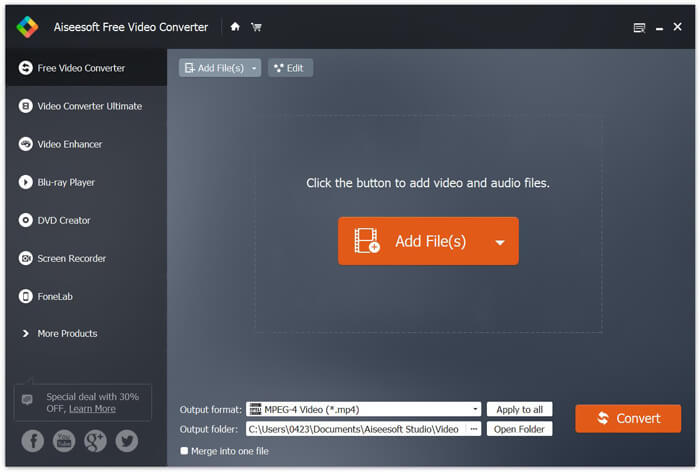
Langkah 3. Pilih MOV sebagai format sasaran anda daripada senarai Output format. Kemudian klik butang Convert untuk memulakan penukaran daripada MTS ke MOV.
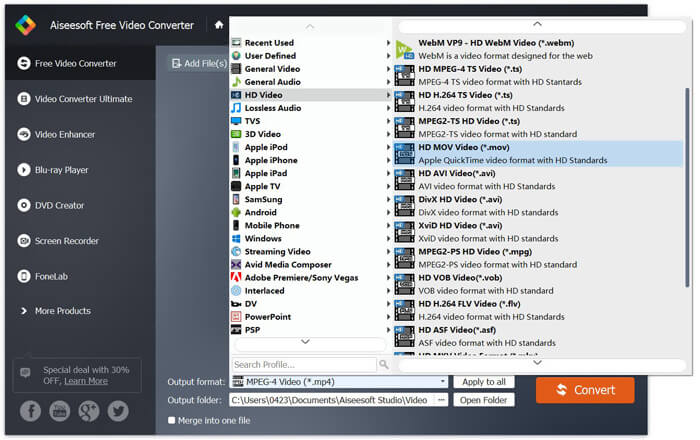
Seperti yang anda lihat dari atas, penukar MTS ke MOV percuma ini juga membawa beberapa ciri penyuntingan asas. Sebelum penukaran terakhir, anda boleh menggunakannya untuk menyesuaikan fail MTS anda. Berbanding dengan penukar dalam talian, Penukar Video Percuma ini dapat memberi anda kelajuan penukaran yang lebih cepat dan kualiti video output yang lebih tinggi. Itulah sebabnya kami menjadikannya cadangan pertama kami.
Bahagian 2. Penukar Dalam Talian Percuma Membantu Anda Menukar Video dengan Mudah
Apabila anda Google cara menukar MTS ke MOV, anda akan mendapat banyak hasil penukar dalam talian percuma. Di sini kami memperkenalkan kepada anda satu penukar MTS ke MOV dalam talian percuma yang mudah digunakan, iaitu FVC Free Online Video Converter. Tanpa memasang sebarang perisian, anda boleh menukar mana-mana format video popular kepada MP4, AVI, MOV dan lain-lain secara percuma. Dan anda tidak perlu risau tentang apa-apa kerana proses penukaran adalah selamat dan stabil. Tiada data akan hilang semasa proses penukaran.
Langkah 1. Buka pautan di atas dan klik butang Add Files to Convert. Sebelum menukar, sila muat turun dan pasang FVC launcher. Ia hanya mengambil masa beberapa saat.

Langkah 2. Selepas memasang dan mengemas kini pelancar tersebut, pilih sahaja video yang ingin anda tukar. Kemudian pilih format yang anda perlukan dan tekan Convert.

Langkah 3. Buka pautan di atas dan klik butang Add Files to Convert. Sebelum menukar, sila muat turun dan pasang FVC launcher. Ia hanya mengambil masa beberapa saat.
Bahagian 3. Cara Menukar MTS ke MOV Percuma Dalam Talian dengan ZAMZAR
ZAMZAR adalah salah satu perisian penukaran video dalam talian yang paling popular yang dapat membantu anda menukar MTS ke MOV secara percuma. Ia direka dengan antara muka ringkas dan ciri penukaran sederhana. Anda boleh mengambil panduan berikut untuk membuat penukaran video MTS.
Langkah 1. Buka penyemak imbas anda dan arahkan ke laman rasmi ZAMZAR. Di sini anda boleh terus ke laman https://www.zamzar.com/convert/mts-to-mov/. Di sini anda dibenarkan menukar MTS ke MOV secara langsung tanpa melakukan tetapan lain.
Langkah 2. Klik butang Tambah Fail untuk memuatkan fail MTS yang ingin anda ubah. Anda boleh drag and drop untuk memuat naik fail MTS. Satu perkara yang harus anda ketahui ialah, penukar MTS dalam talian percuma ini hanya membolehkan anda menukar fail MTS kurang dari 150MB.
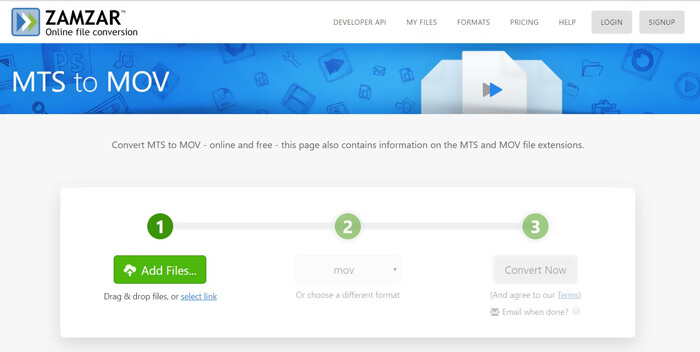
Langkah 3. Selepas memuat naik, anda boleh klik butang Convert Now untuk mula menukar MTS ke MOV secara percuma dalam talian.
Bahagian 4. Cara Dalam Talian untuk Menukar MTS ke MOV dengan FreeConvert
FreeConvert ialah satu lagi penukar video dalam talian yang popular yang mempunyai keupayaan untuk membuat penukaran video MTS ke MOV secara percuma. Penukar MTS ke MOV percuma ini sangat menyokong format MTS dan M2TS. Ia membolehkan anda memuat naik fail MTS sehingga 1GB. Selain itu, ia membenarkan anda memuat naik 20 fail MTS pada satu masa untuk ditukar. Sekarang anda boleh ikut langkah di bawah untuk menukar MTS anda kepada MOV.
Langkah 1. Mula-mula, anda perlu pergi ke FreeConvert.com pada pelayar anda. Di sini anda boleh terus pergi ke https://www.freeconvert.com/mts-to-mov untuk penukaran.
Langkah 2. Klik butang biru besar Choose MTS Files untuk memuat naik fail MTS yang ingin anda tukar kepada MOV. Seperti yang dinyatakan di atas, di sini anda dibenarkan memuat naik satu atau lebih fail MTS untuk penukaran.
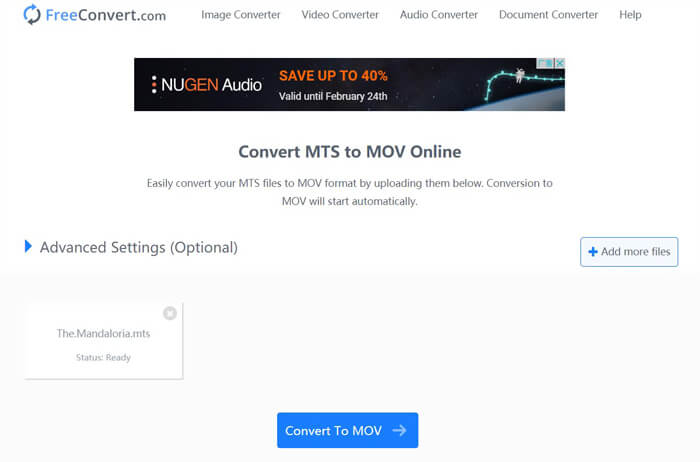
Langkah 3. Klik butang Convert To MOV untuk memulakan proses memuat naik dan menukar. Selepas itu, anda perlu klik butang Download untuk menyimpan fail yang telah ditukar ke komputer anda.
Apabila anda memilih penukar dalam talian percuma untuk menukar MTS ke MOV, anda perlu mengambil masa yang agak lama untuk proses memuat naik dan menukar. Jadi adalah lebih baik untuk menukar fail MTS bersaiz kecil dengan perisian penukaran dalam talian. Jika anda ingin menukar video MTS atau M2TS yang besar, anda perlu bergantung pada Free Video Converter yang sangat disyorkan.
-
 6 Cara Mudah untuk Menukar TS ke AVI / MKV / MOV / WMV pada Windows / Mac
 Ingin menukar fail TS ke AVI / MKV / MOV / WMV dengan cepat? Artikel ini menunjukkan penukar video dalam talian dan luar talian dengan panduan lengkap. Mungkin anda boleh mendapatkan penukar TS percuma terbaik di sini.
-
 MOV VS MP4 - Mana Yang Lebih Baik
 MOV VS MP4, yang manakah lebih baik? Catatan ini memberitahu perbezaan antara MP4 dan MOV, sehingga anda dapat memperoleh pilihan yang lebih baik untuk digunakan untuk fail video anda.
-
 Cara Bergabung dengan Fail MOV (QuickTime) secara Percuma
 Mungkin sukar bagi pemula untuk menggabungkan beberapa klip video MOV bersama. Jadi, adakah cara mudah dan cepat untuk menggabungkan fail MOV? Sekiranya ada, maka bagaimana menggunakannya? Catatan ini akan membantu anda mendapatkan jawapan ini.
