


 Video Converter Ultimate
 Skjermopptaker
 Videoreparasjon
Fordelaktige metoder for å konvertere DV til FLV enkelt
DV-fil er en fil som inneholder en digital video. Vår analyse av DV-filer har avslørt at Digital Video er én bruk av dette formatet. Vi har ennå ikke fullstendig forklart hva disse filene inneholder eller hvordan brukerne bruker dem, men teamet vårt jobber med tusenvis av filtyper. Hvis du har informasjon om formatet, vil vi gjerne høre fra deg. Filtypen .flv angir derimot FLV-filer (Flash Video). Brukere kan bruke Adobe Flash Player eller Adobe Air til å strømme lyd- og videoinnhold over internett ved hjelp av FLV. FLV-filer koder dataene sine på samme måte som SWF-filer. For å løse problemet med DV-videoformatet er brukere mer tilbøyelige til å konvertere det til FLV-format, som er kompatibelt med et bredt spekter av mediespillere. Hvis du altså ser etter verktøy som kan konvertere DV til FLV-videoformat, kan du fortsette å lese denne artikkelen.

Del 1. Beste måten å konvertere DV til FLV offline
Video Converter Ultimate er et av de utmerkede programmene som kan hjelpe deg med å konvertere DV-videoformat til FLV. Med sitt ultrasnære akselerasjonssystem kan du konvertere DV til FLV på bare et sekund, noe andre verktøy ikke kan overgå. Takket være denne programvaren trenger du ikke lenger bekymre deg for å konvertere DV til andre formater, fordi dette programmet støtter en rekke formater du knapt kan forestille deg, som MP4, MOV, 3GP, FLV, WMV, WEBM, MPEG osv. I tillegg til å konvertere filer har denne programvaren flere andre verktøy å by på: den kan klippe, forbedre, slå sammen, hastighetsjustere og har andre nyttige funksjoner som kan løfte videoen din til neste nivå.

Video Converter Ultimate
6 357 200+ nedlastinger- Den støtter over 1000 forskjellige video- og lydformater.
- Konverter 30 ganger raskere enn andre omformere.
- Kan konvertere video opp til 4K HD-kvalitet.
- Den tilbyr en rekke andre verktøy som hjelper deg med å forbedre videoen din.
- Den krever ikke tung vedlikeholdsmaskinvare for å fungere.
Gratis nedlastingFor Windows 7 eller nyereSikker nedlasting
Gratis nedlastingFor MacOS 10.7 eller nyereSikker nedlasting
Trinn 1: Last ned programvaren ved å klikke på knappen Free Download som ligger ovenfor. Deretter må du installere programvaren på datamaskinen og starte den ved å klikke på Start Now når installasjonen er fullført.
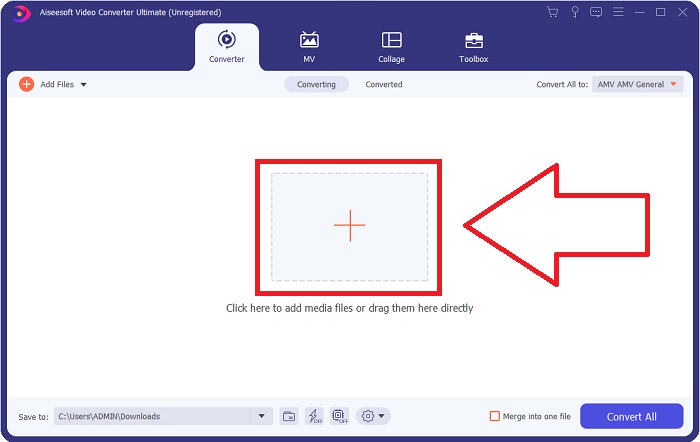
Trinn 2: Deretter vil et vindu dukke opp på skjermen. Programvaren vil vise funksjonen Converter. For å importere en fil fra datamaskinen klikker du på +-knappen i midten, eller du kan ganske enkelt dra en hvilken som helst DV videofil til midten.
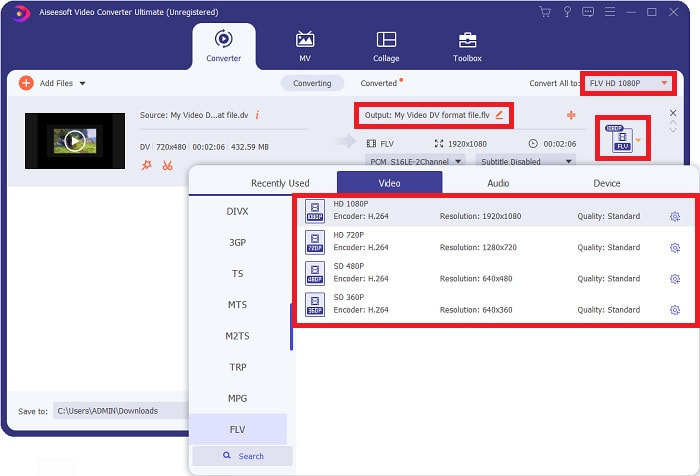
Trinn 3: Du er halvveis i prosessen. Klikk på formatikonet ved siden av utdatavideoen din, og velg FLV-videoformat. Deretter kan du også velge mellom ulike videokvaliteter som programvaren tilbyr.
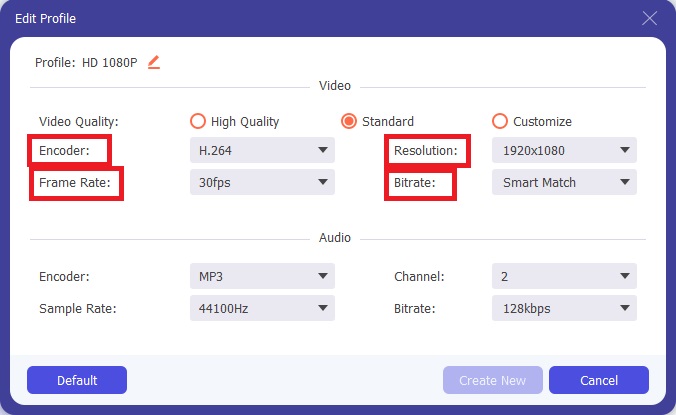
Trinn 4: Litt innsats gjenstår før du er ferdig. Hvis ingen av videokvalitetene oppfyller behovene dine, kan du tilpasse videokvaliteten på videoutdataene ved å klikke på tannhjulikonet rett ved siden av valget av videokvalitet.
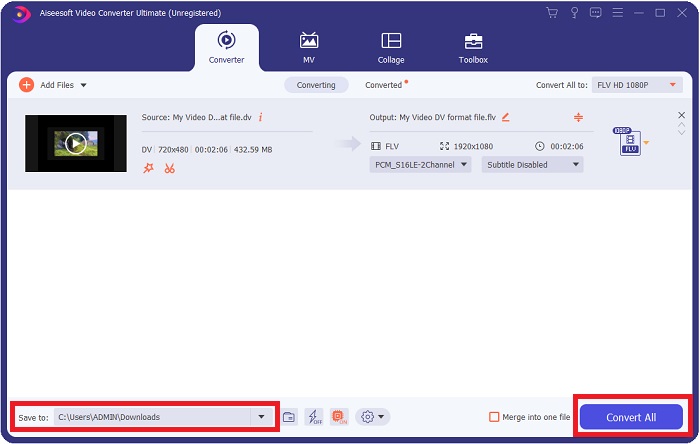
Trinn 5: Nå er du på oppløpssiden. Gå til feltet Save to i det andre hjørnet for å velge hvor den konverterte filen skal lagres. Du kan nå konvertere filen ved å klikke på knappen Convert All som ligger nederst i høyre hjørne av skjermen.
Del 2. Hvordan konvertere DV til FLV Online
Internett tilbyr og introduserer ulike nettbaserte verktøy som kan hjelpe deg med å konvertere DV til FLV. Men dette nettverktøyet som heter Free Video Converter Online skiller seg fra andre verktøy når det gjelder rask konvertering, fordi det kan konvertere en fil på bare et sekund. Det støtter også formater som MP4, FLV, MOV, M4A, TS, WMV, ASF, VOB, AAC, WMA og flere. Det konverterer dessuten video til HD-videoer uten kvalitetstap. Dette gratis videokonverteringsverktøyet er kjent for sine konverteringsmuligheter og lar brukerne finjustere videoprosjektene sine uten bryderi. La oss nå gå gjennom alle trinnene som vil hjelpe deg å bruke denne nettbaserte konverteren.
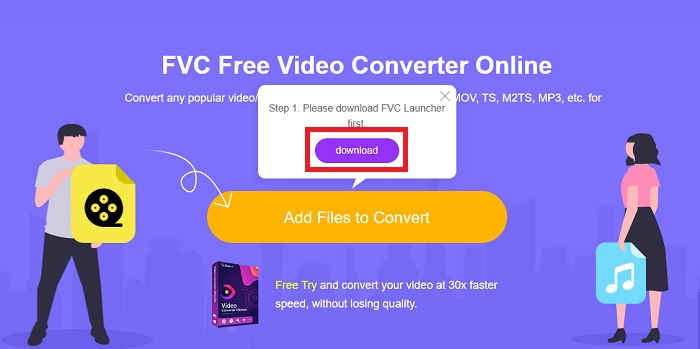
Trinn 1: For å gå til hovedsiden til dette nettverktøyet klikker du på denne lenken og fortsetter. Klikk på knappen Add Files to Convert på datamaskinens hovedskjerm for å laste ned starteren som lar deg bruke dette nettverktøyet. Klikk deretter på den igjen for å fortsette med å laste opp en fil.
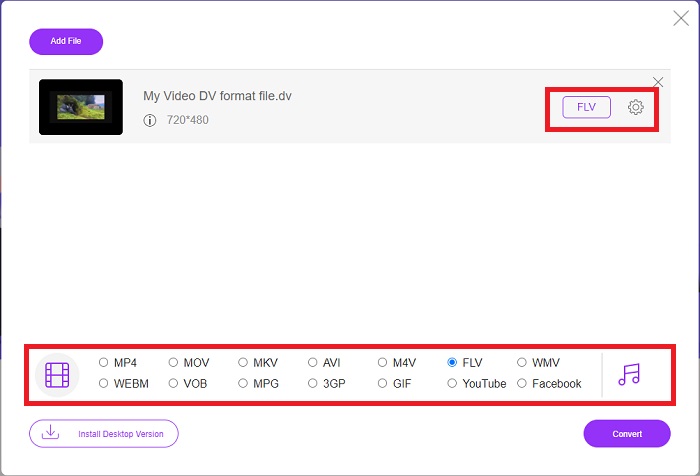
Trinn 2: Nå som du har en fil du vil konvertere, må du velge FLV-videoformat fra videolistevalget nederst på skjermen. Du kan også justere noen av spesifikasjonene for videoen ved å endre innstillinger som oppløsning, bildefrekvens osv. ved å klikke på tannhjulikonet.
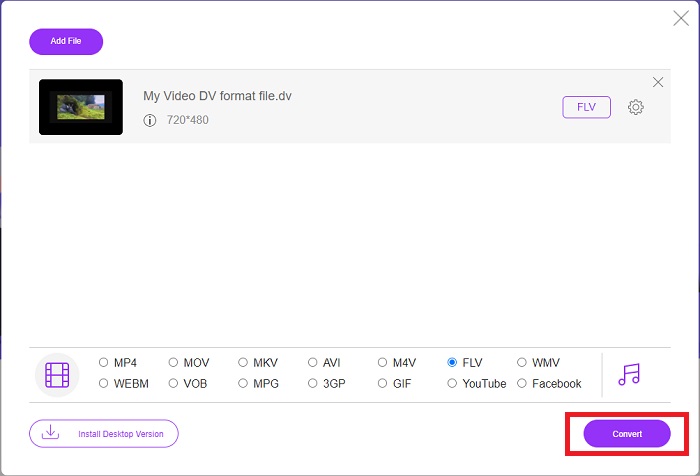
Trinn 3: Deretter kan du konvertere filen ved å klikke på knappen Convert nederst til venstre i vinduet.
Del 3. Sammenligningsskjema: DV vs. FLV
En digital video (DV)-fil lages av et digitalkamera og lagres i råformatet som brukerne alltid bruker. En Digital Video (DV)-fil består av Digital Interface Blocks (DIF), som hver inneholder 80 byte. Lyd, video og metadata kan alle inkluderes i DIF-blokker. DIF-blokker kan lagres som datafiler i rå form eller som filformater pakket rundt dem – multiplekser blokkene til 150-blokksekvenser. En videoramme kan inneholde opptil ti eller tolv sekvenser.
Strømmetjenester som YouTube, Hulu og Vevo bruker imidlertid fortsatt Adobe Systems' Flash Video Format til sine nettvideoer. Adobe Flash Player (inkludert nettlesertillegg) og tredjepartsprogramvare kan lese og spille av FLV-filer på nesten alle operativsystemer (unntatt iOS). iPhone og Android kan spille av FLV-filer ved hjelp av åpen kildekode-programvare og bestemte nettlesere. Flash er fortsatt et problem for iOS. FLV-filer kan bare vises i FLV-avspillingsprogramvare, og brukere kan bruke skjermopptaks- og innspillingsprogrammer til å ta opp FLV-videoer.
| Filutvidelse | DV (.dv) | FLV (.flv) |
| Filnavn | Digital video | Flash-videofil |
| Utviklet av | Flere videokameraprodusenter | Adobe System Incorporated |
| Fordeler | ◆ En standard Mini DV har 19,5 GB, noe som utgjør ca. 25 cent per GB lagringsplass. ◆ Intuitiv HD-til-standard konvertering ◆ Tape er enkle å merke og ideelle for langtidsoppbevaring. | Når det gjelder å lage dynamiske og interaktive nettsider, kan Adobe Flash være en stor ressurs. Prosessen er enkel, men resultatene kan være betydelige. I sin storhetstid ble Flash også mye brukt til enkle videospill. |
| Ulemper | ◆ En firewire-tilkobling er nødvendig (de fleste PC-er har ikke dette). ◆ Kvaliteten på et opptak reduseres for hver påfølgende pass. ◆ Den tar bare opp i 60 til 90 minutter om gangen. | Det er en ulempe at FLV har avtatt i popularitet gjennom årene. Å lage FLV-innhold kan ta lang tid og koste mye penger. I tillegg kan ikke brukere se Flash-innhold på iOS-enheter, noe som sterkt begrenser muligheten til å tiltrekke seg nye følgere. |
| Programmer som støtter filen | ◆ VLC Media Player | ◆ RealPlayer ◆ Apple QuickTime Player ◆ VLC Media Player ◆ MPlayer |
Del 4. Vanlige spørsmål om DV til FLV-konvertering
Hvilken oppløsning er DV?
Med DV registrerer standardoppløsningen 720 horisontale piksler og 480 sammenflettede linjer i land som bruker 60Hz elektrisk strøm og 576 linjer med 50Hz elektrisk strøm. En høyoppløselig versjon av digital video (HDV) er en offisiell HDV-standard, og Panasonics DVCPRO HD er et eksempel på et slikt format (se HDV og DVCPRO).
Er DV-video interlaced?
Det er alltid mye DV-opptak nederst først. Andre opptak kan vises først. Tolk det importerte klippet igjen med feltseparasjon på, senk først (fil > tolk opptak > sentralt) for å se om det er sammenflettet. Deretter, i prosjektets vindu, bruk Alt-dobbeltklikk-snarveien for å få tilgang til den. Bruk side opp/Dn-tastene for å navigere gjennom videoen. Interlacing oppstår hvis videoen endres hver gang du trykker på avspillingsknappen. En rykkebevegelse indikerer at feltrekkefølgen er feil, og opptakene bør tolkes på nytt ved å bruke den andre feltrekkefølgen.
Er FLV et passende videoformat?
Adobe Flash Player lagrer videofiler i FLV-format. Alle videoplattformer og nettlesere godtar det som et av deres støttede videoformater. Online videostreamingplattformer som YouTube drar nytte av å bruke FLV-formatet. Som et resultat av den lille filstørrelsen er de raske og enkle å laste ned.
Konklusjon
For å oppsummere alle temaene som er tatt opp, vil du legge merke til at den beste konverteren denne artikkelen anbefaler at du bruker, er programmet Video Converter Ultimate og nettverktøyet Free Video Converter Online. Siden disse to konverterne overgår andre alternativer, har de profesjonelle tilleggsfunksjoner og et brukervennlig grensesnitt.
-
 Beste strategi for hvordan du konverterer DV-fil til AVI-format med detaljerte trinn
 Vil du konvertere DV-filen til AVI? Les deretter denne artikkelen for å vite det unike verktøyet du kan bruke til å konvertere og en mediespiller for å spille av DV-en din på PC eller Mac.
-
 Topp 2 måter å konvertere DV-filer til MOV gratis på skrivebordet og online
 Har du problemer med å konvertere DV-filene til MOV på Mac-en? Hvis det er problemet ditt, kan vi løse det sammen hvis vi leser denne artikkelen.
-
 MP4 til FLV | Topp 3 gratis omformere (online / Mac / Windows)
 Dette innlegget er den detaljerte guiden til MP4 til FLV-konvertering. Du kan ta de 3 beste gratis omformerne for å endre MP4 til FLV online, på Windows eller Mac-datamaskiner uten problemer.
