


 Video Converter Ultimate
 Skjermopptaker
 Videoreparasjon
3 Online og offline MPG til MP4-konverterere Du må prøve å konvertere MPG-filer
MP4 er et av de vanligste filformatene du vil se på internett i dag. Selv om MPG og MP4 har mange likheter, har de også sine forskjeller. Og hvis du vil konvertere MPG-filen din til MP4-filformat, har vi testet videokonvertere som er populære nå for tiden. Dessuten har vi valgt ut de beste MPG til MP4-konverterne for deg!

Del 1. Hvorfor trenger du å konvertere MPG til MP4
Hva er betydningen av å konvertere MPG til MP4? MPG og MP4 er formater som ofte brukes til videoer på internett. Men hva er forskjellen mellom dem? MPG eller MPEG er det originale formatet som bruker MPEG-codec. Det er en koder som gir videoutganger av høy kvalitet.
På den annen side er MP4 et av de vanligste videofilformatene og bruker moderne videokomprimering. Så hvilken er bedre? Den høye komprimeringsevnen til MP4 gjør at filer kan komprimeres i mindre størrelser enn noe annet videofilformat som MPG.
Del 2. 3 måter å konvertere MPG til MP4
Her er de utmerkede videokonvertererne du kan bruke online og offline og lære hvordan du endrer MPG til MP4.
1. Bruk Video Converter Ultimate
Video Converter Ultimate er en mediefilkonverter som lar deg konvertere MPG-filen din til MP4-filformat enkelt. Denne konverteren har et brukervennlig grensesnitt, men gir imponerende resultater. Den har funksjoner som lar deg redigere, forbedre og komprimere MPG-filen din. I tillegg kan du batchkonvertere MPG til MP4 i dette programmet.
Video Converter Ultimate har også et alternativ der du kan collage bilder og videoer. Også, hvis du vil lage en GIF, har denne omformeren den funksjonen. I tillegg til det, ved å bruke denne omformeren, kan du konvertere store filer uten å ødelegge kvaliteten. Selv om funksjonene virker profesjonelle, kan du bruke dem raskt fordi de bare er enkle å bruke.
Trinn 1. For å laste ned denne konverteren, klikk på nedlastingsknappen nedenfor. Følg installasjonsprosessen, og åpne deretter programmet.
Gratis nedlastingFor Windows 7 eller nyereSikker nedlasting
Gratis nedlastingFor MacOS 10.7 eller nyereSikker nedlasting
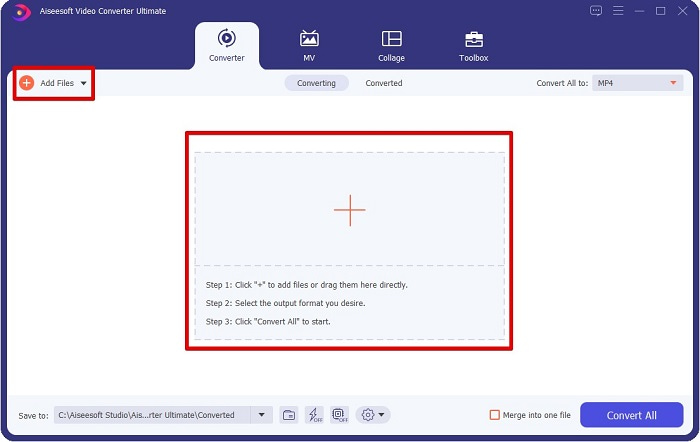
Trinn 2. Etter at du har startet konverteren, klikker du på knappen Add Files eller + for å laste opp MPG-filen din. Datamaskinens filer vil vises, der du finner filen i mappene dine. Klikk deretter Open for å legge til filen i køen.
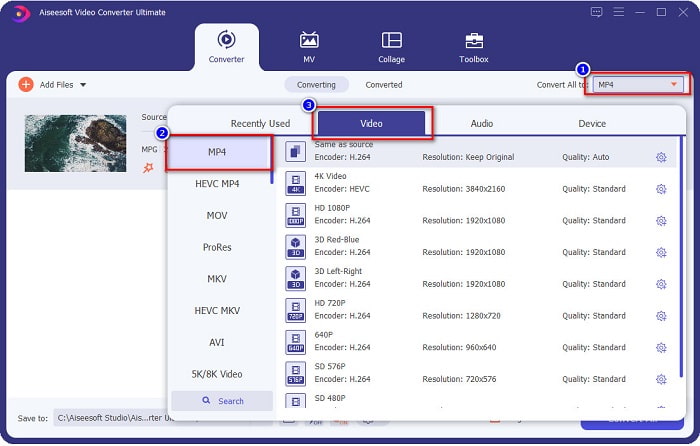
Trinn 3. For å endre formatet på MPG-filen din, klikker du Convert All to øverst i høyre hjørne av skjermen. Etter at du ser en liste over filformater, velger du filformatet MP4.
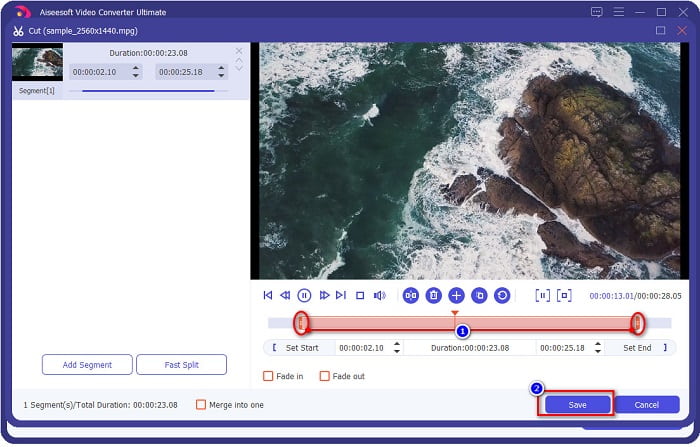
Hvis du vil kutte lengden på videoen din, klikker du på scissor-knappen for å trimme videoen. Ved å dra play head-knappene kan du justere lengden på videoen din. Klikk Save for å fullføre.
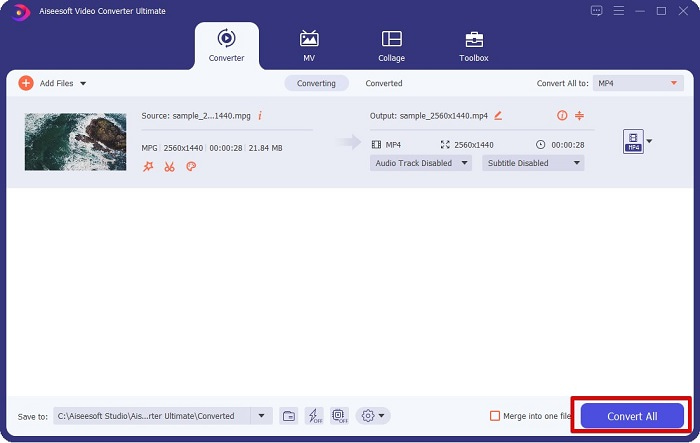
Trinn 4. Når du har valgt filformatet du ønsker, klikker du Convert All for å konvertere MPG-filen din til en MP4-fil. Vent litt, så vil MPG-filen din bli konvertert til en MP4-fil. Med disse enkle trinnene har du enkelt konvertert MPG-filen din til MP4.
2. Bruk Free Online Converter
FVC Free Online Video Converter lar deg konvertere MPG-filen din til MP4-filformat gratis uten registrering. Det er en gratis nettbasert videokonverter som lar deg konvertere uten begrensninger. I tillegg kan du konvertere store filer på nettet med denne konverteren. Du trenger heller ikke å laste ned noe, fordi du kan bruke den direkte på nettet. Ulempen er imidlertid at den er avhengig av internett, noe som betyr at konverteringshastigheten avhenger av hvor rask tilkoblingen din er. Likevel har mange brukere benyttet seg av denne konverteren, og den er bevist å være en fantastisk videokonverter.
Her er listen over trinn for å konvertere i FVC Free Online Video Converter:
Trinn 1. Gå til nettleseren din og søk etter FVC Free Online Video Converter.
Trinn 2. Når du allerede er på nettsiden, klikker du Add Files to Convert. En tekstboks vil vises, der du først må laste ned starteren. Når starteren er lastet ned, blir du ført til filene dine – velg MPG-filen du vil konvertere.
Last ned skrivebordsversjonen for å konvertere filer i batch.
Trinn 3. Etter å ha valgt MPG-filen din, vil du se det første grensesnittet med en oversikt over videoformater. Velg MP4 før du konverterer MPG-filen din til MP4 på nettet.
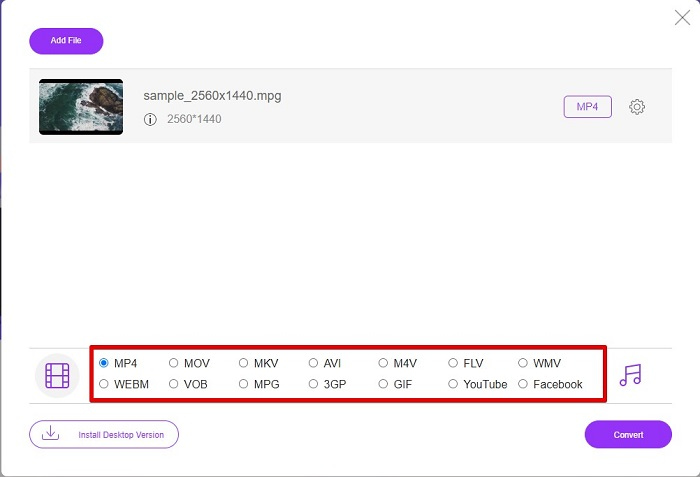
Trinn 4. Klikk på knappen Convert for å starte konverteringen. En ny fane vil dukke opp der du velger hvor du vil lagre den konverterte filen på datamaskinen din, og deretter klikker du select folder.
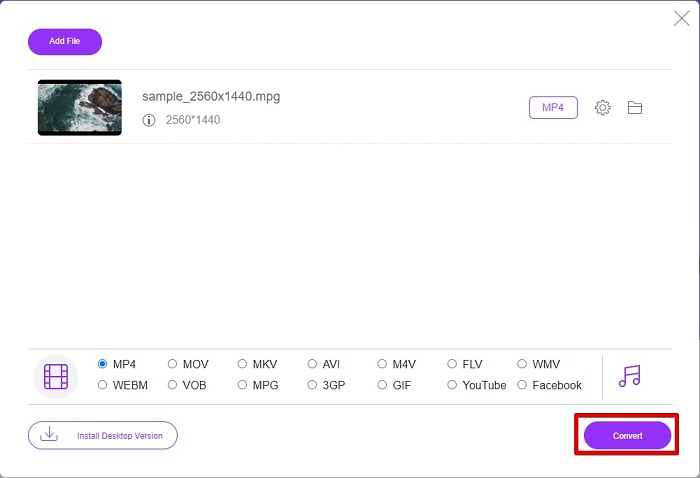
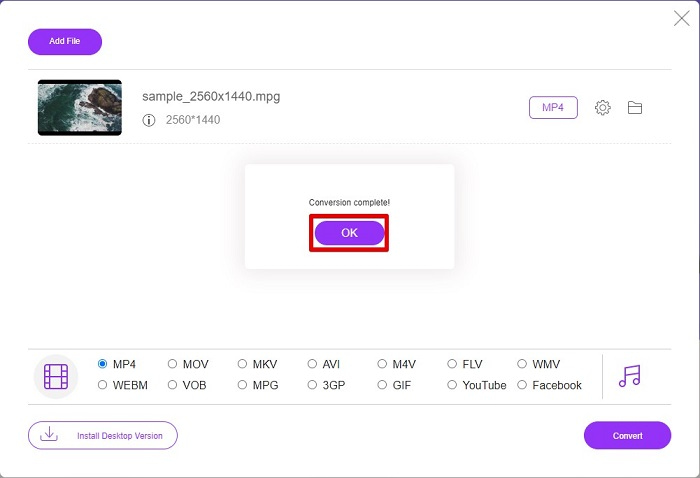
Trinn 5. Til slutt begynner filen din å konverteres, og når den er ferdig, klikker du OK for å avslutte. Og det var det! Du er ferdig med konverteringen like enkelt som 1-2-3!
3. Bruk ConvertFiles.com
ConvertFiles.com er en gratis online konverteringsapp for å konvertere MPG-filen din til MP4. Den lar deg konvertere filformater, opptil 300 varianter av filformater. Og hvis du leter etter en MPG til MP4-konverterer på nettet som lar deg konvertere dokumenter, tegninger, videoer, presentasjoner og mer. Men når du bruker denne online-konverteren, vil du møte mange forstyrrende annonser. Ikke desto mindre er denne online-konverteren fortsatt verdt å prøve og har vist seg lovende.
Slik konverterer du MPG-filen til MP4-filformat:
Trinn 1. Søk etter ConvertFiles.com i nettleseren din for å gå direkte til nettsiden.
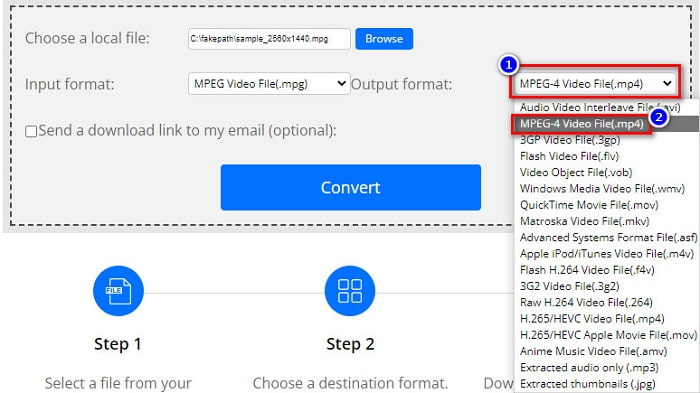
Trinn 2. Velg MPG-filen din ved å klikke på den rektangulære knappen eller Browse-knappen ved siden av Choose a local file. Finn MPG-filen din, og velg den.
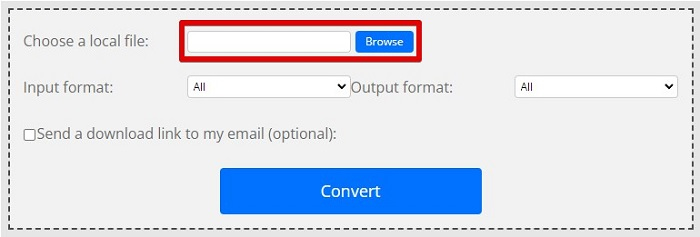
Trinn 3. Etter å ha valgt MPG-filen du vil konvertere, velger du .mp4-format i utdataformatet ved å klikke på drop-down-knappen.
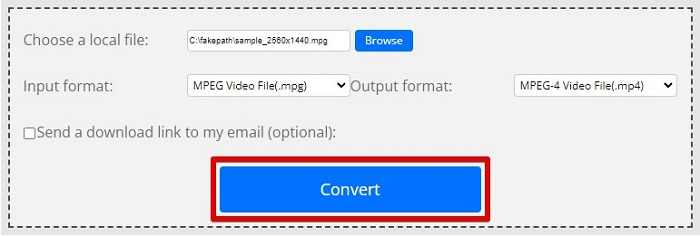
Trinn 4. Når du har valgt filformatet du vil ha, kan du nå konvertere filen ved å klikke Convert.
MPG vs. MP4
Laget av Moving Picture Experts Group (MPEG), MPG er et vanlig digitalt videoformat for å lagre video, lyd og metadatainformasjon. Det er ganske nyttig når du lager filmer for deling på Internett. Disse filene i MPG inneholder vanligvis MPEG-1 eller MPEG-2 video/lydkomprimering.
Utgitt av Moving Picture Experts Group (MPEG) i 2001, kan MP4-formatet hjelpe deg med å lagre video-, lyd-, undertekst- og bildedata i separate spor. Det er en forkortelse for MPEG-4 Part 14. I tillegg er det et av de mest populære formatene som brukes til å streame og dele videoer.
Del 3. Vanlige spørsmål om MPG- og MP4-format
Kan jeg konvertere MPG-filer til MP4 uten å miste kvaliteten?
Ja. Video Converter Ultimate lar deg konvertere MPG til MP4-format, uten å miste kvaliteten, til tross for filstørrelsen.
Hvor kan jeg spille MPG-filer?
MPG-filer støttes bredt. Derfor kan mange mediespillere åpne dette filformatet, inkludert Microsoft Windows Media Player og VideoLAN VLC Media Player. Du kan lese denne artikkelen for mer informasjon: Best 4 MPG/MPEG Players for Windows/Mac/Android/iPhone [2021]
Kan jeg konvertere MP4 til MPG?
Ja. Du kan konvertere MPG til MP4 filformat ved å bruke filkonvertererne som vi har listet opp ovenfor.
Konklusjon
Konverterne vi har listet opp ovenfor er bevist å være pålitelige. De er enkle å bruke og gratis! Men hvis du vil ha en filkonverter som kan konvertere MPG-filen din til MP4-filformat, og som har fantastiske funksjoner som kan forbedre filen din, er Video Converter Ultimate det beste valget. Hvis du dessuten vil ha en nettbasert konverter som er fri for annonser og også kan konvertere store filer uten problemer, kan du prøve FVC Free Online Converter.
-
 3 enkle måter å konvertere MPG til MOV på din Mac/Windows/Online
 Vil du konvertere MPG-filene dine og senere transportere dem på iOS, iPod, iPad eller Mac? Denne artikkelen vil hjelpe deg med å finne ut hvordan du konverterer MPG til MOV med trinn.
-
 Hvordan konvertere MPG til FLV uten å miste kvalitet [Bevist]
 Du må se favorittfilmen din på denne mediespilleren, men den støtter ikke MPG. Prøv å konvertere MPG-filen din til FLV ved å bruke disse omformerne som denne artikkelen introduserer.
-
 2 Ultimate MPG-konverterere for å konvertere MPG til WMV gratis
 Vil du konvertere MPG til WMV gratis? I så fall er du heldig fordi vi fant ut at det er to verktøy du kan bruke til å konvertere MPG-filene dine.

