


 Video Converter Ultimate
 Skjermopptaker
 Videoreparasjon
 Sikker nedlasting
Beste måter å konvertere HEIC til JPG på Android ved hjelp av apper og online uten problemer
Etter at Apple tok i bruk det nye bildeformatet HEIC, kan ikke Android støtte formatet direkte fordi det mangler kodeker som støtter HEIC. Selv om du bruker den nyeste versjonen av en Android‑telefon, kan du ikke vise HEIC‑formatet på denne enheten. Siden formatet ikke er kompatibelt med Android, er den beste løsningen å konvertere det til et bildeformat som er kompatibelt med alle enheter, nemlig JPEG. Så, hvis du mottar en fil og vil konvertere HEIC til JPG på Android for å kunne se den, må du lese detaljene nedenfor. Vi har gjort researchen for deg, slik at prosessen blir så enkel og effektiv som mulig.

Del 1. Hvordan konvertere HEIC-fil til JPG på Android ved hjelp av mobilapper
Dropbox
Dropbox gir deg en av de beste måtene å distribuere og laste opp filer til skylagring i stedet for på enhetens lokale lagring, slik at du enkelt kan dele dem med andre. Med en HEIC til JPG‑konverter på Android som dette, blir det enkelt og praktisk å konvertere HEIC‑formatet til JPEG. Selv om den kan konvertere bildefiler til JPEG, støter den vanligvis ikke på de samme problemene som andre konvertere, som ofte krever flere ekstra trinn før prosessen er fullført.
Fordi det automatisk endrer formatet til et kompatibelt format etter at det er delt. Vil du vite hvordan du konverterer formatet til en JPEG? Følg deretter trinnene nedenfor for å vite hvordan du gjør det.
Trinn 1. Last ned og åpne Dropbox‑appen på Android‑enheten din. Registrer en konto før du bruker den, men hvis du allerede har en Dropbox‑konto, trenger du bare å logge inn.
Trinn 2. Trykk på Camera Uploads og velg HEIC‑filen du har på telefonen.
Trinn 3. Trykk på Save HEIC Photos og velg JPG‑formatet for å lagre bildet med denne filetternavnet. Vent til prosessen er ferdig, og sjekk deretter i Galleri at bildet nå er i dette formatet.
HEIC til JPG Free Converter - Konverter HEIC til JPEG
HEIC to JPG Free Converter er en av de beste HEIC til JPG‑konverteringsappene på Android, og kan hjelpe deg med å konvertere HEIC‑formatet du har til et kompatibelt format. Med denne appen kan du gjøre HEIC‑filen om til JPEG uten å bekymre deg for tap av kvalitet eller metadata som er knyttet til bildet. I motsetning til Dropbox, der du må logge inn, trenger du ikke å gjøre det her, så det blir mindre styr fordi du kan konvertere HEIC‑filene direkte uten innlogging.
Selv om du ikke trenger å logge på mens du bruker appen, vil du legge merke til at popup-annonser vises på telefonen din hvis du bruker den. Hvis dette ikke er et problem for deg, følg trinnene nedenfor for å vite hvordan du bruker det.
Trinn 1. Søk etter HEIC to JPG Free Converter i Play Store, installer den, og åpne appen for å begynne å bruke den.
Trinn 2. Trykk på Open File og finn HEIC‑bildet på mobilenheten din, og trykk deretter på Select to for å laste det opp til konverteren.
Trinn 3. Under Convert to velger du JPG‑formatet i listen og trykker på Convert for å starte konverteringen av HEIC‑filen.
Del 2. Mest profesjonell måte å batchkonvertere HEIC til JPG Android Online
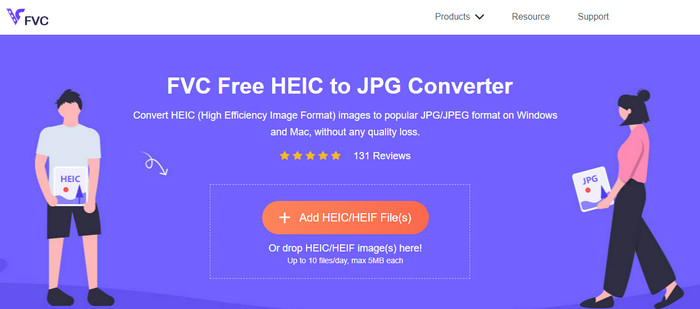
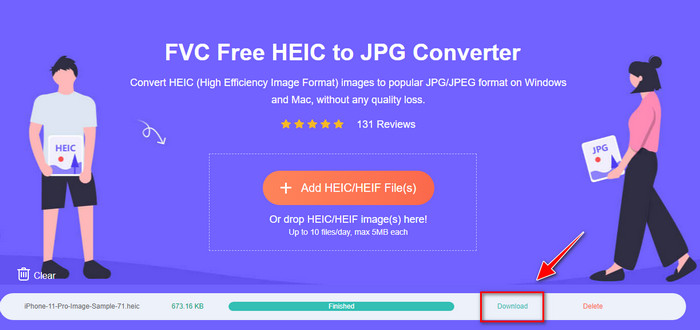
Må du vite hvordan du konverterer en HEIC‑fil til JPG på Android uten hjelp av en nedlastbar app? Da er FVC Free HEIC to JPG Converter nettverktøyet du trenger. Ved en slik oppgave trenger du et profesjonelt verktøy, spesielt hvis du vil konvertere en hel batch med HEIC‑filer til JPEG uten kvalitetstap, og det er nettopp det dette nettverktøyet tilbyr.
I motsetning til applikasjonene vi nevnte ovenfor, med dette, trenger du ikke å laste ned ytterligere data før du kan bruke det, og du trenger ikke engang å logge på. I stedet for å laste ned appen på Android og vente på installasjonsprosessen , hvorfor ikke prøve å bruke dette nettverktøyet med en gang? Hvis dette nettbaserte verktøyet fanget din oppmerksomhet, må du lese følgende detaljer nedenfor. For å vite hvordan et profesjonelt nettverktøy konverterer HEIC til JPG på din Android online og gratis.
Trinn 1. For å åpne det profesjonelle nettverktøyet må du klikke på denne lenken, og en ny fane åpnes i nettleseren din.
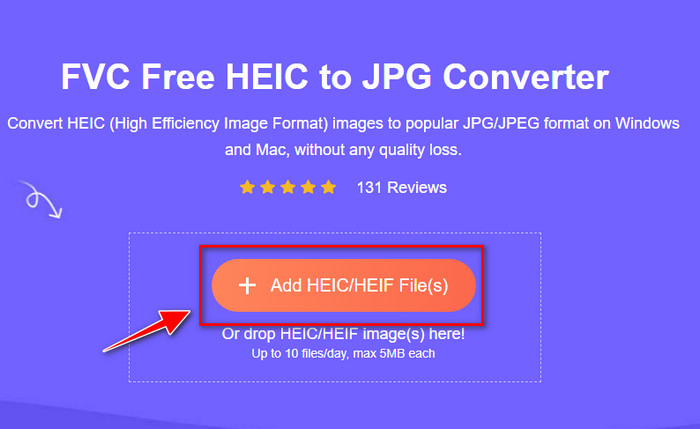
Trinn 2. Når du er i nettverktøyet, trykker du på Add HEIC/HEIF File og laster opp HEIC‑filen her. Du kan også laste opp flere HEIC‑filer og konvertere dem til JPEG samtidig.
Trinn 3. Vent til konverteringen er ferdig, og når fremdriftslinjen er fullført, kan du lagre HEIC‑filene du har lastet opp, ved å klikke på Download-knappen. Filene lagres automatisk i nedlastingsmappen; du kan gå dit for å se bildene i JPEG‑format.
Del 3. Vanlige spørsmål om konvertering av HEIC til JPG på Android
Kan Google Android Pie se HEIC-filen?
Ja, du kan enkelt se HEIC-bildet her. Denne 16. versjonen av Android har offisielt HEIC-kodekene for å se bildet uten å konvertere det til JPEG eller PNG. Så hvis Android-en din er i denne versjonen, trenger du ikke å konvertere formatet til JPEG eller PNG for å se det, og det er klart til å motta HEIC-bildet.
Hvorfor kan jeg ikke konvertere HEIC til JPG på Android?
Først må du sjekke omformeren du bruker på Android om den støtter konvertering av HEIC til en JPG. Selv om noen apper sier at de støtter konvertering av HEIC, er de fleste av dem clickbait. For å unngå at dette skjer, må du lese anmeldelsene om dem for å se om de støtter HEIC og om den kan konvertere bildeformatet til JPG.
Hvorfor ble HEIC populær på iOS-enheter?
HEIC ble populært på iOS‑enheter på grunn av komprimeringen det gir og den detaljerte fargegjengivelsen, som er langt bedre enn JPEG. Hvis bildet ditt er i dette formatet, vil du merke at filstørrelsen er mindre og kvaliteten bedre enn i JPEG‑format. Det er en av grunnene til at det har blitt så populært på iOS‑enheter.
Konklusjon
Denne artikkelen introduserer de beste HEIC til JPG‑konverterne for Android, og alle er tilgjengelige på mobilenheten din. Selv om alle kan hjelpe deg med å konvertere formatet på Android, er det deres styrker og svakheter som gjør dem forskjellige fra hverandre. Hvis du vil bruke den profesjonelle konverteren på Android for å konvertere HEIC‑filen til JPG, anbefaler vi å bruke FVC Free HEIC to JPG Converter. Selv om dette er et nettbasert verktøy, er det fortsatt langt bedre enn de andre nevnte appene. Hvis du vil teste nettverktøyet på Android‑enheten din, finner du trinnene ovenfor; du kan følge dem nøye for å gjøre det på en effektiv måte.
-
 Konverter HEIC til PDF ved å bruke topp 4 forbedrede måter i 2022
 For å vite mer informasjon om den beste HEIC til PDF-konverteren kan du laste ned denne 2022. Du kan lese denne artikkelen ettersom vi ga en anmeldelse av dem.
-
 Beste gratis og betalte HEIC-konverterer du må kjenne til [Oppdatert 2022]
 Vil du vite hva HEIC-omformeren er? I så fall inkluderer vi de 5 beste gratis og betalte HEIC-konvertererne du kan bruke til å endre HEIC-formatet.
-
 HEIC vs. JPG |Som er et bedre bildeformat å bruke
 Kampen mellom HEIC vs. JPG ble dypere, men hvilket av de to er det beste bildeformatet? Les denne artikkelen for å svare på spørsmålene dine.
