


 Video Converter Ultimate
 Skjermopptaker
 Videoreparasjon
 Sikker nedlasting
Sømløs Caf til MP3-konvertering for å bevare lydkvalitet og tilgjengelighet
Konvertering av Caf til MP3 er avgjørende for forbedret kompatibilitet og tilgjengelighet. Konvertering av Caf-filene dine til MP3 sikrer sømløs avspilling på tvers av ulike plattformer, og eliminerer kompatibilitetsproblemer. I tillegg er MP3-filer mindre i størrelse, noe som gjør dem enklere å lagre, overføre og dele. Enten du vil nyte lydsamlingen din på smarttelefoner, datamaskiner eller systemer i bilen, gir konvertering av Caf til MP3 deg større fleksibilitet og bekvemmelighet når det gjelder tilgang til favorittmusikken, podcastene eller opptakene dine.
By utilizing a Caf to MP3 converter, you can easily transform your Caf files into the popular MP3 format, which ensures broader accessibility, smaller file sizes, and seamless sharing of your audio collection. That said, find out the tools you can use to help you change your files from Caf to MP3.

Del 1. Hva er CAF, og hvorfor konvertere CAF til MP3
Caf eller Core Audio Format er et lydfilformat introdusert av Apple Inc. Det brukes ofte på macOS- og iOS-plattformer. Caf-filer lages og brukes ofte i profesjonelle lydapplikasjoner, for eksempel lydredigering, miksing og opptak. Konvertering av Caf til MP3 gir flere overbevisende grunner og fordeler. Her er noen av de få hovedgrunnene til at du kan vurdere å konvertere Caf-filene dine til MP3-formatet:
Enhanced Compatibility: MP3 is one of the most widely supported audio formats across various devices, media players, and operating systems. By converting your Caf files to MP3, you ensure compatibility and eliminate any playback issues or limitations you might encounter with Caf files.
Accessibility: Converting Caf to MP3 enables greater accessibility to your audio content. MP3 files can be streamed on multiple devices, including smartphones, tablets, laptops, desktop computers, portable music players, and even in-car audio systems. This versatility allows you to enjoy your favorite music, podcasts, or recordings anytime, anywhere.
Smaller File Size: MP3 files are typically compressed, resulting in significantly smaller file sizes compared to Caf files. This compression helps save storage space on your devices without compromising the audio quality noticeably. It also makes it easier to transfer or share your audio files with others via email, messaging apps, or online platforms.
Del 2. Konverter CAF til MP3 offline
Video Converter Ultimate is a highly efficient software that enables the conversion of various file formats to diverse audio formats such as Caf and MP3. The software provides a batch conversion functionality enabling the user to convert multiple audio files simultaneously.
I tillegg har brukere muligheten til å optimere kvaliteten på enhver ønsket sang gjennom programmets funksjon som tillater tilpasning av utdatatekniske egenskaper, inkludert samplingshastighet og bithastighet. For enkeltpersoner som ønsker å utføre batchkonvertering av lydfiler fra Caf til MP3 eller omvendt, har vi gitt en kortfattet veiledning nedenfor for gjennomlesing. Du kan se instruksjonene nedenfor for å lære hvordan du endrer Caf til MP3.
Step 1. Select the appropriate Free Download icon below to launch the program on your device. Ensure to follow the on-screen instructions to activate the program in the following step. Once installed, its interface can be mastered. This tool works as a Caf to MP3 Mac and Windows converter.
Gratis nedlastingFor Windows 7 eller nyereSikker nedlasting
Gratis nedlastingFor MacOS 10.7 eller nyereSikker nedlasting
Step 2. Click the Add button on the primary interface to import the audio file you wish to edit. You will then be taken to a thumbnail of the imported file. You can submit a folder to convert multiple files at once. Choose the location within your directory that contains all the required audio files.
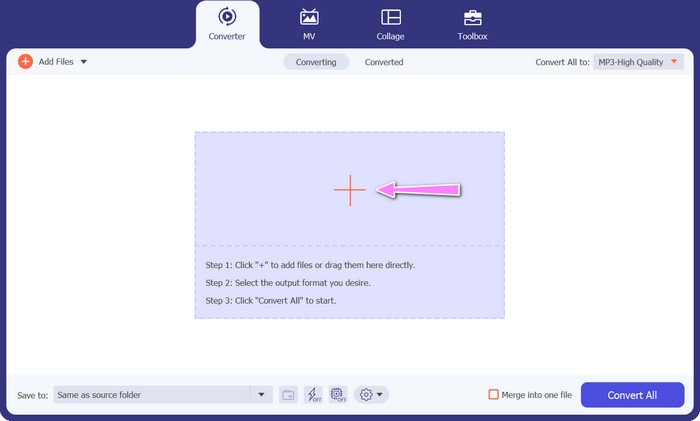
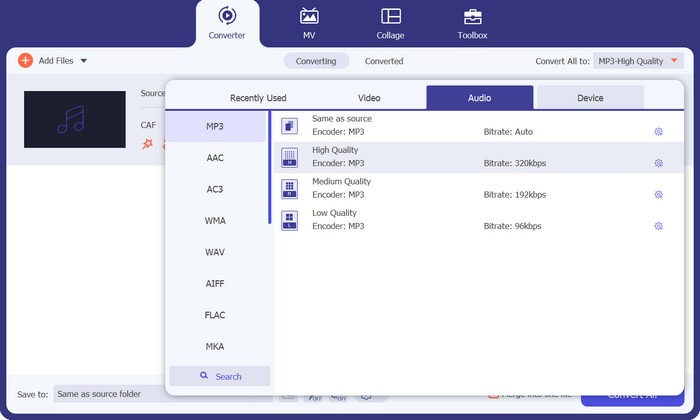
Step 3. You can now alter the output format by clicking the Converter All to button located at the top of the program's window. Choose MP3 from the pane labeled Audio. In the meantime, you can alter the output file's sample rate and bitrate to achieve the desired quality.
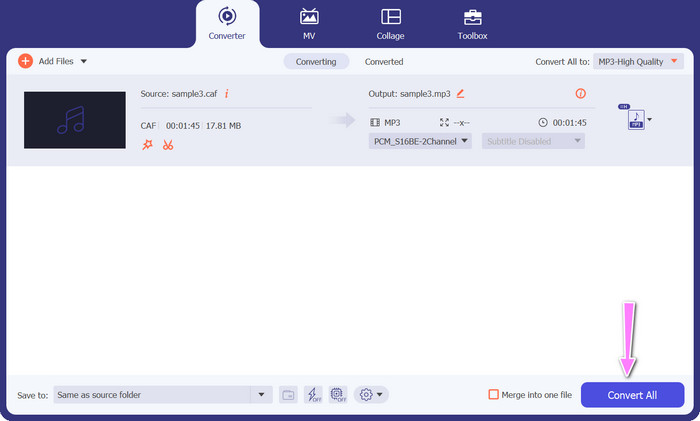
Step 4. Click the Convert All button below to initiate the conversion procedure as the final step. The program will then automatically open the output folder for you to verify the new file format.
Fordeler
- Den kan batchkonvertere Caf til MP3 lydfilformat.
- Programmet fungerer bra med både Windows og Mac OS.
Ulemper
- Det krever en betalt abonnementsavgift etter den gratis prøveperioden.
Del 3. Konverter CAF til MP3 Online
You can also utilize the Free MP3 Audio Converter Online, which is another option. This is a web-based application that works in conjunction with the internet, as its name suggests. Consequently, you do not need to have an app that converts Caf to MP3. Everything is reachable, and you need only your browser to get things done. In terms of features, this Caf to MP3 free converter does not fall short in any way. In addition, you can upload a large number of files, convert them in bulk, or adjust the profile of a video or audio clip. By following the techniques outlined here, you will get knowledge on the best online Caf to MP3 converter.
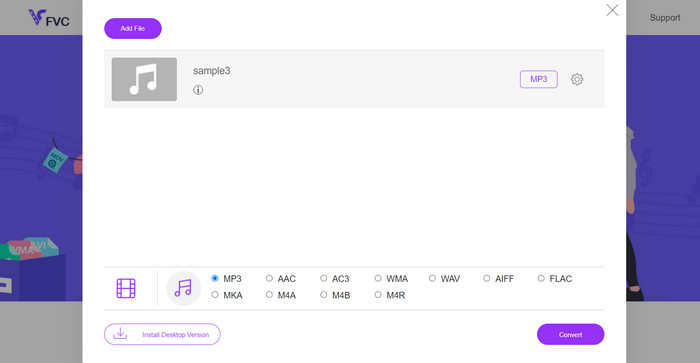
Step 1. Simply to the main website of the Free MP3 Audio Converter Online by clicking the link located above. You can submit your audio file by going to the main screen and selecting the Add Files to Convert option.
Step 2. On the screen will appear a glimpse of the original file that you selected. You may select the output format you want by going below the panel where you initially were.
Step 3. To change the file format from Caf to MP3, click the Convert button. You will need to do the same procedure from the beginning if you want to convert another file.
Fordeler
- Brukere kan glede seg over ubegrensede konverteringer per dag.
- Denne Caf til MP3-konvertereren på nettet fungerer på nesten alle nettlesere.
Ulemper
- Konverteringshastigheten er proporsjonal med tilgjengelig internettbåndbredde.
Mer lesing:
MP3 to AAC Conversion: How to Improve Your Audio Quality
MP3 Player Download – 10 Best Free MP3 Music Players of 2023
Del 4. Vanlige spørsmål om konvertering av CAF til MP3
Kan jeg beholde metadataene til Caf-filene mine etter å ha konvertert dem til MP3?
Bevaring av metadata under konvertering av Caf til MP3 avhenger av den spesifikke omformeren eller programvaren du bruker. Noen konverteringsverktøy har muligheten til å beholde metadata som artistnavn, albumtittel, spornummer og mer. Det er imidlertid viktig å merke seg at ikke alle konverterere støtter oppbevaring av metadata.
Er det noen andre lydformater jeg kan konvertere Caf-filer til?
Ja, foruten MP3, er det flere andre lydformater du kan konvertere Caf-filer til, avhengig av dine spesifikke behov. Vanlige alternative formater inkluderer WAV, FLAC (Free Lossless Audio Codec), AAC og OGG (Ogg Vorbis).
Må jeg betale for en Caf til MP3-konverter?
Det er både gratis og betalte Caf til MP3-konverteringsalternativer tilgjengelig. Mange online-konverterere tilbyr gratis tjenester, slik at du kan konvertere Caf-filer til MP3 uten kostnad. Noen avansert programvare eller førsteklasses nettjenester kan imidlertid kreve et kjøp eller abonnement for tilleggsfunksjoner eller høyere konverteringshastigheter.
Konklusjon
With Caf to MP3 conversion, you can unlock the full potential of your audio collection and enjoy seamless playback anytime, anywhere. It lets you enjoy your favorite music, podcasts, or recordings on a wide range of devices and platforms.
-
 Beste 4 måter å konvertere AIFF til MP3 på Mac og PC
 Har du problemer fordi AIFF-filer er for store til å lagres? Så du må fortsette å lese mens vi forklarer hvordan du fikser det ved å konvertere AIFF til MP3-format.
-
 Finn ut hvordan du konverterer AMR til MP3 [online og offline]
 Har du det vanskelig fordi .amr-filer ikke kan spilles av på skrivebordet ditt? Les deretter denne artikkelen for å lære hvordan du konverterer AMR til MP3-format.
-
 Veiledning om hvordan du legger til albumgrafikk til MP3 enkelt på Breze
 Vil du vite hvordan du legger til albumgrafikk i MP3? I så fall kan du lese alle detaljene og en veiledning om redigering av albumomslaget på filen din.
