


 Video Converter Ultimate
 Skjermopptaker
 Videoreparasjon
 Sikker nedlasting
Hva er en fargekorreksjon og hvordan den utføres
Har du noen gang vært misfornøyd med dumpe eller off-tone opptak som ikke yter kreativiteten din rettferdighet? Si farvel til dine bekymringer! En AI-drevet fargekorreksjon er nøyaktig utviklet for å bringe videoopptakene eller filmene dine til live, og sikre at hver farge, nyanse og tone vises slik du har tenkt. Denne innovative teknologien er en banebrytende teknologi som utstyrer kraften til kunstig intelligens for å forbedre og gi fargeperfeksjoner i videoene dine.
Enten du retter opp fargefeil, skaper en bestemt stemning eller bare finpusser den visuelle helheten, vil en AI‑videofargekorrigering effektivisere prosessen og gi enestående resultater. La oss gi videoinnholdet ditt liv med levende, naturtro farger som fanger publikums oppmerksomhet og etterlater et varig inntrykk. Gjør deg klar til å male verden din med brillians mens vi går grundig til verks i denne artikkelen.

Del 1. Hva er en fargekorreksjon på video?
Det er ganske enkelt å forstå hva som er fargekorrigeringsdefinisjonen i video. Det refererer til å forbedre og endre en videos farger og toner for å oppnå et ønsket utseende eller for å sikre nøyaktighet og konsistens. Det er som å finjustere fargene i et fotografi, men for levende bilder. Se for deg at du tar et bilde, og fargene ser litt uklare, matte eller overdrevent livlige ut. Dette kan også skje i en video, men det er ofte tusenvis av bilder. Fargekorreksjon hjelper til med å fikse disse inkonsekvensene, og sikrer at fargene samsvarer godt gjennom hele videoen. For eksempel, hvis en scene ble tatt på en overskyet dag, kan fargene virke rolige og blåaktige. Fargekorreksjon kan varme opp tonene for å få dem til å se mer naturlige ut, eller få bluesen til å poppe for kunstnerisk effekt. Den kan også justere kontrast, metning, lysstyrke og andre aspekter for å skape en bestemt stemning eller stil i en video.
Del 2. Ulike situasjoner med fargekorrigering
Fargekorreksjon er avgjørende i en rekke situasjoner innen videoproduksjon. Dette for å oppnå ønsket visuell effekt og opprettholde konsistens. Nedenfor er noen situasjoner som involverer fargekorrigering i en video.
Blandede lysforhold – fargekorrigering er nyttig når du filmer på steder med ulike lyskilder, som naturlig lys, fluorescerende lys og glødelamper. Fargekorrigeringen bidrar til å balansere og forene fargene slik at alt ser naturlig og konsekvent ut i alle opptakene.
Problemer med hvitbalanse – korrigering av hvitbalanse sørger for at hvitt fremstår som ekte hvitt og ikke får et uønsket fargestikk, noe som ofte oppstår på grunn av feil kamerainnstillinger eller varierende lysforhold.
Eksponeringsproblemer – videofargekorrigering kan rette opp overeksponert (for lyst) eller undereksponert (for mørkt) materiale, hente frem detaljer og opprettholde en riktig balanse mellom lyse og mørke toner.
Color grading for estetikk – fargekorrigering omfatter også color grading, der videoens farger justeres for å skape en bestemt stemning eller stil. Dette kan innebære å forsterke kontrast og metning eller gi videoen et nostalgisk, «vintage» preg.
Gjenskaping av tidspunkt på dagen – justering av videofarger er nyttig for å simulere et bestemt tidspunkt, for eksempel å få en dagscene til å se ut som om det regner, som om den er tatt ved solnedgang, eller å endre fargene for å formidle morgen- eller kveldslys.
Del 3. Hvordan gjøre fargekorrigering på video?
Fargekorrigering i videoredigering er en avgjørende prosess fordi den forbedrer videoens samlede visuelle kvalitet. Et av de beste verktøyene du kan stole på, er Video Converter Ultimate. Dette kraftige verktøyet for fargekorrigering lar deg raskt korrigere fargene i videoene dine og forbedre både uttrykk og kvalitet. Med dette verktøyet kan du eksperimentere med ulike alternativer for fargekorrigering for å oppnå akkurat det uttrykket du ønsker i videoen din. Redigeringsfunksjonene gjør det mulig å klippe, redigere, beskjære og legge til effekter i videoene.
Dessuten muliggjør det sømløs konvertering mellom ulike videoformater, noe som gjør det enkelt å tilpasse videoinnholdet for forskjellige enheter. En annen ting som er prisverdig med dette verktøyet er at det er brukervennlig. Med Video Converter Ultimate kan du enkelt justere og korrigere farger for å gjøre videoen din mer tiltalende. Her er en trinn-for-trinn-guide for å vite hvordan du bruker dette verktøyet:
Trinn 1: Last ned og installer Video Converter Ultimate
Hvis du ikke har verktøyet ennå, kan du laste ned og installere Video Converter Ultimate på datamaskinen. Klikk på en av knappene for Gratis nedlasting nedenfor, avhengig av operativsystemet ditt, og følg installasjonsveiledningen.
Gratis nedlastingFor Windows 7 eller nyereSikker nedlasting
Gratis nedlastingFor macOS 10.7 eller nyereSikker nedlasting
Trinn 2: Start Video Converter Ultimate
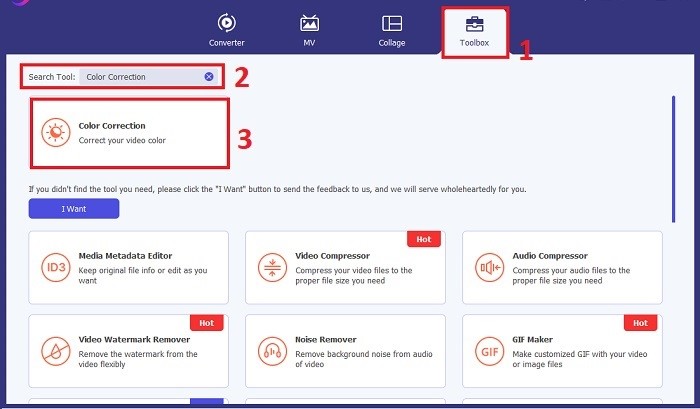
Når installasjonen er fullført, starter du programmet for fargekorrigering på datamaskinen for å få tilgang til hovedgrensesnittet. Gå til Verktøykasse i den globale menyen. Her kan du finne eller søke etter funksjonen Fargekorrigering og klikke på den.
Trinn 3: Importer videoen som skal fargekorrigeres
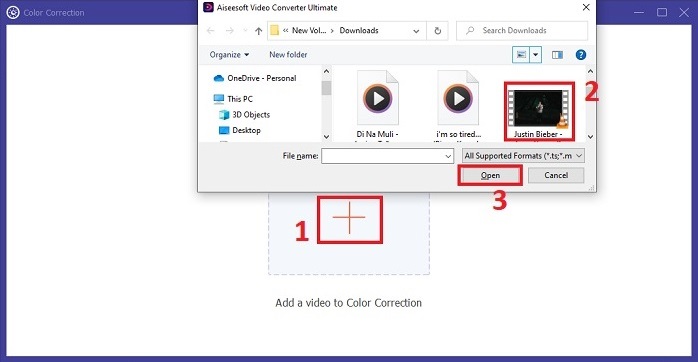
Klikk på Pluss-knappen for å importere videoen du vil fargekorrigere. Finn videofilen på datamaskinen, og klikk Åpne for å importere den i programvaren.
Trinn 4: Juster parametere for videofarge
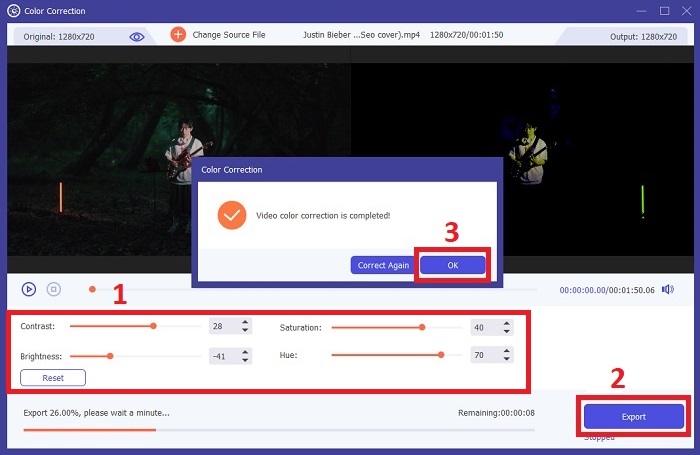
Når videoen er importert, justerer du innstillinger som lysstyrke, kontrast, metning og fargetone for å oppnå ønsket fargekorrigering. Mens du redigerer videoen i verktøyet, kan du forhåndsvise endringene i sanntid i panelet på høyre side. Når du er fornøyd med fargejusteringene, klikker du Eksporter. La verktøyet behandle videoen og lagre resultatet på ønsket sted.
Mer lesing:
Videoeffekter: Forbedre videoen din med filtre og effekter på datamaskin
Hva er 3D? Alt du trenger å vite om 3D og hvordan du lager det
Del 4. Vanlige spørsmål om videofargekorreksjon
Hvordan vet jeg om jeg trenger en fargekorrigering?
Er du usikker på om videoen din trenger fargekorrigering? Fargekorreksjon er nødvendig hvis fargene ser ujevne, rare ut eller ikke samsvarer med videoopptakets ønskede stemning eller motiv.
Er fargekorrigering virkelig nødvendig?
Absolutt! En AI-videofargekorreksjon er avgjørende i videoproduksjon for å garantere at fargene er nøyaktige og visuelt tiltalende. Det forbedrer visuell enhetlighet og kan heve en anstendig video til en ekstraordinær.
Hva er en fargekorrektor i film?
En fargekorrigerer i film er et verktøy, enten maskinvare eller programvare, som brukes i etterproduksjon for å modifisere og balansere farger. Den hjelper filmskapere med å oppnå et bestemt utseende, stemning eller atmosfære, noe som gjør det visuelle mer engasjerende og enhetlig i historien.
Konklusjon
Avslutningsvis er fargekorrigering av video nøkkelen til en fengslende visuell opplevelse. Det handler om å finjustere farger og toner slik at de samsvarer med din kreative visjon og sørger for at hver rammeformidler den tilsiktede gløden. Ved å bruke AI‑drevet fargekorrigering forvandles videoene dine med livlige, naturtro farger som gir et minneverdig inntrykk. Fra å rette opp blandede lysforhold til å skape bestemte stemninger løfter denne innovasjonen historiefortellingen din. Video Converter Ultimate fremstår som en kraftfull samarbeidspartner som forenkler fargekorrigeringsprosessen og frigjør ditt kunstneriske potensial.
-
 Hva er FPS? Alt du trenger å vite om det
 Hva er FPS? Lær all informasjon du trenger om Frame Per Seconds (FPS) og hva den kan gjøre i forskjellige situasjoner. Les denne artikkelen for alle detaljer.
-
 Topp Photo Color Enhancer-app på Android og iOS gratis
 Vil du ha en app for fotofargeforbedring på telefonen? Vel, velg hvilke forsterkere du tror passer best til ditt behov.
-
 Ultimate guide for å endre videooppløsning tilgjengelig på tvers av plattformer
 Trenger du å endre videooppløsningen til videoen? I så fall kan du lære de forskjellige måtene du enkelt kan gjøre for å endre videooppløsningen til videoen du ser på.
