


 Video Converter Ultimate
 Skjermopptaker
 Videoreparasjon
 Sikker nedlasting
3 gratis måter å konvertere FLV til WAV
Vil du hente ut lyd fra nedlastede videoer, men vet ikke hvordan? Ser du etter en enkel måte å konvertere FLV til WAV eller MP3 på?
I noen tilfeller trenger du bare lydsporet eller bakgrunnsmusikken til en video. Så du må konvertere video til lyd. Dette innlegget vil hovedsakelig snakke om hvordan du konverterer FLV til WAV.

Her anbefales 3 gode FLV til WAV‑omformere for at du skal kunne konvertere FLV-filene dine. Du kan velge den metoden du foretrekker for å gjøre FLV om til WAV‑lyd.
Del 1. Konverter FLV til WAV Online
Når du søker etter en måte å konvertere FLV til WAV på internett, vil du se at mange av søkeresultatene er gratis nettkonvertere. I tilfelle du ikke vet hvilken du bør bruke, vil vi her oppriktig anbefale den populære Free Online Video Converter. Den er spesielt utviklet for å konvertere FLV til alle ofte brukte video‑ og lydformater som MP4, MOV, AVI, MP3, AAC, M4A og WAV.
Sammenlignet med andre online FLV til WAV-omformere, støtter den flere inngangs- og utdataformater, og gir raskere konverteringshastighet. Videre krever det ingen kontooppmelding eller pålogging. Det lar deg konvertere en FLV-fil uten filstørrelsesbegrensning.
Trinn 1: Gå til dette gratis nettstedet for FLV til WAV‑konvertering i nettleseren din. Det er kompatibelt med de fleste nettlesere, inkludert Safari, IE, Chrome, Firefox og Yahoo.
Trinn 2: Klikk på Add Files to Convert og deretter på Download-knappen for å installere et startprogram for FLV‑konverteringen. Etter installasjonen får du et popup‑vindu der du kan laste inn FLV‑filen din.

Trinn 3: Når du kommer til hovedvinduet for konverteringen, kan du se at noen populære videoformater som MP4, MOV, AVI, FLV, MKV, VOB, MPG, WMV og flere er listet opp der. I dette trinnet må du klikke på Audio-ikonet for å få frem lydformater. Velg WAV som utdataformat.
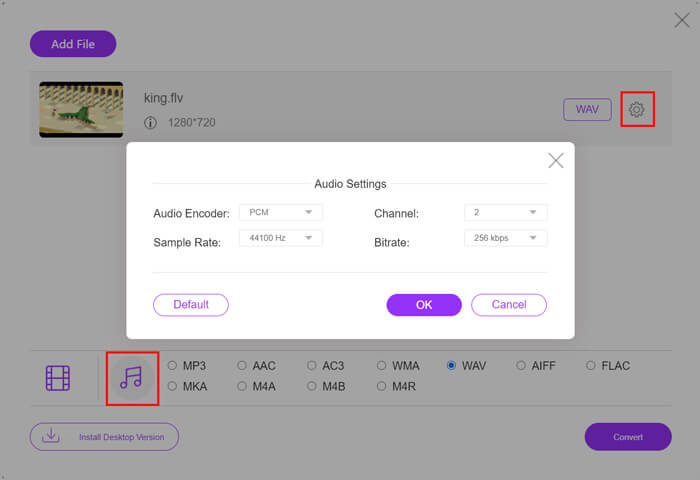
Trinn 4: Før FLV til WAV‑konverteringen kan du klikke på Settings-ikonet ved siden av utdataformatet for å tilpasse flere lydinnstillinger. Her kan du justere lydkoder, kanal, samplingsfrekvens og bitrate. Deretter kan du klikke på Convert-knappen for å endre FLV‑filen din til WAV‑lyd.
Hvis du vil konvertere FLV til lyd som MP3, WMA, WAV osv., bør du klikke på fanen for lyd og hake den av.
Del 2. Gratis Konverter FLV til WAV
I tillegg til FLV‑omformere på nett finnes det også noen gratis videokonvertere som kan hjelpe deg med å konvertere FLV til WAV på en enkel måte. For å gjøre dette kan du bruke Free FLV Converter.

Gratis FLV til WAV Converter
155321+ nedlastinger- Konverter FLV til WAV, AAC, MP3, M4A, MP4, MOV, AVI og mer.
- Støtt alle video- og lydformater som ofte brukes.
- Støtt de nyeste flerkjernede CPUene og GPU-akselerasjonene.
- Konverter en eller flere FLV-filer uten tap av kvalitet.
Gratis nedlastingFor Windows 7 eller nyereSikker nedlasting
Gratis nedlastingFor MacOS 10.7 eller nyereSikker nedlasting
Den har alle konverteringsfunksjonene du trenger. Følgende guide vil vise deg hvordan du kan gjøre FLV til WAV med det.
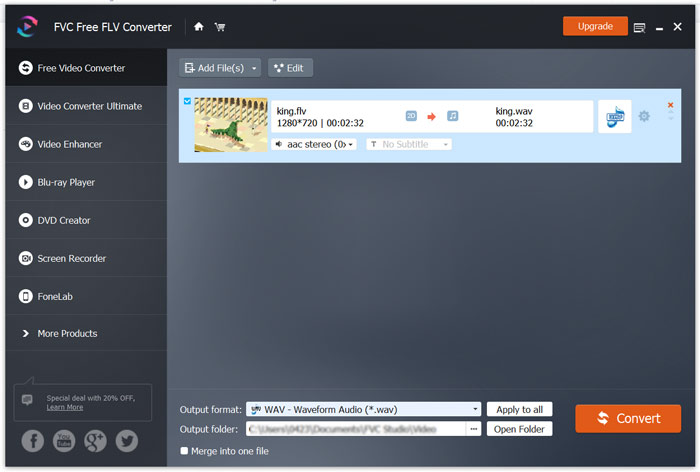
Trinn 1: Last ned, installer og kjør denne gratis FLV til WAV‑omformeren på datamaskinen din. Klikk på Add Files for å importere FLV‑fil(ene) dine.

Trinn 2: Klikk på Output format og velg WAV som målformat. Velg deretter en passende målmappe for filen.
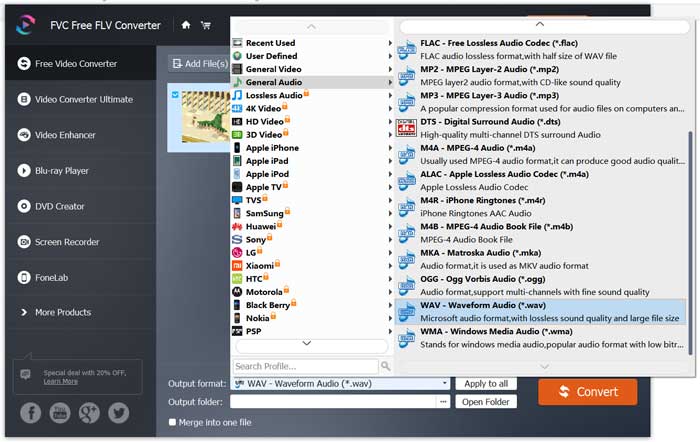
Trinn 3: Klikk på Convert-knappen for å starte FLV til WAV‑konverteringen.
Del 3. Konverter FLV til WAV med VLC
Hvis du har VLC Media Player installert på datamaskinen din, kan du også bruke VLC til å konvertere FLV til WAV. Du bør vite at VLC er en populær mediespiller som også har noen grunnleggende funksjoner for konvertering og redigering.
Trinn 1: Åpne VLC Media Player på datamaskinen din. Du kan gratis installere den fra VideoLAN-siden. Klikk på Media og velg deretter Convert/Save-alternativet fra rullegardinmenyen.
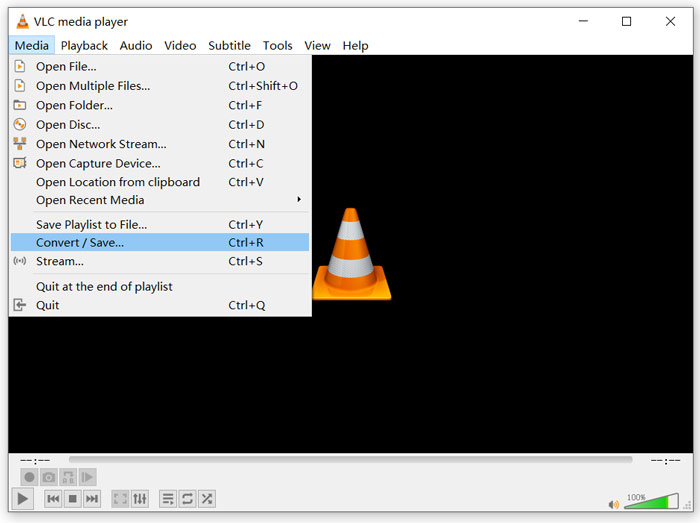
Trinn 2: Nå kommer du til vinduet Open Media. Klikk på Add-knappen for å legge til FLV‑filen du vil konvertere. Klikk deretter på Convert/Save-knappen for å få frem Convert-vinduet.
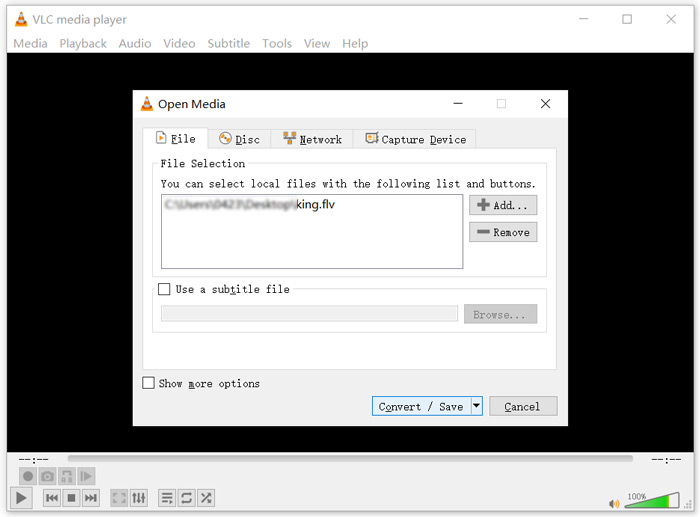
Trinn 3: Merk av for Display the output under Convert-fanen. Velg deretter et passende utdataformat fra rullegardinlisten Profile. Klikk på Browse-knappen for å velge en passende målmappe. I dette trinnet kan du gi utdatafilen nytt navn.
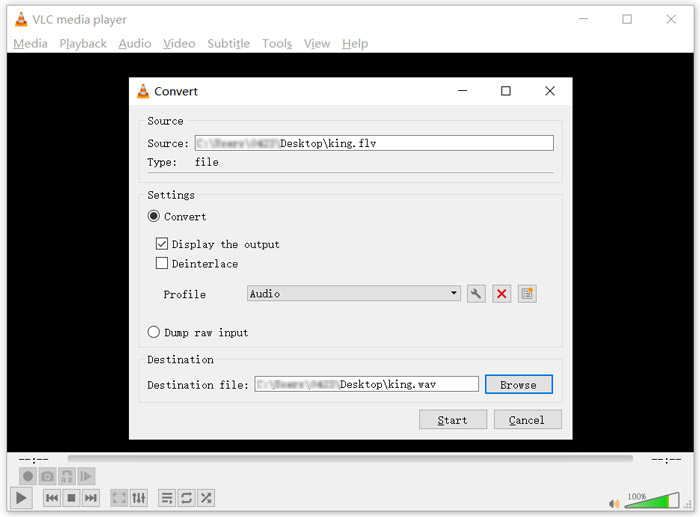
Trinn 4: Klikk på Start-knappen for å begynne å konvertere FLV‑filen din til WAV. Etterpå vil VLC automatisk spille av den konverterte WAV‑filen. Du kan se meldingen Converting file under konverteringen. Ikke lukk VLC Media Player helt før konverteringen er ferdig.
Del 4. Vanlige spørsmål om konvertering av FLV til WAV
FLV vs WAV, hva er forskjellen mellom FLV og WAV?
FLV, Flash Video File, er en flash‑kompatibel videofil som er utviklet av Adobe Systems. Den inneholder et kort hode, sammenflettede video‑, lyd‑ og metadatapakker. FLV er opprinnelig laget for å bygge inn videostrømmer i Adobe‑applikasjoner. En FLV‑fil inneholder en videostrøm på 640x360 og en lydstrøm med 44,1 kHz, 2 kanaler, AAC.
En fil med filendelsen WAV er et Waveform Audio File Format og er en beholder som lagrer data i segmenter. Den ble opprinnelig utviklet av Microsoft og IBM og lagrer ukomprimert, tapsfri lyd, noe som gir svært store filstørrelser. Formatet bruker beholdere for å lagre lyddata, spornumre, samplingsfrekvens og bitrate.
Hvordan konvertere FLV til WAV ingen programvare?
Hvis du vil konvertere FLV til WAV uten omformerprogramvare, kan du velge å endre filtypen fra .flv til .wav.
Hvordan laste ned FLV til WAV?
Det finnes et stort antall skjermopptakere på markedet som kan hjelpe deg med å lagre video som lydfiler på din lokale datamaskin.
Konklusjon
Etter å ha lest dette innlegget kan du lære 3 gratis måter å hente ut WAV‑lyd fra FLV‑filer på. Når du trenger å konvertere FLV til WAV, kan du velge din foretrukne FLV‑omformer for å gjøre det.
-
 5 beste gratis WAV-spillere for Android, iOS og datamaskiner
 Hvordan spiller jeg WAV-filer på Android-telefonen? Hvilken spiller kan spille WAV? Dette innlegget deler 5 beste gratis WAV-spillere for Android, iPhone, Mac og PC.
-
 10 beste FLV-videospillere for Windows 10/8/7, Mac, iOS og Android du må prøve
 FLV-spiller hjelper deg med enkel tilgang til FLV-filene dine på Windows, Mac, Android, iOS-enheten. Sjekk ut de beste FLV-filspillerne du kan laste ned akkurat nå.
-
 Hvordan konvertere WAV til MP3 med topp 5 gratis omformere
 Denne siden er en lang liste med gratis WAV til MP3-omformer (iTunes, Audacity, VLC, Windows Media Player og Free Audio Converter) for å endre WAV til MP3 på datamaskinen.
