


 Video Converter Ultimate
 Skjermopptaker
 Videoreparasjon
 Sikker nedlasting
Hvordan konvertere M2TS til MP4 uten å redusere kvaliteten
“Når jeg legger videoene fra Sony-kameraet mitt til datamaskinen, er det M2TS-filer, som ikke kan deles på Facebook eller YouTube. Hvor kan jeg finne en videokonverter for å konvertere filene til MP4 og se på datamaskinen min? "
Noen ganger vil du spille av M2TS-filer på bærbare enheter, eller laste dem opp til YouTube eller Facebook. Det er lurt å konvertere dem til et vanlig videoformat som MP4. I dette innlegget deler vi 5 gratis måter å konvertere M2TS til MP4 på Windows og Mac.

Del 1. Beste måten å konvertere M2TS til MP4 gratis
Ikke alle mediespillere støtter M2TS-filer. For å få en bedre opplevelse av M2TS-videoer fra HD‑videokameraer, er det best å endre M2TS til det vanlige MP4‑formatet for avspilling. FVC Free M2TS Converter er en alt‑i‑ett M2TS‑konverter og redigeringsprogram. Du kan ikke bare konvertere M2TS‑filer til MP4, MKV, AVI, MOV osv., men også redigere M2TS‑filene, for eksempel komprimere, slå sammen, legge til tema med mer.
Gratis nedlastingFor Windows 7 eller nyereSikker nedlasting
Gratis nedlastingFor MacOS 10.7 eller nyereSikker nedlasting
Trinn 1. Ved å klikke på knappen Gratis nedlasting kan du raskt laste ned Free M2TS Converter. Deretter installerer og starter du den på Windows‑datamaskinen din. Klikk på knappen Legg til fil(er) for å importere M2TS‑filen til programmet.
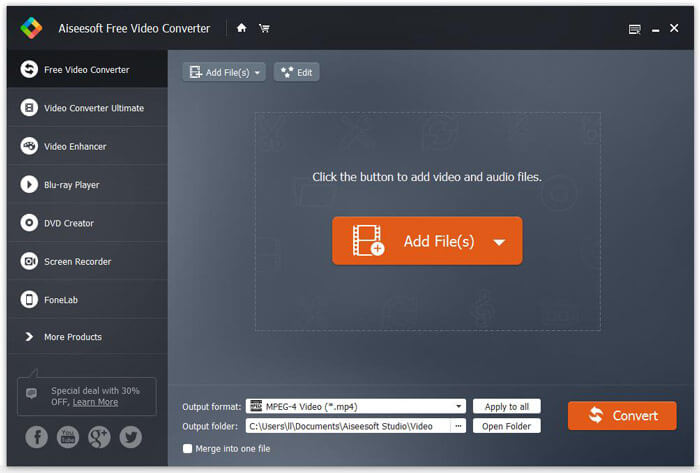
Trinn 2. Klikk på rullegardinknappen for Utdataformat, og velg MPEG-4 Video (*.mp4) som utdataformat. Du kan også angi utdatamappen der den konverterte filen skal lagres.

Trinn 3. Hvis du vil legge til et bestemt tema for videoen, kan du klikke på knappen Rediger i toppmenyen for å velge et passende tema. Når alle innstillinger er gjort, kan du klikke på knappen Konverter for å begynne å endre M2TS‑fil til MP4.

Del 2. Hvordan endre M2TS til MP4 Online
Hvis du vil konvertere M2TS til MP4 gratis på nettet, er FVC Free Online Video Converter et godt valg. Som en gratis nettbasert multimediekonverter støtter den konvertering av nesten alle vanlige video- og lydfiler til MP4, FLV, MKV, MOV, M4V, MTS, TS, M2TS, WMV, ASF, VOB, MP3, AAC osv. Dessuten er den svært enkel å bruke.
Trinn 1. Gå til nettsiden til FVC Free Online Video Converter. Klikk på Legg til filer for konvertering øverst. Last deretter ned og installer FVC‑starteren.

Trinn 2. Velg videoen du vil konvertere. Hvis du vil ha en MP4‑video, klikker du bare på MP4. Deretter Konverter.

Trinn 3. Du kan lagre MP4‑videoen direkte på skrivebordet. Etter det vil konverteringen starte automatisk.
Del 3. Hvordan konvertere M2TS til MP4 med ConvertFiles
ConvertFiles er den nettbaserte M2TS til MP4-omformeren som støtter 200+ formater av videoer, lyd, bilder, dokumenter, presentasjoner og arkiver. Følg de enkle trinnene nedenfor for å begynne å konvertere M2TS-fil til MP4 online.
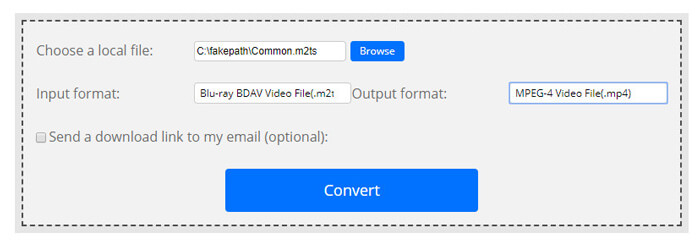
Trinn 1. Gå til den offisielle siden til ConvertFiles. Klikk på knappen Bla gjennom for å laste opp din lokale M2TS‑fil.
Trinn 2. Klikk på boksen Inndataformat og velg HDV Video File(.m2ts), og klikk på boksen Utdataformat for å velge MPEG-4 Video File(.mp4) som utdataformat.
Trinn 3. Klikk på knappen Konverter for å begynne å gjøre om M2TS til MP4 gratis. Konverteringen kan ta noen minutter. Deretter kan du klikke på nedlastingslenken for å laste ned den konverterte MP4‑filen.
Noen ganger kan konverteringen mislykkes på grunn av det ugyldige inndataformatet. For å oppnå en høy suksessrate, kan du prøve Free M2TS Converter i stedet.
Del 4. Hvordan transformere M2TS til MP4 med VLC
VLC Media Player er en åpen kildekode multimediaspiller for Windows, Mac, Linux, iOS og Android. Det fungerer også som en flott M2TS til MP4-omformer for å konvertere M2TS-filer til MP4, MOV, AVI og mer. I tillegg kan du redigere M2TS-filene som beskjæring, klipp, rotere, legge til bildeeffekter og mer.
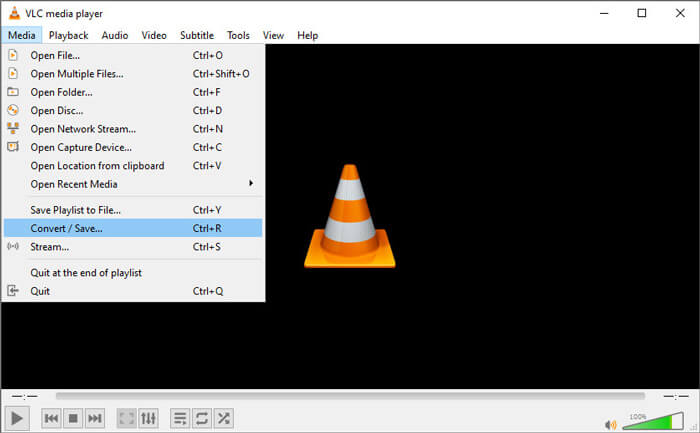
Trinn 1. Last ned og kjør VLC Media Player på datamaskinen din. Klikk på Media > Konverter / Lagre... for å fortsette. Klikk deretter på knappen Legg til... for å legge til M2TS‑filen din.
Trinn 2. Klikk på knappen Konverter / Lagre for å gå til vinduet Konverter. Klikk på rullegardinknappen Profil for å velge Video - H.264 + MP3 (MP4) som utdataformat.
Trinn 3. Klikk på knappen Bla gjennom for å velge en målmappe. Klikk deretter på knappen Start for å begynne å konvertere M2TS til MP4.
Del 5. Slik eksporterer du MP4 fra M2TS med håndbrems
HandBrake er en annen gratis og åpen kildekode videokonverterer som kan konvertere video fra nesten hvilket som helst format. Du kan prøve håndbrems for å konvertere M2TS-fil til MP4 med følgende trinn.
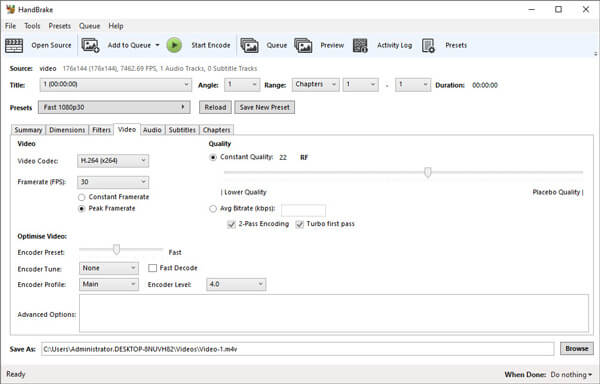
Trinn 1. Last ned gratis, installer og start HandBrake på Windows/Mac. Klikk på Open Source i venstre hjørne for å importere M2TS‑filen fra den lokale mappen.
Trinn 2. Du kan justere innstillingene for M2TS‑filen. Velg MP4 fra rullegardinknappen Format i fanen Summary. I fanen Video kan du justere videokodek, videokvalitet, bildefrekvens og optimalisere videoen.
Trinn 3. Klikk på knappen Bla gjennom for å angi målmappe. Klikk deretter på knappen Start Encode for å begynne å konvertere M2TS til MP4 gratis.
Del 6. Vanlige spørsmål om konvertering av M2TS til MP4
Hva er forskjellen mellom M2TS og MP4?
M2TS står for MPEG-2 transportsystem. Det er et Blu-ray Disc Audio Video-filformat, og brukes til multiplexing av video, lyd og andre strømmer. Vanligvis er M2TS-filer større enn MP4-filer i samme kvalitet. MP4-filer støttes på nesten alle mediespillere, men M2TS-filer kan bare spilles på noen få spillere.
Hvordan spiller jeg av M2TS‑filer på PC‑en min?
Du kan åpne M2TS-filer direkte i noen populære mediaspillerapplikasjoner, inkludert Windows Media Player, VLC Media Player, 5K Player, SMPlayer, Splash, etc. Du kan også spille M2TS-filer med Sony Picture Motion Browser Software.
Kan VLC spille av M2TS‑filer?
Ja. Du kan spille M2TS-filer med VLC Media Player på Windows og Mac. Bare kjør VLC media player, og klikk Media for å åpne File for å spille M2TS-filen i VLC. Hvis det ikke fungerer for kodekproblemer, bør du først konvertere M2TS til VLC-støttet videoformat.
Konklusjon
Med de 5 gratis metodene ovenfor kan du enkelt konvertere M2TS-filer til MP4. Etter sammenligning bør FVC Free M2TS Converter være den beste M2TS til MP4-omformeren. Med maskinvareakselerasjonsteknologien eksporterer den MP4-filer i høy kvalitet med på få minutter. Du kan prøve denne gratis omformeren på en gang.
-
 Omfattende guide for hvordan du konverterer TS til MP4
 Hva er TS filer og ønsker å konvertere TS til MP4? I dette innlegget vil vi dele deg gratis og online metoder for å konvertere TS til MP4.
-
 Hvordan konvertere MTS-filer til MP4
 Vet ikke hvordan du konverterer MTS-fil til MP4? I denne guiden finner du 6 gratis og enkle måter å endre MTS-format til MP4 på Windows eller Mac uten tap av kvalitet.
-
 2 enkle måter å gratis konvertere MTS til MP3
 Har du behov for å trekke ut MP3-lyd fra MTS-filen, men vet ikke hvordan? Dette innlegget deler to enkle måter å hjelpe deg med å konvertere MTS / M2TS til MP3 med høy lydkvalitet.
