


 Video Converter Ultimate
 Skjermopptaker
 Videoreparasjon
 Sikker nedlasting
Enkle måter å fjerne vannmerke i Lightroom Mobile
Å legge et vannmerke på bildet ditt er flott, spesielt hvis du vil sikre bildet ditt. Men noen ganger ønsker du bare å beholde bildet, og da kan vannmerkene bli irriterende. Dette innlegget viser deg flere apper med enkle metoder du kan bruke for å fjerne vannmerker fra bildene dine. Du vil også lære hvordan du fjerner vannmerker i Lightroom mobil. Hvis du vil lære mer om dette, les denne veiledningen og få med deg flere viktige detaljer.

Del 1: Slik deaktiverer du Lightroom Mobile Apps vannmerkefunksjon før eksport
Lightroom mobile er pålitelig for å fjerne forstyrrende objekter fra bildene dine, som vannmerker, logoer, signaturer og mer. Du kan fjerne dem med bare noen få trykk. Denne brukervennlige programvaren er designet for alle brukere, spesielt ikke-profesjonelle brukere. Hvis du vil oppdage de enkleste måtene å fjerne vannmerker i Lightroom-mobilappen, er det her hvordan du gjør det. Følg de enkle veiledningene nedenfor.
Trinn 1: Last ned og installer Lightroom-appen på mobilen din. Start appen og åpne tidslinjen.

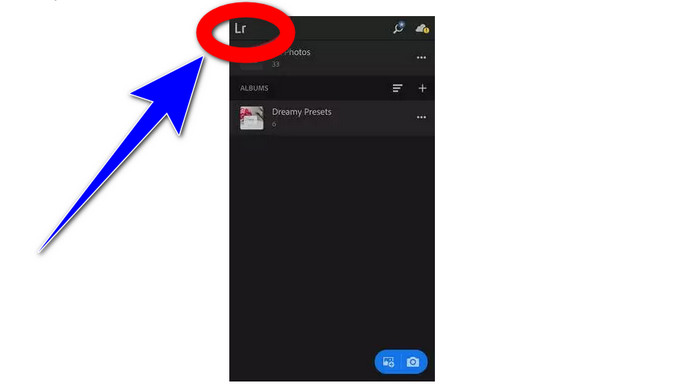
Trinn 2: Øverst i venstre hjørne av skjermen trykker du på Lr-ikonet.
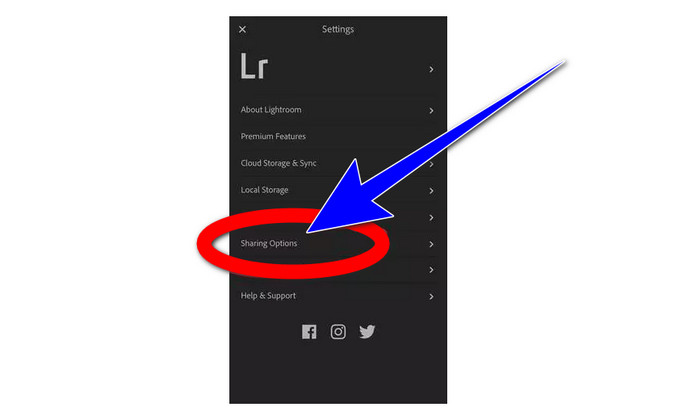
Trinn 3: Gå deretter videre til delingsinnstillingene og trykk på dem.
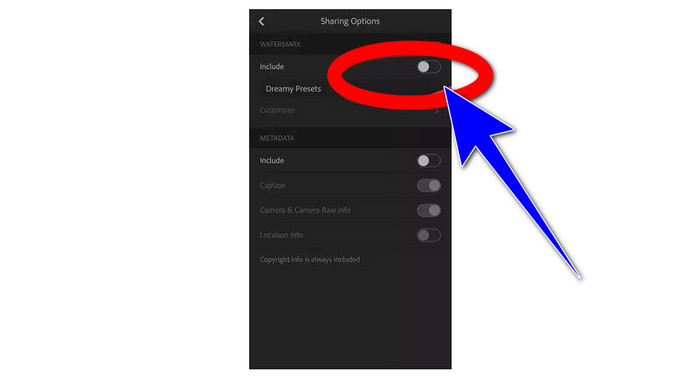
Trinn 4: Etter at du har trykket på delingsinnstillingene, slår du av Dreamy Prest-alternativet for å fjerne vannmerket. Trykk på dette alternativet og slå det av.
Del 2: Slik fjerner du vannmerke fra bilder uten lightroom
I tillegg til Lightroom mobil kan du fjerne vannmerker fra bildene dine med FVC Free Watermark Remover. Det er et av de beste verktøyene for å fjerne vannmerker du kan bruke på nettet. Det kan også fjerne andre irriterende elementer fra bildene dine, som logoer, bildetekster, klistremerker, stempler, signaturer og mer, i tillegg til vannmerker. Du kan også lagre bildet ditt i samme format som originalen etter at du har fjernet vannmerket. Ulike fjerningsverktøy, inkludert Lasso, Pensel og Polygonal, gjør det enkelt å fjerne vannmerker. I tillegg tilbyr dette verktøyet et beskjæringsverktøy som du kan bruke hvis vannmerket ligger i kanten eller hjørnet av bildet. I tillegg er dette verktøyet helt gratis. Du trenger ikke kjøpe et abonnement, slik du må med andre fjerningsverktøy.
Dessuten har den et enkelt grensesnitt og prosedyrer for å fjerne vannmerker, som passer for nybegynnere. Til slutt garanterer filene dine personvern, du er den eneste som kan se arbeidet ditt. Følg de detaljerte trinnene nedenfor for å fjerne vannmerker fra bildene dine ved å bruke FVC Free Watermark Remover.
Trinn 1: Gå til nettsiden til FVC Free Watermark Remover. Last opp bildet ditt ved å klikke på knappen Upload Image.

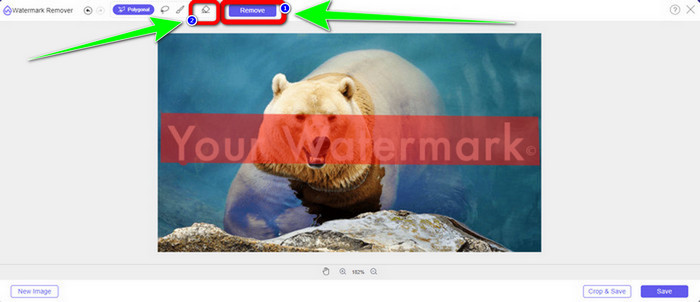
Trinn 2: Etter at du har lastet opp bildet ditt, markerer du vannmerkene med verktøyene for fjerning av vannmerker. Som du ser, er vannmerket midt på bildet, noe som betyr at du ikke kan bruke beskjæringsverktøyet. Derfor bruker vi Polygonal-verktøyet, et av verktøyene for å fjerne vannmerker.
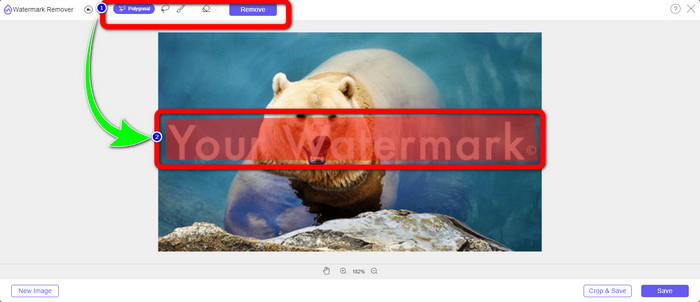
Trinn 3: Hvis du vil velge markeringsområdet på nytt, bruker du knappen Erase. Når du er ferdig med å markere vannmerkene på bildet ditt, klikker du på knappen Remove og venter på at fjerningsprosessen blir fullført.
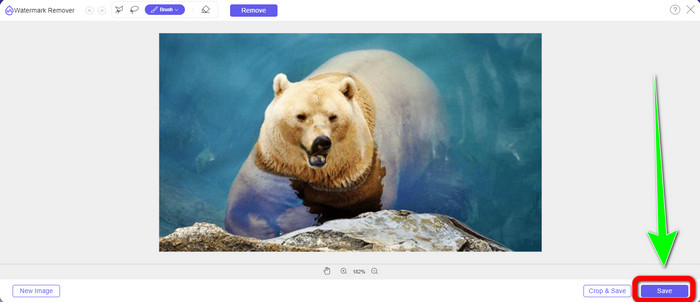
Trinn 4: Når du har fjernet vannmerkene, kan du klikke på knappen Save og laste ned bildet ditt til datamaskinen.
Bruker WatermarkRemover.io
Hvis du vil bruke et annet nettverktøy til å fjerne vannmerker fra bildene dine, kan du bruke WatermarkRemover.io. Denne nettbaserte programvaren kan fjerne alle unødvendige objekter fra bildene dine, som logoer, tekst, stempler og mer. Du kan også fjerne flere vannmerker fra bildene dine. Den har et oversiktlig grensesnitt og enkle arbeidsmåter som passer for nye brukere. Dette nettverktøyet støtter ulike bildeformater, som PNG, JPG, WEBP og JPEG. Det har imidlertid begrensninger i gratisversjonen. Du kan bare laste opp opptil 50 bilder, og du får kun 25 GB lagringsplass. Du må kjøpe et abonnement hvis du vil laste opp flere bilder og få mer lagringsplass, noe som er litt kostbart. Hvis du vil fjerne forstyrrende elementer fra bildene dine med WatermarkRemover.io, følger du de enkle trinnene nedenfor.
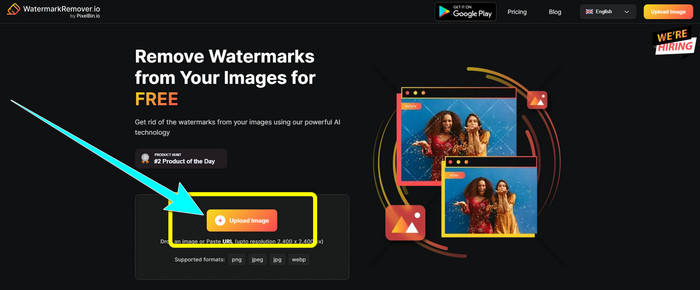
Trinn 1: Gå til nettsiden til WatermarRemover.io. Klikk på knappen Upload Image for å legge til bildet ditt med vannmerket du vil fjerne.
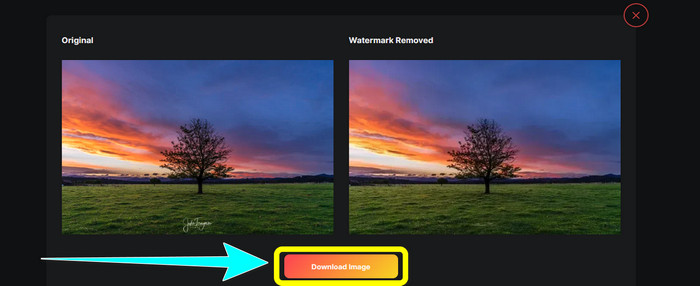
Trinn 2: Etter at du har lagt til bildet ditt, vil vannmerkene bli fjernet automatisk. Klikk på knappen Download Image for å lagre bildet på datamaskinen.
Bruk av Apowersoft Watermark Remover Online
Apowersoft Video Watermark Remover Online er et av de nyttige verktøyene hvis du er på jakt etter en annen nettløsning for å fjerne vannmerker fra bildene dine. Med dette nettverktøyet kan du enkelt slette vannmerker fra bildene dine. I tillegg er det et enkelt og brukervennlig program, noe som gjør det egnet for nybegynnere som vil bli kvitt vannmerker. Apowersoft er dessuten ikke bare bra til å fjerne vannmerker fra bilder. Du kan også fjerne vannmerker fra videoer, noe som er svært praktisk for brukerne. Siden det er et nettbasert program, trenger du ikke installere det på datamaskinen. Filen din blir automatisk slettet etter at du har fjernet vannmerkene og lagret resultatet, så du trenger ikke å bekymre deg for filen din. Du må imidlertid ha en rask internettforbindelse hvis du vil at dette verktøyet skal fungere godt. I tillegg tar fjerningsprosessen ganske lang tid, noe som er tidkrevende for brukerne. Følg trinnene nedenfor for å fjerne vannmerker med Apowersoft Online Watermark Remover.
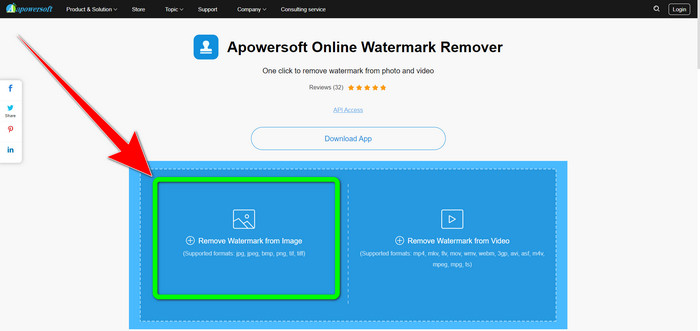
Trinn 1: Gå til nettsiden til Apowersoft Online Video Watermark Remover. Klikk på knappen Remove Watermark from Image for å laste opp bildet ditt med vannmerke.
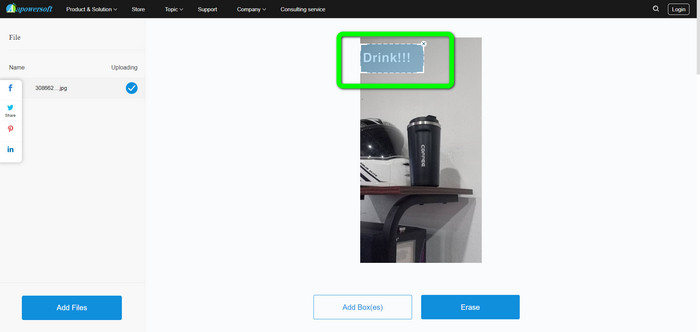
Trinn 2: Du vil se et kvadratisk element etter at du har lastet opp bildet ditt. Dra det for å dekke til vannmerkene på bildet.
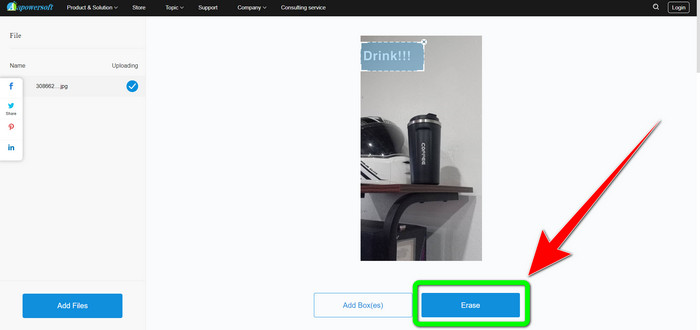
Trinn 3: Når du er ferdig med å dekke til vannmerket, klikker du på knappen Erase for å fjerne det. Vent på at fjerningsprosessen blir fullført, og last deretter ned det endelige bildet uten vannmerke.
Del 3: Vanlige spørsmål om fjerning av vannmerker fra bilder i Lightroom
Hvordan fjerne et vannmerke fra kanten av bildet?
Hvis vannmerket ligger i kanten eller hjørnet av bildet ditt, kan du enkelt fjerne det ved å bruke beskjæringsverktøyet. Du finner beskjæringsverktøyet på verktøylinjen øverst på bildet ditt. Men hvis du ikke vil kutte bort noen del av bildet ditt, kan du bruke et verktøy for fjerning av vannmerker som FVC Free Watermark Remover. Dette verktøyet kan hjelpe deg med å fjerne irriterende elementer fra bildene dine, som vannmerker, logoer, signaturer og mer.
Er vannmerker opphavsrettsbeskyttet?
For ytterligere informasjon er selve vannmerket ikke en opphavsrett. Vannmerket kan minne folk om ikke å stjele bildene dine fordi arbeidet ditt allerede er opphavsrettsbeskyttet på det tidspunktet det lages.
Kan jeg fjerne et vannmerke fra et skjermbilde?
Ja det kan du. Et vannmerke fra et skjermbilde kan enkelt fjernes ved hjelp av verktøy for fjerning av vannmerker, som FVC Free Watermark Remover, WatermarkRemover.io, Apowersoft Online Watermark Remover, Inpaint og mer.
Hva er forskjellen mellom en logo og et vannmerke?
Vannmerket er en mer strømlinjeformet, gjennomskinnelig versjon av logoen, som er deres primære kjennetegn. Det er vanligvis plassert over bildet ditt for å hindre andre i å utnytte det som sitt eget og er vanligvis bare én farge, hvit eller svart.
Er det et viskelær i Lightroom?
Ja det er. Dette alternativet lar oss korrigere og fjerne penselstrøk som vi utilsiktet malte over. Du trenger bare å klikke "Viskelær" for å bruke den. Akkurat som du ville gjort hvis du bruker børsteverktøyet, går du vanligvis over områdene du ønsker å fjerne.
Konklusjon
Denne artikkelen viser deg den beste måten å fjerne vannmerker i Lightroom mobil på. I tillegg presenterte vi ulike metoder du kan prøve for å fjerne vannmerker utenom å bruke Lightroom-appen. Hvis du foretrekker enkle måter å fjerne vannmerker og andre unødvendige elementer fra bildene dine umiddelbart, bør du bruke FVC Free Watermark Remover.
-
 Trinn-for-trinn-guider for hvordan du fjerner emojis fra video
 Føler du deg irritert over emojier på videoene dine? Dette innlegget vil gi deg de beste prosedyrene for å øyeblikkelig fjerne emojier fra videoene dine ved å bruke flotte verktøy.
-
 Hvordan fjerne vannmerker fra videoer i After Effects enkelt
 Denne artikkelen vil hjelpe til med å fjerne vannmerker fra videoen ved hjelp av After Effects. Det vil også gi de beste alternativene for å eliminere forstyrrende gjenstander.
-
 Måter på hvordan du enkelt kan fjerne Reddit-vannmerker fra bilder
 Hvis du er her, kan det hende du leter etter en utmerket Reddit vannmerkefjerner. I så fall vil vi vise deg den enkleste metoden for å fjerne Reddit-vannmerker.
