


 Video Converter Ultimate
 Skjermopptaker
 Videoreparasjon
 Sikker nedlasting
Slik konverterer du enkelt F4V til MP4 ved å bruke offline og online verktøy
FLV-filformatet er et av standardformatene som brukes av Adobe Flash, men hvis du vil spille av en video med høyere kvalitet, må du konvertere F4V-filen din til andre formater som MP4. Du kan spille av MP4-formatet på nesten alle enheter, som iPhone, iPad, Android og datamaskiner. Så hvis du foretrekker video i høy kvalitet, gir vi deg de mest effektive metodene for å konvertere F4V til MP4 ved hjelp av både offline- og nettbaserte verktøy.

Del 1: Grunnleggende metode for å konvertere F4V til MP4 på Mac og Windows
Hvis du er Mac-bruker og liker å konvertere videofiler, kan du bruke Video Converter Ultimate. Denne offline-konverteren er utmerket til å konvertere F4V til MP4 på både Mac og Windows, noe som gjør den praktisk for alle brukere. Den kan også konvertere nesten alle videoformater, siden den støtter AVI, MP4, MOV, FLV, VOB, MTS, SWF, MKV, WMV og flere. I tillegg er det enkelt å konvertere F4V-filer i dette programmet, fordi det har et brukervennlig grensesnitt med grunnleggende konverteringsmetoder. På denne måten kan du være trygg på at det er lett å bruke, spesielt for nybegynnere. Dessuten vil du alltid være fornøyd med konverteringshastigheten. Video Converter Ultimate tilbyr en ultrasnabb konverteringsprosess som er 30 ganger raskere enn andre konvertere. Du kan også konvertere flere videofiler samtidig, siden det støtter batchkonvertering. Videre kan du gjøre mer enn bare å konvertere videoer i dette programmet. Du kan også lage en musikkvideo med dette verktøyet hvis du ønsker det. Programmet tilbyr en Musikkvideoprodusent og gir ulike temaer, som enkel, lykkelig, snøfylt natt, ryddig og mer. I tillegg har denne videokonverteren en Collage maker-funksjon, der du kan lage en collage med forskjellige maler og filtre. Du kan oppleve enda flere flotte funksjoner når du bruker FVC Video Converter Ultimate.
Funksjoner
◆ Konverter 100+ videofilformater, som MP4, F4V, MOV, AVI, MKV, WMV, VOB, etc.
◆ Lag en collage med gratis maler og filtre.
◆ Lag en fantastisk musikkvideo med forskjellige temaer.
◆ Komprimer en video til ønsket filstørrelse.
◆ Juster hastigheten på videoen fra 0,125x til 8x raskere enn gjennomsnittlig videohastighet.
◆ Legg til og fjern vannmerket fra en video.
◆ Konverter bildefilformater, for eksempel BMP, PNG, JPG, TIF, etc.
Følg de enkle metodene nedenfor for raskt å konvertere F4V til MP4 ved hjelp av FVC Video Converter Ultimate.
Trinn 1: Last ned Video Converter Ultimate på datamaskinen din ved å klikke på Last ned-knappen nedenfor. Gå deretter videre til installasjonsprosessen og start programmet.
Gratis nedlastingFor Windows 7 eller nyereSikker nedlasting
Gratis nedlastingFor MacOS 10.7 eller nyereSikker nedlasting
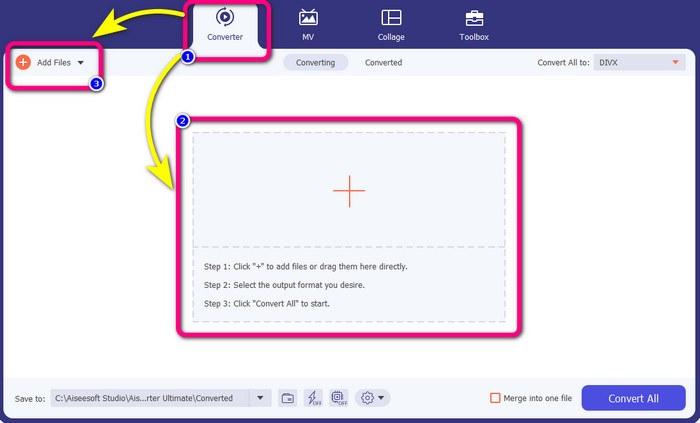
Trinn 2: For å konvertere F4V-videoen din, gå til alternativet Converter og velg Plus-ikonet eller knappen Add File for å sette inn videoen din i F4V-filformat.
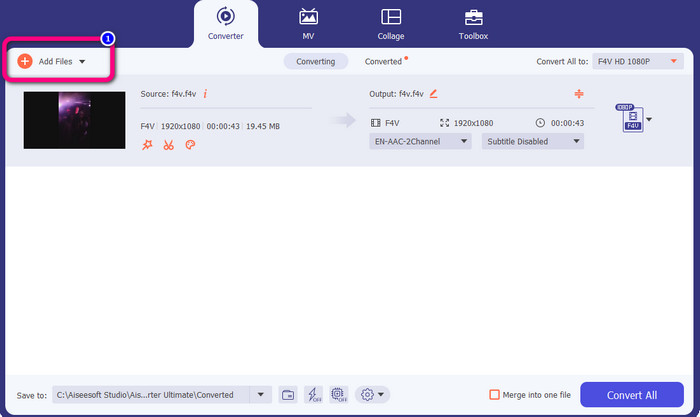
Trinn 3: Hvis du ønsker å konvertere flere F4V-filer samtidig, trykker du på knappen Add Files og legger til en ny F4V-fil.
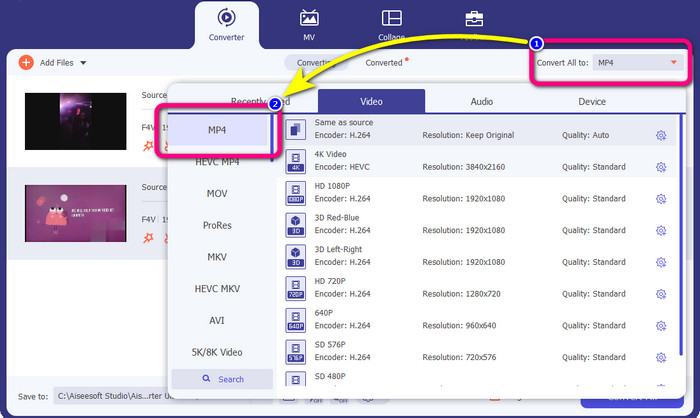
Trinn 4: Gå til knappen Convert All to for å endre utdataformatet. Du vil se formatvalgene og velge MP4-formatet. Du kan også velge ønsket videokvalitet.
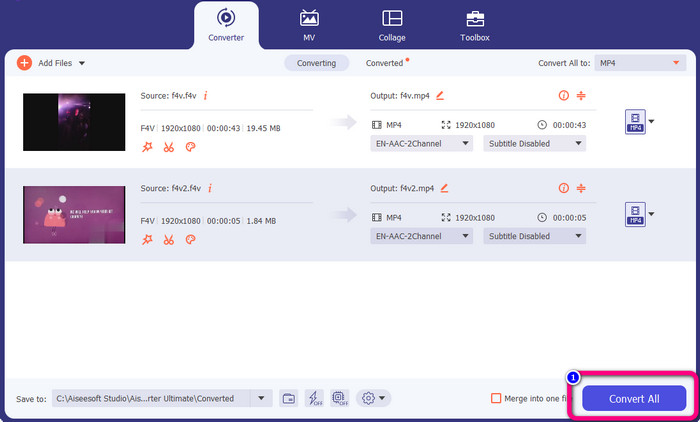
Trinn 5: Når du er ferdig med å endre utdataformat, kan du konvertere filene ved å klikke på knappen Convert All. Konverteringsprosessen vil starte, og F4V-videoen din blir til en MP4-fil i løpet av få sekunder.
Del 2: Enkle trinn for å konvertere F4V til MP4 ved hjelp av VLC
I denne delen lærer du hvordan du konverterer F4V til MP4 ved hjelp av VLC Media Player. Ja! Du leste det riktig! Bortsett fra å spille av videoer, er VLC et annet verktøy du kan bruke til å konvertere filer. Den støtter også ulike filformater, for eksempel MP4, WEBM, OGG, TS, ASF og mer. Du må imidlertid vite nok om dette verktøyet fordi det har et forvirrende grensesnitt. Se veiledninger eller spør noen avanserte brukere om å få en idé om å konvertere filer ved hjelp av VLC. Dessuten er det tidkrevende å laste ned denne omformeren. Følg prosedyrene nedenfor for å konvertere F4V til MP4 ved hjelp av VLC Media Player.
Trinn 1: Last ned VLC Media Player på datamaskinen din. Start programmet etter installasjonsprosessen.
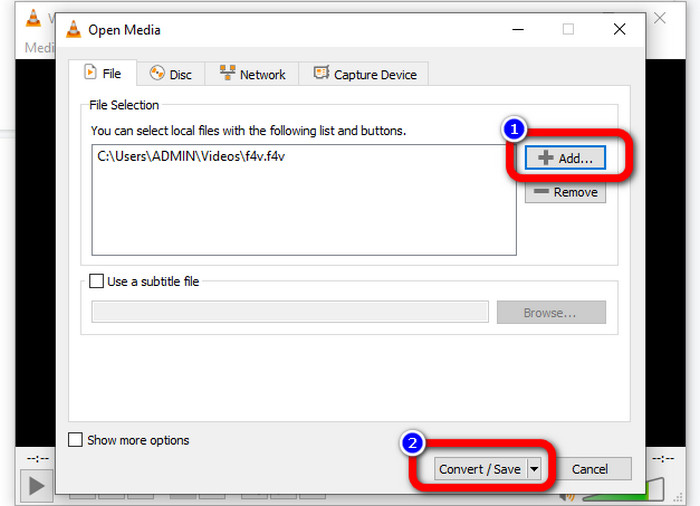
Trinn 2: Gå til Media > Convert/Save-knappen. Klikk deretter på Add-knappen for å legge til F4V-videoen din.
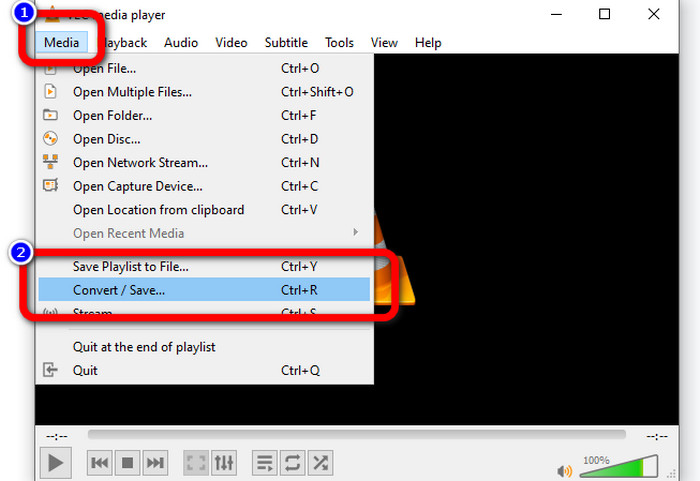
Trinn 3: Etter å ha lagt til F4V-videoen, klikker du på Convert/Save-knappen igjen nederst i grensesnittet.
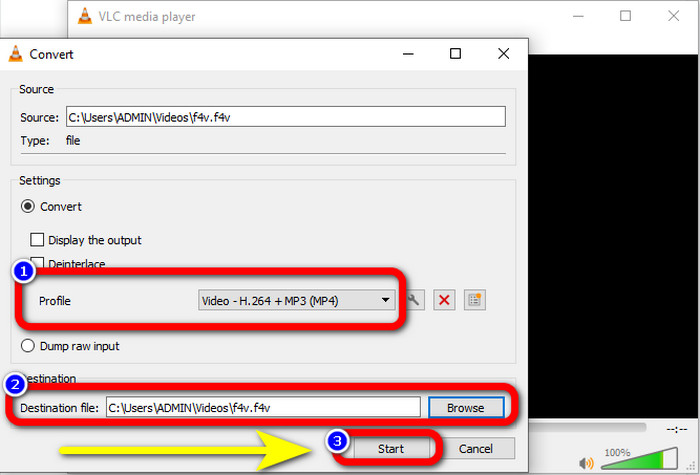
Trinn 4: Gå til profil og velg MP4-filformatet. Gå deretter til Browse for å angi hvor du vil lagre videoen. Trykk på Start-knappen for å fortsette konverteringsprosessen.
Del 3: Enkel måte å konvertere F4V til MP4 ved hjelp av håndbrems
Hvis du fortsatt leter etter en annen F4V til MP4-konverter for Windows, kan du bruke Handbrake. Det er et offline-verktøy som støtter flere videoformater, som MP4, MKV, WEBM osv. Dette verktøyet er imidlertid komplisert fordi det har mange alternativer som kan virke forvirrende. Bruk trinnene nedenfor for å konvertere F4V-filen din til MP4-format.
Trinn 1: Last ned Handbrake på Windows-datamaskinen din. Start deretter programmet når du er ferdig med å installere det.
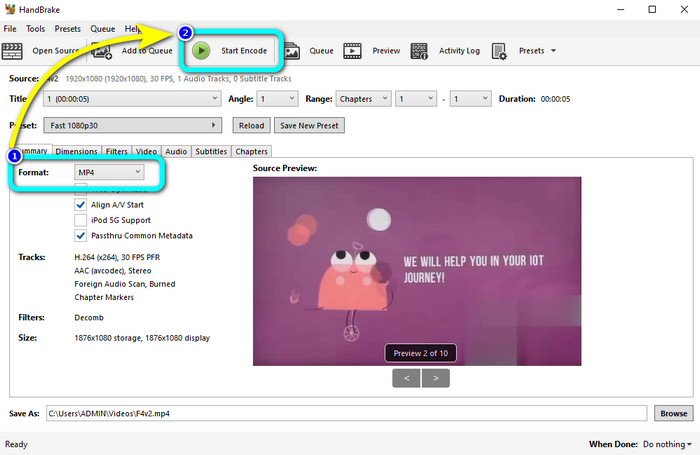
Trinn 2: Klikk på knappen File for å legge til F4V-filen din.
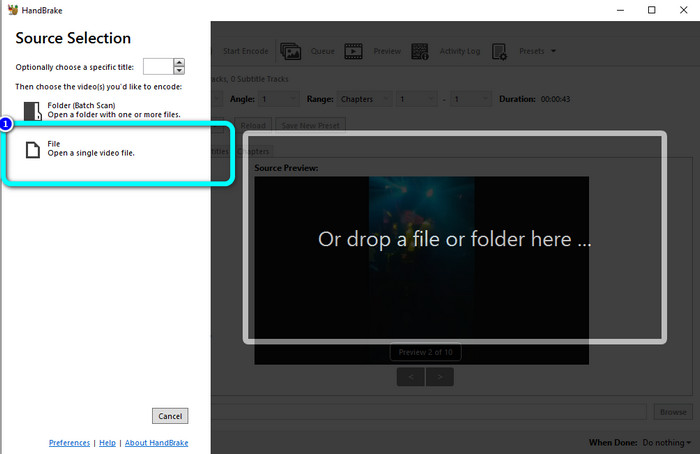
Trinn 3: Gå til formatalternativene og velg MP4-filformatet. Trykk deretter på knappen Start Encode. Vent på at konverteringsprosessen skal bli ferdig, og lagre den ferdige videoen.
Del 4: Detaljerte trinn for å konvertere F4V til MP4 gratis online
Vil du bruke et nettbasert program til å konvertere F4V til MP4 gratis? Bruk FVC Free Video Converter Online. Du kan konvertere F4V-filen din uten å bruke en eneste krone. Denne konverteren har også et svært enkelt grensesnitt, som er egnet for ikke-profesjonelle brukere. Den støtter ulike videoformater, som FLV, WMA, MOV, AVI, WMV og flere. Det beste er at du kan konvertere videofiler uten å miste kvalitet. Følg de detaljerte trinnene nedenfor for enkelt å konvertere F4V til MP4.
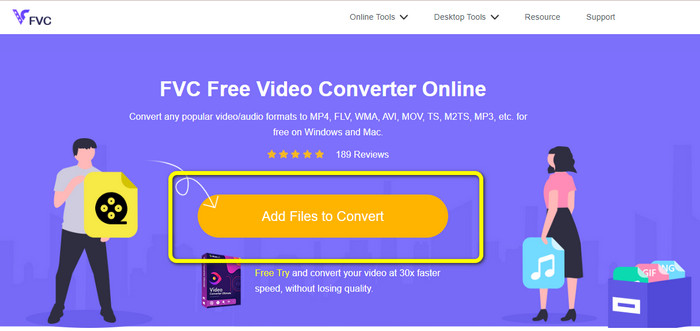
Trinn 1: Gå til nettsiden til FVC Free Video Converter Online. Trykk på knappen Add Files to Convert for å laste opp F4V-videofilen din.
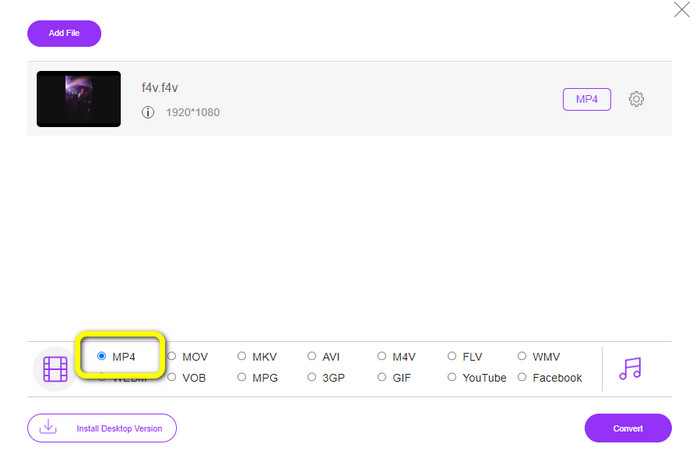
Trinn 2: Etter å ha lastet opp videoen, går du til den nedre delen av grensesnittet og klikker på MP4-filformatet
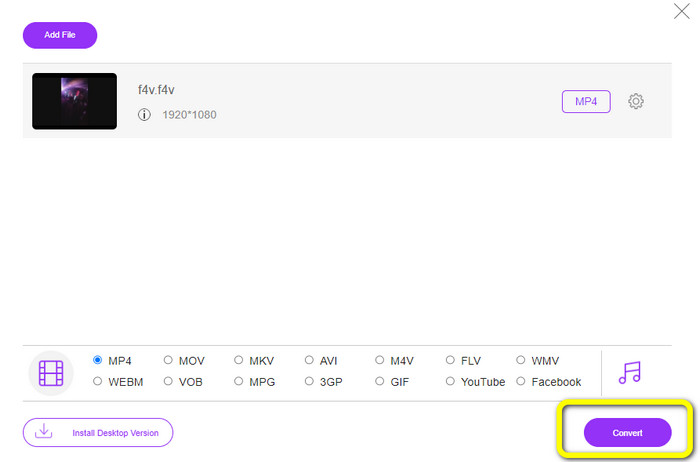
Trinn 3: Til slutt trykker du på Convert-knappen. Vent til konverteringsprosessen er ferdig, og lagre filen på ønsket plassering
Del 5: F4V vs. MP4
Se tilleggsinformasjonen nedenfor om disse to filformatene.
| F4V | MP4 | |
| Filutvidelse | .f4v | .mp4 |
| Utviklet av | eple | Moving Picture Experts Group |
| Beskrivelse | Dette er det originale flash-filformatet. Den er også basert på ISO-basemediefilformatet som støtter flash player 9. F4V-filer kan heller ikke spilles av på iOS-enheter, men på nettlesere som støtter flash kan du spille dem. | Dette er en multimediefil. Beholderen kan lagre undertekstdata, lyd og video. I likhet med andre containerformater tillater MP4 streaming på internett. |
| Tilknyttede programmer | XVLC Media Player Video LAN Windows media spiller FFDShow Microsoft Windows Bildegallerivisning | Apple QuickTime Player Video LAN VLC Media Player Apple iTunes Microsoft Windows Media Player |
Videre lesning:
2 av de favorittvalgte konverterne for å konvertere F4V til WMV [2023]
2 av de raskeste måtene å konvertere F4V til FLV på [Online og frakoblet]
Del 6: Vanlige spørsmål om konvertering av F4V til MP4
1. Kan jeg konvertere MP4 til F4V?
Ja det kan du! Du kan bruke Video Converter Ultimate. Denne applikasjonen kan umiddelbart konvertere MP4-filen din til F4V-format.
2. Hva er forskjellen mellom F4V til FLV?
Hovedforskjellen mellom disse to formatene er at F4V støtter høykvalitetsvideoer kodet av H.264, men FLV-formatet bruker vanligvis H.263.
3. Hvordan bruke FFmpeg til å konvertere F4V til MP4?
Last ned FFmpeg på datamaskinen din. Åpne ledeteksten. Skriv Skrivebord for å bytte kommandolinje. Konverteringskommandoen begynner med FFmpeg-i, og skriv deretter inn navnet på videoen og filformatet. Også typen utdatafil. Trykk Enter og vent på konverteringsprosessen. Etter det kan du se filen på skrivebordet
Konklusjon
Denne veiledningen viser deg detaljerte instruksjoner for å konvertere F4V til MP4 både på nett og offline. Brukere foretrekker en enklere og raskere måte å konvertere videoer på. Da kan du bruke Video Converter Ultimate til å konvertere videofilene dine umiddelbart, siden den har en konverteringshastighet som er 30 ganger raskere enn andre konvertere. Du kan også bruke FVC Free Video Converter Online til å konvertere video på en enkel måte, som bare krever noen få klikk.
-
 4 nyeste online og offline konverterere for å konvertere F4V til AVI-format
 Har du ingen anelse om hvilken konverter du bør bruke for å konvertere F4V til AVI eller et annet videoformat? Les deretter denne artikkelen mens vi lærer hvordan du konverterer med verktøyet som er tilgjengelig.
-
 Hvordan konvertere F4V til MOV uten å miste kvalitet [Løst]
 Hvis du sliter med å anerkjenne noen videoformater som F4V. Les denne artikkelen for å lære mer om F4V- og MOV-videoformater og lære hvordan du konverterer F4V til MOV ved hjelp av forskjellige metoder.
-
 Vellykkede metoder for å konvertere DIVX til MP4 med en gang
 Hvordan konverterer jeg DIVX til MP4? Hvis du leter etter den beste løsningen, er du i den rette artikkelen. Vi vil vise deg hvordan du enkelt konverterer DIVX til MP4
