


 Video Converter Ultimate
 Skjermopptaker
 Videoreparasjon
 Sikker nedlasting
MP4 til MXF uten problemer med å spille MXF-filer på forskjellige enheter
Noen ganger foretrekker visse videoredigeringsprogramvare eller kringkastingssystemer MXF-filer. Hvis du har å gjøre med det, blir det viktig å konvertere MP4-videoene dine til MXF for jevn avspilling og redigering. Det er noen nyttige verktøy der ute som kan gjøre denne konverteringen til et stykke kake. Så hvis du er nysgjerrig på å takle denne oppgaven uten å svette, fortsett å lese!
La oss bli kjent med disse fantastiske MP4 til MXF‑omformerene og de enkle trinnene de tilbyr for å konvertere MP4‑filene dine til MXF som en proff.

Del 1. Beste 5 måter å konvertere MP4 til MXF
1. Video Converter Ultimate
Video Converter Ultimate er et førsteklasses verktøy som tilbyr en fantastisk løsning for å konvertere MP4‑filer til ulike videoformater og enheter som iPhone, iPad, Galaxy S6 og mer. Det brukervennlige grensesnittet gjør det enkelt å navigere og bruke selv for dem som ikke er spesielt teknisk kyndige. Du vil bli overrasket over hvor raskt det konverterer videoer, og overgår annen programvare med god margin. I tillegg er batch‑modus for konvertering av flere filer rett og slett imponerende. Se veiledningen nedenfor for å lære hvordan du konverterer MP4 til MXF med dette kraftige verktøyet.
Trinn 1. Last ned og installer omformeren via knappene for Gratis nedlasting nedenfor. Når installasjonen er fullført, starter du appen på datamaskinen din.
Gratis nedlastingFor Windows 7 eller nyereSikker nedlasting
Gratis nedlastingFor macOS 10.7 eller nyereSikker nedlasting
Trinn 2. Last opp MP4‑videoen du vil konvertere ved å klikke på Plusstegnet eller bruke mellomromstasten for å åpne datamaskinens mappe. Bla gjennom og velg målvideoen.
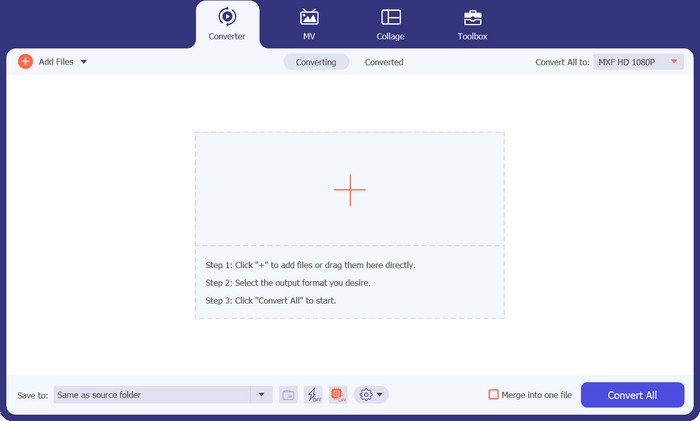
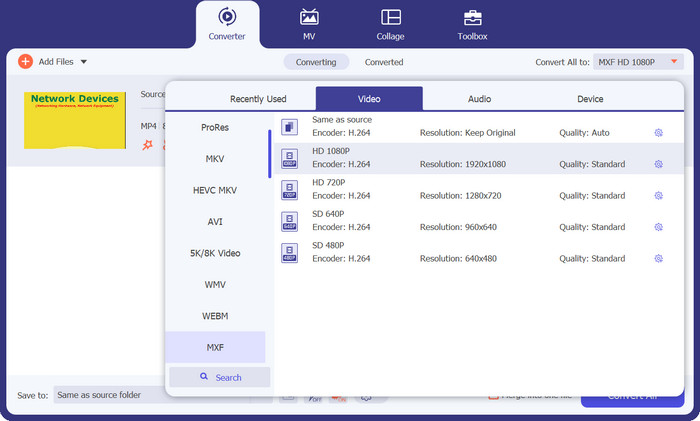
Trinn 3. Velg MXF som utdataformat. Bare åpne rullegardinlisten Profile øverst til høyre, gå til fanen Video og finn MXF. Du kan også bruke søkefeltet for å finne det raskt. Velg ønsket kvalitet for utdatafilen din.
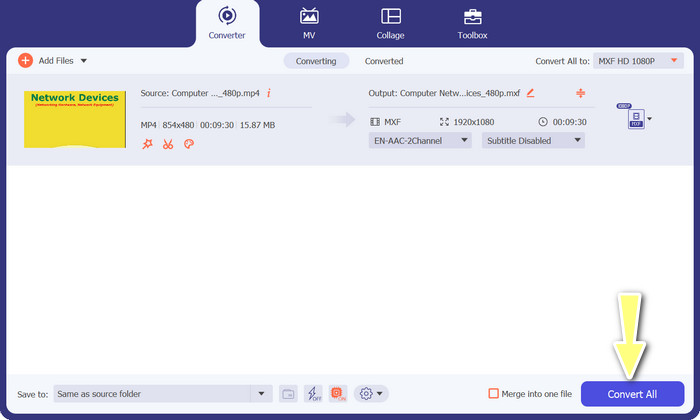
Trinn 4. Klar til å konvertere! Klikk på knappen Convert All nederst til høyre, og vips! Den konverterte filen lagres automatisk i en mappe på datamaskinen din.
2. Gratis MP4 Converter Online
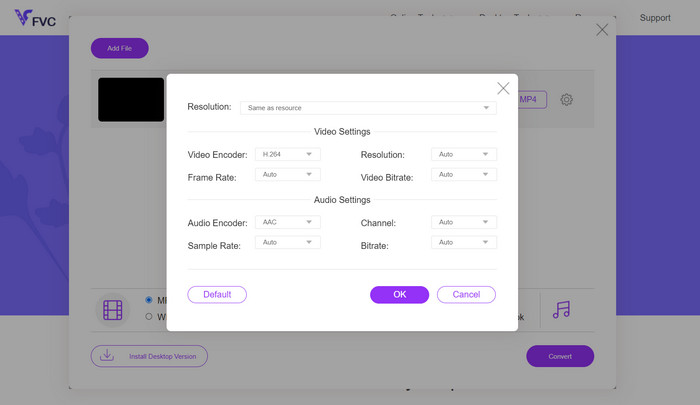
Hvis du er på utkikk etter en pålitelig MP4‑omformer på nett for å konvertere MP4 til MXF online, kan du prøve Free MP4 Converter Online. Dette nettstedet gir en sikker og pålitelig plattform der du kan laste opp MP4‑filene dine og konvertere dem til MXF eller en rekke andre formater. Du kan være trygg på at konverteringene holder jevnt høy kvalitet hver gang. I tillegg har du mulighet til å tilpasse konverteringen ved å redigere videokodek og forhåndsinnstillinger. Prøv det, så kan du skreddersy konverteringene akkurat slik du ønsker.
Trinn 1. Gå til nettstedet deres i nettleseren din. Du trenger ikke å laste ned noe; bare åpne det som et hvilket som helst annet nettsted.
Trinn 2. Klikk på knappen Add Files to Convert eller dra og slipp MP4‑videoen din inn på nettsiden. Den begynner å behandle filen, og du vil se en fremdriftslinje.
Trinn 3. Når opplastingen er fullført, finner du alternativet og velger MXF fra listen. Hvis det finnes en kvalitetsinnstilling, velger du den du foretrekker. Klikk på knappen Convert, og magien er i gang!
3. FreeFileConvert
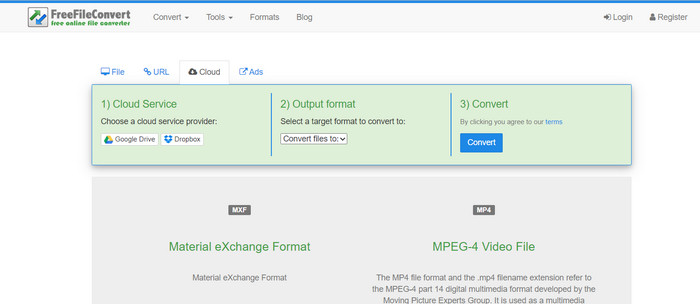
Ser du etter en annen MXF-til-MP4-konverterer gratis? Gi FreeFileConvert en sjanse! Denne brukervennlige plattformen følger en enkel tre-trinns prosess og tilbyr et grensesnitt som er lett å navigere for å hjelpe deg med å konvertere videoene dine problemfritt. Bare besøk nettstedet deres, last opp filen fra datamaskinen din, velg ønsket utdataformat og trykk på konverter. Ikke bare kan du laste opp filer fra datamaskinen din, men du har også muligheten til å laste opp fra Dropbox- eller Google Drive-kontoen din.
Trinn 1. Åpne nettleseren din og gå til FreeFileConvert‑nettstedet. Ingen installasjon nødvendig, akkurat som når du besøker et hvilket som helst vanlig nettsted.
Trinn 2. Klikk på knappen Choose File. Du kan også laste opp fra Dropbox eller Google Drive hvis det er mer praktisk for deg.
Trinn 3. I rullegardinmenyen Output Format finner du MXF og velger det som ønsket format. Klikk deretter på knappen Convert, og la FreeFileConvert gjøre jobben!
4. AnyConv
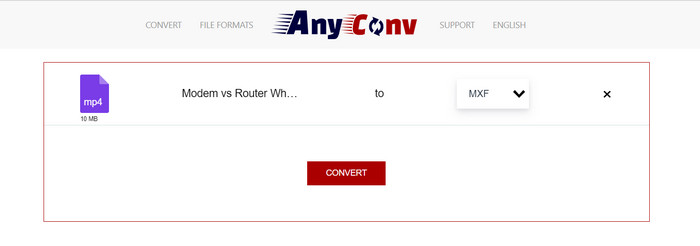
Leter du etter et online verktøy for å konvertere MP4 til MXF? Se ikke lenger enn til AnyConv! Som de andre krever den ingen installasjon. Dessuten er det ikke begrenset til bare MP4 til MXF; den kan også håndtere forskjellige andre formatkonverteringer! Den beste delen? Du trenger ikke registrere deg for hele tjenesten – det er problemfritt. Bare følg trinnene nedenfor, og du vil ha MP4 til MXF-konverteringen gjort på kort tid. Easy-peasy.
Trinn 1. Åpne AnyConv‑nettstedet i en hvilken som helst nettleser.
Trinn 2. Klikk på knappen CHOOSE FILES for å laste opp MP4‑videoen din. Utvid deretter Profile‑menyen og finn MXF‑formatet.
Trinn 3. Klar til å konvertere? Klikk på den blå knappen Convert, så starter konverteringsprosessen.
5. Convertio
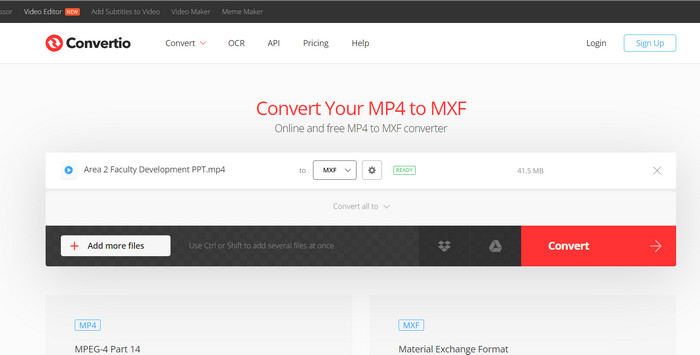
Ringer alle brukere som ønsker en filkonvertering uten å måtte laste ned flere apper! Convertio har dekket deg. Med dette verktøyet er konvertering av MP4 til MXF online en lek uten bryet med å finpusse kompliserte innstillinger. Den beste delen? Den støtter ulike mediefilformater, inkludert dokumenter, arkiver, regneark, presentasjoner og mer.
Trinn 1. Velg en nettleser på datamaskinen din og gå til verktøyets offisielle side.
Trinn 2. Klikk på knappen Choose Files i programmets hovedgrensesnitt for å laste opp MP4‑filene dine. Alternativt kan du, for enkelhets skyld, bare dra og slippe videofilen.
Trinn 3. Finn menyen Profile og velg MXF‑formatet fra Video-delen. Klikk deretter på knappen Convert for å starte konverteringsprosessen.
Mer lesing:
4 gratis måter å konvertere MXF fra videokamera til MP4 for universell avspilling
[Veiledning] 2 ultimate metoder for å slå sammen MXF‑videoer fra Sony X70
Del 2. Vanlige spørsmål om MP4 til MXF
Hva er en MXF fil?
En MXF-fil er en filtype som representerer Material Exchange Format, som fungerer som en beholder for standard profesjonelt lyd- og videoinnhold. Den brukes ofte i TV- og teaterkringkasting på grunn av dens evne til å opprettholde video av høy kvalitet. I hovedsak fungerer MXF som et alternativ til å lagre faktiske videoer i digitalt format, noe som gjør det til et foretrukket valg for håndtering av profesjonelt videoinnhold.
Kan jeg konvertere MXF til MP4?
Absolutt! Med verktøy som Video Converter Ultimate er konvertering av MP4 til MXF eller omvendt en lek. Du har fleksibiliteten til å prøve begge alternativene og se hvilken som fungerer best for deg.
Hvordan åpner jeg en MXF-fil?
Når det gjelder å åpne MXF-filer, er VLC Media Player et førsteklasses valg. Dette lette medieverktøyet på tvers av plattformer utmerker seg når det gjelder å vise mediefiler av alle slag.
Hva er de potensielle ulempene ved å konvertere MP4 til MXF?
Konvertering av MP4 til MXF kan resultere i større filstørrelser på grunn av de forskjellige komprimeringsmetodene som brukes i MXF. I tillegg kan noen verktøy kreve en stabil internettforbindelse for online konvertering.
Kan jeg redigere MXF-filene etter konvertering?
Ja, etter å ha konvertert MP4 til MXF, kan du redigere MXF-filene ved å bruke kompatibel videoredigeringsprogramvare. MXF-filer er godt støttet av profesjonelle videoredigeringsverktøy og ikke-lineære redigeringssystemer.
Konklusjon
Enten du trenger å konvertere MP4 til MXF, åpne MXF‑filer eller håndtere et hvilket som helst videoformat, finnes det brukervennlige verktøy som gjør prosessen sømløs. Med disse kraftige og allsidige verktøyene kan du enkelt navigere i videokonverteringens verden og nyte problemfri medieavspilling.
-
 Hvordan komprimere MXF med Premiere Pro og gratis online
 Hvordan komprimere MXF med mindre filstørrelse? Hvordan komprimerer du MXF-filer i Adobe Premiere Pro? Dette innlegget deler to måter å komprimere MXF-filer på.
-
 Topp 4 beste løsninger for å konvertere MXF til MKV [løst]
 Bli kjent med disse fire flotte metodene for å enkelt konvertere MXF til MKV online og offline. Appene som er inkludert i dette innlegget kan hjelpe deg med å konvertere filer uten problemer.
-
 Hvordan konvertere MP4 til MPG på skrivebordet og online enkelt
 Lær hvordan du konverterer din favoritt MP4 til MPG med enkle trinn. Ingen teknisk hodepine, bare jevne overganger for mediefilene dine.
