


 Video Converter Ultimate
 Skjermopptaker
 Videoreparasjon
 Sikker nedlasting
Gratis og online måter å konvertere RMVB til MP4
RMVB (RealMedia Variable Bitrate) er en RealMedia-videofil som ikke støttes av alle programmer. Mange ønsker å endre filformatet fra RMVB til MP4 for enkel avspilling på mobiltelefoner. Denne veiledningen viser deg tre gratis og nettbaserte måter å konvertere RMVB-filer til MP4 raskt, slik at du kan fortsette å nyte videoene dine uten problemer.

Del 1. Hvordan konvertere RMVB til MP4 med RMVB til MP4 omformer
For å konvertere RMVB til MP4 på Windows 10 eller Mac, er en RMVB til MP4‑konverter ganske rask og pålitelig. Free RMVB to MP4 Video Converter er en funksjonell og gratis videokonverter som gjør rask konvertering fra RMVB til MP4. Den støtter også konvertering av RMVB til AVI, FLV, MOV og andre formater. Nedenfor finner du trinnene for å endre RMVB til MP4.
Gratis nedlastingFor Windows 7 eller nyereSikker nedlasting
Gratis nedlastingFor MacOS 10.7 eller nyereSikker nedlasting
Trinn 1. Før du begynner, må du laste ned og installere dette gratisprogrammet på datamaskinen din. Start deretter Free RMVB to MP4 Converter, og importer RMVB‑filene til programmet ved å klikke på knappen Add File(s). For øvrig kan du utføre batchkonvertering, slik at du kan konvertere flere RMVB‑filer samtidig.
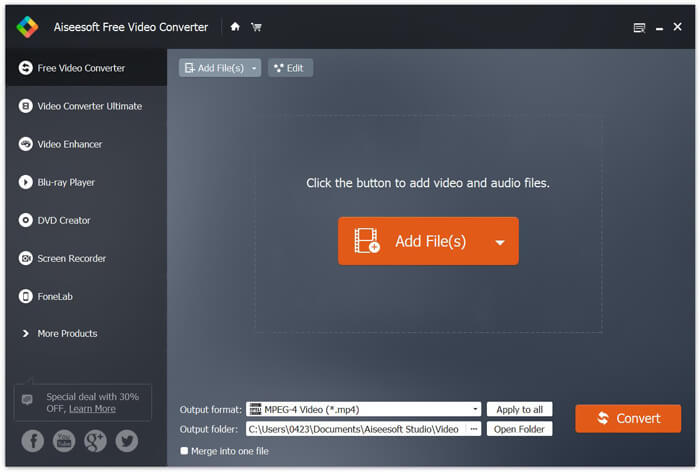
Trinn 2. Etter at du har lagt til filene i programmet, går du til Output format og velger deretter formatet MP4.

Trinn 3. Klikk på knappen Convert. Vent et par minutter, så får du de ønskede MP4‑filene.
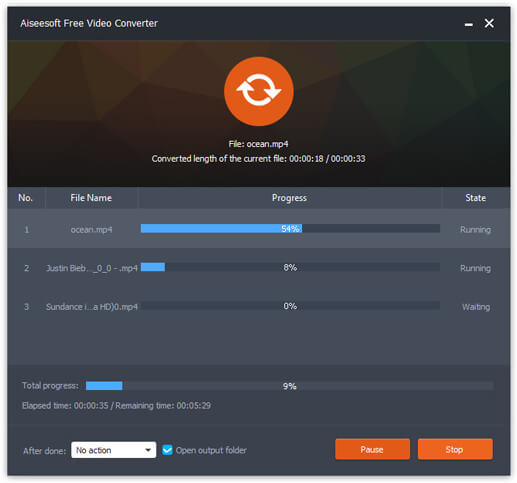
Når du har fått MP4‑filene, kan du spille dem av på datamaskinen eller mobile enheter. I tillegg kan du også bruke denne Free RMVB to MP4 Converter til å gjøre om RM til MP4, eller konvertere WMV til MP4.
Del 2. Hvordan konvertere RMVB til MP4 med VLC
VLC fungerer også som et praktisk videokonverteringsverktøy, og du kan enkelt konvertere RMVB-filene dine til MP4 i høy kvalitet. La oss se hvordan du bruker VLC til å gjøre denne jobben.
Trinn 1. Først må du laste ned og installere programmet VLC Media Player på datamaskinen din, og deretter kjøre det.
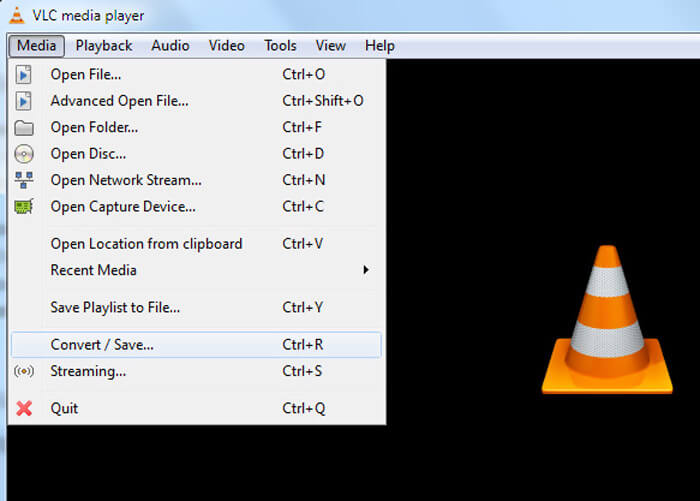
Trinn 2. Gå til Media-fanen, og velg deretter Convert/Save for å fortsette.
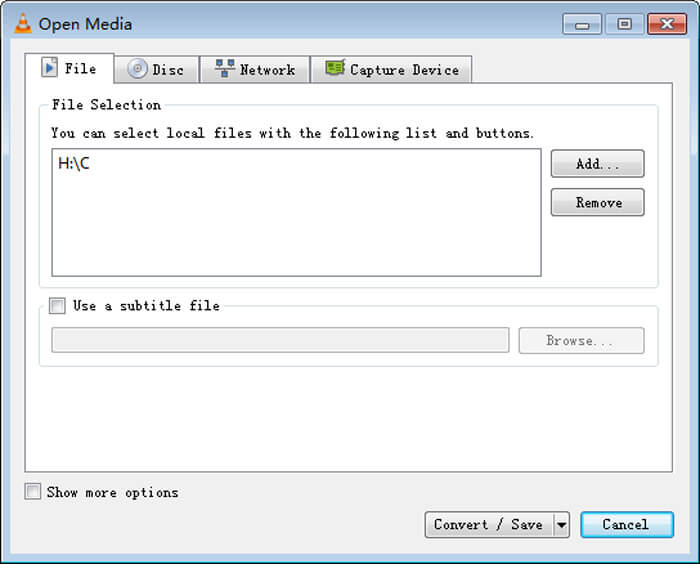
Trinn 3. Når du ser vinduet Open Media, må du legge til RMVB‑filene dine i VLC ved å klikke på knappen Add… under alternativet File. Klikk deretter på knappen Convert/Save nederst i vinduet.
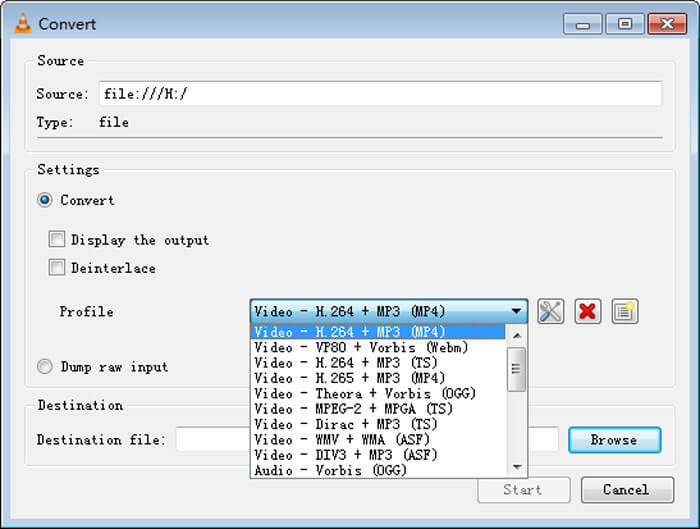
Trinn 4. Deretter kommer du til vinduet Convert. Her må du finne Settings, gå til Profile, og deretter velge MP4 som utdataformat fra rullegardinmenyen. Til slutt klikker du på Start for å konvertere RMVB til MP4 for enkel avspilling.
Del 3. Hvordan endre RMVB til MP4 Online
Den nettbaserte videokonverteren støtter også rask konvertering av RMVB‑videoer til MP4. Free Online Video Converter er en nettbasert videokonverter som kan konvertere alle populære video‑ eller lydfiler til MP4, MOV, FLV, AVI, MP3, AAC og mye mer, helt gratis. Den lar brukerne endre filer fra RMVB til MP4 direkte i nettleseren på en enkel måte.
Trinn 1. Gå til https://www.free-videoconverter.net/free-online-video-converter/ og klikk på knappen Add Files to Convert for å aktivere startprogrammet.
Last ned skrivebordsversjonen for å konvertere filer i batch.

Trinn 2. Deretter importerer du RMVB‑filene dine til dette nettverktøyet. Velg så formatet MP4 under fanen Video. Når du er klar til å starte konverteringen, klikker du på knappen Convert for å sette i gang. Når konverteringen er fullført, blir de konverterte filene automatisk lagret på datamaskinen din.

RMVB vs. MP4
RMVB, en nyere variant av standard Real Media (.RM)-format, er et Real Media-videofilformat komprimert med en variabel bitrate. Det er et populært format for asiatiske filmer og anime. RMVB-filer er mindre i størrelse og har lavere bithastigheter, men bedre kvalitet.
Utgitt av Moving Picture Experts Group (MPEG) i 2001, kan MP4-formatet hjelpe deg med å lagre video-, lyd-, undertekst- og bildedata i separate spor. Det er en forkortelse for MPEG-4 Part 14. I tillegg er det et av de mest populære formatene som brukes til å streame og dele videoer.
Del 4. Vanlige spørsmål om RMVB til MP4
Hva er en RMVB-fil?
RMVB (RealMedia Variable Bitrate) er et Real Media-videofilformat som bruker den variable bithastigheten. Det var en gang populært for distribusjon av asiatisk anime, filmer, episoder, torrent, etc. på nettet, siden filstørrelsen er mindre og kvaliteten er mye bedre.
Hvordan åpne en RMVB-fil?
RealPlayer støtter avspilling av RMVB-filer i Windows, Mac OS X og Linux. Eller du kan bruke VLC til å spille RMVB-filer.
Kan håndbrems konvertere RMVB til MP4?
HandBrake er et flott verktøy for å konvertere video til å fungere på en rekke støttede enheter. Det er et godt valg for alle å gjøre RMVB til MP4.
Så det er slik du konverterer RMVB-filer til MP4. Har du hatt problemer med å følge trinnene nevnt ovenfor? Gi oss gjerne beskjed om tankene dine.
-
 3 enkle trinn for å brenne video _TS filer / mappe til DVD på Mac / Windows
 Hvordan konverterer og brenner jeg TS-filer til DVD-plate? Denne trinnvise veiledningen viser deg hvordan du kopierer TS-filer og mapper til DVD på Windows / Mac, slik at du kan se TS-filer på DVD-spiller eller TV.
-
 6 enkle måter å konvertere TS til AVI / MKV / MOV / WMV på Windows / Mac
 Vil du raskt konvertere TS-filer til AVI / MKV / MOV / WMV? Denne artikkelen viser online og offline videokonvertere med komplett guide. Kanskje du kan få den beste gratis TS-omformeren her.
-
 Slik konverterer du MP4 til M4A på Windows / Mac (gratis og online)
 Hvordan konverterer jeg MP4 til M4A online? Kan jeg trekke ut lyd fra MP4-filer? Les dette innlegget, så får du alle svarene om konvertering fra MP4 til M4A.

