


 Video Converter Ultimate
 Skjermopptaker
 Videoreparasjon
 Sikker nedlasting
Slik reduserer du GoPro-videostørrelsen enkelt og raskt
Har du et GoPro-kamera? Da må du være en stor entusiast for ekstrem friidrett og eventyr. GoPro er faktisk et selskap grunnlagt av Nick Woodman i 2002. Det produserer hovedsakelig actionkameraer, mobilapper og videoredigeringsprogramvare.
Med et GoPro-kamera kan du ta opp videoer med høy oppløsning opptil 4K eller HDR. Men dette medfører også et problem – de innspilte videofilene kan noen ganger være for store. I tillegg til å skape alvorlige plassproblemer ved lagring, kan for stor filstørrelse gjøre det umulig for deg å sende videoen til Instagram, WhatsApp, Dailymotion, e-post og andre plattformer.
For å løse dette problemet gir vi deg en komplett veiledning om hvordan du kan komprimere GoPro-videoer på Windows og Mac.

Del 1. Hvordan komprimere GoPro Video gratis online
Selv om GoPro er et godt valg for å ta opp fantastiske bilder og videoopptak, kan du oppleve at innspilte videoer opptar alt for mye lagringsplass. Imidlertid er det begrenset plass til å lagre videoer på hvert GoPro-kamera, selv på den nyeste HERO9 Black, noe som betyr at du må overføre videoen til datamaskinen, SD-kortet, flash-stasjonen eller harddisken for sikkerhetskopiering eller videre redigering. I så fall vil det ta mye plass på enheten din.
Det du trenger, er en kraftig videokompressor for å krympe størrelsen på de innspilte videoene. FVC Free Video Compressor lar deg komprimere store 4K- og HDR-videoer tatt opp med GoPro-kamera gratis i alle populære nettlesere som Google Chrome, Microsoft Edge og Mozilla Firefox.
Følg trinnene nedenfor for å redusere GoPro-videostørrelsen til et minimum på få sekunder online.
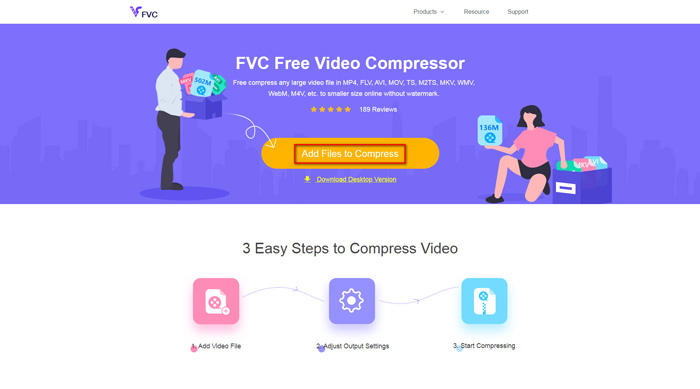
Trinn 1: Klikk på lenken ovenfor for å åpne FVC Free Video Compressor i nettleseren din. Klikk deretter på knappen Add Files to Compress i midten av banneret. Følg instruksjonene på skjermen for å laste ned og installere startprogrammet på datamaskinen din.
Trinn 2: Velg nå GoPro-videofilen du vil komprimere etter at du har koblet enheten til datamaskinen. For å komprimere videoen bruker du bare skyveknappen bak Size -boksen. Dra den og juster filstørrelsen som du vil. Du kan også tilpasse oppløsning og bithastighet hver for seg.
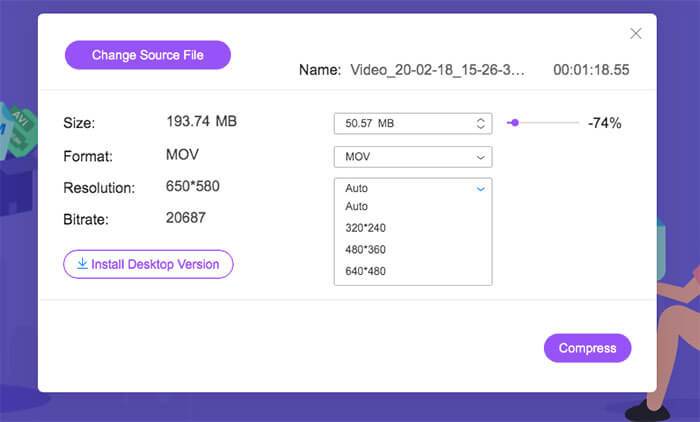
Trinn 3: Velg et utdataformat. Klikk deretter på Compress i høyre hjørne. Velg en mappe der den komprimerte videoen skal lagres. Vent et øyeblikk, så får du den ønskede videoen med høy kvalitet.
Del 2. Hvordan endre størrelse på GoPro-video for opplasting
Men hva om du vil dele GoPro-videoen til YouTube, Instagram, WhatsApp, Facebook, Twitter, Snapchat eller TikTok? Og er det et strengt tid / størrelse krav når du laster opp videoer på disse plattformene?
| YouTube | Hva skjer | Snapchat | TikTok | ||||
| Varighet | ≤ 12 timer | ≤ 2 minutter | ≤ 3 minutter | ≤ 240 minutter | ≤ 40 sekunder | ≤ 60 sekunder | ≤ 60 sekunder |
| Størrelse | ≤ 128 GB | — | ≤ 16 MB | ≤ 4 GB | — | — | — |
Som du ser, har nesten alle plattformer sine egne krav til videolengde, noe som betyr at du må klippe videoen før du deler den. Da kan du prøve Video Converter Ultimate. Med dette videoredigeringsprogrammet kan du trimme videoen til ønsket lengde. Det gjør det også mulig å slå sammen flere videoklipp til én komplett video.
Gratis nedlastingFor Windows 7 eller nyereSikker nedlasting
Gratis nedlastingFor MacOS 10.7 eller nyereSikker nedlasting
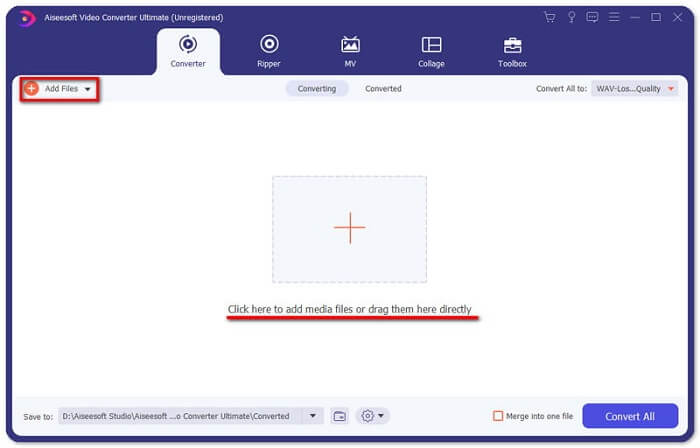
Trinn 1: Last ned og installer den profesjonelle videokonverteren på datamaskinen din. Start programmet etter installasjonen. Klikk på Add Files for å legge til GoPro-videofilen du vil redigere. Eller dra filen direkte inn i programmet.
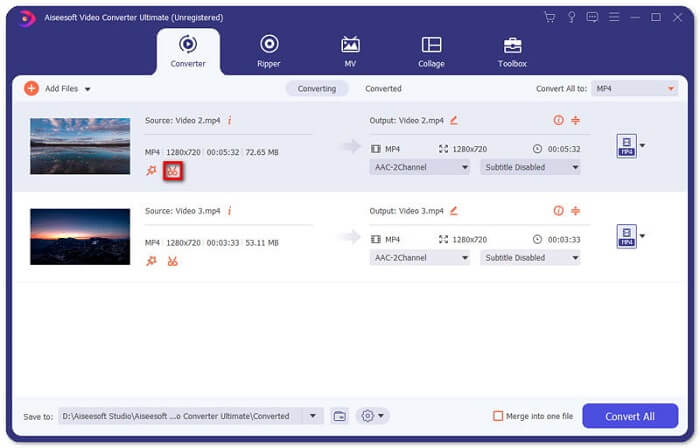
Trinn 2: Etter opplasting klikker du på ikonet Cut. Ikonet ser ut som en saks og ligger ved siden av miniatyrbildet av videoen din.
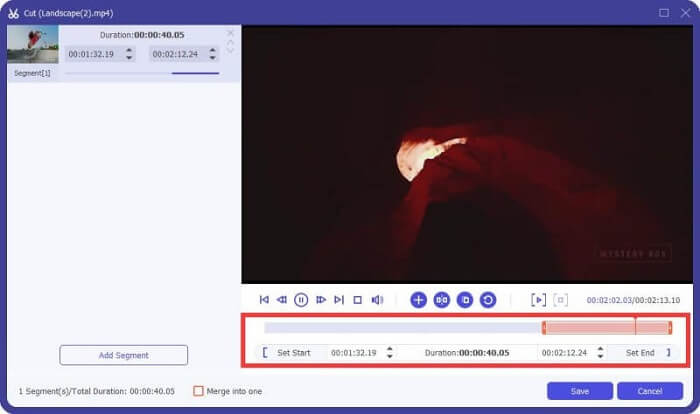
Trinn 3: For å klippe bort uønskede deler drar du bare markøren på tidslinjen. Du kan også skrive inn start- og sluttid direkte i boksen Duration nedenfor. Etter trimming klikker du på Save for å lagre alle endringene.
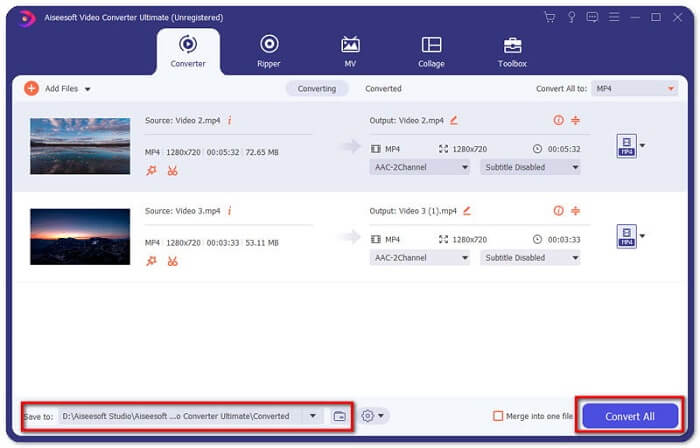
Trinn 4: Gå tilbake til hovedgrensesnittet. Klikk på Convert All for å eksportere den trimmede videoen til datamaskinen. Hvis du har flere videoklipp som må kombineres til én fil, merker du bare av i boksen foran alternativet Merge into one file.
Etter at du har trimmet den originale GoPro-videoen, kan du enkelt dele høydepunktene med andre. Men hvis du bruker WhatsApp, kan det hende du fortsatt må komprimere den kuttede videoen før opplasting på grunn av maksimal tillatt videostørrelse.
Del 3. Vanlige spørsmål om komprimering av GoPro-video
Hvorfor er GoPro-videoer så store?
Det er fordi du filmer ved 60FPS i 1080p eller til og med 4K. For eksempel vil en 1-minutts 60FPS-video i 4K-oppløsning ta opp rundt 600 MB minne.
Hvorfor bryter GoPro-videoen min?
Det kalles kapittelinndeling. Når du filmer en video, kan kameraet ditt automatisk dele opptaket inn i en ny fil (kapittel) hvis det når en viss størrelse.
Hva er videoformatet til GoPro?
Standardformatet for GoPro-videoer er MP4-filtype, noe som betyr at du kan spille det på nesten alle enheter og spillere.
Konklusjon
Nå vet du hvordan du komprimerer GoPro-videoer på både Mac og Windows. Hvis du ikke trenger å laste opp til plattformer med strenge begrensninger, kan du ganske enkelt bruke FVC Free Video Compressor til å endre størrelsen på GoPro-videoen. For å trimme videoen kan du også prøve Video Converter Ultimate.
-
 Fra 50 MB til 5 MB - Hvordan komprimere MP4-fil på få sekunder
 MP4-video er for stor til å lastes opp? Vil du redusere videostørrelsen? Her er 3 effektive måter å komprimere en MP4-fil til mindre størrelse uten begrensning.
-
 Hvordan komprimere en video for e-post og gjøre den mindre enn 25 MB
 Kan du ikke sende en video via e-post som er for stor? Hvis du har dette problemet, kan du få brukbare måter å komprimere en video for e-post her. Denne artikkelen vil vise deg hvordan du kan krympe store videofiler gratis i detaljer.
-
 GIF-komprimering - Hvordan komprimere animert GIF til liten filstørrelse
 Her er to enkle måter å komprimere GIF på datamaskinen eller mobiltelefonen din. Du kan bruke FVC Free Online Video Compressor og Photoshop redusere GIF-filstørrelse i forskjellige aspekter.
