


 Video Converter Ultimate
 Skjermopptaker
 Videoreparasjon
 Sikker nedlasting
Reduserer opplasting av videoer til Google Disk kvaliteten? Sjekk her
Google Drive er et skybasert depotsystem som lar brukere dele, lagre, lagre og få tilgang til filer fra forskjellige enheter med en internettforbindelse. Denne plattformen lar brukere enkelt samarbeide med sine kolleger og venner når de lager sanntidsdokumenter, regneark og presentasjoner. Tjenesten tilbyr 15 GB gratis lagringsplass, med muligheten til å oppgradere til ekstra lagringsplaner mot en avgift.
Alt i alt er denne skylagringen en allsidig og brukervennlig skylagringsløsning som kan være nyttig både for privatpersoner og bedrifter. Enten du trenger å lagre viktige dokumenter eller samarbeide med andre om prosjekter, tilbyr Google Disk en praktisk og pålitelig plattform. Den filtypen som lagres mest på denne plattformen, er video. Men hvordan kan den mindre lagringskapasiteten lagre flere filer? Komprimerer Google Disk video? Alle disse spørsmålene vil bli besvart i denne artikkelen.

Del 1. Reduserer opplasting av videoer til Google Drive kvaliteten
Opplasting av videoer til Google Disk kan redusere kvaliteten på videoene dine. Det skyldes at Google Drive komprimerer videofilene for å spare serverplass. Det kan også gjøre videoen enklere å dele med andre. Når videoer komprimeres, går noen av detaljene deres tapt, og noen ganger kan den generelle kvaliteten på filen bli redusert. Mengden kvalitetstap avhenger av ulike faktorer, for eksempel oppløsningen til den originale videoen, filformatet og komprimeringsinnstillingene som brukes av Google Disk. Når for eksempel en video med høy oppløsning er komprimert, kan den oppleve mer kvalitetstap enn en video med lav oppløsning. Det anbefales å bruke det anbefalte videoformatet og komprimeringsinnstillingene for å minimere kvalitetstap når du laster opp videoer til Google Disk. Du kan bruke videoformater som MP4, som inneholder AVC (H.264) og HEVC (H.265) som komprimerer videofilstørrelsen, men som fortsatt opprettholder kvaliteten på videoen.
Del 2. Kan jeg bruke Google Disk til å komprimere videoer?
Ja, som vi tok tak i ovenfor, komprimerte Google Drive videoer, noe som gjør det mulig for brukere å lagre flere videoer på serveren. Den eneste ulempen med denne prosessen er at den kan redusere kvaliteten på filens utseende betydelig når brukere laster opp videoer av høyere kvalitet, for eksempel 4K. Slik kan du komprimere video ved hjelp av Google Disk.
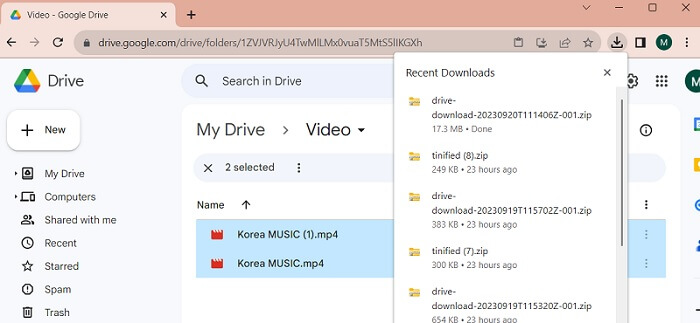
Trinn 1. Last opp filen du ønsker å redusere, til Google Disk-kontoen din. Du kan dra videoen og slippe filen inn i Google Disk for å importere den til serveren.
Trinn 2. Når videofilen er lastet opp til Google Disk, vil den automatisk komprimere den i henhold til sine anbefalte filer. Du kan spille av videofilen med den innebygde mediespilleren.
Trinn 3. Til slutt kan du laste ned videofilen eller zippe den for å få den i en mindre filstørrelse. Du kan velge flere videofiler samtidig og høyreklikke med musen. En meny vil vises. Velg knappen Last ned, så vil Google Disk laste ned de zippede videoene og lagre dem på PC-en din.
Del 3. Hvordan komprimere videoer for Google Drive
Leter du etter et effektivt verktøy for å komprimere videofilene dine på enheten? Du kan alltid bruke Video Converter Ultimate for å redusere og endre videofilstørrelsen på PC-en din. Dette programmet er kompatibelt med og kan brukes på både Mac og Windows, så du kan ha det på hvilken som helst enhet som bærbar PC, stasjonær PC og mer. Det har et bredt utvalg av videoformater, inkludert MP4, MOV, MKV, WebM, AVI og flere. Det har en skyveknapp der brukerne kan komprimere en viss prosentandel av videofilstørrelsen uten å kutte ned varigheten på videoen. I tillegg kan denne appen behandle 4K-videoer uten problemer. Den bruker avansert teknologi for å behandle og komprimere videoene dine. Denne programmets evne til å redusere filstørrelse uten begrensninger og restriksjoner gjør det til en unik kompressor. Sjekk og vurder den detaljerte veiledningen for hvordan du bruker dette verktøyet.
Trinn 1. Installer appen
Det første du må gjøre, er å laste ned Video Converter Ultimate på datamaskinen eller den bærbare enheten din. For å få en enkel måte å installere denne appen på, klikk på ikonet Gratis nedlasting nedenfor.
Gratis nedlastingFor Windows 7 eller nyereSikker nedlasting
Gratis nedlastingFor macOS 10.7 eller nyereSikker nedlasting
Trinn 2. Importer videofilen
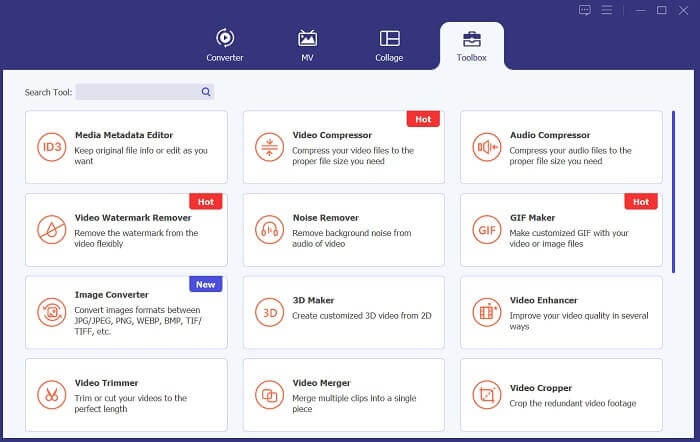
Det neste trinnet er å importere videoen din til appens grensesnitt. Dette kan du gjøre ved å gå inn i verktøyets grensesnitt og klikke på alternativet Verktøykasse. Velg funksjonen Videokompressor fra listen og klikk på +-ikonet.
Trinn 3. Komprimer video
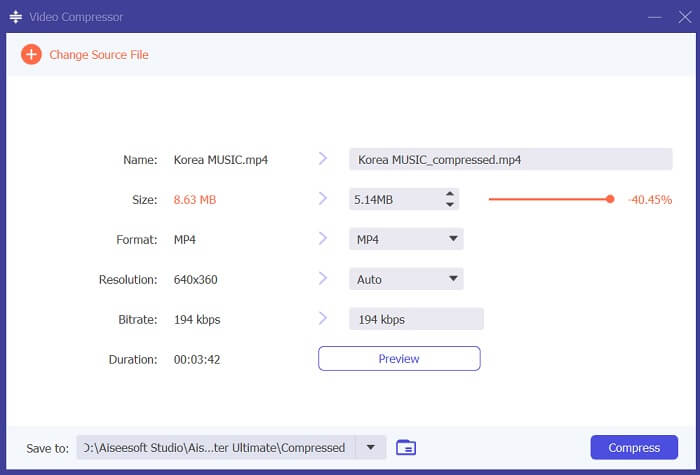
Deretter vil du kunne finne mappene på PC-en din. Velg videoen du trenger å konvertere, og klikk Åpne for å importere den. En ny side vil dukke opp der du kan redusere filstørrelsen. Dra skyveknappen eller endre videoparametere som Oppløsning, Format og Bitrate. Klikk på Komprimer-alternativet for å starte prosessen.
Trinn 4. Spill av utdatafilen
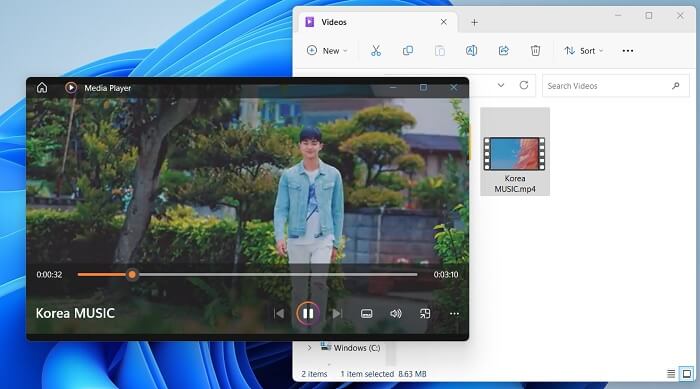
Det siste trinnet er å vente på at komprimeringsprosessen er ferdig. Gå til utdatamappen og forhåndsvis filen. Du kan dobbelttrykke på videoen for å starte den med PC-ens mediespiller.
Mer lesing:
[Løst] Hvordan spille av MP4-filer i Google Disk
Veiledning for å komprimere en video til e-post på iPhone/Android/nett
Del 4. Vanlige spørsmål om Google Drive Compress Video
Kan du laste opp en 4K-video til Google Disk?
Ja, du kan laste opp en 4K-video til Google Disk! Det er en fin måte å lagre og dele videoer av høy kvalitet med andre. Sørg for at du har nok lagringsplass, siden 4K-videoer kan ta mye plass. Når du har lastet opp videoen din, trenger du ikke dele den originale kopien av videofilen. Bare send dem lenken til stasjonen for å få tilgang til videofilen. Med denne nettbaserte plattformen kan du enkelt dele videofiler.
Hvordan lagrer du en video på Google Disk uten å miste kvalitet?
Følg disse trinnene for å laste opp en video til Google Disk uten å miste kvalitet. Forsikre deg først om at videoen din har 4K-oppløsning. Gå deretter inn på Google Disk-kontoen din og klikk på knappen Ny øverst til venstre. Velg Filopplasting derfra, og velg videoen du vil laste opp. Når opplastingen er fullført, kan du enkelt dele videoen med andre ved å sende dem en lenke til filen. Med disse enkle trinnene kan du sikre at videoen din lastes opp til Google Disk uten å gi avkall på kvaliteten.
Hva er den maksimale videooppløsningen for Google Disk?
Maksimal videooppløsning for Google Disk er 4K. Så hvis du vil laste opp en video uten å miste kvalitet, sørg for at den er i 4K-oppløsning. Du kan følge de tidligere trinnene for enkelt å laste opp mediefilene dine til Google Disk-kontoen din og dele dem med andre.
Konklusjon
Videoer er verdifulle digitale data vi tar vare på på alle enheter vi eier. Enten det er en mobiltelefon, et digitalkamera, en datamaskin eller et nettbrett, leter vi alltid etter alternativer og løsninger for å lagre og sikre videofilene våre. Heldigvis er Google Disk en av de mest praktiske plattformene for deling og lagring av medier. Vi har også lært at denne tjenesten kan redusere og komprimere videofiler på en måte som er gunstig for brukerne. Så hvis du fortsatt lurer på, komprimerer Google Disk video? Gå gjennom løsningene og informasjonen som er nevnt ovenfor på nytt.
-
 Hvordan komprimere video effektivt på nettet uten å miste kvalitet
 Når nettstedsvideoen din får mange klager fra klienter om at den alltid bufrer mye, kan du prøve å komprimere video for nettet på to effektive måter, noe som vil hjelpe deg å redusere nettstedsbuffertiden for å beholde klienter.
-
 [Detaljert veiledning] Hvordan fikse Google Drive-video som ikke spilles av på datamaskinen
 Videoer på Google Drive spiller ikke med feilen "Det oppstod et problem med å spille av denne videoen". Det kan være forårsaket av Google Drive selv eller kromproblemene. Denne artikkelen vil introdusere seks løsninger i detalj.
-
 Beste måter å konvertere HEIC til JPG på Google Disk
 Hvis du vil lære hvordan du konverterer HEIC til JPG på Google Drive, kan du lese denne guideposten for å lære den enkleste måten å konvertere HEIC til JPG på Google Drive på PC.
