


 Video Converter Ultimate
 Skjermopptaker
 Videoreparasjon
Gjennomgang om viktigheten av ID3 Tag Editor i 2022
Sanger du har lastet ned fra musikknettsteder har faktisk metadata, også kjent som ID3‑tagger. Vanligvis ligger all informasjonen du trenger om sangen i tag‑informasjonen. Noen ganger følger musikken likevel uten tagger, eller med feil informasjon. I slike tilfeller trenger du programvare som kan hjelpe deg å håndtere oppgaven enkelt. I denne sammenhengen presenterer vi med glede den beste ID3‑tag‑editoren du kan laste ned på Windows, Mac, iOS og Android for å redigere taggene på sangene dine.

Del 1. Hva er ID3-tag
ID3‑tagger er viktige for alle brukere som vil vite mer detaljert informasjon om en sang. Et godt eksempel på tagger du kan se uten å åpne selve taggene, er navnet på artisten og tittelen på sangen. Selv om vi ikke la dette til i lydfilen selv, er det likevel innebygd for å hjelpe oss å vite om vi spiller av riktig musikk.
Likevel, hvis du ikke har en tag på sangene eller podcasten din, er det en sjanse for at filene blir kryptert gjennom hele biblioteket eller mappen på hvor de er lagret. Å legge til kodene på filen din kan hjelpe deg med å finne filen og ordne den slik at den ser organisert ut. Hvis filen din ikke har en, må du legge til data. Hold ballen i gang for å hjelpe deg med å se etter ID3-tag-editoren du bør bruke som passer dine behov.
Men før vi begynner, vennligst klargjør metadataene du vil legge til lydfilen din; disse inkluderer tittel, forfatter, kapittel, sider, kommentarer, tekster og slikt. Etter å ha lest dette, vil du bli overrasket over vår anmeldelse om de beste tag-editorene du kan bruke på alle enheter.
Del 2. Beste ID3 Tag Editor på Windows/Mac for å enkelt endre metadata
FVC Video Converter Ultimate – Beste ID3 Tag Editor
Noe av det grunnleggende du bør vite når du velger en ID3‑tag‑editor på Mac eller Windows, er at den bør være presis, brukervennlig og lett tilgjengelig. Alt dette finner du i FVC Video Converter Ultimate. Den er kjent som en førsteklasses metadata‑editor som er enkel å bruke, selv for brukere som ikke vet hvordan de skal justere taggene riktig. I motsetning til andre tag‑editorer trenger du ikke gjøre mange kompliserte ting for å legge til eller rette opp lyd‑ eller videotagger. Så hvis du er ny på dette med å redigere eller fikse ID3‑tagger, er dette uten tvil programmet som dekker alle behov.
Videre kalte vi det ikke en one-stop editor uten grunn; kanskje du tenker hvorfor. Hvis vi utforsker mer om verktøyet, vil du se at du kan gjøre avansert og grunnleggende videoredigering her for å få videoen til å se enestående ut ved å legge til effekter og filtre. Det er fortsatt for mange unevnte funksjoner du kan avsløre hvis du laster ned verktøyet. Men i dag vil vi fokusere på å bruke denne ID3-tag-redigeringsprogramvaren for å hjelpe deg raskt å redigere og fikse etikettene til sangene dine.
Trinn 1. Last først ned programmet til det operativsystemet du har valgt; det finnes to alternativer, Windows og Mac. Installer det deretter riktig ved å følge installasjonsveiviseren, og åpne verktøyet når du har gjort dette ferdig.
Gratis nedlastingFor Windows 7 eller nyereSikker nedlasting
Gratis nedlastingFor MacOS 10.7 eller nyereSikker nedlasting
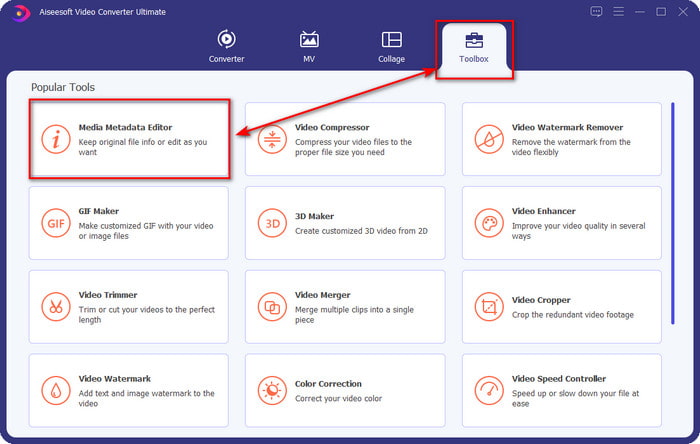
Trinn 2. Når du har åpnet verktøyet, går du til delen Verktøykasse og åpner Media Metadata Editor ved å klikke på den.
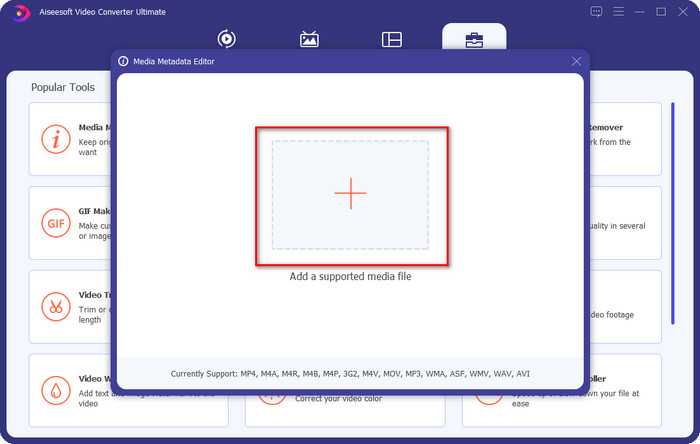
Trinn 3. Trykk på +-ikonet i det nye vinduet som dukker opp på skjermen, velg lydfilen du vil endre ID3‑taggene på, og trykk Open for å laste den opp.
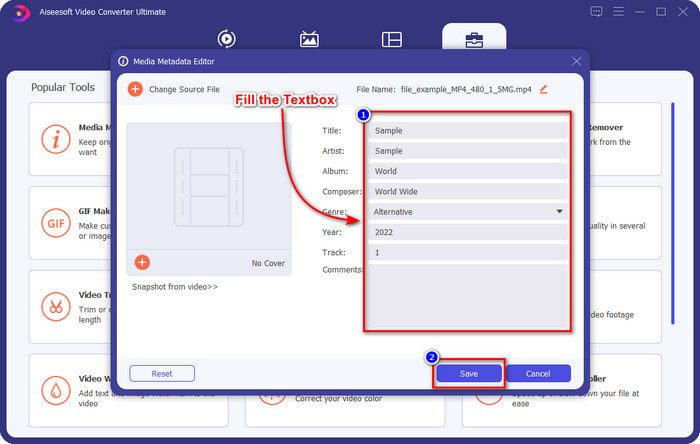
Trinn 4. Nå kan du skrive inn informasjonen du vil legge til i lydfilen din, og klikke Save når du er ferdig med hver textbox. Så enkelt er det – du har nå lagt til tagger i lydfilen ved hjelp av dette programmet.
Fordeler
- Den støtter endring av MP3, WMA, WAV og 1000+ metadata uten problemer.
- Ultrarask konvertering og maskinvareakselerasjon støttes for en lynhastighetsprosess.
- Primære opptil avanserte videoredigeringsfunksjoner er tilgjengelige på Toolbox.
- Det er førstevalget blant millioner av brukere over hele verden som tar denne oppgaven.
Ulemper
- Å kjøpe verktøyet er nødvendig for å ha alle de fancy redigeringsfunksjonene.
- Ikke tilgjengelig på Android og iOS.
VLC Media Player
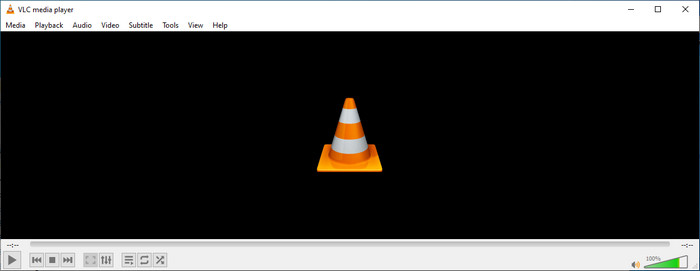
VLC Media Player er en førsteklasses mediespiller du kan laste ned på Windows og Mac. Dette verktøyet kan hjelpe deg å spille av video uten å laste ned ekstra kodeker på systemet, men du kan også bruke det til å redigere ID3‑taggene i lydfilen din. Selv om verktøyet ikke er en dedikert metadata‑editor, kan det likevel rette opp feilaktige tagger. Hvis du allerede har dette verktøyet, kan du enkelt justere metadataene til sangene dine, men ikke forvent for mye, for det er ikke like bra som en førsteklasses ID3‑tag‑editor på datamaskin.
Fordeler
- En mediespiller og metadataredigerer du kan bruke på hvilken som helst enhet.
- Den støtter et gjennomsnittlig medieformat for å endre kodene.
- GUI er enkelt og greit.
Ulemper
- Det er ikke en pro metadataredigerer.
- Støtter begrensede funksjoner angående redigering av taggene.
Del 3. Topp 3 ID3 Tag Editor på iOS/Android mobile enheter
Star Music Tag Editor
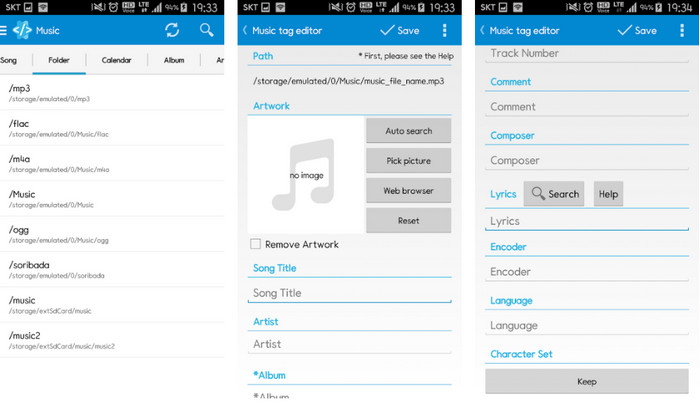
Star Music Tag Editor er en av de mest brukte ID3‑tag‑editorene på Android. Denne appen kan vise deg forskjellig informasjon om musikken din, og du kan endre den ved behov. Grensesnittet er svært enkelt, så du kan lett lære hvordan du bruker den, selv om du ikke er vant til å bruke verktøy for tag‑redigering. Selv om appen er god, har den fortsatt noen svakheter når det gjelder å legge til metadata, spesielt for albumcover. Selv om det kan oppstå problemer, er den fortsatt en pålitelig tag‑editor du kan laste ned på Android‑telefonen din.
Fordeler
- Gratis å laste ned metadata editor på Android.
- GUI er enkelt og lett å forstå.
- Legg til kodene på lydfilen enkelt.
Ulemper
- Den har et problem med å legge til et bildedeksel på lydfilen.
- Noen ganger skjer det fortsatt feil.
Clouds musikkspiller for skyer
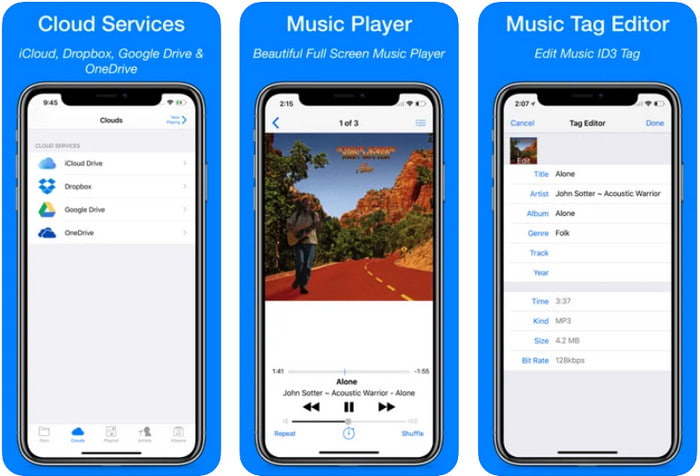
Clouds Music Player for Clouds er en flerbruksapp du kan laste ned på iOS‑enhetene dine. Den kan redigere ID3‑tagger på iPhone, spille musikk og lage ringetoner av musikken. Til tross for funksjonene er brukergrensesnittet enkelt og oversiktlig, og du kan få tilgang til skylagringstjenesten din gjennom appen. Selv med sitt brukervennlige grensesnitt er det noe informasjon du ikke kan legge til som metadata i lydfilen, noe som betyr at bare de grunnleggende taggene er tilgjengelige for redigering. Likevel er den utmerket å laste ned hvis du er iOS‑bruker.
Fordeler
- Tilgjengelig på alle iOS-enheter for nedlasting.
- Multifunksjonell musikkredaktør og tag-editor.
- Intuitiv metadataredigerer på iOS.
Ulemper
- Den støtter ikke å legge til flere metadata.
- Endring av metadatafeil og problemer skjer, men ikke ofte.
Dash- Infotainment-app
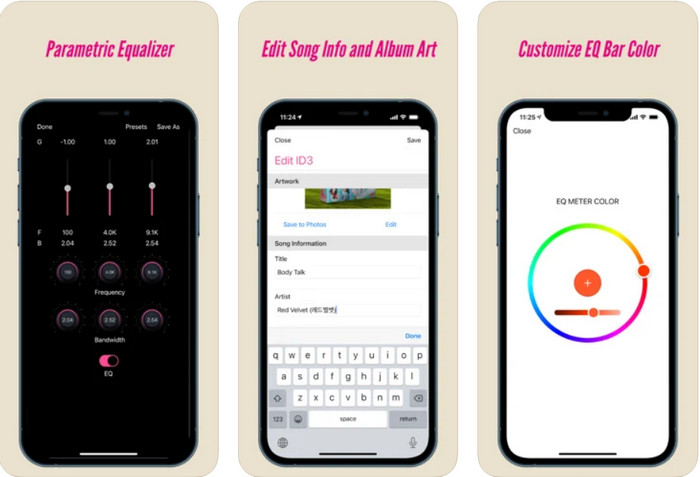
Dash- Infotainment App er et annet verktøy du kan laste ned for å redigere ID3‑tagger på iPhone når du trenger det. Det er ikke mye du trenger å lære før du tar appen i bruk, takket være det enkle og strømlinjeformede brukergrensesnittet. Du kan bruke dette verktøyet til enkelt å endre parametrene for FLAC- og ALAC‑filer med den brukervennlige equalizeren. I tillegg kan du se hastigheten og kompassretningen (tempo og «key») til sangen du laster opp her. Akkurat som den første iPhone‑tag‑editoren kan du bare legge til tittel, artist og albumgrafikk her, men husk at formatet må være FLAC eller ALAC; hvis det ikke er i ett av disse formatene, kan du ikke laste det opp.
Fordeler
- Læringskurven er ikke så stiv.
- En mangfoldig lydequalizer er tilgjengelig.
- GUI er ikke mye, og det er ikke mindre.
Ulemper
- Den støtter kun FLAC- og ALAC-format.
- Det er ikke mye å tilby når det gjelder redigering av metadata.
Del 4. Vanlige spørsmål om ID3 Tag Editor
Hva er den beste kommandolinje-ID3-tag-editoren jeg kan bruke?
Hvis du er på utkikk etter en kommandolinje‑basert ID3‑tag‑editor, bør du vite at FFmpeg er en kommandolinje‑editor. Med dette verktøyet kan du konvertere, rotere, klippe, trimme og redigere metadata‑tagger. Hvis du vil vite mer om FFmpeg, kan du lese hvordan du bruker det ved å klikke på lenken for å redigere FFmpeg‑metadata enkelt.
Hva er de andre typene metadata?
Det finnes seks typer metadata: beskrivende, administrative, referanse‑ eller forklarende, statistiske, juridiske og strukturelle metadata. Hvis du vil vite mer om disse typene og hva de innebærer, kan du klikke på denne lenken og lese mer om dem.
Er det mulig å se tagger uten en app?
Ja, i stedet for å laste ned programvare kan du bruke et nettbasert verktøy til å vise taggene i filen din. Klikk på denne lenken for å vise metadata på datamaskinen din på nett, men vi vil også presentere noen verktøy du kanskje vil laste ned.
Konklusjon
Med informasjonen vi lister ovenfor, ble det mulig å redigere ID3-taggene ved å bruke redigeringsprogrammet vi presenterte ovenfor, uansett hvilken enhet du bruker for øyeblikket. Dessuten er appen og programvaren perfekt for brukere som trenger å redigere metadataene sine. Selv om verktøyene åpner for en utmerket mulighet for brukere til å redigere metadataene, er det fortsatt ingen tvil om at det ultimate verktøyet presenterer en effektiv måte å redigere ID3-tagger på en hvilken som helst musikkfil. Hvis du vil ha den beste ID3-tag-editoren på Windows og Mac, kan du laste den ned spot-on ved å klikke på nedlastingsknappen presentert ovenfor, og deretter nyte dens storhet.
-
 2 beste måter å redigere OGG-metadata du bør prøve gratis
 Trenger du å redigere OGG-metadata? Vel, du kan enkelt håndtere redigering av taggene ved å bruke riktig programvare. Hvis du ikke har en som leser denne artikkelen er et must.
-
 En absolutt oversikt over Pentaho Metadata Editor [Oppdatert 2022]
 Finner du ikke en pålitelig artikkel om Pentaho Metadata Editor? Heldigvis har vi gjennomgått verktøyet selv for å gi fakta du vil vite om verktøyet.
-
 Tips og triks om VLC Metadata Editor du må kjenne til i 2022
 Vil du bruke VLC som en metadataredigerer? I dette tilfellet kan du lese denne artikkelen mens vi gir en objektiv gjennomgang av VLC-metadataredigereren.
